Pros
- Large curved 4K screen with high native 144Hz refresh.
- DisplayPort overclock mode reaches 160Hz on compatible PC.
- HDMI 2.1 and USB-C KVM support multiple modern devices.
- VA contrast, height adjustment and built-in speakers add versatility.

All categories
 New condition
Monitors
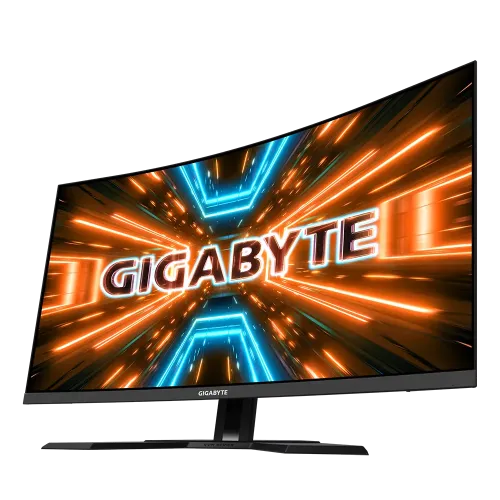
Gigabyte · M32UC 31.5-inch 4K
31.5-inch 4K curved VA gaming monitor with 144Hz native, 160Hz DP overclock, HDMI 2.1 and USB-C KVM.
Price unavailable
Price range updating
No verified price is available yet. Store offers will appear when merchants publish them.
Compare store prices
No live offers for this variant
Offers will appear when merchants publish them.
Loading history…
Product story
GIGABYTE M32UC is a 31.5-inch curved 4K UHD gaming monitor built around a SuperSpeed VA panel. Official specifications list 3840 × 2160 resolution, 144Hz native refresh, an overclocked 160Hz mode over DisplayPort 1.4, 1500R curvature and FreeSync Premium Pro. The large screen, high resolution and fast refresh aim to combine immersive play with a broad desktop workspace. Supported modes depend on region, graphics output, cable and settings; manufacturer specifications do not establish local price, stock or warranty. Confirm Bangladesh offer and serial-specific service with the seller.
The product record identifies a UK version, so confirm the exact M32UC regional suffix, power cord, packaging and warranty terms on the delivered unit. M32UC should not be confused with the flat M32U IPS monitor or M32UC variants with different regional accessory bundles. GIGABYTE specifies the core panel and ports, but regional offers and service coverage can differ. Supported modes depend on region, graphics output, cable and settings; manufacturer specifications do not establish local price, stock or warranty. Confirm Bangladesh offer and serial-specific service with the seller.
The native image is 3840 × 2160 pixels in a 16:9 format with a 1500R curve. At 31.5 inches, UHD provides detailed text and game imagery, while the curved screen wraps slightly around the viewing position. A centered seat at suitable desk distance helps keep edges comfortable. The curvature is a personal preference and may be less ideal for users who need geometrically flat lines. Supported modes depend on region, graphics output, cable and settings; manufacturer specifications do not establish local price, stock or warranty. Confirm Bangladesh offer and serial-specific service with the seller.
GIGABYTE identifies a 31.5-inch SuperSpeed VA panel with typical 3000:1 contrast, 350 cd/m² brightness, 178-degree viewing angles and 8-bit color. VA contrast can give dark scenes more depth than many IPS panels, though dark transitions may behave differently by setting and content. Evaluate overdrive and viewing angle from the normal seated position. Supported modes depend on region, graphics output, cable and settings; manufacturer specifications do not establish local price, stock or warranty. Confirm Bangladesh offer and serial-specific service with the seller.
The M32UC operates at up to 144Hz natively and can reach 160Hz overclocked with DisplayPort 1.4. Enable the overclock option in the monitor menu and choose the supported refresh in the graphics settings. If the image is unstable or shows artifacts, return to 144Hz. The PC must render enough frames to take advantage of high refresh, especially at 4K resolution. Supported modes depend on region, graphics output, cable and settings; manufacturer specifications do not establish local price, stock or warranty. Confirm Bangladesh offer and serial-specific service with the seller.
GIGABYTE lists 1ms MPRT and 2ms GTG response figures, plus FreeSync Premium Pro variable refresh. MPRT and GTG use different measurement methods and do not mean every pixel transition completes in one millisecond. Aim Stabilizer Sync and Smart OD settings can change motion appearance; compare them in games and disable any mode that introduces distracting artifacts. Supported modes depend on region, graphics output, cable and settings; manufacturer specifications do not establish local price, stock or warranty. Confirm Bangladesh offer and serial-specific service with the seller.
VESA DisplayHDR 400 support is listed, along with 350 cd/m² typical brightness. HDR input compatibility does not guarantee deep blacks, local dimming or a strong cinema-style HDR effect. Set HDR in the game, operating system and monitor when supported, then compare with SDR. Room brightness and selected picture mode affect perceived contrast and highlights. Supported modes depend on region, graphics output, cable and settings; manufacturer specifications do not establish local price, stock or warranty. Confirm Bangladesh offer and serial-specific service with the seller.
The display has two HDMI 2.1 inputs, one DisplayPort 1.4 input and HBR3 support. GIGABYTE lists HDMI operation up to 4K 144Hz with DSC for 4:4:4 or 4K 144Hz 4:2:0 under the specified conditions. The 160Hz overclock is listed with DisplayPort 1.4. Use a capable GPU and certified cable; adapters can constrain bandwidth or chroma format. Supported modes depend on region, graphics output, cable and settings; manufacturer specifications do not establish local price, stock or warranty. Confirm Bangladesh offer and serial-specific service with the seller.
USB-C supports DisplayPort Alternate Mode and up to 18W power delivery. The monitor also has USB 3.2 upstream and three downstream ports, enabling KVM and hub functions when the required USB cables connect the computer. The 18W USB-C power is not full laptop charging for most systems. Check host compatibility and use a separate laptop charger when required. Supported modes depend on region, graphics output, cable and settings; manufacturer specifications do not establish local price, stock or warranty. Confirm Bangladesh offer and serial-specific service with the seller.
Built-in stereo speakers are rated at 3W each, and an earphone jack is provided. These speakers can serve basic desktop audio, but external speakers or headphones may offer clearer sound and stronger bass. Select the correct audio output on the computer and monitor. Do not assume audio will route through USB-C or HDMI without checking the source settings. Supported modes depend on region, graphics output, cable and settings; manufacturer specifications do not establish local price, stock or warranty. Confirm Bangladesh offer and serial-specific service with the seller.
The stand offers 100mm height adjustment and tilt from -5 to +20 degrees. It does not provide swivel or pivot in the official specification. VESA 100 × 100mm mounting is supported. Plan enough desk depth for the base and curve, and check monitor-arm load capacity and clearance before removing the supplied stand. Supported modes depend on region, graphics output, cable and settings; manufacturer specifications do not establish local price, stock or warranty. Confirm Bangladesh offer and serial-specific service with the seller.
OSD Sidekick enables software control when the PC connects to the monitor through the USB upstream cable. GIGABYTE also lists Black Equalizer, Aim Stabilizer Sync, dashboard, crosshair, timer, counter, Eagle Eye, PiP/PbP, KVM, six-axis color control and HDMI CEC. These options are convenience tools; some overlays or visibility settings may change the image and should be used according to game rules. Supported modes depend on region, graphics output, cable and settings; manufacturer specifications do not establish local price, stock or warranty. Confirm Bangladesh offer and serial-specific service with the seller.
For 4K high-refresh PC gaming, connect directly to a GPU with HDMI 2.1 or DisplayPort 1.4, select 3840 × 2160 and set 144Hz. For the 160Hz overclock, use DisplayPort and enable the option in the monitor menu. Enable FreeSync Premium Pro if desired, verify the active signal and adjust game quality or upscaling to reach a stable frame rate. Supported modes depend on region, graphics output, cable and settings; manufacturer specifications do not establish local price, stock or warranty. Confirm Bangladesh offer and serial-specific service with the seller.
HDMI 2.1 can support compatible console modes such as 4K at up to 120Hz when the console, game and connection allow it. The monitor’s 144Hz and 160Hz maximums are PC-oriented; a console generally will not use 144Hz/160Hz. Check the console’s video output menu and game-specific performance mode, and confirm VRR availability on the selected HDMI input. Supported modes depend on region, graphics output, cable and settings; manufacturer specifications do not establish local price, stock or warranty. Confirm Bangladesh offer and serial-specific service with the seller.
The large curved screen can provide an immersive field of view for games and space for multiple desktop windows. UHD is useful for detail, but small interface elements may require operating-system scaling. Curve distortion may matter for CAD, layout or straight-line design work. Match seating distance and application type to the display before choosing it as a professional color monitor. Supported modes depend on region, graphics output, cable and settings; manufacturer specifications do not establish local price, stock or warranty. Confirm Bangladesh offer and serial-specific service with the seller.
Advantages include 4K detail, 144Hz native refresh, 160Hz overclock over DisplayPort, a high-contrast VA panel, HDMI 2.1, USB-C KVM and adjustable height. Trade-offs include the GPU demands of 4K high refresh, limited HDR400 capability, USB-C power capped at 18W, no stand swivel or pivot, and a curved screen that may not suit every precision workflow. Supported modes depend on region, graphics output, cable and settings; manufacturer specifications do not establish local price, stock or warranty. Confirm Bangladesh offer and serial-specific service with the seller.
The monitor uses an external adapter rated 19V DC and 7.9A. GIGABYTE lists 47W consumption under its stated test conditions, with 0.5W standby and 0.3W off. Keep the adapter ventilated, use the supplied regional power equipment and leave space for airflow. Clean the screen with a soft cloth and avoid pressing or spraying cleaner directly onto the panel. Supported modes depend on region, graphics output, cable and settings; manufacturer specifications do not establish local price, stock or warranty. Confirm Bangladesh offer and serial-specific service with the seller.
If 144Hz or 160Hz is missing, verify the active input, direct GPU connection, cable capability, driver settings and selected output resolution. Enable overclock mode before choosing 160Hz. For KVM or USB ports, connect the USB upstream cable and assign the appropriate host. Confirm both connected computers use the intended KVM input and keyboard/mouse routing. Supported modes depend on region, graphics output, cable and settings; manufacturer specifications do not establish local price, stock or warranty. Confirm Bangladesh offer and serial-specific service with the seller.
Before ordering in Bangladesh, verify current stock and price, exact M32UC regional version, new/open-box status, UK power plug or supplied adapter, included HDMI/DP/USB cables, return and dead-pixel policy, delivery and seller’s written serial-specific GIGABYTE warranty provider and term. Regional accessory lists vary. Keep the invoice and packaging while checking the panel and serial. Supported modes depend on region, graphics output, cable and settings; manufacturer specifications do not establish local price, stock or warranty. Confirm Bangladesh offer and serial-specific service with the seller.
M32UC is a 31.5-inch 4K 1500R curved SuperSpeed VA monitor with 144Hz native refresh and a DisplayPort overclock up to 160Hz. It includes HDMI 2.1, DP 1.4, USB-C with 18W power, a USB hub, KVM and 3W × 2 speakers. Confirm the UK-version accessories, source compatibility and Bangladesh warranty before purchase. Supported modes depend on region, graphics output, cable and settings; manufacturer specifications do not establish local price, stock or warranty. Confirm Bangladesh offer and serial-specific service with the seller.
Helpful answers
Product-specific answers maintained with the catalog information.
3840 × 2160 4K UHD on a 31.5-inch curved display.
144Hz native; up to 160Hz overclocked with DisplayPort 1.4.
GIGABYTE specifies a 1500R curvature.
Two HDMI 2.1 inputs, with specified 4K high-refresh bandwidth modes.
USB-C delivers up to 18W, which is below the charging needs of most laptops.
Yes, the manufacturer lists two 3W speakers.
Yes, KVM and a USB hub are listed; connect the upstream USB cables for host switching.
Console output ceilings depend on device and game; 160Hz is a PC-oriented DisplayPort overclock mode.
Confirm local provider, coverage, duration and serial-specific terms with the seller in writing.
Customer community
Become a merchant
Join BiponiBD, publish accurate offers and start free.