Pros
- Kit format includes a spray cleaner and cleaning accessories as listed by retailers.
- 130 ml bottle quantity is stated in multiple product listings.
- Model identity HV-SC055 is clearly given by seller listings.

All categories
 New condition
Computer Accessories
Havit · HV-SC055 Screen Cleaning Kit
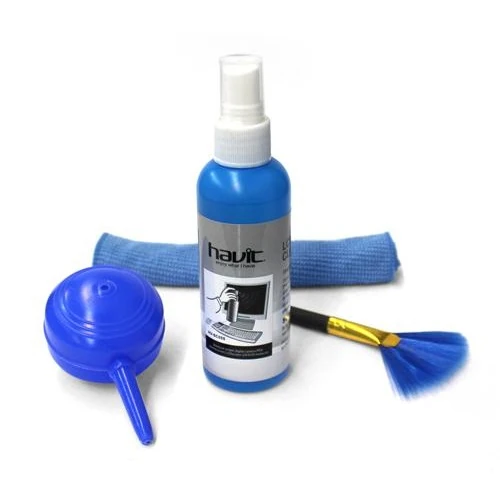
Havit HV-SC055 screen cleaning kit with 130 ml spray, cleaning cloth and soft brush listed by retailers. Apply cleaner to cloth and follow device maker instructions.
Approximate Market Price
BDT 250
Informational market estimate only; this is not a current Store offer.
Compare store prices
No live offers for this variant
BDT 250
Approximate Market Price
Informational market estimate only; this is not a current Store offer.
Loading history…
Product story
The Havit HV-SC055 is a screen and device cleaning kit. Star Tech and Rokomari list 130 ml of cleaning liquid and identify accessories including a cleaning cloth and soft brush; Star Tech also describes a disinfectant component. The kit is sold for laptop and monitor cleaning. Retailer listings do not agree consistently on warranty, colour or detailed solution composition. Follow the display maker’s care instructions and confirm the exact kit contents and local seller terms before use.
The product is identified as Havit SC055 or HV-SC055. Star Tech lists manufacturer part number HV-SC055 and a 130 ml spray bottle. Rokomari describes a kit that includes a cleaning cloth, soft brush, spray cleaner and disinfectant. Check the label and contents on the delivered box because seller listings may summarize the package differently. Do not confuse this screen-cleaning accessory with a powered electronic cleaner.
Retailer descriptions identify a spray cleaner and cleaning cloth, with a soft brush also listed. Some pages mention a disinfectant component. Verify the actual bottle, cloth, brush and any additional item on the package label before purchase. The kit does not include a laptop or monitor. No refill bottle, replacement cloth quantity or accessory dimensions are consistently specified in the sources reviewed.
Star Tech and Rokomari list the liquid quantity as 130 ml. This is the stated bottle quantity, not a measured number of cleaning applications or a guarantee of usage duration. Do not refill the bottle with another solution unless Havit’s instructions specifically allow it. Keep the original label visible and store the bottle closed according to its packaging directions.
Star Tech’s instructions say to spray the liquid onto the microfiber cloth and then wipe the LCD screen carefully. Do not spray liquid directly onto a display, keyboard, port, device seam or electrical opening. Turn off and unplug equipment first, and use only the method approved in the device maker’s manual. Apply minimal liquid to the cloth and prevent moisture from collecting at screen edges or entering the device.
Star Tech lists laptop and monitor compatibility, but screen coatings and manufacturer cleaning instructions vary. The available pages do not establish compatibility with every LCD, OLED, anti-glare coating, touchscreen, TV or phone. Check the display manufacturer’s care instructions before using any cleaning fluid. If the device maker permits a damp cloth, use a small amount on the cloth only, avoid pressure and let the screen dry before powering it on.
A soft brush can help remove loose dust from suitable exterior surfaces, and a microfiber or cleaning cloth can be used gently when appropriate. Do not use the brush on delicate coatings or push dust into vents, ports or keyboard gaps. Keep the cloth clean and free of grit to avoid scratching. The reviewed listings do not specify the cloth dimensions, fiber blend, washing method or brush bristle material.
Retailer descriptions use terms such as cleaning liquid and disinfectant, but detailed ingredient information is inconsistent and no authoritative safety data sheet was verified. Do not assume the formula is alcohol-free, ammonia-free, safe for all coatings, antibacterial, or suitable for skin contact. Read the bottle label and follow the warnings. If you need a specific chemical profile, ask the seller for the original manufacturer documentation before use.
Keep the spray container closed when not in use and store it away from children, pets, food, direct heat and open flames. Do not ingest or intentionally inhale the liquid. Avoid contact with eyes and skin, and follow the label if accidental contact occurs. Do not transfer it into an unlabelled container. Dispose of an empty or expired bottle according to local instructions and the product label.
First consult the equipment manual, shut down and disconnect power, and let hot components cool. Remove loose dust gently with an appropriate dry cloth or soft brush. If the display maker permits liquid cleaner, apply a small amount to the supplied cloth rather than the panel. Wipe gently without pressing, keep liquid away from edges and openings, and allow the surface to dry before reconnecting power. Stop if the coating changes or streaks persist.
Warranty information differs across offers. Star Tech explicitly says the HV-SC055 kit has no warranty. Other local seller pages show generic warranty or brand-warranty badges without a consistent duration, and may apply different terms. Confirm the exact seller, replacement window, exclusions and invoice conditions before paying. Retain the package and receipt, especially for a liquid product, and check for leakage or damage at delivery.
The kit combines a 130 ml spray bottle with cleaning accessories listed by local sellers and is marketed for laptop and monitor care. Its practical use depends on the actual included items and the instructions for your particular display. Chemical composition, coating compatibility, refill availability, exact accessory dimensions and universal warranty are not established by sources reviewed. Use the bottle label and device manufacturer guidance as the authority for safe application.
What is the model? Havit HV-SC055. How much liquid is listed? 130 ml. What accessories are included? Retailers list a cleaning cloth and soft brush; Star Tech also mentions a disinfectant component. Should I spray the screen directly? No; Star Tech says to spray the cloth, and device maker instructions should be followed. Is it compatible with every display? The sources do not establish universal coating compatibility; check your device manual. What is in the solution? The detailed composition was not reliably verified; read the bottle label. Can I use it on keyboards or ports? Do not spray into openings; follow device-specific care instructions. Is a refill included? Not listed. What warranty applies? Star Tech states none; other seller offers differ, so verify the invoice. What should I do if the bottle leaks? Do not use a damaged package; contact the seller and follow label safety instructions.
Helpful answers
Product-specific answers maintained with the catalog information.
The screen cleaning kit is identified as Havit HV-SC055 or SC055 by retailers.
Star Tech and Rokomari list a 130 ml liquid quantity for this kit.
Retailers list a cleaning cloth and soft brush; Star Tech also mentions disinfectant.
No. Star Tech directs users to spray the microfiber cloth, not the display panel.
Universal coating compatibility is not established; follow the display maker’s cleaning instructions.
Detailed ingredients were not reliably verified in sources reviewed; check the bottle label or request an official safety sheet.
No. Keep liquid away from ports, openings and device seams; use only as directed.
The reviewed listings do not identify a refill as included in the package.
Star Tech lists no warranty, while other offers are unclear; confirm the selected seller invoice.
Avoid using a damaged or leaking kit and contact the seller, following the product label safety directions.
Customer community
Become a merchant
Join BiponiBD, publish accurate offers and start free.