Pros
- Clip-on placement keeps the mic near the speaker
- 3.5mm connection suits compatible mic inputs and combo jacks
- 1.5m cable allows flexible positioning near a host device

All categories
 New condition
Headphones & Speakers
Havit · MC361
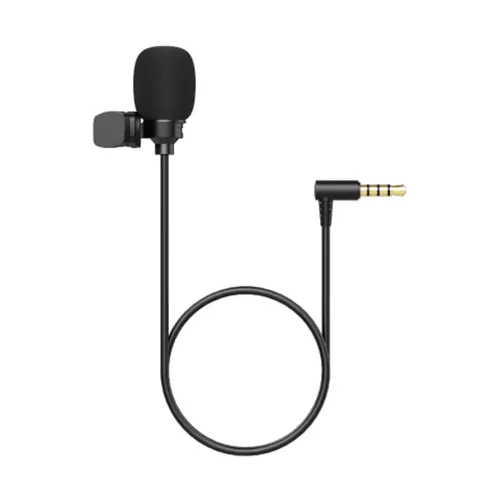
Havit MC361 is a 3.5mm omnidirectional clip-on microphone with an approximately 1.5m cable. Check your device’s mic input and plug compatibility before buying.
Approximate Market Price
BDT 450
Informational market estimate only; this is not a current Store offer.
Compare store prices
No live offers for this variant
BDT 450
Approximate Market Price
Informational market estimate only; this is not a current Store offer.
Loading history…
Product story
The Havit MC361 is a wired clip-on microphone for capturing voice near the speaker. Bangladesh retailer listings specify a 3.5mm connector, an approximately 1.5m cable, an omnidirectional capacitive microphone, 20Hz–20kHz frequency response, sensitivity of 42±3dB and output impedance of 900–1000Ω. It can be clipped to clothing for calls, meetings, voice recording or streaming when connected to a compatible microphone input. Results depend on the host input, placement and room noise.
The MC361 uses a single 3.5mm plug. Connect it to a compatible microphone input or combo headset jack that supports the microphone’s wiring and bias requirements. A 3.5mm socket may be headphone output only, a separate mic input, or a combined headset jack, so confirm the port type on your laptop, phone, camera or recorder. If the host has separate mic/headphone ports, USB-C or Lightning only, a suitable adapter may be needed and is not confirmed as included.
Retailers describe an omnidirectional pickup pattern, which can capture sound from around the microphone capsule rather than focusing only on one direction. This can make placement less sensitive to exact orientation, but it also means the mic may pick up room noise, keyboard sounds and other nearby voices. Clip it consistently near the speaker’s chest, keep it clear of rubbing fabric and reduce ambient noise where possible.
Attach the clip securely to a stable area of clothing near the speaker’s upper chest, with the microphone capsule unobstructed. Avoid placing it against a scarf, zipper or loose fabric that can rub during movement. Keep the 1.5m cable routed with slack and away from snag points. The clip helps position the mic; it does not provide noise cancellation or prevent wind noise by itself.
Local listings give a frequency response of 20Hz–20kHz and sensitivity of 42±3dB. These are published specifications, not a guarantee of studio-grade sound or equal response at every frequency. The listings do not consistently state the sensitivity reference/sign, signal-to-noise ratio, maximum sound pressure level or measured noise floor. Recording quality also depends on the device’s preamp, input level, software and environment.
The MC361 is listed with output impedance of 900–1000Ω. Confirm that the host microphone input is intended for an external electret/capacitive mic and provides compatible bias. A headphone socket or line input may not supply the required mic input circuit, and an input’s connector fit alone does not guarantee the right electrical match. Check the host or recorder manual if the microphone is not detected or level is very low.
For calls, select the MC361 or external microphone input in the meeting app and perform a short test recording before an important session. Keep the capsule close enough for clear speech without touching clothing. Use the app’s input meter to avoid clipping and reduce gain if the recording distorts. The microphone does not include a listed USB interface, hardware mute button, battery pack or independent gain control.
Some cameras, phones and tablets accept 3.5mm microphone input; others provide only headphone output, use a combo jack with a specific wiring standard or require a proprietary/USB-C adapter. Compatibility depends on the model and operating system. The phrase “audio recorders” in generic listings does not guarantee every recorder works. Verify the exact mic input and connector pinout on your device before ordering.
The cable is approximately 1.5m long. Keep it loosely routed, avoid tight knots and do not pull on it when removing the plug. Keep the capsule and connector dry; store the microphone without crushing the cable or clip. Stop using the unit if the cable jacket is damaged, the connector is bent or the recording crackles when the mic and cable are still.
Confirm the mic is in the input jack, the app selected the correct input and the host supports an external microphone. Move the capsule away from fabric friction, fans and keyboard noise. Check the input level and test another recording app or compatible host. If the 3.5mm port is headphone-only or lacks mic bias, the microphone may remain silent despite fitting physically. Use only a compatible adapter confirmed for microphone input.
Retailers identify the Havit MC361 as a wired clip microphone. Confirm exact plug wiring, cable length, included clip/accessories, warranty provider and return terms with the seller. Some listings state a one-year warranty, but coverage may vary by merchant. A phone adapter, extension cable or recorder is not confirmed as included. External shop prices and availability do not establish a live BiponiBD offer.
It has a 3.5mm plug. The host must have a compatible microphone input or combo jack.
Local listings specify approximately 1.5 metres.
Retailer listings identify it as an omnidirectional capacitive clip microphone.
The listed frequency range is 20Hz–20kHz.
Listings state 42±3dB sensitivity and 900–1000Ω output impedance; specification reference details are not provided.
It depends on whether the laptop’s 3.5mm port supports an external mic and matches the plug wiring. Separate mic/headphone ports may need a compatible adapter.
Only if the phone provides a compatible microphone input or you use an adapter that supports microphone input. Check the exact model.
Noise cancellation is not specified. An omnidirectional mic may pick up sound from multiple directions.
A hardware mute button or independent gain control is not specified in the reviewed listings.
Some sellers list one year; verify the exact warranty provider and coverage with your retailer.
Helpful answers
Product-specific answers maintained with the catalog information.
It has a 3.5mm plug. The host must have a compatible microphone input or combo jack.
Local listings specify approximately 1.5 metres.
Retailer listings identify it as an omnidirectional capacitive clip microphone.
The listed frequency range is 20Hz–20kHz.
Listings state 42±3dB sensitivity and 900–1000Ω output impedance; specification reference details are not provided.
It depends on whether the laptop’s 3.5mm port supports an external mic and matches the plug wiring. Separate mic/headphone ports may need a compatible adapter.
Only if the phone provides a compatible microphone input or you use an adapter that supports microphone input. Check the exact model.
Noise cancellation is not specified. An omnidirectional mic may pick up sound from multiple directions.
A hardware mute button or independent gain control is not specified in the reviewed listings.
Some sellers list one year; verify the exact warranty provider and coverage with your retailer.
Customer community
Become a merchant
Join BiponiBD, publish accurate offers and start free.