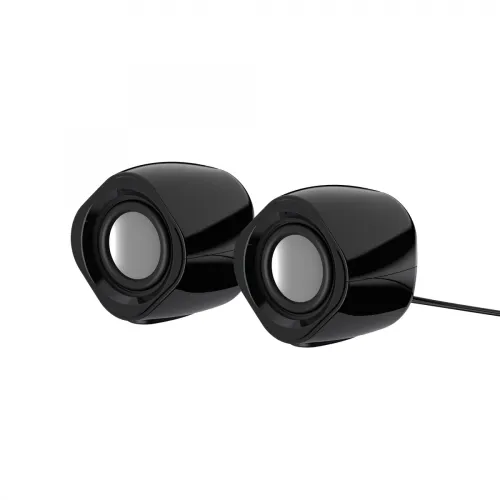
Havit SK715 2.0 USB stereo speaker
The Havit SK715 is a compact wired desktop speaker pair for a computer, laptop or other source with a 3.5 mm audio output. Local retailer specifications list two 52 mm drivers, 3 W x 2 RMS output, a 125 Hz–20 kHz frequency response and 4 ohm impedance. The speakers use USB for power and a separate 3.5 mm AUX connection for audio, so check that your setup has both an available USB power port and a compatible analog audio output.
Separate audio and power connections
Connect the 3.5 mm plug to the source device's headphone or line-out jack, then connect the USB plug to a suitable powered USB port. USB supplies power; the 3.5 mm cable carries the audio signal. USB alone does not provide the audio input, and the speaker is not listed as a Bluetooth or wireless model. If a laptop or desktop lacks a 3.5 mm output, use an appropriate compatible audio adapter or USB sound device; an adapter is not included unless the seller confirms it.
Sound output and system expectations
The listed 3 W x 2 RMS rating describes the rated output for the two channels, not a guarantee of room-filling volume or bass response. The published frequency response is 125 Hz to 20 kHz and the driver size is 52 mm each. Listening level and sound quality depend on the source, audio settings, placement, room acoustics and the recording. These compact speakers are intended for near-field desktop listening; they do not replace a subwoofer or a larger room audio system.
Recorded specifications
- Brand/model: Havit SK715
- Speaker layout: 2.0 wired stereo pair
- Rated output: 3 W x 2 RMS
- Drivers: two 52 mm speakers
- Frequency response listed: 125 Hz–20 kHz
- Impedance listed: 4 ohm
- Audio input: 3.5 mm mini-jack / AUX
- Power connection: USB
- Dimensions listed per speaker: 77.1 x 71.3 x 78.1 mm
- Weight listed: 400 g (retailer listing; confirm whether pair/package weight)
- Color: Black (retailer-listed)
- Warranty: one year appears in local listings; seller coverage varies
Setup and placement
- Place the left and right speakers on a stable desk with space around their drivers.
- Connect the 3.5 mm audio lead to the source's headphone or line-out jack.
- Connect USB power to a suitable powered port. Do not assume the USB plug carries audio.
- Select the source's analog/headphone output and begin at a low volume before adjusting it.
- If there is no sound, check the source output, volume, mute state and both cable connections.
Advantages and trade-offs
The pair combines two-channel stereo, USB power and a familiar 3.5 mm audio input in a small desktop format. A separate audio jack can work with many devices that provide analog headphone output, while USB avoids a separate mains adapter when a suitable port is available. The wired design requires both USB and AUX connections, and the source must provide a compatible 3.5 mm signal. The 3 W x 2 rating and compact drivers are suited to desktop listening rather than high-volume parties or deep sub-bass playback.
Before ordering
Check that the device has a 3.5 mm audio output and a USB port that can power the speakers. Confirm that both speakers and the complete power/audio cables are included, and verify current stock and the store's one-year warranty terms. Prices vary by retailer; confirm the current offer and return policy before checkout.