Pros
- No battery, charging or wireless pairing required
- Standard three-button layout works for common desktop navigation
- Direct USB-A connection is simple on compatible computers

All categories
 New condition
Computer Accessories
Hoco · GM50 League Wired Optical Mouse
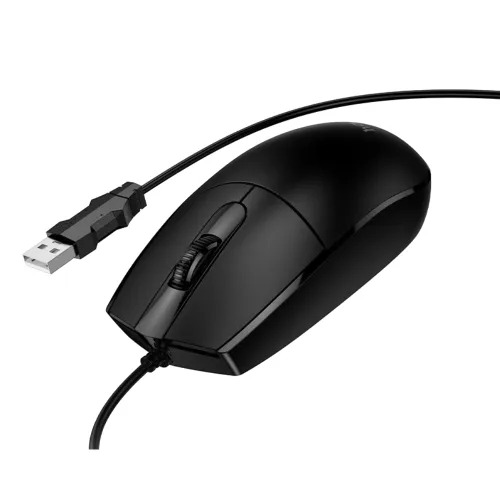
Hoco GM50 League is a USB-A wired optical mouse with 1000 DPI, three buttons, a 1.45m cable and a listed 66g weight.
Approximate Market Price
BDT 600
Informational market estimate only; this is not a current Store offer.
Compare store prices
No live offers for this variant
BDT 600
Approximate Market Price
Informational market estimate only; this is not a current Store offer.
Loading history…
Product story
The Hoco GM50 League is a basic wired optical mouse for everyday desktop and laptop navigation. HOCO’s product page identifies it as a USB-A wired mouse with plug-and-play setup, 1000 DPI resolution and three buttons. It is intended for ordinary pointing, clicking, scrolling, document work, browsing and study tasks. The listed features describe a straightforward wired mouse; the reviewed sources do not present it as a dedicated gaming mouse or a model with programmable controls.
The GM50 connects to a computer through a wired USB-A plug. A direct cable connection means it does not need Bluetooth pairing, a wireless receiver, charging or a mouse battery. HOCO describes the connection as plug and play, so basic operation should begin when connected to a compatible USB-A port. Devices that only have USB-C may require a compatible adapter; confirm that adapter and operating-system support separately. Cable routing and available desk space can affect convenience.
HOCO lists 1000 DPI resolution. DPI describes how far the pointer moves relative to physical mouse movement, while the computer’s pointer-speed setting can further adjust the on-screen feel. The reviewed GM50 specifications do not confirm multiple selectable DPI levels, a dedicated DPI switch, polling-rate settings or advanced driver software. Treat 1000 DPI as the published resolution and choose operating-system pointer settings for personal preference.
The manufacturer lists three buttons, corresponding to the standard left click, right click and clickable scroll wheel layout. This covers common selection, context-menu and page-scrolling actions without extra side controls. The HOCO product page states a one-million-click lifespan for the left and right buttons; this is a manufacturer rating under its test conditions, not a promise of a specific service life for every user. The sources do not list programmable buttons or additional gaming controls.
The GM50 is listed at 116 × 62.5 × 37.5mm and 66g. HOCO specifies a 1.45m cable with a 2.6mm PVC outer sheath. These published measurements help estimate desk fit and reach, but the cable length may be shorter than needed when a computer is far from the work surface. The body is identified as ABS with electronic components; use a flat, suitable surface and keep the optical sensor area free of dust.
HOCO lists desktop computers and laptops with a USB-A port as compatible devices. Connect the plug to an available port and allow the operating system to recognize a standard mouse input device. No dedicated driver is identified for basic use in the reviewed official listing. Support on other systems may depend on the host device and operating-system USB HID support. If the pointer does not respond, try another USB port, inspect the cable for damage and review pointer settings.
A direct cable connection can be practical for office work, online study, browsing, spreadsheets and general computer use because there is no battery to replace or wireless pairing to troubleshoot. At the same time, the cable can restrict movement and add desk clutter. The three-button layout is intentionally simple. Sources do not establish adjustable DPI, a gaming sensor, RGB lighting, wireless operation, Bluetooth, rechargeable power or software customization, so buyers who need those features should compare a different model.
The reviewed BiponiBD record and local listing specify black. HOCO identifies ABS and electronic components as the construction materials. Color, surface finish and packaging can vary by seller or production batch, so confirm the actual offer photos and included items with the seller before ordering. Keep liquids away from the mouse and avoid pulling the cable to disconnect it; grip the USB plug instead.
Skyland lists a six-month warranty for its GM50 listing, while its descriptive copy also contains a conflicting one-month statement. This conflict means the seller’s written warranty terms should be confirmed before purchase. That retailer information does not independently establish the warranty offered by a BiponiBD merchant. Check the selected seller’s current price, stock, warranty coverage, claim process and delivery terms. Offer price and availability can change.
Use the product name and GM50 model marking to distinguish it from other Hoco wired mice. Before ordering, verify that the listing is the GM50 League with USB-A connection, 1000 DPI and three buttons. Unplug the mouse by holding its connector, clean the exterior with a soft dry cloth and avoid liquid entering the optical sensor or USB connector. Retain purchase documentation and follow the seller’s stated process for any warranty claim.
It uses a wired USB-A connection. HOCO describes it as plug and play.
HOCO lists 1000 DPI. Multiple selectable DPI levels are not confirmed by the reviewed sources.
Three buttons are listed: the standard left, right and clickable scroll-wheel controls.
HOCO lists a 1.45m cable with a 2.6mm PVC outer sheath.
The published dimensions are 116 × 62.5 × 37.5mm and the listed weight is 66g.
No battery or charging is specified; the mouse uses its wired USB connection.
HOCO lists laptops and desktops with a USB-A port. A compatible adapter may be needed for USB-C-only devices.
No. The GM50 reviewed here is a wired USB-A model.
Skyland lists six months, but its page also has conflicting warranty copy. Confirm written terms with the actual BiponiBD seller.
It can provide basic pointer input, but reviewed sources do not establish gaming-specific features, adjustable DPI or a gaming sensor.
Source basis: HOCO manufacturer product page, Skyland Computer BD, iEducationBD, Ryans and IOSBD. Warranty statements are attributed because seller pages conflict.
Helpful answers
Product-specific answers maintained with the catalog information.
It uses a wired USB-A connection. HOCO describes it as plug and play.
HOCO lists 1000 DPI. Multiple selectable DPI levels are not confirmed by the reviewed sources.
Three buttons are listed: the standard left, right and clickable scroll-wheel controls.
HOCO lists a 1.45m cable with a 2.6mm PVC outer sheath.
The published dimensions are 116 × 62.5 × 37.5mm and the listed weight is 66g.
No battery or charging is specified; the mouse uses its wired USB connection.
HOCO lists laptops and desktops with a USB-A port. A compatible adapter may be needed for USB-C-only devices.
No. The GM50 reviewed here is a wired USB-A model.
Skyland lists six months, but its page also has conflicting warranty copy. Confirm written terms with the actual BiponiBD seller.
It can provide basic pointer input, but reviewed sources do not establish gaming-specific features, adjustable DPI or a gaming sensor.
Customer community
Become a merchant
Join BiponiBD, publish accurate offers and start free.