Pros
- Combines charging and data capability in one cable
- Display provides a visible charging-power indication
- 1.2m braided cable suits common desk and bedside setups

All categories
 New condition
Computer Accessories
Hoco · U125 Benefit
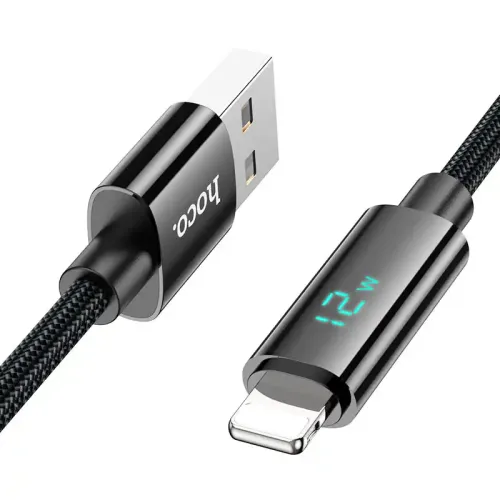
Hoco U125 is a 1.2m USB-A to Lightning charging and data cable with a charging-power display. Listed current is up to 2.4A; verify charger and device compatibility.
Approximate Market Price
BDT 450
Informational market estimate only; this is not a current Store offer.
Compare store prices
No live offers for this variant
BDT 450
Approximate Market Price
Informational market estimate only; this is not a current Store offer.
Loading history…
Product story
The Hoco U125 Benefit is a 1.2m USB-A to Lightning cable for compatible Apple devices. Hoco describes it as a charging and data cable with a nylon-braided exterior and an LED digital display that shows charging power when connected. Hoco and local retailer listings specify current up to 2.4A. This is a wired cable with a standard USB-A source connector; it does not provide USB-C Power Delivery. The product title’s 12W wording reflects a nominal 5V × 2.4A maximum, not a guaranteed charging rate for every device.
Connect the rectangular USB-A plug to a compatible USB-A charger, computer or power source, and the Lightning plug to a compatible Lightning-port device. Check that the port is Lightning and that the charger’s output matches the device’s requirements. The cable cannot plug directly into a USB-C-only charger or a USB-C iPhone. A USB-C-to-USB-A adapter or different cable may be needed, but accessories are not confirmed as included.
Hoco specifies current up to 2.4A for phones and tablets. If supplied at 5V and the connected device accepts the full current, this corresponds to up to 12W nominal input power. It is not a universal charging guarantee: the charger, cable, battery state, device, temperature and charging protocol determine the actual rate. Fast-charge branding does not establish USB Power Delivery or Apple fast-charge support. Use a reputable, correctly rated USB-A power adapter.
The cable includes an LED digital display intended to show charging power while connected. Hoco does not provide a verified measurement-accuracy tolerance in the reviewed specification. Treat the readout as an informational display, not a calibrated meter or proof of battery health, charger safety or exact power delivery. The display may show different readings as a device changes its charging behavior, and its visibility or function depends on a powered connection.
Hoco lists the U125 as a charging and data cable, so it can support a compatible USB-A computer-to-Lightning device connection. The reviewed official specification does not give a data rate or USB generation. Do not assume a particular USB speed. Use the device’s supported sync/import workflow and a trusted computer. If only charging works, check the data connection, the host port, software prompts and device settings; a charge-only adapter or port will not transfer files.
The Lightning connector is intended for compatible Lightning-port devices, but the source information reviewed does not establish Apple MFi certification or compatibility with every device, iOS version or accessory. Confirm certification and device support with the seller if they are required. Older or newer device models may have different connector types. This cable does not provide audio conversion, video output or USB-C charging.
The listed length is 1.2m and weight is 35g. Hoco specifies nylon braid; local technical listings also describe the cable construction and an approximate 4.0mm outer diameter. The braid may help protect the cable jacket during everyday handling, but no water-resistance or bend-life rating was established. Avoid sharp bends at the connector strain relief, tight knots, heavy pulling and use while a connector is damaged.
Connect the USB-A end to a suitable power adapter, then attach the Lightning end securely. Keep the cable and ports dry, use undamaged equipment and disconnect by holding the plug rather than pulling the wire. Stop charging if the cable, display or connector becomes unusually hot, damaged or intermittent. Do not leave a charging device covered by bedding or other heat-trapping material. The display does not replace safe-charging practices.
If charging is slow, confirm the adapter supports the needed USB-A output and that the device accepts that charging mode; check the battery state and temperature as well. Clean ports only according to the device maker’s guidance. If a computer does not detect the device, test another trusted USB-A port and verify the device’s trust/sync prompt. Compare with a known-good cable to isolate the fault. The display showing a value does not confirm data connectivity or certification.
Retail listings identify model U125 Benefit and a 1.2m cable weighing about 35g. Verify the exact Lightning connector version, color, package contents, warranty provider and return conditions with the selected retailer. Some shops may list different warranty periods. The charger and Lightning device are not confirmed as included. Do not infer MFi status from the Lightning connector alone; request explicit confirmation if certification matters. Other retailer prices and stock are not a live BiponiBD offer.
U125 combines USB-A charging, listed data capability and a charging-power display in a 1.2m braided Lightning cable. Hoco lists up to 2.4A, but actual charging depends on the charger, device and charging mode. The official source does not specify USB data speed or MFi certification, and the LED readout is not documented as calibrated. Confirm Lightning-device compatibility, certification, warranty and charger fit before ordering.
It has a USB-A plug on the charger/computer side and a Lightning plug for a compatible device.
Hoco and local retailers list a length of 1.2m and a weight of about 35g.
Hoco lists current up to 2.4A. Actual charging current depends on the power adapter and device.
The 12W product title corresponds nominally to 5V at 2.4A. That maximum is not guaranteed for every charger or device, and USB-C Power Delivery is not specified.
It is described as an LED digital display of charging power while connected. Measurement accuracy is not specified.
Hoco describes the cable as a charging and data cable, but the reviewed official specification does not state a data speed.
MFi certification was not established by the reviewed product information. Ask the seller for current certification evidence if required.
The cable has a USB-A plug, so it does not connect directly to a USB-C-only charger. Use a suitable USB-A port or a compatible separate adapter.
No Lightning connector fits a USB-C-only device. Check your exact phone connector and choose the matching cable.
A power adapter is not confirmed as included. Check the selected seller’s package contents.
Warranty terms vary by seller; verify the duration, provider and service conditions for the exact unit.
Helpful answers
Product-specific answers maintained with the catalog information.
It has a USB-A plug on the charger/computer side and a Lightning plug for a compatible device.
Hoco and local retailers list a length of 1.2m and a weight of about 35g.
Hoco lists current up to 2.4A. Actual charging current depends on the power adapter and device.
The 12W product title corresponds nominally to 5V at 2.4A. That maximum is not guaranteed for every charger or device, and USB-C Power Delivery is not specified.
It is described as an LED digital display of charging power while connected. Measurement accuracy is not specified.
Hoco describes the cable as a charging and data cable, but the reviewed official specification does not state a data speed.
MFi certification was not established by the reviewed product information. Ask the seller for current certification evidence if required.
The cable has a USB-A plug, so it does not connect directly to a USB-C-only charger. Use a suitable USB-A port or a compatible separate adapter.
No Lightning connector fits a USB-C-only device. Check your exact phone connector and choose the matching cable.
A power adapter is not confirmed as included. Check the selected seller’s package contents.
Warranty terms vary by seller; verify the duration, provider and service conditions for the exact unit.
Customer community
Become a merchant
Join BiponiBD, publish accurate offers and start free.