Pros
- Connects USB-A accessory to Lightning port
- Manufacturer describes flash drive access
- Portable form factor

All categories
 New condition
Computer Accessories
Hoco · UA17
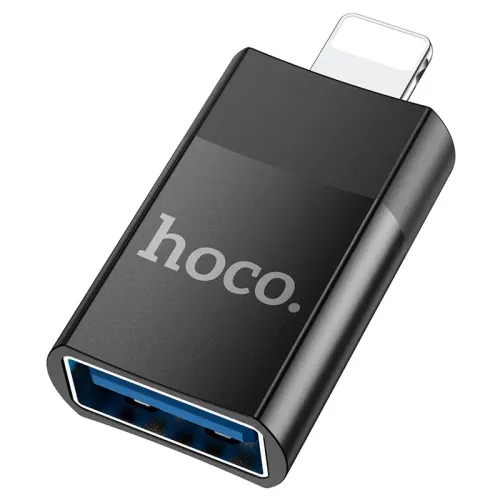
HOCO UA17 is a Lightning male to USB-A female OTG adapter for connecting supported USB accessories to compatible iPhone and iPad models.
Approximate Market Price
BDT 499
Informational market estimate only; this is not a current Store offer.
Compare store prices
No live offers for this variant
BDT 499
Approximate Market Price
Informational market estimate only; this is not a current Store offer.
Loading history…
Product story
The HOCO UA17 is a compact adapter with a Lightning male plug and USB Type-A female socket. HOCO describes it as an OTG adapter for Apple mobile devices, including direct access to USB flash-drive files through the Files app on supported devices. It provides a physical connection between a Lightning port and a USB-A accessory; it does not guarantee that every accessory, file system or iOS version will work.
Insert the Lightning male connector into a compatible iPhone or iPad Lightning port. Connect a USB-A accessory to the female socket. This is not a Lightning-to-USB-A charging cable, a USB-A-to-Lightning cable or a USB-C adapter. Check the device port before ordering, especially when choosing accessories for newer Apple devices that use USB-C.
The manufacturer listing says the UA17 supports OTG on Apple mobile phones and can read USB flash-drive files. On supported devices, connect the drive and look for it in the Files app. Recognition can depend on the device model, iOS version, drive format, available power and file system. Back up important files before changing drive formats.
The adapter may be useful with USB-A storage or other accessories when the iPhone/iPad and operating system support them. The checked HOCO sources do not provide a complete tested-device or accessory matrix. A keyboard, audio interface, camera accessory or other peripheral may require a compatible app, supported protocol or more power than the phone can supply.
The UA17 is presented as an OTG/accessory adapter. The sources checked do not confirm pass-through charging or an external power input. Do not assume it charges the iPhone while an accessory is connected. Bus-powered accessories can fail if they draw more current than the Apple device can provide; use a separately powered accessory only when its manufacturer supports that configuration.
A specific USB generation or maximum transfer rate is not stated in the HOCO listings checked. Actual file transfer speed depends on the adapter implementation, connected drive, Apple device, file system and workload. Do not advertise a numerical speed or USB 3.x performance without documentation for the exact UA17 unit.
The adapter is for Apple devices with a Lightning port. Confirm model, iOS version and accessory support before purchase. A USB-C iPad or USB-C iPhone cannot connect directly to this Lightning adapter. Device software updates can change accessory compatibility, so check current Apple support information if a particular device or drive is critical.
If a drive does not appear in Files, reseat the adapter, unlock the device, check for an iOS accessory prompt and test a compatible drive with a supported file format. A high-power drive or unsupported file system may not be recognized. If possible, confirm the drive works on another device and consult Apple support for the iPhone/iPad model.
If a USB-A accessory does not respond, confirm iOS support, required apps, connector orientation and power draw. Try a low-power accessory known to work with the Apple device. An adapter can change connector shape but cannot add missing device functions or supply extra power unless external power support is explicitly documented.
Keep the Lightning and USB-A contacts clean and dry. Insert and remove the adapter by holding its body, without twisting or pulling a connected accessory sideways. Avoid pressure on the phone port, liquids and damaged USB plugs. Disconnect if the adapter becomes hot, loose or intermittent.
The HOCO listings checked identify model UA17, but Bangladesh warranty terms can vary by seller. Confirm the warranty provider, claim location, duration and invoice requirements before checkout. The listings describe the adapter itself; do not assume a cable, flash drive or charger is included unless the seller’s package list says so.
The UA17 offers a compact way to connect a USB-A accessory to a compatible Lightning device and is specifically described for OTG flash-drive file access. Accessory support and power are device-dependent, no transfer-rate figure or pass-through charging is verified, and USB-C Apple devices need a different adapter.
Choose the UA17 only if the Apple device has a Lightning port and the intended USB accessory is supported by its model and iOS version. For storage, confirm file-system compatibility; for power-hungry accessories, confirm power requirements. Verify seller warranty and exact package contents before ordering.
It is a Lightning male to USB-A female adapter, model UA17, intended for OTG access to compatible USB accessories.
The adapter has a Lightning male plug for the Apple device and a USB Type-A female socket for a USB accessory.
HOCO describes reading USB flash-drive files through the iPhone Files app. Other compatible USB accessories may work when supported by the device, iOS version, accessory and power requirements.
The manufacturer and retailer listings describe OTG support for Apple mobile phones. The exact behavior depends on the iPhone/iPad model, iOS version, file format and accessory.
A compatible flash drive may be readable in the Files app. The drive format, power draw and iOS support can affect recognition; test the specific drive and device.
This is described as a USB accessory/OTG adapter, not a charging adapter. The checked sources do not establish pass-through charging, so do not assume it can charge the iPhone while in use.
No universal device list is confirmed. Verify the device has a Lightning port and that its iOS version supports the intended USB accessory. USB-C iPads and newer USB-C iPhones need a different adapter.
Only if the Apple device and iOS support that accessory and its power needs. The checked sources chiefly describe flash-drive access and do not provide a tested compatibility list.
A specific transfer-rate rating is not stated in the checked HOCO/manufacturer listings. Actual speed depends on the adapter, USB accessory and Apple device.
No external power input is shown in the listings checked. Some USB accessories draw more power than the phone can provide and may not work; no powered accessory support is confirmed.
Warranty terms vary by local seller. Confirm duration, provider and claim process for the exact unit before purchase.
The listing describes the UA17 adapter. A cable or power supply is not established as included; check package details with the seller.
Helpful answers
Product-specific answers maintained with the catalog information.
It is a Lightning male to USB-A female adapter, model UA17, intended for OTG access to compatible USB accessories.
The adapter has a Lightning male plug for the Apple device and a USB Type-A female socket for a USB accessory.
HOCO describes reading USB flash-drive files through the iPhone Files app. Other compatible USB accessories may work when supported by the device, iOS version, accessory and power requirements.
The manufacturer and retailer listings describe OTG support for Apple mobile phones. The exact behavior depends on the iPhone/iPad model, iOS version, file format and accessory.
A compatible flash drive may be readable in the Files app. The drive format, power draw and iOS support can affect recognition; test the specific drive and device.
This is described as a USB accessory/OTG adapter, not a charging adapter. The checked sources do not establish pass-through charging, so do not assume it can charge the iPhone while in use.
No universal device list is confirmed. Verify the device has a Lightning port and that its iOS version supports the intended USB accessory. USB-C iPads and newer USB-C iPhones need a different adapter.
Only if the Apple device and iOS support that accessory and its power needs. The checked sources chiefly describe flash-drive access and do not provide a tested compatibility list.
A specific transfer-rate rating is not stated in the checked HOCO/manufacturer listings. Actual speed depends on the adapter, USB accessory and Apple device.
No external power input is shown in the listings checked. Some USB accessories draw more power than the phone can provide and may not work; no powered accessory support is confirmed.
Warranty terms vary by local seller. Confirm duration, provider and claim process for the exact unit before purchase.
The listing describes the UA17 adapter. A cable or power supply is not established as included; check package details with the seller.
Customer community
Become a merchant
Join BiponiBD, publish accurate offers and start free.