Pros
- Adds Bluetooth connectivity to compatible USB-A computers
- Small 2.7g form factor listed by the manufacturer
- HOCO lists 5.1 with backward support for older versions

All categories
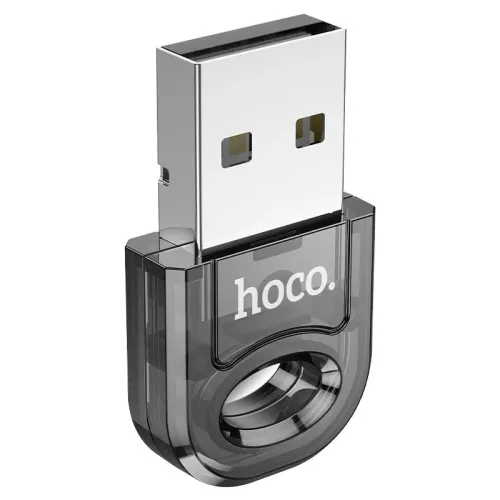 New condition
Computer Accessories
Hoco · UA28 Bluetooth 5.1 USB-A Adapter
HOCO UA28 adds Bluetooth 5.1 through USB-A, with 3Mbps and up to 10m listed. Verify host OS, driver needs and local warranty.
Approximate Market Price
BDT 350
Informational market estimate only; this is not a current Store offer.
Compare store prices
No live offers for this variant
BDT 350
Approximate Market Price
Informational market estimate only; this is not a current Store offer.
Loading history…
Product story
The HOCO UA28 is a compact USB-A Bluetooth adapter that adds Bluetooth connectivity to a compatible computer. HOCO lists Bluetooth 5.1, a 3Mbps transfer rate and up to 10m transmission distance. Its manufacturer specification gives dimensions of 30 × 17 × 6mm and weight of 2.7g; some retailer pages show different dimensions, so the manufacturer measurements are used here. Host operating-system and driver support determine whether a given peripheral can be paired and used.
The UA28 connects through a USB-A plug on a desktop or laptop. A computer with only USB-C ports may need a compatible adapter, which is not confirmed as included. The UA28 is a Bluetooth adapter, not a Wi-Fi adapter, USB storage device or stand-alone receiver. It requires a host computer and operating-system Bluetooth support. Connect it directly to a working port when troubleshooting, and avoid force or repeated movement that could damage the small plug.
HOCO identifies the UA28 as a Bluetooth 5.1 adapter and lists backward support for Bluetooth 4.0 and 3.0. Bluetooth version compatibility does not guarantee every profile, codec, headset feature, printer function or operating-system capability. The reviewed pages do not list a complete profile matrix or chipset details. Check the device and host requirements for the intended use, and pair peripherals through the computer’s Bluetooth settings.
HOCO specifies a transfer rate of 3Mbps and a transmission distance of up to 10m. These are published maximum figures rather than guaranteed real-world throughput or indoor reach. Walls, furniture, metal computer cases, radio interference, USB port placement, antenna orientation, Bluetooth profile and the peripheral can reduce performance. Bluetooth audio uses supported audio profiles and does not stream at the headline data rate. Keep devices close while pairing or diagnosing dropouts.
To use Bluetooth audio, plug in the UA28, enable Bluetooth in the host operating system, place the headset or speaker in pairing mode and select it in system settings. After pairing, choose the correct audio output or microphone endpoint. Audio codecs, microphone quality and low-latency behavior depend on the computer’s Bluetooth stack and peripheral. The product pages reviewed do not specify codecs or guarantee all headset controls, so verify those features for a particular device.
HOCO describes multi-device connectivity and compatibility with common Bluetooth peripherals. Pair each accessory using the host operating system and follow any device-specific setup instructions. The product specification does not provide a guaranteed maximum simultaneous device count or describe which profiles can operate at once. A keyboard or mouse may pair successfully while a specialized companion application or feature remains unsupported. Remove obsolete pairings if the host cannot reconnect to a device.
HOCO and Bangladesh retailers list Windows 7, Windows 8, Windows 10, Linux and other operating systems. Exact Linux distributions, kernel versions and Windows 11 support are not fully specified in the reviewed product information. Some hosts may need a driver; others may use built-in support. Check the computer maker or a trusted driver source for the exact OS before installation. Managed work computers may restrict Bluetooth or driver installation through administrator policy.
The adapter is small and may sit close to the computer’s metal chassis or other USB equipment. If range or audio stability is poor, try another USB port and move the host or peripheral closer. A short compatible USB extension can sometimes improve placement, but it is not listed as included. Reduce obstacles and nearby interference where practical. Actual connection quality depends on the environment and cannot be determined by the Bluetooth version alone.
HOCO lists the UA28 at 30 × 17 × 6mm and 2.7g. Some local retailer listings provide a smaller 22 × 17 × 1.2mm size and 2g weight, which conflicts with the manufacturer page; this product description uses HOCO’s published figures and records the retailer discrepancy for review. Because the adapter protrudes slightly from the port, avoid impacts and remove it before packing a laptop tightly. Keep the connector clean and dry.
If the adapter is not detected, test another USB port and check the operating system’s device list. Confirm Bluetooth is enabled and that a compatible driver or host service is available. If pairing fails, put the peripheral into pairing mode, remove stale host pairings and bring the devices closer. For dropouts, reduce obstructions and try a different USB port. Pairing does not ensure the required audio, keyboard, printer or application profile is supported.
Pair only with peripherals you recognize and follow operating-system prompts. Remove unused pairings and disable Bluetooth when it is not needed, according to the host’s security policy. The UA28 provides a Bluetooth radio interface; it does not independently manage user accounts or replace host security controls. Avoid pairing in untrusted public environments if the device’s identity cannot be verified.
The existing catalog record and some local product descriptions list a three-month warranty, sometimes requiring the box and accessories for claims. Warranty terms remain seller- and distributor-specific; confirm provider, service location, claim process, replacement window and proof requirements with the selected BiponiBD store. Other retailers’ prices and stock do not confirm this offer. On receipt, verify HOCO UA28, USB-A connector, black finish and packaging, and keep the invoice and box.
UA28 adds Bluetooth 5.1 through a compact USB-A adapter, with HOCO listing up to 3Mbps and 10m. It can connect compatible audio and input peripherals when supported by the host OS, drivers and Bluetooth profiles. Its small form factor is convenient but can be exposed to knocks while plugged in. Exact profile support, simultaneous device count and newer OS compatibility are not fully documented. Some retailers show dimensions that conflict with HOCO’s manufacturer specification.
HOCO UA28 is a USB-A Bluetooth 5.1 adapter with backward support listed for Bluetooth 4.0 and 3.0. HOCO specifies 3Mbps and up to 10m, with 30 × 17 × 6mm dimensions and 2.7g weight. Windows 7/8/10 and Linux are listed, but exact OS/driver support varies. Some Bangladesh sellers list a three-month warranty; verify the terms for the selected offer.
Helpful answers
Product-specific answers maintained with the catalog information.
The adapter model is HOCO UA28.
HOCO lists Bluetooth 5.1 with backward support for Bluetooth 4.0 and 3.0.
It plugs into a USB-A port. A USB-C-only host may need a separate compatible adapter.
HOCO specifies up to 3Mbps; real throughput depends on the Bluetooth profile and environment.
HOCO lists up to 10m, but obstacles and interference can reduce practical range.
Windows 7, 8, 10 and Linux are listed; exact versions and driver needs vary.
A compatible headset can pair through the host OS if its Bluetooth audio profiles are supported.
HOCO describes multi-device support, but does not specify a guaranteed simultaneous-device count.
HOCO lists 30 × 17 × 6mm and 2.7g; some retailer measurements conflict.
Some local listings record three months; confirm the selected seller’s current claim terms.
Customer community
Become a merchant
Join BiponiBD, publish accurate offers and start free.