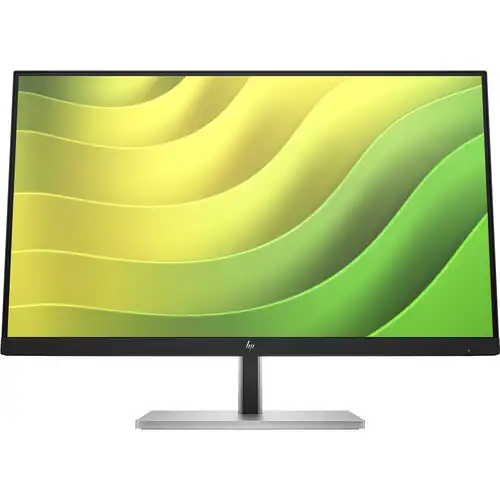
HP E24q G5 overview
HP E24q G5 QHD Monitor, model 6N4F1AA, is a 23.8-inch IPS business display with 2560 × 1440 native resolution and 75Hz maximum refresh. HP QuickSpecs lists 300 nits typical brightness, 1000:1 static contrast, 99% sRGB, 5ms GtG with overdrive, one HDMI 1.4, one DisplayPort 1.2 and four USB-A 5Gbps downstream ports enabled by USB-B upstream. Its stand adjusts height, tilt, swivel and pivot; VESA mounting is 100 × 100mm. HP Eye Ease low-blue-light hardware and flicker-free operation are specified. Existing record details align on the core QHD/75Hz but have now been expanded and tied to the exact model.
Screen size and QHD resolution
The exact HP model is 23.8 inches (60.5cm) diagonally, with a 16:9 aspect ratio and a QHD native resolution of 2560 × 1440. HP lists an active area of 52.69 × 29.64cm, 0.21mm pixel pitch and 123 pixels per inch. This pixel density provides detailed text and workspace on a compact business monitor. Some applications may benefit from operating-system scaling. Choose the native resolution for the sharpest output, and check that the computer or dock supports QHD through its selected connection. The “24-inch” family description is rounded; the manufacturer’s exact figure is 23.8 inches.
IPS panel and image quality
HP specifies an IPS panel with 178° horizontal and vertical viewing angles, 300 nits typical brightness, 1000:1 static contrast and support for up to 16.7 million colors. It has an edge-lit backlight, anti-glare screen treatment, 3H hardness and 25% haze. The panel is true 8-bit according to QuickSpecs. These are typical manufacturer specifications and actual panels can vary. Anti-glare coating helps manage reflections but does not remove glare from direct light. Adjust brightness and monitor placement for the room and viewing distance.
Color gamut and calibration
HP lists 99% sRGB coverage and factory color calibration for color temperature, with neutral 6500K plus warm 5000K and cool 9300K presets. Color-space/subsampling support includes RGB 4:4:4, YCbCr 4:4:4 and YCbCr 4:2:2; RGB gain adjustment is available. Gamut coverage and color-temperature calibration do not guarantee color accuracy across every unit or application. For image editing, use a calibrated profile and color-managed software. Confirm the correct preset and application behavior if the monitor will be used for print or brand-critical color matching.
Refresh rate and response
The maximum refresh is 75Hz, with a typical 5ms GtG response when overdrive is enabled. HP lists a maximum resolution of QHD at 75Hz and vertical scan up to 75Hz. This display is aimed at office productivity and general use rather than high-refresh gaming. Overdrive can affect pixel transitions and may create visible artifacts depending on content; choose settings based on the image. A 75Hz refresh does not mean every transition takes 5ms, because refresh and response time measure different behavior. Confirm the computer output supports 2560 × 1440 at 75Hz over the selected cable.
HDMI and DisplayPort inputs
HP lists one HDMI 1.4 port and one DisplayPort 1.2 port. HP notes that DisplayPort 1.2 or HDMI 1.4 is required to drive the panel at its native QHD resolution. Both interfaces support HDCP. Choose the port that matches the host computer and cable; adapters or docks can restrict resolution or refresh. The monitor includes video inputs only through the stated connections and does not list USB-C video. If a laptop has only USB-C, use a compatible adapter or dock that supports QHD at 75Hz and connect the USB-B upstream cable separately to enable the monitor’s USB hub.
USB hub and data ports
The monitor has one USB-B upstream port and four SuperSpeed USB Type-A downstream ports with a 5Gbps signaling rate. One of the downstream ports supports charging. Connect the USB-B upstream cable to the computer so the downstream ports can carry data. The box includes an upstream cable according to HP’s QuickSpecs. These are USB-A hub ports; they do not make the monitor a USB-C dock and do not provide USB-C laptop charging or video. Check the connected peripheral’s power needs and use a direct computer port for devices with unusually high power requirements.
Ergonomic stand and posture
HP specifies 150mm height adjustment, tilt from -5° to +23°, swivel ±45° and pivot ±90°. The detachable stand allows adjustment for different users and desk arrangements. Raise the monitor so the screen sits comfortably in the field of view, then adjust tilt and swivel to reduce neck movement and reflections. Pivot to portrait when appropriate, and also rotate the operating-system display orientation. Leave slack in connected cables before turning the screen. The adjustment range helps on shared workstations but does not replace a suitable chair, desk height or regular movement breaks.
VESA and security
The monitor supports 100 × 100mm VESA mounting and has a detachable stand. HP lists a security lock-ready slot. Before mounting, check the arm or wall bracket’s VESA pattern and weight rating, use the correct fasteners and follow the installation guide. The monitor head weighs 3.81kg without hinge or 4.18kg with hinge per QuickSpecs; the packaged configuration differs. A lock cable is sold separately. Keep enough clearance around the display and cables, especially when using pivot or swivel.
HP Eye Ease and flicker-free operation
HP lists Eye Ease as a TÜV low-blue-light hardware solution and specifies flicker-free operation. Eye Ease is designed to reduce blue-light emissions while preserving color presentation; it is not a substitute for comfortable room lighting, readable scaling or breaks. The monitor’s brightness and color controls can be adjusted through the on-screen display. Use comfortable brightness and positioning, particularly during long desk sessions. If color-sensitive work is affected by a comfort mode, compare the image in the standard preset and choose the setting appropriate to the task.
On-screen controls and software
The OSD includes brightness, color, image, input, power, menu, management and information controls. HP lists HP Display Center and HP Display Manager; the host computer must meet the software requirements, and HP notes Windows 10 and later for relevant functions. Four user-assignable function buttons provide quick access to selected options. Install current software from HP’s support page for the correct model and operating system. These tools help manage display settings but do not change the monitor’s native QHD resolution or 75Hz maximum.
Power and operating conditions
HP lists an internal power supply and AC input from 100 to 240V at 50/60Hz. Typical power consumption is 39W and maximum is 56W; standby is 0.5W. Energy Star measured operational figures are about 17.6–17.7W depending on the test voltage, while the regional SDR on-mode figure is 18W. These figures use different defined measurement methods and should not be treated as contradictory actual-use promises. Operate the monitor within HP’s stated environmental range and keep vents unobstructed.
What is in the box
HP QuickSpecs lists an AC power cord, setup poster and documentation. The illustration and package section identify the monitor and stand components; cable bundles can vary by market. Confirm whether HDMI, DisplayPort and USB-B upstream cables are included in the Bangladesh package before ordering. HP’s rear-port layout shows HDMI, DisplayPort, USB-B upstream and four USB-A downstream connections. Keep the packaging and serial label until the return window has passed, and record the accessories delivered with the invoice.
Compatibility and desk workflow
Connect a PC through HDMI 1.4 or DisplayPort 1.2 and select 2560 × 1440 at up to 75Hz. To use the USB-A ports, connect USB-B upstream to the computer as well. A laptop with only USB-C needs an adapter or dock capable of the required QHD signal; this monitor’s USB-C video/charging is not listed. The display’s 23.8-inch size and QHD resolution suit documents, coding, spreadsheets and multi-window work. Verify the host graphics and dock support the selected mode before deploying it in a shared office.
Warranty and Bangladesh purchase
HP QuickSpecs lists regional warranty service as 3/3/0 for Latin America, North America, EMEA and APJ, with 3/3/3 in select APJ countries. This does not establish which coverage applies to a particular Bangladesh unit. The existing catalog states three years, but local serial eligibility, service provider, panel terms and dead-pixel coverage still need seller confirmation. Ask for the authorized warranty provider and written terms on the invoice. No current BiponiBD price or stock was independently confirmed in this review; verify the live offer, delivery charge and return policy before payment.
Advantages and trade-offs
E24q G5 combines QHD detail on a 23.8-inch IPS panel, 99% sRGB, 75Hz refresh, Eye Ease, four USB-A ports, and a stand with height, tilt, swivel and pivot. It is well suited to office, documentation, coding and general productivity setups that value adjustable ergonomics. Its 75Hz refresh is below gaming monitors designed for 144Hz or higher, and it has no listed USB-C video or charging. Consider the host ports, hub requirement and local warranty when comparing it with other business displays.
Buyer checklist
Confirm the model number is HP E24q G5 / 6N4F1AA and not the FHD E24 G5 or another E-series display. Verify 2560 × 1440 at 75Hz, one HDMI 1.4, one DP 1.2, USB-B upstream and four USB-A downstream ports. Ask whether the box includes the required video and upstream cables, and check the warranty provider, Bangladesh serial eligibility, dead-pixel policy and return period. On setup select native QHD/75Hz, connect USB-B for the hub, set height and pivot, and install HP display software only from the official support source.
Summary
HP E24q G5 model 6N4F1AA is a 23.8-inch QHD 2560 × 1440 IPS monitor with 75Hz refresh, 5ms GtG overdrive response, 300 nits typical brightness, 1000:1 contrast, 99% sRGB, HDMI 1.4, DisplayPort 1.2 and four USB-A 5Gbps downstream ports enabled by USB-B upstream. The stand provides 150mm height adjustment, tilt, swivel and pivot; VESA is 100 × 100mm. HP Eye Ease and flicker-free operation are specified. Confirm the local warranty term and package cables for the exact Bangladesh unit before ordering.