Verified model overview
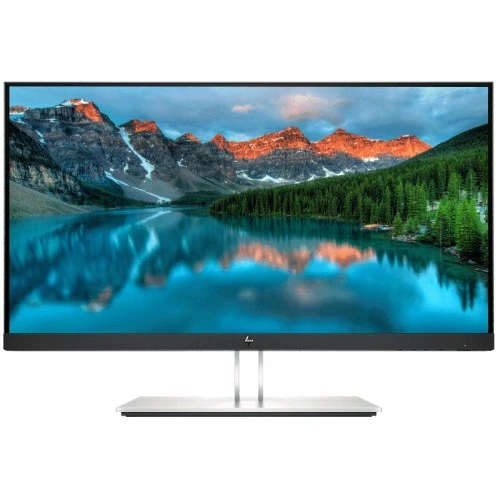
The HP E24t G4 FHD Touch Monitor is a 23.8-inch IPS touchscreen for business and desktop use. HP QuickSpecs lists native 1920 × 1080 resolution at 60Hz, 300 cd/m² typical brightness, 1000:1 static contrast, 5ms gray-to-gray response with overdrive, 10-point touch and anti-glare glass. It has HDMI 1.4, DisplayPort 1.2, VGA and USB connectivity. The ergonomic stand supports height, tilt, swivel and pivot. This product is the touchscreen E24t G4 and should not be confused with non-touch E24 G4 or later E24t G5 models.
23.8-inch Full HD workspace
The 23.8-inch display uses native Full HD 1920 × 1080 resolution in a 16:9 format. HP lists a panel area of 526.85 × 296.35mm and 123 pixels per inch, giving clear text and practical detail for office applications. Native resolution is recommended at 60Hz. Full HD works well for documents, web apps, video calls and dashboards; it offers less desktop space than QHD. Adjust operating-system scaling and text size for comfortable reading and accurate touch targets.
IPS panel and viewing angles
HP specifies an IPS panel with 178-degree horizontal and vertical viewing angles. The three-sided micro-edge bezel leaves a slim border along the top and sides. Typical static contrast is 1000:1 and brightness is 300 cd/m² in the QuickSpecs for the 9VH85AA model; other regional part numbers may list different brightness. The matte anti-glare surface can reduce reflections, but position the screen away from direct light. Wide viewing angles do not guarantee color calibration or uniformity for every unit.
10-point touchscreen operation
The E24t G4 supports touch input. The display is intended to work with a compatible operating system and computer connection; touch data requires the appropriate USB connection in addition to video. Use clean fingers and supported touch gestures to tap, scroll, zoom or interact with compatible applications. Gloves, styluses, operating-system settings and application support can affect behavior. Confirm the exact package’s USB cable and connection instructions before setup. Avoid pressing hard on the glass or using sharp objects.
Resolution and 60Hz timing
HP lists 1920 × 1080 at 60Hz as the native recommended timing, with supported modes including several lower resolutions. This is a business touch monitor rather than a high-refresh gaming screen. A stable native mode keeps text and UI elements sharp. If the system reports a different resolution, check the graphics driver, input cable and display settings. The screen’s 60Hz ceiling means it does not offer the motion smoothness of higher-refresh gaming displays.
Response time and motion
HP lists a typical 5ms gray-to-gray response with overdrive. This is not a measure of input lag and does not imply that every transition completes in exactly five milliseconds. For office work, pointer movement and standard video, the 60Hz panel is designed for everyday display tasks. Fast competitive games may show more motion blur than gaming monitors with higher refresh rates. Use the recommended resolution and refresh and choose picture settings that preserve readable text and natural image quality.
Brightness and contrast
The 9VH85AA QuickSpecs lists 300 cd/m² typical brightness, 1000:1 static contrast and 5,000,000:1 dynamic contrast. Some other regional or part-number versions have different published brightness; check the product label and seller documentation for the delivered model. Typical and dynamic contrast are different measurements, and a large dynamic figure does not indicate native black-level performance. Set brightness for the room and preserve shadow and highlight detail rather than relying on a marketing ratio.
Color and anti-glare glass
HP lists 72% NTSC color coverage, an 8-bit panel depth and a neutral 6500K default color temperature in QuickSpecs. The glass has anti-glare treatment, Haze 25% and hard coating 3H. These details suit general productivity but do not certify professional color accuracy. For photo work or print matching, calibrate the monitor and use color-managed applications. Clean the touch surface with a suitable soft cloth and follow HP care instructions to avoid scratching or damaging the coating.
HDMI, DisplayPort and VGA
The monitor includes one VGA, one HDMI 1.4 and one DisplayPort 1.2 input. HP lists 1920 × 1080 at 60Hz as native timing. Choose the digital connection supported by the computer for a clear image; VGA is an analog option for older systems. If touch is not responding, video alone is not enough—connect the appropriate USB data cable between the monitor and host and verify the operating-system touch settings. Select the correct source in the monitor menu.
USB hub and touch data
The E24t G4 offers USB connectivity for touch operation and peripheral use. HP documents USB hub ports, and the QuickSpecs include a USB Type-B upstream connection and multiple Type-A downstream ports. A USB upstream cable must connect the monitor hub to the computer for touch events and attached USB devices. USB charging and data speeds depend on port and host capabilities. Check the exact regional QuickSpecs and package contents because cable inclusions can vary by SKU.
Audio and speakers
The QuickSpecs list audio-related functions and a 3.5mm audio output, while built-in speakers are not specified for this touchscreen model. Plan to use external speakers or headphones, connected to the computer or monitor audio output as supported by the selected video source. Choose the correct playback output in the operating system if sound does not play. Do not assume the touch panel includes speakers just because other E-series monitors have integrated audio.
Ergonomic stand movement
The stand supports height adjustment, tilt, swivel and pivot for portrait orientation. HP lists tilt from approximately -5 to +23 degrees, height adjustment and the ability to rotate the screen. Use the stand to align the top of the display with a comfortable eye level and adjust tilt for touch access and glare. Leave cable slack as the monitor moves. The base should rest on a stable surface, especially when tapping the screen, to avoid the display shifting.
VESA mounting and footprint
The monitor supports 100 × 100mm VESA mounting. HP QuickSpecs gives a net weight around 5.7kg with stand and 3.6kg without stand, while packaging dimensions and weights depend on the SKU. Verify the exact model’s weight and mounting method before choosing an arm. Touch interaction can transmit force to the display, so use a stable stand or arm. Check desk depth, cable clearance and screen position when mounting in portrait orientation.
Power and consumption
HP specifies universal AC 100–240V at 50/60Hz. The 9VH85AA QuickSpecs lists 25W typical and up to 52W maximum, with around 0.5W standby; actual usage varies with brightness, USB devices and operating mode. Use the supplied power cable and a properly grounded outlet. Keep ventilation clear and disconnect power before cleaning or moving. Power figures can differ by model part number and measurement method, so the exact regional datasheet takes precedence for a delivered unit.
Flicker-free and low-blue-light modes
HP lists flicker-free operation and low-blue-light modes. These are display features and not medical treatment claims. Comfort also depends on room illumination, brightness, viewing distance, font size and breaks. The neutral color temperature is listed at 6500K; lower blue-light modes may shift colors. Use a comfortable mode for office work and switch to a neutral preset when color appearance matters. Position the touchscreen so repeated reaching does not cause unnecessary shoulder strain.
Business touch applications
The E24t G4 can support touch-oriented workflows such as kiosk interfaces, point-of-sale screens, check-in, shared dashboards and interactive office apps when the software and host computer support touch. Application compatibility, operating system settings and USB data connection determine the experience. It is not an all-in-one computer; a separate PC or supported source is required. Plan for screen cleaning and secure cable routing in shared environments. Confirm the exact multi-touch behavior required by the application.
Strengths and practical trade-offs
The E24t G4 combines 23.8-inch Full HD IPS, 10-point touch, a flexible stand and common HDMI, DisplayPort and VGA inputs. Its 60Hz refresh and 5ms typical response suit business and interactive workflows rather than high-speed gaming. Touch requires USB data as well as video, and speakers are not listed. HP documentation varies by part number for some values, including brightness and power; verify the precise SKU. The 100 × 100mm VESA pattern enables third-party mounting when compatible.
Bangladesh warranty and part-number check
HP QuickSpecs covers multiple part numbers and regional configurations. HP’s regional warranty terms do not confirm local Bangladesh coverage for the serial offered by a seller. Ask for the exact HP part number, touch warranty conditions, service location, start date and proof of authorized coverage. Existing catalog warranty text says three years; verify it for the serial. Check price, stock, delivery, return and payment terms at checkout, and retain the invoice and packaging.
Setup and touch troubleshooting
Connect power and a supported video input, then set 1920 × 1080 at 60Hz. Connect the monitor’s USB upstream cable to the computer so touch and hub functions can communicate. If the image is missing, select the correct input and check the cable and graphics output. If touch does not work, reconnect USB, verify the operating system detects a touch device and calibrate if required. Adjust stand height and tilt before repeated touch use; route cables to move safely.
Who should consider the E24t G4
The HP E24t G4 can suit office users and interactive workplaces that need a 23.8-inch touch display, Full HD resolution and an adjustable stand. It can support touch-enabled business apps when connected to a compatible host. Buyers should check required USB hub functions, external audio needs, refresh expectations and regional part number. Verify that the seller supplies the correct touch model rather than a non-touch E24 G4, and confirm local warranty for the product serial before purchase.
Specification summary
HP E24t G4 FHD Touch Monitor (9VH85AA QuickSpecs): 23.8-inch IPS touchscreen, 1920 × 1080 at 60Hz, 16:9, 10-point touch, 300 cd/m² typical, 1000:1 static contrast, 5ms GtG with overdrive, 72% NTSC and anti-glare Haze 25%/3H glass. Inputs: VGA, HDMI 1.4, DisplayPort 1.2; USB upstream/hub; audio out. Stand supports height, tilt, swivel and pivot. VESA 100 × 100mm. Regional specifications vary; verify exact part number and Bangladesh warranty.