Pros
- 10-point touch supports compatible interactive workflows.
- Four-way adjustable stand helps position the touch panel ergonomically.
- USB hub adds convenient peripheral connections.
- 99% sRGB and anti-glare panel suit general office use.

All categories
 New condition
Monitors
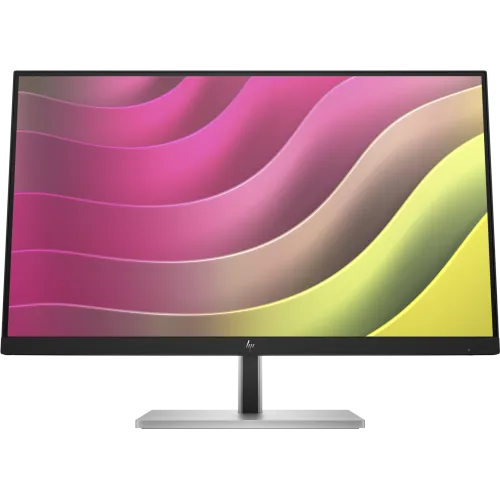
HP · E24t G5 23.8-inch FHD Touch
23.8-inch Full HD IPS touchscreen with 10-point touch, 75Hz, HP Eye Ease and an adjustable stand.
Price unavailable
Price range updating
No verified price is available yet. Store offers will appear when merchants publish them.
Compare store prices
No live offers for this variant
Offers will appear when merchants publish them.
Loading history…
Product story
HP’s E24t G5 FHD Touch Monitor is a 23.8-inch IPS display with 1920 × 1080 resolution and up to 10-point Advanced In-Cell Touch using self-capacitive technology. HP specifies 75Hz maximum refresh, 300-nit brightness, 1000:1 static contrast, 5ms GtG with overdrive and 99% sRGB. Its ports include HDMI 1.4, DisplayPort 1.2, USB-B upstream and four USB-A ports. The stand supports height, tilt, swivel and pivot. HP product number 6N6E6AA appears in regional documentation; confirm local SKU and serial warranty.
The panel is 23.8 inches diagonally with native FHD resolution of 1920 × 1080 and a 16:9 aspect ratio. This format suits office desks, point-of-sale workflows, classrooms and compact work areas. Choose native resolution for crisp text, then adjust scaling and application zoom for readability. Full HD has fewer pixels than QHD or 4K, so compare workspace needs before choosing. Computer output, cable and selected input determine whether the monitor receives the intended mode.
HP specifies up to 10-point Advanced In-Cell Touch with self-capacitive technology. This allows compatible operating systems and applications to recognize multiple simultaneous touch points. Touch operation requires a supported USB data connection to the computer in addition to the video cable; the USB-B upstream link connects the monitor’s touch interface and hub. Check OS and driver compatibility, then calibrate or configure touch as needed. The panel does not become a standalone tablet.
Connect HDMI or DisplayPort for the picture, then connect the USB-B upstream cable to the computer for touch data. Confirm that the operating system detects the monitor’s touch device. If touch input maps to another screen in a multi-monitor setup, use the operating system’s tablet-PC or touch display settings to associate the correct panel. Keep the surface clean and use fingers or a compatible stylus only as permitted by HP documentation.
The IPS LCD panel is rated for typical 178-degree horizontal and vertical viewing angles. This supports viewing from different positions around a desk. Angles are measured by a contrast threshold and do not guarantee identical color or brightness from every viewpoint. The anti-glare finish helps manage reflections, but placement still matters. Keep windows and bright lamps from reflecting directly into the screen and use a comfortable, centered viewing position for accurate touch interaction.
The maximum refresh rate is 75Hz, with 50–75Hz vertical scan frequency. HP lists 5ms GtG response with overdrive. This refresh can make general scrolling and pointer movement smoother than 60Hz, but the monitor is not a high-refresh gaming display. The response value depends on overdrive and test conditions and is not input lag. Select an available mode in the computer’s display settings and confirm the active signal.
HP lists 300 nits typical brightness and 1000:1 static contrast, plus an 8,000,000:1 dynamic contrast figure. Static and dynamic measurements should not be compared as equivalent. A typical 300-nit rating suits many indoor work environments; choose a comfortable level based on room lighting. Excessive brightness in a dim room may be uncomfortable. Actual contrast, uniformity and perceived black level vary with panel and ambient conditions.
HP specifies 99% sRGB gamut and 8-bit color depth via 6-bit plus FRC, supporting up to 16.7 million colors. The gamut value describes color coverage rather than calibration accuracy for every unit. For web content or office work, choose a natural preset. For photography or design, calibrate the display and use color-managed software. Do not interpret 99% sRGB as proof of a particular Delta E result or suitability for print without calibration.
HP Eye Ease is a TÜV-certified hardware low-blue-light solution. HP also lists flicker-free operation. Use the low-blue-light mode if it feels comfortable, recognizing that it may change color temperature. For color work, use a calibrated neutral mode. These are display comfort features, not medical treatment. Brightness, viewing distance, ambient light and breaks also affect comfort during long sessions.
The monitor uses an anti-glare screen treatment and HP lists 3H hardness. Touchscreens can collect fingerprints through normal use, so clean the panel gently using HP-recommended methods. Do not press hard or use abrasive cleaners, as they can damage surface coatings. Avoid spraying liquid directly onto the screen. The anti-glare layer reduces reflected light but does not make the display immune to strong reflections or direct sunlight.
The included stand supports up to 150mm of height adjustment, tilt from -5 to +23 degrees, swivel ±45 degrees and pivot ±90 degrees. These adjustments help position the touch panel for seated or standing use and can support portrait layouts. Adjust the height and angle to limit wrist reach and glare during touch interaction. The stand is detachable; the monitor supports 100 × 100mm VESA mounting for compatible arms.
HP’s datasheet lists one HDMI 1.4 input, one DisplayPort 1.2 input, four SuperSpeed USB-A ports at 5Gbps (one charging port), and a USB-B upstream port. Connect USB-B to activate the USB data path for touch and hub use. HDMI and DisplayPort support HDCP. The monitor is not listed with USB-C video, so check laptop output and use an appropriate adapter only when necessary.
A video cable alone carries the picture but does not ordinarily carry the monitor’s touch data to a computer on this model. Use the USB-B-to-USB-A cable listed by HP Support to link touch and USB peripherals. If the touchscreen works intermittently, check the upstream connection, USB port, cable and operating system. Keep the video and touch connections attached to the same host computer. A dock may affect touch enumeration or power to USB devices.
HP states that there is no integrated camera. The datasheet does not list built-in speakers or a microphone as core features. Plan to use external camera and audio hardware if needed. HP Support lists DisplayPort and HDMI cables, USB Type-B-to-A cable, warranty card, quick setup poster and AC power cord in the package for a supported regional bundle. Confirm the contents of the Bangladesh unit with the seller because accessories vary.
The monitor uses an internal 100–240V AC, 50/60Hz power supply. HP lists 25W typical, 53W maximum and 0.5W standby consumption. Actual draw depends on brightness and connected USB devices. Use a grounded supply and the power cable specified for the unit. USB charging output is limited to the designated charging port and does not establish that the monitor can charge a laptop. Check the power label and local plug arrangement.
The display’s panel active area is approximately 52.7 × 29.65cm. The assembled monitor requires desk depth for its stand and touch reach; HP lists a 150mm height adjustment range. Place the touchscreen where you can tap it without leaning excessively. Keep the stand stable while using multi-touch gestures. If mounting on an arm, confirm load capacity and that the 100 × 100mm plate leaves access to the ports.
The E24t G5 can suit reception, retail, education, collaborative work and office environments where direct screen interaction is useful. The 23.8-inch Full HD size is familiar and manageable, while the adjustable stand supports different desk setups. Touch functionality depends on USB connection and host software. For a laptop one-cable desk, a USB-C monitor may be simpler; for detailed design, a higher-resolution display may be preferable.
The monitor is 75Hz, Full HD and lacks integrated camera. It uses USB-B rather than USB-C for touch and the hub. Multi-touch behavior depends on the connected OS and applications. A protective screen film or thick gloves may affect touch sensitivity. Full specifications and included cables can differ by regional SKU. Confirm software compatibility, stand, ports and serial warranty before purchase, particularly for point-of-sale deployments that depend on touch hardware.
HP’s international datasheet does not guarantee local coverage for a specific Bangladesh serial. Ask the seller to confirm authorized channel, warranty duration, service location, dead-pixel and touch-panel policies, and invoice requirements. Match the product number and serial on the monitor, carton and invoice. Test all touch points, video inputs, USB ports and stand adjustments during the seller’s return window. Retain proof of purchase for service.
Clean fingerprints with a soft, lint-free cloth according to HP guidance, with the monitor powered off. If touch input fails, connect USB-B upstream and confirm the correct touch display in operating-system settings. If the image is missing, verify the selected HDMI/DisplayPort input and the computer’s output mode. For a blurry image, choose 1920 × 1080 and use appropriate scaling. Avoid pressure on the panel when adjusting the stand.
Helpful answers
Product-specific answers maintained with the catalog information.
The HP E24t G5 has native Full HD resolution of 1920 × 1080.
HP lists up to 10-point Advanced In-Cell touch capability.
Use USB-B upstream as well as HDMI or DisplayPort to link touch data.
HP lists a maximum refresh rate of 75Hz.
HDMI 1.4, DisplayPort 1.2, USB-B upstream and four USB-A ports are listed.
Yes, height, tilt, swivel and pivot adjustments are listed.
HP specifies that there is no integrated camera.
It supports 100 × 100mm VESA mounting.
Confirm serial-specific HP coverage and service terms with the seller.
Customer community
Become a merchant
Join BiponiBD, publish accurate offers and start free.