Pros
- QHD resolution provides more workspace than Full HD at 27 inches.
- Four-way adjustable stand supports varied desk setups.
- Four USB-A ports add convenient peripheral connectivity.
- 99% sRGB and HP Eye Ease suit general office and content work.

All categories
 New condition
Monitors
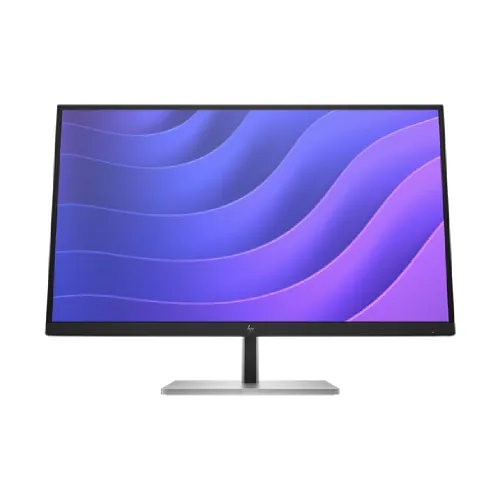
HP · E27q G5 27-inch QHD IPS
27-inch QHD IPS business monitor with 75Hz, 350-nit brightness, HP Eye Ease, adjustable stand and USB hub.
Price unavailable
Price range updating
No verified price is available yet. Store offers will appear when merchants publish them.
Compare store prices
No live offers for this variant
Offers will appear when merchants publish them.
Loading history…
Product story
The HP E27q G5 is a 27-inch business monitor with an IPS panel and native QHD resolution of 2560 × 1440. HP QuickSpecs identify model 6N6F2AA and specify 75Hz maximum refresh, 350-nit typical brightness, 1000:1 static contrast, 5ms GtG with overdrive, and 99% sRGB. It includes HDMI 1.4, DisplayPort 1.2, USB-B upstream and four SuperSpeed USB-A ports. Its stand adjusts for height, tilt, swivel and pivot. Check the exact product number and local warranty before purchase.
The native resolution is 2560 × 1440 pixels in a 16:9 format. This provides more workspace and finer detail than Full HD at the same diagonal size. HP lists approximately 109 pixels per inch. Set the operating system to native resolution for sharp text and choose scaling that suits your eyesight and viewing distance. Older computers may offer limited output modes through docks or adapters. Confirm that the graphics source supports QHD at the intended refresh rate over the chosen connection.
HP specifies an IPS panel with typical 178-degree horizontal and vertical viewing angles. The technology is suited to desk use where the screen may be viewed off-center. Viewing-angle figures describe a threshold under HP’s test method; they do not promise identical brightness or color from every position. Place the monitor at a comfortable distance and angle, and avoid direct light reflections. Color-critical work still benefits from calibration and a controlled environment.
The maximum listed refresh rate is 75Hz, with a vertical scan frequency range of 50 to 75Hz. HP lists 5ms gray-to-gray response with overdrive. This is a general productivity display rather than a high-refresh gaming monitor. The response figure depends on the overdrive mode and test conditions; it is not input lag. Select a supported timing in the operating system and check the active signal information if the screen runs at a lower rate.
Typical brightness is 350 nits and static contrast is 1000:1. HP also publishes an 8,000,000:1 dynamic contrast figure, which is a separate dynamic measurement and should not be directly compared with static contrast. Brightness needs vary with room lighting; using a moderate setting can reduce eye strain in a dim room. Panel uniformity and the perceived black level can vary by unit and ambient light.
HP lists 99% sRGB color gamut and true 8-bit panel depth, supporting up to 16.7 million colors. A gamut percentage describes color coverage, not factory color accuracy for every unit. HP lists factory color temperature calibration. For photo, design or print work, use an appropriate color profile and calibration tool. For everyday office tasks, select a comfortable preset and avoid interpreting the sRGB rating as proof of professional hardware calibration.
HP Eye Ease is a hardware low-blue-light solution, listed as TÜV Low Blue Light certified. It is designed to reduce blue-light exposure while maintaining a usable picture. Choose the setting that feels comfortable and keep sensible break habits and room lighting. The feature does not diagnose or prevent eye conditions. HP Display Center also provides software controls and an ergonomic setup guide on supported computers.
The included stand supports height adjustment up to 150mm, tilt from -5 to +20 degrees, swivel ±45 degrees and pivot ±90 degrees. This helps position the display for sitting, standing or portrait layouts. Rotate the panel carefully and use the operating system’s orientation control for portrait mode. The stand is detachable, and the display supports 100 × 100mm VESA mounting for a compatible arm. Confirm arm load capacity and clearance.
HP’s datasheet lists one HDMI 1.4 port, one DisplayPort 1.2, four SuperSpeed USB-A 5Gbps ports (one charging), and one USB-B upstream connection. Connect the included or compatible USB upstream cable to the computer to activate the hub. The monitor is not listed as having USB-C video or charging. Check the exact regional unit and included cable bundle before relying on a particular connection.
Choose HDMI 1.4 or DisplayPort 1.2 based on the computer’s available output. DisplayPort is useful for desktop setups and supports HDCP; HP lists HDCP over both HDMI and DisplayPort. For the clearest desktop image, use native 2560 × 1440 resolution and a supported refresh. If no picture appears, check the selected input, cable seating, source output and any dock or adapter. The monitor does not include a built-in webcam.
The four USB-A ports provide a convenient place to connect keyboard, mouse and other peripherals. HP identifies one port as charging-capable and specifies 5Gbps signaling for the USB-A group. The USB-B upstream cable links the hub to a computer; USB-A ports alone do not provide a computer data path. Charging capacity and behavior depend on port, host power state and device requirements. Do not assume the monitor can charge a laptop.
HP’s specification does not list an integrated webcam or microphone. The listed connectivity also does not identify built-in speakers or a dedicated audio output. Plan to use external USB or computer-connected audio devices where needed. This avoids assuming conferencing hardware that is not part of the published configuration. Exact region-specific product bundles should be checked with the seller.
The screen has an anti-glare treatment, 3H hardness and 25% haze according to HP QuickSpecs. HP describes a three-sided micro-edge design. The panel is edge-lit and rated for a 30,000-hour minimum backlight life to half brightness under the manufacturer’s conditions. These are published design characteristics; actual wear, uniformity and lifespan depend on use and environment. Keep the screen clean with a soft cloth and follow HP care instructions.
HP lists an internal power supply accepting 100–240V AC at 50/60Hz. The datasheet gives 35W typical, 60W maximum and 0.5W standby consumption. Actual power draw depends on brightness, USB charging, signal and settings. Use an appropriately grounded outlet and avoid overloaded extension boards. Local plug and package contents may vary by market; confirm them with the seller.
With stand, HP lists dimensions of about 61.4 × 22.7 × 54.7cm and weight of 7.08kg. Without the stand, dimensions vary depending on the hinge configuration; HP lists approximately 61.34cm wide. Leave space for the stand’s depth and adjustment movement. Use two people when moving or mounting the monitor if needed, and protect the panel from pressure. Packaged dimensions and weight are larger than the assembled product.
The official datasheet lists ENERGY STAR certification, EPEAT registration and TCO certification, with environmental design notes including recycled and renewable materials. Certification and registry status may depend on the exact SKU and market. The product number in the HP QuickSpecs is 6N6F2AA. Compare the package label to the intended regional configuration before using a certification or accessory claim for purchasing requirements.
This model is suited to office productivity, spreadsheets, reading, coding and multi-window work where QHD detail and a flexible stand are useful. The USB hub can reduce desk cable clutter when connected upstream. Its 75Hz refresh and 5ms overdrive response are not positioned as esports specifications. Choose a higher-refresh display if competitive gaming response is the priority, or a USB-C monitor if a single-cable laptop connection is required.
There is no listed USB-C video input, integrated webcam or speaker system. Maximum refresh is 75Hz, and the monitor’s USB hub requires an upstream cable. QHD output depends on the computer and connection. Brightness, color uniformity and response can vary between units. These tradeoffs are worth weighing against the ergonomic stand, resolution and office-oriented USB connectivity. Confirm the exact package, local stock and service terms before ordering.
HP’s global specification pages do not establish the warranty terms for a specific Bangladesh unit. Ask the seller to confirm whether the product is locally authorized, the warranty duration, service provider, dead-pixel policy and required purchase documents. Match the serial number and product number on the box and monitor, and retain the invoice. Check current stock and delivery condition at checkout because offers and availability change.
Assemble the stand on a stable surface and avoid pressing the LCD. Set the monitor to native QHD resolution, then adjust height and tilt so the top of the display sits comfortably near eye level. Connect USB-B upstream if using the monitor’s USB hub. Set brightness for the room and enable HP Eye Ease if preferred. Use the on-screen controls to choose input and picture settings; consult HP support material for troubleshooting and safe cleaning.
Helpful answers
Product-specific answers maintained with the catalog information.
2560 × 1440 QHD at a 16:9 aspect ratio.
HP lists 75Hz maximum.
A 27-inch IPS panel with 178-degree typical viewing angles.
Yes. Height, tilt, swivel and pivot adjustments are listed.
HDMI 1.4, DisplayPort 1.2, USB-B upstream and four USB-A ports.
USB-C video or charging is not listed in the HP datasheet.
Neither integrated speakers nor a webcam are listed.
Yes, it supports 100 × 100mm VESA mounting.
Confirm serial-specific local coverage and service terms with the seller.
Customer community
Become a merchant
Join BiponiBD, publish accurate offers and start free.