Pros
- Large 31.5-inch screen for documents, dashboards and media.
- VA panel with HP-listed 3000:1 contrast and 178-degree viewing angles.
- AMD FreeSync and 75Hz refresh are listed.
- Two HDMI inputs plus VGA support several common sources.

All categories
 New condition
Monitors
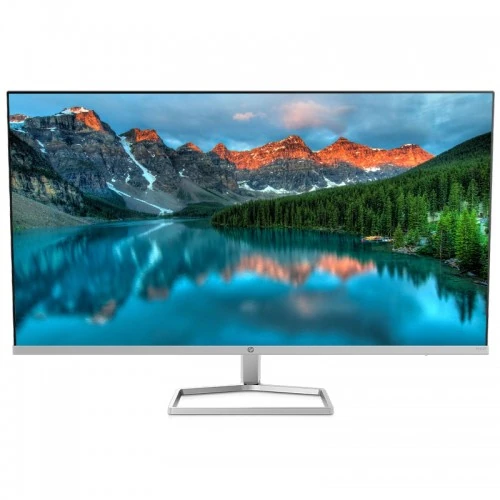
HP · M32f 31.5-inch FHD VA FreeSync
31.5-inch Full HD VA monitor with 75Hz refresh, AMD FreeSync, anti-glare display and dual HDMI inputs.
Price unavailable
Price range updating
No verified price is available yet. Store offers will appear when merchants publish them.
Compare store prices
No live offers for this variant
Offers will appear when merchants publish them.
Loading history…
Product story
The HP M32f FHD Monitor is a 31.5-inch VA display with native 1920 × 1080 resolution. HP lists 75Hz refresh, 300 nits brightness, 3000:1 contrast and 7ms gray-to-gray response with overdrive. It supports AMD FreeSync and low-blue-light mode, with an anti-glare surface and security lock-ready design. The model has two HDMI 1.4 ports and one VGA input. Its stand provides tilt only; HP lists no height adjustment and no VESA mounting compatibility. Verify the exact product number because similar HP M-series monitors differ.
The monitor has a 31.5-inch diagonal screen with 1920 × 1080 Full HD resolution in a 16:9 format. HP lists a 0.364mm pixel pitch. At this large screen size, text and fine detail are less dense than on a 27-inch QHD or 4K monitor. FHD can be useful for basic documents, dashboards, video and larger on-screen controls. Set the native resolution and adjust application scaling or viewing distance for readability. Consider the intended use before selecting Full HD at 31.5 inches.
HP specifies a VA LCD panel with 3000:1 contrast and 178-degree viewing angles in the M32f materials. VA contrast can make dark scenes look deeper than typical IPS displays, while the viewing angle figure describes a specified visibility range rather than perfect color uniformity. Contrast perception changes with room light, brightness and individual panel behavior. The flat, anti-glare screen is suited to a straightforward desk layout. HP lists 300 nits brightness and 99% sRGB in the M-series overview; exact regional documentation should guide color claims.
HP lists a 75Hz maximum refresh rate for the M32f. This is above the conventional 60Hz office mode and can make cursor movement and scrolling somewhat smoother on a compatible computer. It remains an everyday productivity display rather than a high-refresh gaming monitor. Choose 1920 × 1080 at 75Hz in system settings if supported by the connection. If only 60Hz is available, check the graphics output, cable, driver and selected input. A 75Hz limit does not guarantee a game will render at 75 frames per second.
HP specifies 7ms GtG response with overdrive. Gray-to-gray response describes pixel transition time under test conditions, not input lag or the time every transition always takes. Overdrive can improve some transitions but may create artifacts. The M32f is designed for general desktop use and casual gaming rather than competitive fast motion. Use standard image settings and evaluate any motion enhancement with the content you use. A response-time number alone does not predict the full motion experience.
HP lists AMD FreeSync support. With compatible graphics hardware and connection, variable refresh can synchronize display updates with frame output and reduce tearing within supported conditions. Enable FreeSync in the monitor and graphics settings, then check the range supported by the exact system. FreeSync does not add rendering performance. If flicker or image instability appears, compare another cable, refresh mode or driver and test with the feature switched off. The product page does not list NVIDIA G-Sync certification.
HP lists 300 nits brightness and 3000:1 static contrast. Some retailer data may display dynamic contrast separately; dynamic processing does not replace the native contrast specification. Typical brightness can vary by mode and unit. Adjust brightness to the room and preserve shadow and highlight details. A large screen in a dim room may need a lower setting. Avoid using dynamic contrast claims to imply HDR capability; HP’s M32f specifications do not list HDR certification.
HP lists 99% sRGB for the M-series product family and 8-bit color in its overview. The surface is anti-glare, which can reduce reflections from ambient light. Gamut coverage is not a calibration accuracy rating, so color-critical image or print work should use a calibrated display and color-managed applications. HP’s M-series materials describe color presets such as warm, neutral, cool and night. Choose a neutral profile for general work and avoid oversaturation if colors look unnatural.
The M32f provides two HDMI 1.4 inputs and one VGA input. HP QuickSpecs documents these connections for the M32f. HDMI carries digital video from modern computers and media devices; VGA supports older analog equipment. Select the correct input in the on-screen menu. Native 1920 × 1080 resolution is supported, with up to 75Hz depending on source and cable. No DisplayPort or USB-C input is listed for this model, so verify any adapter requirements in advance.
HP lists on-screen controls for brightness, information, management, power, input, menu, image and color. These options allow basic picture adjustment without computer software. Use the physical controls to choose the active HDMI or VGA source and set brightness and color presets. If the picture is missing, check the cable and source selection. The monitor is not a smart display or computer; a PC, laptop or external device must provide the video signal.
The included stand supports tilt adjustment, approximately -5 to +25 degrees in HP’s M-series datasheet. HP lists no height adjustment for the M32f. Set desk and chair height so the fixed screen position is comfortable, then tilt to manage reflections. The stand is not a pivot or height-adjustable ergonomic arm. The 31.5-inch panel is large, so check desk depth and monitor distance before setup. Do not force the hinge beyond its supported travel.
HP support lists the M32f as not VESA mount compatible. Do not assume that a generic 75 × 75mm or 100 × 100mm bracket will attach safely. The product is security lock-ready, with compatible lock sold separately. Plan to use the included stand on a stable surface and check the exact package before purchase. Leave enough room behind the display for its stand and cables, and secure the power and video leads so they cannot pull the screen.
HP lists dimensions with stand around 71.03 × 21.66 × 49.48cm and without stand 71.03 × 4.02 × 41.46cm. Weight is approximately 5.1kg with stand. These figures make the M32f a broad desktop display that needs substantial desk width and viewing distance. Measure the available space, cable bend radius and clearance to walls or shelves. Since the stand is tilt-only, also check the fixed height against the user’s eye line before installation.
HP’s product specifications list external power input rated at 100–240V AC, 50/60Hz. Regional data and test conditions can report different typical and maximum consumption; check the exact HP product number rather than relying on a generic M-series figure. Use the supplied adapter and cable, keep ventilation open and use a grounded outlet. Disconnect power before cleaning or moving the monitor. Energy consumption varies with brightness, input and operating conditions.
HP lists a low-blue-light mode and anti-glare screen for the M32f. These are display features and not medical claims. Comfort also depends on brightness, room lighting, viewing distance, font size and breaks. Because the stand does not adjust height, position the desk or chair to avoid neck strain. The large panel can be viewed from farther away; use scaling if small text is difficult to read. Choose the mode that feels comfortable without assuming it will suit every task.
The large 31.5-inch screen can make spreadsheets, web pages and video easier to view from a distance. Full HD resolution provides a large interface but less fine detail than QHD at this size. The VA panel’s 3000:1 contrast and FreeSync support add options for casual media and gaming. The monitor has no listed integrated speakers, so plan external audio. HDMI and VGA cover common sources, but USB-C and DisplayPort are not listed. Consider these connections when planning a laptop workstation.
The M32f offers a large VA panel, 75Hz refresh, 3000:1 contrast, AMD FreeSync and anti-glare treatment. Its trade-offs include Full HD pixel density on a 31.5-inch screen, 7ms GtG response, a tilt-only stand and no VESA compatibility. HP lists two HDMI 1.4 ports and VGA but no DisplayPort or USB-C. These details suit basic desktop use but may not meet buyers seeking high-resolution productivity, mounting flexibility or competitive gaming performance.
HP’s support specification covers product number 2H5M7AA series examples; it does not establish a Bangladesh warranty for a particular serial. The existing listing states three years, which should be verified with the seller. Ask for the exact product number, serial coverage, warranty start, authorized service location and eligible panel defects. Check that the product is M32f rather than M32fw or another HP 32-inch monitor. Confirm current price, stock, delivery and return terms at checkout and keep the invoice.
Connect the supplied power adapter and choose HDMI or VGA. Set native 1920 × 1080 and select 75Hz if the system and cable support it. If no picture appears, check the active input, cable, graphics output and display settings. Enable AMD FreeSync where supported if tearing occurs. Adjust brightness, color and input using the on-screen controls. Position the stand on a stable surface and tilt within its range. Use external speakers if audio is required; integrated speakers are not listed.
The HP M32f can suit users who want a large, simple Full HD display for office documents, dashboards, video and casual gaming with FreeSync. It is less suited to fine-detail work at close range, fast competitive gaming, a VESA arm or USB-C laptop docking. Check that 31.5-inch FHD meets the intended text clarity and desk distance. Confirm the exact HP product number, supplied adapter and local warranty before purchase.
HP M32f FHD Monitor: 31.5-inch VA LCD, 1920 × 1080, 16:9, 75Hz, 7ms GtG with overdrive, 300 nits brightness, 3000:1 contrast, 0.364mm pixel pitch, FreeSync, low-blue-light mode and anti-glare surface. Inputs: 2 × HDMI 1.4 and 1 × VGA. Stand tilt only, approximately -5° to +25°; no height adjustment or VESA compatibility. 5.1kg with stand; dimensions about 71.03 × 21.66 × 49.48cm. Verify regional SKU and warranty.
Helpful answers
Product-specific answers maintained with the catalog information.
The HP M32f has native Full HD 1920 × 1080 resolution.
It uses a 31.5-inch VA LCD panel.
HP lists a maximum refresh rate of 75Hz.
Yes. AMD FreeSync is listed in HP specifications.
Two HDMI 1.4 inputs and one VGA input are listed.
HP lists the M32f as not VESA mount compatible.
No. HP lists a tilt-only stand without height adjustment.
Integrated speakers are not listed.
Confirm exact serial coverage and local service with the seller.
Customer community
Become a merchant
Join BiponiBD, publish accurate offers and start free.