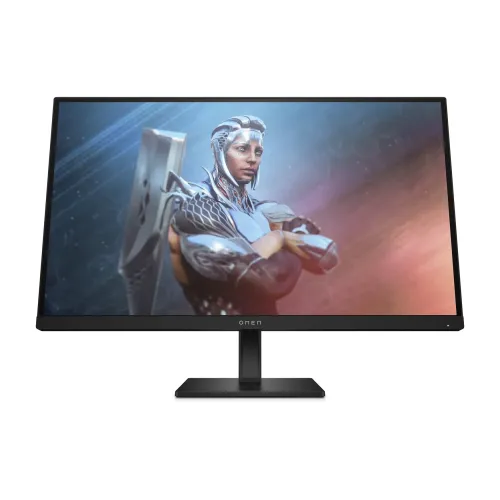
The HP OMEN 27 is a 27-inch Full HD gaming monitor with an IPS panel and a maximum 165Hz refresh rate. HP’s product specifications list 1ms gray-to-gray response with overdrive, AMD FreeSync Premium, VESA Adaptive-Sync, HDR support, a typical brightness of at least 400 nits and broad stated color coverage. The stand adjusts in height, tilt and pivot, and the input panel includes DisplayPort 1.4, two HDMI 2.0 ports and a 3.5mm audio output. This is the FHD OMEN 27, product number 780G0AA as listed by Bangladesh retailers; it should not be confused with the QHD OMEN 27q or other OMEN models.
Screen size and Full HD resolution
The 27-inch diagonal screen displays 1920 × 1080 pixels in a 16:9 layout. HP lists a 0.3108mm pixel pitch and approximately 82 pixels per inch. Full HD can help a gaming PC reach higher frame rates than a more demanding resolution, but fine text and interface details are less dense than on a 27-inch QHD display. Consider your viewing distance, operating-system scaling and whether you prioritize frame rate or workspace detail. At the same screen size, the OMEN 27q has a different QHD resolution and must be treated as a separate product.
Refresh rate and compatible output
HP specifies a maximum refresh rate of 165Hz. A high-refresh setting can make compatible motion look smoother when a computer or console outputs enough frames. Actual available modes depend on the source GPU, connector, cable, game and operating-system display setting. Connect via a supported DisplayPort or HDMI path, then select the desired refresh rate. A monitor’s maximum rate does not cause the computer to render at that frame rate automatically; performance depends on the system and software.
Response time and motion
HP lists 1ms GtG with overdrive as a typical response specification. Gray-to-gray describes pixel transition time under a defined test method; it is distinct from total input lag and does not promise that every transition has identical behavior. Overdrive can affect overshoot or ghosting depending on the selected level and refresh rate. Use the on-screen controls to compare modes with real content and select the setting that looks best to you.
IPS viewing and color coverage
The flat IPS panel provides listed viewing angles of 178° horizontally and vertically. HP specifies a true 8-bit panel with up to 16.7 million colors and gamut coverage of 99% sRGB and 95% DCI-P3. These are coverage figures rather than a color-accuracy certificate. Factory variation, color mode and application color management affect what you see. For professional grading or print matching, use a calibrated workflow and confirm that the display’s modes meet the project’s color requirements.
Brightness, contrast and HDR
HP lists typical brightness of at least 400 nits and a static contrast ratio of 1000:1. HP also lists HDR support for this OMEN 27. HDR playback depends on the source, operating system, content and monitor setting; HP’s general product page does not establish a specific VESA DisplayHDR certification or guarantee identical HDR performance across units. Compare the stated capabilities with the exact HDR standard you need, rather than relying on the word HDR alone.
FreeSync Premium and Adaptive-Sync
The product specification lists AMD FreeSync Premium and VESA Adaptive-Sync. Variable refresh can coordinate monitor refresh with compatible graphics output to reduce tearing under supported conditions. Enable the relevant setting on the monitor and in the graphics driver, and check the computer’s compatibility. Adaptive sync does not raise rendering performance by itself and its operating range or behavior depends on the source, driver, connection and display mode.
Inputs and connection planning
The input list includes one DisplayPort 1.4, two HDMI 2.0 and one 3.5mm audio output. HDMI and DisplayPort support HDCP according to HP. These inputs can connect a PC and additional devices, but the supported maximum resolution and refresh rate should be checked for each source and cable. The monitor does not provide a USB hub in the listed port set. Choose the input based on the source’s capabilities and use the on-screen input menu to switch between connected devices.
Stand adjustment and VESA mount
HP lists up to 100mm of height adjustment, tilt from -5° to +20° and pivot through ±90°. The VESA mounting pattern is 100 × 100mm, with the bracket listed as included. These options can help align the monitor with a seated viewing position or rotate it to portrait. Before attaching a separate arm, confirm its weight rating and compatible hardware. Support the screen while adjusting or installing it and leave enough cable slack for the full range of movement.
Audio and speakers
HP lists a 3.5mm audio output but no integrated speakers for this model. Audio can be routed to headphones or another compatible audio device; alternatively, connect speakers directly to the computer. A video signal carrying audio does not mean the monitor has speakers. Check the source device’s audio output and operating-system playback selection if sound does not reach the connected headphones. External speakers and other audio equipment are separate accessories unless explicitly included by the seller.
Eye-comfort and screen surface
HP lists HP Eye Ease with Eyesafe certification and an anti-glare surface. These features are intended to support comfortable viewing by reducing reflections and managing blue-light output while preserving color, according to HP. They are not medical claims and do not guarantee that every user avoids eye fatigue. Set the screen at a comfortable distance and height, reduce reflections, use appropriate room lighting and take breaks during long gaming or work sessions.
Dimensions, weight and power
HP lists dimensions with stand of 24.16 × 8.79 × 20.62 inches (about 614.0 × 223.3 × 523.7mm, W × D × H) and weight of 8.08kg with stand or 6.04kg without stand. The official support specification lists 100–240VAC at 50/60Hz. Retailer specifications report 25W typical and up to 52W maximum, which should be confirmed against the regional rating label. Measure desk space and verify the electrical label on the exact imported unit before installation.
Box contents and setup
HP’s general product page identifies the display, stand and included VESA bracket, but the local package can vary. Ask the seller to confirm the exact included power cable, HDMI/DisplayPort cable and any documentation before ordering. Assemble the stand on a stable surface, connect power and the chosen video input, then select the input and refresh mode. To use headphones, connect them to the audio output and set the correct playback device on the PC or console. Keep the serial label and invoice for support.
Who this OMEN 27 may suit
This monitor may suit PC gamers who want 165Hz Full HD, IPS viewing angles, variable refresh, several video inputs and an adjustable stand. Its 27-inch panel provides a larger physical screen while remaining at a resolution many gaming systems can drive at high frame rates. It may not suit users who want denser QHD detail, integrated speakers, USB-C laptop docking or a USB hub. If resolution and text sharpness matter more than frame rate, compare the distinct OMEN 27q before choosing.
Bangladesh price and warranty checks
During this research, Skyland displayed ৳29,200 and Ultra Technology displayed ৳28,500, both with in-stock claims. Retailer prices, stock and delivery can change; these observations do not establish a BiponiBD offer. Local pages advertise three-year warranty coverage, but the exact service provider and serial eligibility were not verified. Request written confirmation of the local importer, serial support, warranty start date, dead-pixel policy, claim location and exchange terms before purchase.
Care and model identification
Confirm the rear label and box show product number 780G0AA before purchase. Similar OMEN names include different sizes and QHD/FHD resolutions, ports and stands. Keep the invoice, serial and packaging. Switch off and disconnect the monitor before cleaning, use a soft cloth and do not apply liquid directly to the screen. For drivers, firmware and troubleshooting, use HP support for OMEN 27 and verify that any downloadable document applies to the exact product number.
Key features
- 27-inch flat IPS panel with Full HD 1920 × 1080 resolution and 16:9 aspect ratio.
- 165Hz maximum refresh rate for compatible Full HD sources.
- HP lists typical 1ms GtG response with overdrive; this is not total system input latency.
- At least 400 nits typical brightness and 1000:1 static contrast ratio per HP.
- True 8-bit panel with up to 16.7 million colors, 99% sRGB and 95% DCI-P3 listed by HP.
- AMD FreeSync Premium and VESA Adaptive-Sync support for compatible systems.
- HDR support is listed by HP; check the specific HDR mode and HDR certification requirements before purchase.
- One DisplayPort 1.4, two HDMI 2.0 inputs and one 3.5mm audio output.
- 100mm height adjustment, -5°/+20° tilt and ±90° pivot.
- 100 × 100mm VESA mounting bracket is included according to HP.
- HP Eye Ease low-blue-light feature and anti-glare surface for a more comfortable desk setup.
- No integrated speakers; connect headphones or external audio to the PC or monitor audio output.
Pros and considerations
Pros
- 165Hz Full HD and FreeSync Premium provide a high-refresh option for compatible gaming systems.
- A 27-inch IPS panel offers wide 178° viewing angles and HP-listed 99% sRGB/95% DCI-P3 gamut coverage.
- The stand combines 100mm height adjustment, tilt and pivot for more ergonomic positioning.
- DisplayPort 1.4, dual HDMI 2.0 and a headphone output support several common desktop or console connections.
- HP lists HDR support and a typical brightness of at least 400 nits, in addition to low-blue-light and anti-glare features.
Cons and limitations
- Full HD across 27 inches gives about 82 PPI, with less text and detail density than a 27-inch QHD panel.
- The 1ms figure is GtG with overdrive; performance can vary by setting and transition and is not an input-lag guarantee.
- No built-in speakers are listed, so audio needs headphones or external speakers.
- Retailer-observed local warranty and current stock must be checked for the unit’s serial and importer.
- Color gamut coverage does not itself guarantee factory calibration, uniformity or professional color accuracy.
Frequently asked questions
What is the model number?
HP identifies this product family as OMEN 27; Bangladesh retailer pages list product number 780G0AA. Confirm that number on the box and rear label because similarly named OMEN 27 models may have different resolutions and features.
What are the resolution and refresh rate?
HP specifies native Full HD 1920 × 1080 resolution and a maximum refresh rate of 165Hz. The source computer, graphics output, cable and selected mode must support that combination.
What does 1ms GtG with overdrive mean?
It is HP’s typical gray-to-gray pixel response specification using overdrive. It is not total input latency, and actual transition behavior can differ by mode, panel sample and content.
Does the monitor support FreeSync?
HP lists AMD FreeSync Premium and VESA Adaptive-Sync. A compatible graphics card, connection, driver and settings are needed to use variable refresh.
What are the ports?
HP lists one DisplayPort 1.4, two HDMI 2.0 inputs and one 3.5mm audio output. HDCP is supported over DisplayPort and HDMI.
Does it have built-in speakers?
No built-in speakers are listed for the OMEN 27. Use PC speakers or connect headphones or external audio using a compatible output.
Is the panel HDR?
HP lists HDR support for this OMEN 27. That statement does not on its own identify a DisplayHDR certification or guarantee a particular peak brightness in HDR mode. Confirm HDR mode/certification needs before buying.
How adjustable is the stand?
HP lists height adjustment up to 100mm, tilt from -5° to +20° and pivot from -90° to +90°. The VESA 100 × 100mm bracket is listed as included.
What color coverage is specified?
HP lists 99% sRGB and 95% DCI-P3, with a true 8-bit panel and up to 16.7 million colors. Gamut coverage is not a factory calibration or color-accuracy report.
What is the brightness?
HP lists typical brightness of at least 400 nits and static contrast of 1000:1. Perceived brightness and HDR behavior depend on settings, content and room light.
What warranty applies in Bangladesh?
Local retailer pages advertise three years, but the actual provider and eligibility depend on the imported unit and its serial. Get the coverage, service center, claim conditions and pixel policy in writing from the seller.
What are current local prices?
Skyland listed ৳29,200 and Ultra Technology listed ৳28,500 during research. Stock and prices can change; these listings do not confirm BiponiBD inventory, price or delivery terms.
Source note: Technical specifications use HP’s OMEN 27 165Hz official product page/support specification. Product number 780G0AA and local price/warranty are retailer observations checked 2026-11-08T21:36:55.979Z; they do not verify the serial, BiponiBD stock or a particular unit’s warranty. No independent hands-on test is claimed.