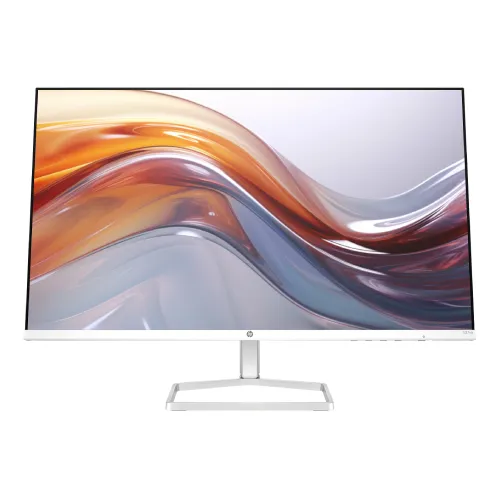
The HP Series 5 527sa is a 27-inch Full HD IPS monitor with a 100Hz refresh rate and integrated dual 2W speakers. HP Bangladesh identifies 99% sRGB, 300-nit brightness, 1500:1 contrast, HP Eye Ease with Eyesafe certification, a tilt-adjust stand, two HDMI 1.4 inputs and one VGA input. It is aimed at everyday work, study, streaming and home entertainment. The 527sa is distinct from the closely named 527sh and 527sw models. It includes speakers and uses its own regional part number, including 94F49AA on the Bangladesh HP page. This listing uses HP’s exact 527sa information; measurements and warranty details from a different Series 5 SKU should not be assumed identical.
Display resolution and workspace
The 27-inch panel has native 1920 × 1080 resolution and a 16:9 aspect ratio. HP lists a 0.31mm pixel pitch and Full HD support, making it compatible with common desktop and laptop output modes. The 100Hz refresh can make pointer movement, scrolling and supported video/game motion appear smoother than on a 60Hz display.
Full HD at 27 inches offers a large physical image but fewer pixels per inch than QHD at the same size. If you work with small text, detailed image editing or several dense windows, compare the pixel density with a 1440p monitor. Use native resolution and choose scaling/font sizes that fit your viewing distance. A computer must support the selected 100Hz mode for the refresh benefit to be available.
IPS panel, color and contrast
HP states IPS technology, 99% sRGB gamut, 300 nits typical brightness and 1500:1 static contrast. The viewing angle is 178 degrees horizontally and vertically. IPS helps maintain a more consistent picture when viewed off-axis, which can be useful when sharing a screen or shifting position at a desk.
The 99% sRGB figure describes the stated color gamut, not an individual unit’s measured accuracy or factory calibration. It does not establish Delta E, white point or uniformity. For design or print work, use a calibrated and color-managed workflow. Ambient light and screen brightness also affect perceived color and contrast, so position the display to limit reflections and tune brightness for the room.
100Hz refresh and source compatibility
HP lists vertical scan from 48Hz to 100Hz. A 100Hz display can update more often than a standard 60Hz display when the source sends a compatible signal. The actual refresh mode depends on the graphics output, resolution, cable, operating-system settings and source device. Check the advanced display settings after connecting.
A higher refresh ceiling does not mean every video or game renders at 100 frames per second. Performance depends on the computer and content. If the 100Hz option is missing, check the selected input, cable, graphics driver and output timing. HP’s product details do not list a variable-refresh range for the 527sa, so do not assume Adaptive-Sync from the refresh-rate specification alone.
Response time and motion
HP specifies 5ms GtG typical with overdrive. Gray-to-gray describes pixel transition behavior under the manufacturer’s conditions. It is not total input latency from a mouse or controller action, and it does not mean every transition takes exactly five milliseconds. Motion clarity also depends on frame pacing, refresh rate, content and display settings.
The 527sa is a general-purpose 100Hz monitor with built-in sound, not a high-refresh esports display. If gaming is a priority, consider the PC’s frame rate and compare monitors that publish a higher refresh ceiling and explicit sync support. Avoid interpreting response time as proof that motion artifacts cannot occur. Use the on-screen controls and choose settings that look comfortable for your content.
Built-in speakers and connections
The HP Bangladesh page identifies integrated dual 2W speakers. The model provides two HDMI 1.4 inputs and one VGA input, letting a user keep more than one digital device and a legacy source connected. HP lists no integrated camera in the regional product sheet. The built-in speakers provide basic playback without requiring a separate speaker pair.
Speaker power is suitable for basic desktop sound but does not imply subwoofer bass or room-filling volume. For louder audio, connect external speakers through a supported source or audio output. Some retailers list audio jack details that are not prominent in HP’s Bangladesh feature summary; check the exact unit’s ports before purchasing accessories. Select the active HDMI or VGA source through the monitor menu.
Stand, design and placement
HP describes a tilt-adjust stand, three-sided thin bezel and integrated cable containment. The related 94F48AA product sheet lists dimensions of 607.9 × 188.2 × 437.3mm with stand and 607.9 × 34.2 × 356mm without; its listed weight with stand is 3.28kg. Because regional SKUs can vary, confirm exact measurements for the 94F49AA carton.
HP’s consulted product sheet lists tilt but does not specify height, swivel or pivot movement. Do not infer the height-adjust stand from the 527sh. If you require a VESA arm or portrait rotation, verify the exact 94F49AA mounting pattern and manual before purchase. Measure the desk and viewing distance, allow space for the stand and cables, and place the monitor on a stable surface.
Eye comfort and software
HP lists Eye Ease with Eyesafe certification and says its design reduces blue-light output while preserving color presentation. The 94F48AA regional datasheet also lists TÜV Flicker Free certification, HP Display Center and the Ergonomic Setup Guide. HP states the guide requires a supported Windows host; display software availability depends on the computer and operating system.
Comfort features are one part of a good setup. Use suitable text size, room lighting, viewing distance and regular breaks. A low-blue-light mode may change how the image looks; review picture settings if accurate color is important. Chromebook certification is listed for supported devices, but check the Chromebook’s output mode and connection type before relying on 100Hz.
Power, sustainability and package
HP’s 94F48AA datasheet specifies AC 100–240V at 50/60Hz, 23W typical, 31W maximum and 0.5W standby. It also lists sustainability materials including 85% post-consumer recycled plastic and 5% ocean-bound plastic. The sheet lists an HDMI cable, power adapter, AC power cord and document kit, while noting that included cables can vary by country.
These power and materials figures come from a regional SKU sheet and may not describe every 94F49AA shipment exactly. Actual energy use depends on brightness, active input, operating hours and standby behavior. Keep ventilation clear, use the supplied power adapter and retain the box and invoice. Ask the seller to confirm the exact power supply, cables, speakers, stand and documentation included in the sealed unit.
Bangladesh price, warranty and model check
Rose Tech listed SKU 94F49AA at ৳27,500 and In Stock with three-year warranty advertised. Dream Electronics listed ৳26,800. These are dated seller observations and can change. They do not verify a BiponiBD offer, current stock or final delivery price. Confirm that the carton says 527sa and the local part number matches the invoice.
The Bangladesh HP product page identifies 94F49AA; a separate HP datasheet for 94F48AA lists a one-year standard warranty. These are different regional part numbers, so the 94F48AA warranty should not be substituted for the local 94F49AA claim. Ask the seller to confirm the serial’s authorized service provider, duration, claim location, invoice requirement, dead-pixel policy and local eligibility in writing.
Who this monitor may suit
The 527sa may suit a home office, study desk or shared family PC where a 27-inch IPS image, 100Hz refresh and integrated speakers are useful. VGA can help with older computers, while dual HDMI supports modern digital sources. Eye Ease, Chromebook certification and HP display software add setup options for supported devices.
Consider a QHD display if detail and workspace matter more than Full HD compatibility; a height-adjustable monitor if you need vertical ergonomics; or a dedicated gaming monitor if you need high refresh and adaptive sync. The 527sa’s built-in speakers are convenient but should not be mistaken for a full audio system. Verify regional SKU and warranty before ordering.
Key features
- 27-inch Full HD IPS panel with 1920 × 1080 resolution, 16:9 aspect ratio and 100Hz refresh.
- Integrated dual 2W speakers provide basic audio without a separate speaker set.
- HP lists 99% sRGB gamut, 300 nits brightness and 1500:1 static contrast.
- 5ms GtG response with overdrive; not a measurement of full system input latency.
- Two HDMI 1.4 inputs plus one VGA input for digital and legacy sources.
- Tilt-adjust stand and HP Display Center Ergonomic Setup Guide on supported Windows hosts.
- HP Eye Ease with Eyesafe certification; TÜV Flicker Free appears in the related regional datasheet.
- Three-sided thin-bezel design, cable containment and Works With Chromebook certification.
- No integrated camera listed by HP.
- HP regional sheet states typical 23W, maximum 31W and 0.5W standby for the 94F48AA configuration.
Frequently asked questions
What is the HP 527sa resolution and refresh rate?
HP specifies a 27-inch IPS monitor with native 1920 × 1080 Full HD resolution and refresh up to 100Hz. The PC, cable and output mode must support the selected timing.
Does this monitor have speakers?
Yes. HP Bangladesh identifies integrated dual 2W speakers. They provide basic audio for media and meetings; external speakers may still be preferable for louder or richer sound.
What ports does the 527sa have?
HP Bangladesh lists two HDMI 1.4 ports and one VGA input. Some local listings also describe audio/headphone connections; verify the exact regional unit’s port labels before relying on them.
Does the HP 527sa include a webcam?
HP identifies no integrated camera in the regional product sheet. Use a separate webcam if video meetings require one.
Is the screen IPS and what is the color gamut?
HP specifies IPS and 99% sRGB, with 178° viewing angles. The gamut figure is not a factory calibration report or measured Delta E result.
What does 5ms GtG with overdrive mean?
It is HP’s typical gray-to-gray pixel transition rating with overdrive enabled. It is not total input latency and does not mean every transition has identical response.
Can I adjust the stand?
HP describes a tilt-adjust stand. The consulted HP Bangladesh details do not confirm height adjustment, swivel or pivot range; verify exact stand movement before purchase.
Does it work with Chromebooks?
HP lists Works With Chromebook certification for supported Chrome OS devices. Verify compatibility with the specific Chromebook and required output cable.
What is the price in Bangladesh?
Rose Tech listed ৳27,500/In Stock for SKU 94F49AA; Dream Electronics listed ৳26,800 in a price list. These seller snapshots can change and are not a BiponiBD offer.
What warranty does the 94F49AA have?
Rose Tech advertises three years for SKU 94F49AA. Confirm the exact serial’s warranty provider, duration, service location, invoice requirements and claim policy in writing.
What is included in the package?
HP’s 94F48AA regional sheet lists an HDMI cable, power adapter, AC cord and document kit, but it notes that cables can vary by country. Confirm the box contents for 94F49AA with the seller.
What is the difference between HP 527sa and 527sh?
The 527sa includes dual 2W speakers and a white finish in HP’s product materials, while 527sh is a different Series 5 variant with a height-adjust stand and its own regional configuration. Do not transfer specs between the model numbers.
Source note: HP Bangladesh model page and regional HP datasheet support specifications; the datasheet is for SKU 94F48AA, while Bangladesh HP lists 94F49AA. Local price and warranty are seller snapshots checked 2026-11-08T21:16:15.867Z. Confirm exact SKU and serial. No hands-on testing is claimed.