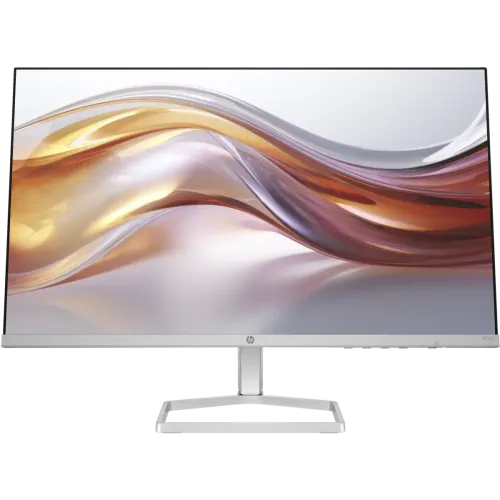
HP Series 5 524sf 23.8-inch Full HD IPS monitor
The HP Series 5 524sf is a 23.8-inch Full HD IPS monitor with a 100Hz maximum refresh rate, 99% sRGB coverage and HP Eye Ease features. HP specifies 1920 × 1080 resolution, 300 nits typical brightness, 1500:1 static contrast, 5ms GtG response time with overdrive, one HDMI 1.4 input and one VGA input. The stand tilts for basic angle adjustment. HP does not list a height-adjustable stand, VESA mount or built-in speakers for this model.
HP India identifies product number 94C18AA for the 524sf configuration. Regional suffixes, accessories and warranty coverage can vary, so verify the product code printed on the Bangladesh unit and carton. HP’s product page and support specification are the primary references for this copy; local retailer price, stock and warranty terms are independent seller listings.
23.8-inch IPS Full HD screen
The monitor has a 23.8-inch IPS LCD panel with a native resolution of 1920 × 1080 pixels and a 16:9 aspect ratio. HP lists a 0.28mm pixel pitch. Full HD resolution is widely supported by laptops and desktop computers and provides a familiar workspace for documents, browsing, study, video meetings and general entertainment. Its anti-glare surface helps manage reflections in normal indoor conditions but does not remove direct light or all glare.
HP specifies 300 nits typical brightness and a 1500:1 static contrast ratio. The 99% sRGB gamut claim is listed on HP’s India page for product number 94C18AA. Coverage figures describe a colour space and do not guarantee calibration accuracy, panel uniformity or professional reference performance. If you use the monitor for colour-critical photo, video or print work, calibrate it and validate the exact regional unit with suitable measurement equipment.
100Hz refresh rate and supported modes
HP lists a maximum refresh rate of 100Hz and a 48–100Hz vertical scan range. At a compatible output, the higher refresh can make pointer movement, scrolling and supported games look smoother than a 60Hz display. The monitor cannot increase the number of frames rendered by the computer. Your graphics output, connection, cable and selected resolution must all support the desired timing.
Connect through HDMI or VGA and check the available 1920 × 1080 refresh modes in the operating system’s display settings. VGA, adapters and older computers can have different limits. If 100Hz is unavailable, confirm the input and cable, update graphics drivers and check that the source device can deliver the mode. This is an everyday productivity monitor rather than a high-refresh esports model.
5ms response time and motion
HP specifies 5ms GtG with overdrive. The value describes typical response behaviour under a defined setting; it does not mean every transition completes at the same speed or that motion will always be free of blur or ghosting. Frame rate, display mode, the image transition and overdrive setting affect perceived clarity.
The 524sf can handle casual gaming and general video, but shoppers prioritizing fast competitive games may prefer a monitor with a higher refresh rate and clearly documented adaptive-sync support. Do not infer a feature such as FreeSync from the refresh-rate figure alone; verify the exact model specification for any variable-refresh requirement.
HP Eye Ease and everyday comfort
HP lists HP Eye Ease and Eyesafe certification for the applicable product configuration. These display features can reduce selected blue-light output while maintaining the intended colour experience, according to HP. They cannot guarantee that extended use will not cause eye fatigue. Choose brightness for the room, use readable text size, position the display comfortably and take regular breaks.
The monitor also has an anti-glare surface and on-screen controls for image, colour, input, brightness and power settings. Use these controls to adapt the display to your workspace. A comfort certification should not be treated as medical advice or a substitute for sensible viewing habits.
HDMI, VGA and audio connections
The HP 524sf provides one HDMI 1.4 input and one VGA input. HDMI is convenient for many current computers and media devices, while VGA may support older systems. HP does not list a DisplayPort input, USB hub or separate audio output. Check the physical ports and exact product suffix before purchasing if a particular connection is required.
HP does not list integrated speakers for the 524sf. Connect speakers or headphones to the computer or source device. An HDMI video connection does not create audio playback through a monitor that lacks speakers or an audio output. The listed HP package includes an HDMI cable, power adapter, AC cable and document kit, though cables may differ by country.
Stand, dimensions and placement
The supplied stand supports tilt adjustment. HP does not specify height adjustment, swivel, pivot or VESA mounting for this model. A riser can raise the screen if the fixed stand height does not fit your desk. Do not assume the monitor can be mounted on a standard arm unless the documentation and rear panel for the exact unit show a compatible mounting pattern.
HP lists dimensions of approximately 535.8 × 177.2 × 396.8mm with the stand and 535.8 × 34 × 315.6mm without it, measured width × depth × height. The monitor weighs about 2.5kg with stand. Check desk space and cable access before placing it in a compact workspace.
Power, materials and package contents
The 524sf uses an external power adapter with input rated 100–240VAC at 50/60Hz. HP specifies 16W typical power consumption, 20W maximum and 0.5W standby. Actual use varies with display settings and operating conditions. Use the adapter supplied with the exact monitor rather than choosing one based only on the connector shape.
HP product materials describe sustainability measures for this Series 5 monitor family, including recycled plastic and responsibly sourced or recyclable packaging. Exact figures can vary by product number and region. The box contents listed by HP include the monitor, HDMI cable, power adapter, AC power cord and document kit. Confirm the local box because HP notes that included cables may vary by country.
Who should consider the HP 524sf?
The 524sf may suit an office, study or home setup that needs a compact Full HD IPS screen, 100Hz refresh, HDMI and VGA connectivity, HP Eye Ease and a clean thin-bezel design. It is suitable for common work and media tasks where a simple tilt stand is adequate. Its familiar resolution is also easy for a broad range of computers to drive.
Consider a different monitor if you need built-in speakers, DisplayPort, USB connectivity, height adjustment, VESA mounting, adaptive sync or higher refresh for competitive gaming. If you frequently move the screen or share it across users, compare stands with more ergonomic adjustments. For colour-critical work, seek verified measurement results for the exact product number.
Bangladesh price, availability and warranty
Bangladesh seller pages checked during this review showed asking prices around ৳18,450–৳19,600, with stock and promotions varying. These are third-party retailer observations, not a live BiponiBD offer. Confirm the current price, delivery charge, return policy, exact model code and availability before paying.
Retailers advertise different warranty terms, often three years, but the responsible service provider and coverage can vary by seller and import batch. HP warranty eligibility depends on the regional product number and serial. Ask for written details covering the provider, serial eligibility, dead-pixel policy, parts/labour and service location. Keep the invoice, serial and warranty paperwork.
Frequently asked questions
Regional configuration note: HP’s 94C18AA product page lists 100Hz, 99% sRGB, HP Eye Ease, HDMI 1.4 and VGA. Confirm the carton code and local warranty terms for the Bangladesh unit. HP lists tilt adjustment only and no integrated speakers.