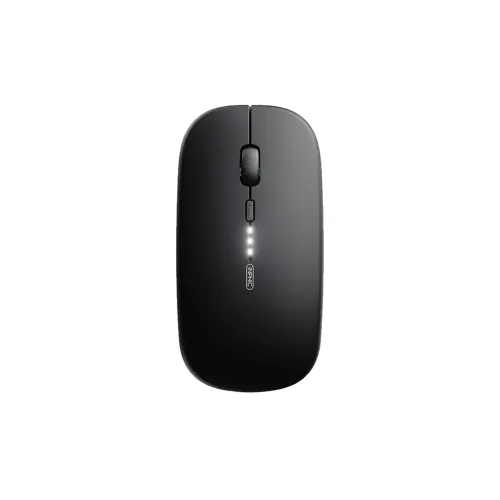
Inphic M1 Pro Dual-Mode Bluetooth & 2.4 GHz Wireless Mouse Product overview The Inphic M1 Pro is a rechargeable wireless mouse listed with two connection routes: a 2.4 GHz USB receiver and Bluetooth. Seller specifications distinguish Bluetooth 4.0 and Bluetooth 5.0, so the mouse can pair with supported devices without keeping the receiver plugged in. The product listing describes four buttons, quiet/silent-click switches rated for 3 million clicks, three DPI settings (800, 1,200 and 1,600), 10G acceleration and a 500 mAh battery. Actual feel and tracking depend on the device, surface and selected connection. Choose a connection and pair it For 2.4 GHz use, connect the supplied receiver to a compatible USB port and select the receiver mode using the mouse controls or instructions. For Bluetooth, select the version and pairing procedure supported by your computer, tablet or phone; put the mouse into pairing mode and select it in the device’s Bluetooth settings. The reviewed retailer pages describe Bluetooth 4.0/5.0 and Windows/macOS compatibility, but exact support can vary by host operating system and Bluetooth adapter. Confirm the device list in the manual. Package contents and receiver storage location were not independently verified. Pointer settings and buttons The three listed DPI levels are 800, 1,200 and 1,600; a higher setting moves the pointer farther for the same hand movement. Choose a level that suits your display and work style, and adjust operating-system pointer speed separately if needed. Star Tech lists four buttons and quiet-click switches with a 3-million-click rating. The available listing does not confirm programmable controls, onboard profiles or software support. A 10G acceleration specification is seller-listed and should not be treated as a promise of a particular gaming result. Polling-rate information on the reviewed product page is internally inconsistent, so no polling value is stated here. Battery and USB-C charging A 500 mAh rechargeable battery and USB-C charging are listed. Battery capacity does not establish how many hours or days the mouse runs; the reviewed sources do not provide a verified runtime or charging time. Use a compatible USB-C cable and power source, and follow the product manual. If the mouse stops responding, check its power/mode control, charge level, receiver connection or Bluetooth pairing, and test another USB port or device. Do not open the enclosure or expose it to liquids. Size, weight and colour options Star Tech lists dimensions of 112 × 58 × 27 mm and a weight of 71 g. Retailer pages show Black, Grey/Gray and Silver options; stock and selectable colours may differ by seller. This BiponiBD catalog entry currently has one generic variant and does not confirm which colour a particular store will supply. Confirm the colour and exact model name before ordering. Warranty and Bangladesh price reference Star Tech and Skyland list a one-year warranty. These are retailer statements and do not establish manufacturer-authorized cover for every unit sold through BiponiBD. Confirm the warranty card, seller, start date, exclusions and service/claim process in writing. On Nov 14, 2026, the reviewed in-stock Star Tech and Skyland pages each showed BDT 1,200. The catalog’s BDT 1,200 market reference is informational and is not a live BiponiBD Store offer; price, stock, shipping and warranty terms may change. Advantages and limitations Dual-mode receiver and Bluetooth connectivity gives a choice for compatible devices. The rechargeable 500 mAh battery, USB-C charging, three DPI settings, quiet-click switches and 71 g listed weight are useful comparison points for office and everyday use. The reviewed sources do not establish battery runtime, charge duration, software programmability or dependable polling rate. Colour options are seller-dependent, and the one-year warranty must be verified with the actual seller. Setup checklist • Confirm your device supports USB receiver use or the Bluetooth version required. • Charge the mouse through USB-C before extended wireless use if the manual advises it. • Pair the receiver or Bluetooth connection according to the supplied instructions. • Test each button, scroll wheel and all three listed DPI settings. • Confirm the colour in stock, included accessories, current price and written warranty terms. Troubleshooting If pairing fails, check the selected connection mode, reconnect the USB receiver or remove and re-pair the Bluetooth device. If pointer movement feels too fast or slow, cycle among 800/1,200/1,600 DPI and adjust host pointer speed. If charging appears inactive, test a known-good USB-C cable and compatible power source. Ask the seller for model-specific instructions if a fault persists. Evidence reviewed: Star Tech Inphic M1 Pro Dual Mode Wireless Mouse (https://www.startech.com.bd/inphic-m1-pro-wireless-mouse) and Skyland Computer BD Inphic M1 Pro Dual Mode Wireless Mouse (https://www.skyland.com.bd/inphic-m1-pro-wireless-mouse). Polling-rate values were omitted because the visible Star Tech/Skyland listing contains an inconsistent unit/value.