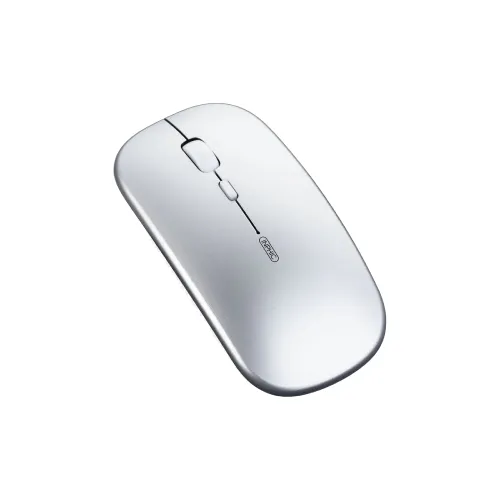
Inphic M1 Rechargeable Wireless Mouse: overview
The Inphic M1 is a compact wireless mouse for routine computer work, study, web browsing and home use. It combines a 2.4GHz wireless connection through a USB nano receiver with a rechargeable design that charges over USB Type-C. The manufacturer lists up to 10 metres of wireless range, four buttons, a 133Hz polling rate, up to 10G acceleration and switches rated for up to three million clicks. Retailer specification tables list five selectable sensitivity steps from 800 to 2400 DPI. The grey model measures 112 × 58 × 26mm and weighs about 68.8g, making it easy to carry with a laptop.
Wireless connection and receiver
The M1 communicates over 2.4GHz radio rather than through a cable attached to the mouse. Its listing identifies a USB nano receiver for connecting to a computer. Insert the receiver into a compatible USB port and keep it available while using the mouse; the receiver is part of the connection path, so the mouse does not work as a direct Bluetooth accessory. If your computer has no suitable port, check whether an adapter or hub is compatible before ordering. The 10m figure is the manufacturer’s stated maximum range under suitable conditions, not a guarantee that every room, desk layout or nearby wireless device will produce the same result.
Five DPI settings for pointer speed
The five reported sensitivity levels are 800, 1200, 1600, 2000 and 2400 DPI. DPI describes how far the pointer moves on screen relative to physical mouse movement; it is a sensitivity setting, not a measure of sensor accuracy or overall quality. A lower level can feel more controlled for small cursor movements, while a higher level can move across a large display with less hand travel. The best setting depends on display size, operating-system pointer settings, the surface and personal preference. The product materials list five levels, but do not provide an independent tracking-accuracy test.
Buttons, polling rate and movement
The mouse has four buttons. The published feature set also lists a 133Hz polling rate and up to 10G acceleration. Polling rate describes how often the mouse reports movement to the connected device; it should not be read as a promise of a particular game response time. The three-million-click rating is a stated switch-life specification, not a guarantee that every physical part will last for that period under every pattern of use. These figures suit an everyday buyer comparing office and general-purpose mice. People choosing equipment primarily for competitive gaming may prefer to compare models with higher polling specifications and the controls or software they specifically need.
USB Type-C charging
The M1 is described as rechargeable and lists USB Type-C as its charging interface. This means charging uses a Type-C connection rather than routine replacement of disposable batteries. The sources reviewed for this listing do not give a verified battery capacity, typical runtime, charging time or low-battery indicator behaviour, so those figures are not stated here. Check the delivered package for the included charging cable and follow the seller’s instructions for charging. USB Type-C describes the connector; it does not by itself establish a charging speed, power rating or battery endurance.
Size, weight and finish
The listed dimensions are 112mm long, 58mm wide and 26mm high, and the listed weight is approximately 68.8g. These measurements help compare the M1 with a mouse you already use and decide whether it will fit your hand, case or desk. Its relatively low profile and compact footprint may suit people who want to travel with a mouse or keep one beside a laptop. A compact shape will not fit every hand or grip style equally, so compare the measurements with your own preferences if palm support is important. Bangladesh retailer listings identify the finish as grey; confirm the delivered colour with the seller because stock and product photos can differ.
Everyday work, study and travel
The combination of wireless operation, selectable DPI, Type-C charging and a lightweight body can make the M1 useful for document work, browsing, online study and ordinary home-computer tasks. The nano receiver removes the mouse cable from the work surface while still requiring a receiver to be connected to the computer. Its dimensions are useful when planning a small laptop bag or limited desk space. These are practical uses inferred from the published connection and size specifications; they are not claims that the mouse was personally tested in each setting. The manufacturer describes the model for everyday use and lists Windows XP and later among applicable systems; verify the exact operating-system and port compatibility of your device with the seller before purchase.
What to expect from the stated specifications
Specification numbers are comparison points, not independent performance measurements. The 10m range is a maximum published distance; walls, placement, interference and the host port may affect real-world operation. The DPI values let you choose pointer sensitivity but do not establish the quality of the sensor. The 133Hz polling rate and 10G acceleration describe the listed operating profile; they do not replace testing with the applications and games you use. Likewise, a three-million-click rating is a manufacturer or retailer durability specification and does not cover the mouse body, battery, receiver or charging connector. Consider the whole feature set instead of treating a single number as a guarantee.
Compatibility and setup checks
Before buying, check that the intended computer can use the M1’s 2.4GHz nano-receiver connection and that a compatible USB port will remain available. If you rely on USB-C-only ports, ask whether your planned hub or adapter works with a wireless receiver. The model’s listed wireless method is 2.4GHz; the sources reviewed here do not describe multi-device Bluetooth pairing. The sources also do not document software customization, programmable macros or a companion control application. For an office or study setup, confirm your preferred DPI level, the grey finish, included accessories and the one-year warranty terms with the selected seller.
Warranty and purchase notes
Bangladesh listings from Star Tech and Monarch IT state a one-year warranty for the Inphic M1. Warranty provider, claim process and exclusions can depend on the seller and the actual unit, so check the warranty card or written seller terms and keep the purchase invoice. The product information reviewed here does not establish the battery capacity, runtime, charging duration, exact package contents or return conditions. Confirm those points if they matter to your purchase. The model identifier is M1; match that model and the described grey finish when comparing listings so you do not confuse it with a different Inphic mouse.
Key specifications
- Model: Inphic M1
- Wireless connection: 2.4GHz with USB nano receiver
- Manufacturer-listed wireless range: up to 10m
- Selectable DPI levels: 800, 1200, 1600, 2000 and 2400
- Buttons: 4
- Polling rate: 133Hz
- Acceleration: up to 10G
- Switch rating: up to 3 million clicks
- Charging interface: USB Type-C
- Dimensions: 112 × 58 × 26mm
- Weight: approximately 68.8g
- Finish: Grey, as listed by Bangladesh retailers
- Warranty: 1 year, as listed by Bangladesh retailers; confirm seller terms