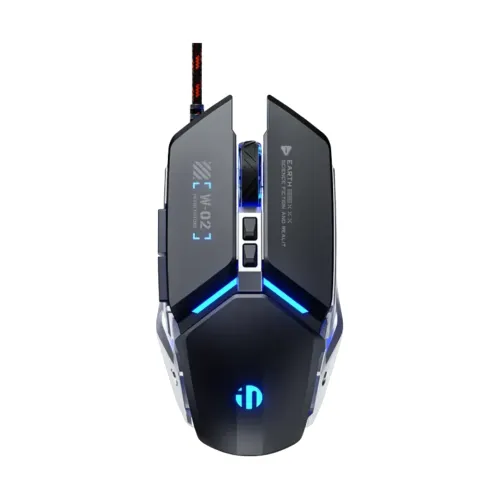
Inphic W2 II Wired Gaming Mouse Product overview The Inphic W2 II is a USB wired mouse intended for desktop gaming and everyday computer use. Star Tech and Skyland list a six-step DPI range of 1,000–12,800, polling up to 1,000 Hz, seven buttons, a 1.5 m cable and one-year seller warranty. Star Tech describes six of the seven buttons as customizable; compatible software and the exact button assignments were not independently tested. The wired connection avoids pairing and charging a mouse battery, while the cable length still limits where the mouse can be used. Connection and setup Connect the USB plug directly to a compatible computer port. The reviewed retailer listing describes driver support and Windows compatibility, but does not confirm every operating-system version or required software package. Check the seller page, product manual and driver source before installing software. Do not download drivers from an unverified third-party site. Set the mouse on a clean, suitable tracking surface and confirm the pointer moves before adjusting sensitivity. Package contents beyond the mouse and cable were not independently verified. DPI, polling and tracking Retailer specifications list six adjustable DPI levels between 1,000 and 12,800. DPI controls how far the pointer moves for a given hand movement; it is separate from the pointer-speed setting in Windows or another host system. The listings specify polling up to 1,000 Hz. Higher polling settings may increase how often the device reports movement, but the practical result depends on the host, software, game and system configuration. Star Tech lists 60 IPS tracking speed and 20G acceleration; treat these as seller-provided specifications rather than a guarantee of game performance. The product description also mentions 7,000 FPS sensor processing, but this is a single-retailer claim and is not used as an independent benchmark. Buttons, switches and lighting Star Tech lists seven programmable buttons, with six customizable; Skyland describes seven-button control. The reviewed pages do not establish the button mapping software, onboard memory, profiles or support for a particular game. Verify those details before relying on remapping. Retailer descriptions list switches rated for five million clicks and silent mechanical clicks. Switch noise and lifespan vary with use, and the click rating is seller-listed. The W2 II is shown with four-color RGB backlighting or breathing modes. Lighting modes and controls may depend on the mouse software or onboard controls; confirm the manual for exact operation. Cable and physical design The listings describe a 150 cm (1.5 m) braided USB cable with a magnetic ring. Measure the distance from your computer to the desk position before ordering, and avoid pulling, sharply bending or trapping the cable. Star Tech and Skyland list weight around 140 g and dimensions of approximately 120 × 77 × 41 mm. Skyland lists Black and Silver; Star Tech images show Black and Grey. Colours and exact stock can vary by seller, and this catalog entry does not currently allow colour selection. Confirm the delivered colour with the store. Warranty and Bangladesh price reference Star Tech and Skyland list a one-year warranty. This is a seller listing and does not establish that every BiponiBD seller or unit has the same coverage. Confirm the warranty card, seller identity, start date, exclusions, repair/replacement conditions and service channel in writing. On 14 November 2026, the visible main price areas showed BDT 1,200 at Star Tech and BDT 1,100 at Skyland. The catalog's BDT 1,100–1,200 range is informational, not a live BiponiBD Store offer. Promotions, delivery fees, availability and warranty terms can change; check the store's current checkout price. Advantages and limitations A wired USB link offers a straightforward setup without a wireless receiver or battery. Adjustable DPI, the seven-button layout, polling up to 1,000 Hz and RGB modes provide several controls for a desktop setup. The 1.5 m cable restricts placement, and the listed 140 g weight may feel heavy to users who prefer lightweight mice. Button customization and driver compatibility are seller-described but not independently tested. Confirm the cable reach, software and written warranty terms before purchase. Setup checklist • Confirm the host has a compatible USB port and the cable reaches your desk position. • Verify the correct W2 II driver source with the seller or manual before installation. • Try the six listed DPI levels and adjust the host pointer speed separately. • Confirm button mappings and RGB controls in the supplied instructions. • Check colour stock, current price and the written one-year warranty conditions. Troubleshooting If the mouse is not detected, reconnect it to a different compatible USB port and check whether the cable or port is damaged. If the pointer feels too fast or slow, select another listed DPI step and then adjust the host pointer setting. If lighting or button mapping does not respond, check that any required software matches the exact W2 II revision and operating system. For a persistent fault, contact the selling store and retain the order and warranty documentation. Evidence reviewed: Star Tech Inphic W2 II Wired Gaming Mouse (https://www.startech.com.bd/inphic-w2-ii-gaming-mouse) and Skyland Computer BD inphic W2 II Silent Wired Gaming Mouse (https://www.skyland.com.bd/inphic-w2-%E2%85%B1-silent-wired-gaming-mouse). Exact software behavior was not tested; seller-listed performance claims are labeled as such.