Pros
- Wireless setup without a cable across the desk
- Three selectable sensitivity levels
- Several color variants across local sellers

All categories
 New condition
Computer Accessories
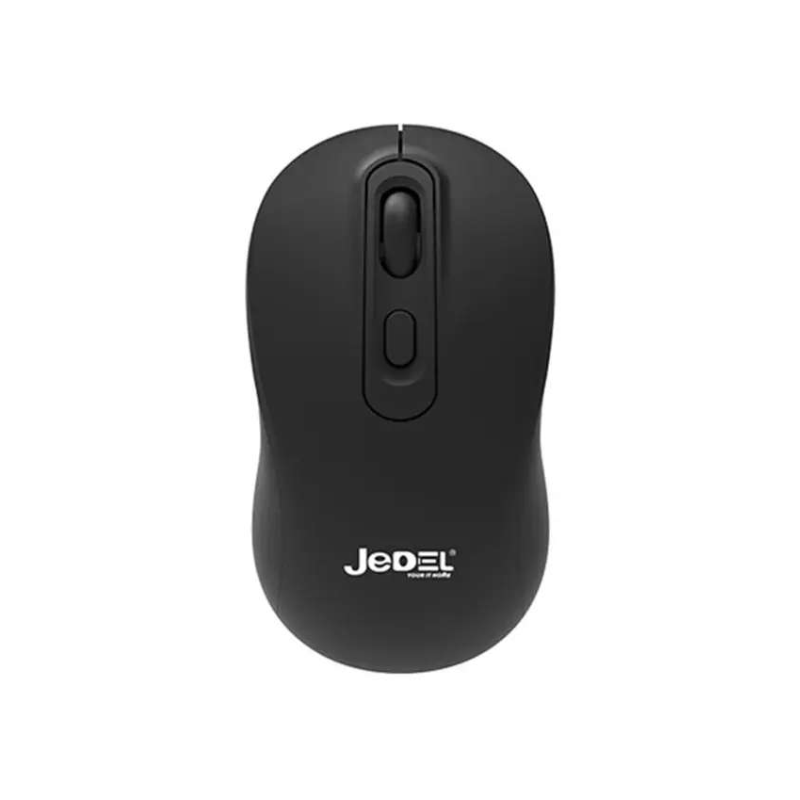
Jedel · W926
Jedel W926 is a 4-button 2.4GHz wireless optical mouse with USB receiver and 800/1200/1600 DPI settings; color and battery variants should be confirmed.
Approximate Market Price
BDT 530 – BDT 630
Informational market estimate only; this is not a current Store offer.
Compare store prices
No live offers for this variant
BDT 530 – BDT 630
Approximate Market Price
Informational market estimate only; this is not a current Store offer.
Loading history…
Product story
Jedel W926 is a compact wireless optical mouse using a 2.4GHz USB receiver. Local retailers list four buttons, three selectable DPI levels (800, 1200 and 1600), and a maximum range of up to 10 metres. The listing includes black, white, green and lavender/purple color options, though not every seller carries every color. It is designed for everyday computer navigation; battery type and runtime are not stated in the reviewed exact-model pages.
Insert the included 2.4GHz receiver into a compatible USB port, then switch on the mouse if the unit has a power switch. The receiver provides the wireless link; it is not Bluetooth and should be kept available when the mouse is in use. A USB-C-only host may need a compatible adapter, which is not confirmed as included. Wireless responsiveness can vary with receiver placement, nearby interference, distance and battery condition.
The W926 is listed with 800, 1200 and 1600 DPI choices. Switching DPI changes pointer movement relative to physical movement; it does not increase the screen’s resolution. Use a lower setting for finer control or a higher setting for faster pointer movement, then adjust operating-system sensitivity to preference. The exact DPI button position is not established by every listing, and no custom software, polling rate or sensor part number was confirmed.
Retailer information lists four buttons plus a scroll wheel and optical tracking. Exact button functions, switch lifecycle, scroll steps and programmable macro support are not specified. Optical tracking performance depends on the sensor, surface texture, cleanliness and movement speed. If the mouse behaves inconsistently, clean the sensor opening, move the receiver closer and test on a flat opaque surface. No gaming-grade sensor or high-speed tracking claim is made here.
Seller listings give a wireless range up to 10m. This is a theoretical or best-case figure; walls, metal surfaces, USB port placement, radio interference and low battery can reduce the actual distance. For reliable use, keep the receiver unobstructed and within a practical distance. The cable-free design may help reduce desk clutter, but the receiver must remain connected and can be misplaced if not stored with the mouse.
Current listings identify black, white, green and lavender or purple variants. Color naming can differ and stock varies between sellers, so check the selected option and product photo before checkout. A comfortable fit depends on hand size, grip style and shape. The reviewed exact-model sources do not establish overall dimensions, weight of the mouse alone or whether its shell is suited equally to left- and right-handed users.
The local sources reviewed do not consistently state the battery type, rechargeability or expected runtime. Confirm the exact package or manual and use the specified battery. Sellers list Windows, Mac and Linux compatibility, but a host still needs to support standard USB mouse input and recognize the receiver. Mobile phones, tablets and smart TVs may require host/OTG support and a suitable adapter.
Several Bangladesh sellers list a one-year warranty. Confirm whether the selected color has the same terms, what manufacturing faults are covered, where service is provided and what proof of purchase is needed. Before ordering, verify the W926 model, 2.4GHz USB receiver, 800/1200/1600 DPI levels, four-button layout, chosen color and battery arrangement. BiponiBD availability and checkout price were not verified during this content update.
The W926 may suit users who want a simple wireless mouse for browsing, office tasks and general computer use, with a few DPI choices and multiple color options. It may not suit someone who requires Bluetooth, documented long battery life, programmable controls or a specific ergonomic shape without confirming those features. Match the USB receiver, color, battery and warranty to your needs.
It uses a 2.4GHz wireless USB receiver. The host needs a compatible USB port; the receiver is not a Bluetooth adapter.
Bangladesh listings specify selectable 800, 1200 and 1600 DPI settings. Pointer sensitivity also depends on operating-system settings and the surface.
The mouse is listed with four buttons plus a scroll wheel. The sources do not describe custom software or programmable macros.
Retailers list a range of up to 10 metres under suitable conditions. Obstacles, interference, receiver location and battery state can reduce practical range.
Listings show black, white, green and lavender/purple variants. Availability and color names differ by seller; select the intended variant before purchase.
Retailers describe optical tracking. The precise sensor model and surface compatibility range are not specified.
The reviewed exact-model listings do not state battery size, whether it is rechargeable or expected runtime. Check the package or manual.
Some local sellers list Windows, Mac and Linux compatibility. Confirm compatibility with the specific device and any USB restrictions.
Star Tech, Vibe Gaming and TechLand list one year. Confirm the selected seller’s written terms and claim process.
This review did not verify a live BiponiBD offer, stock or checkout price. Confirm selected color, battery details and warranty with the seller.
Helpful answers
Product-specific answers maintained with the catalog information.
It uses a 2.4GHz wireless USB receiver. The host needs a compatible USB port; the receiver is not a Bluetooth adapter.
Bangladesh listings specify selectable 800, 1200 and 1600 DPI settings. Pointer sensitivity also depends on operating-system settings and the surface.
The mouse is listed with four buttons plus a scroll wheel. The sources do not describe custom software or programmable macros.
Retailers list a range of up to 10 metres under suitable conditions. Obstacles, interference, receiver location and battery state can reduce practical range.
Listings show black, white, green and lavender/purple variants. Availability and color names differ by seller; select the intended variant before purchase.
Retailers describe optical tracking. The precise sensor model and surface compatibility range are not specified.
The reviewed exact-model listings do not state battery size, whether it is rechargeable or expected runtime. Check the package or manual.
Some local sellers list Windows, Mac and Linux compatibility. Confirm compatibility with the specific device and any USB restrictions.
Star Tech, Vibe Gaming and TechLand list one year. Confirm the selected seller’s written terms and claim process.
This review did not verify a live BiponiBD offer, stock or checkout price. Confirm selected color, battery details and warranty with the seller.
Customer community
Become a merchant
Join BiponiBD, publish accurate offers and start free.