Pros
- Ultrawide resolution provides broad workspace and immersive supported games.
- 1000R curvature wraps the wide screen toward the viewer.
- VA panel specification lists 3000:1 contrast.
- Manual documents PIP/PBP, Adaptive-Sync and 165Hz.

All categories
 New condition
Monitors
KOORUI · 34E6UC
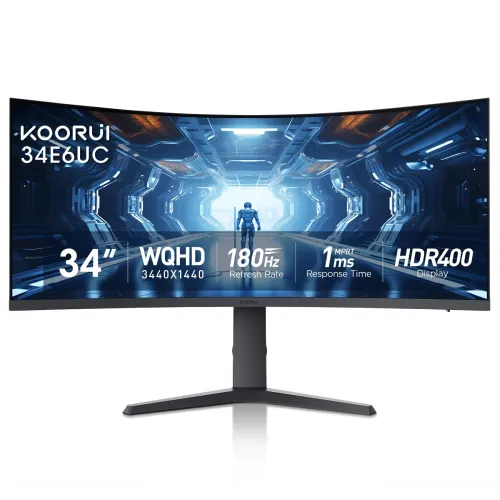
34-inch 1000R UWQHD VA ultrawide with 165Hz in the manual; some regional KOORUI pages say 180Hz. Verify the exact revision.
Price unavailable
Price range updating
No verified price is available yet. Store offers will appear when merchants publish them.
Compare store prices
No live offers for this variant
Offers will appear when merchants publish them.
Loading history…
Product story
KOORUI 34E6UC is a 34-inch curved ultrawide gaming monitor with a 21:9 aspect ratio and 3440 × 1440 UWQHD resolution. Its manual identifies a VA panel, 1000R curvature and a maximum refresh rate of 165Hz. Some current regional KOORUI storefront pages advertise 180Hz for the same model name, so check the exact unit label, manual and input timing before relying on 180Hz. The specification here uses the model manual’s 165Hz figure and documents the regional difference.
The 3440 × 1440 resolution spreads a high pixel count across a 21:9 screen. This creates extra horizontal workspace for timelines, spreadsheets and side-by-side applications, and can widen the field of view in games that support ultrawide formats. The extra pixels require more graphics performance than standard 2560 × 1440. Some games and video sources use 16:9 content, which can leave side bars or crop the image depending on the application.
The manual describes a 34-inch VA display with a 1000R curved surface. VA panels typically offer stronger native contrast than standard IPS panels, while pixel transitions and viewing behavior depend on the specific implementation and picture mode. The curve can make the wide display easier to view across its width at a suitable seating distance. It does not mean every user will prefer the curvature; check desk depth and viewing position before purchase.
The 34E6UC user manual lists a maximum refresh rate of 165Hz. KOORUI US/UK product pages now promote the model as 180Hz. This is a material discrepancy and may reflect a product revision or regional variation. The listing name alone does not identify the panel revision. Ask the seller to provide the serial label, manual version and OSD maximum mode. Until those details are confirmed, use the manual’s 165Hz rating as the grounded specification.
The manual identifies one DisplayPort 1.2 and two HDMI 2.0 inputs, and states that DP/HDMI supports 3440 × 1440 at 165Hz, while HDMI supports 1920 × 1080 at 165Hz or 3440 × 1440 at 100Hz. This makes the selected cable and port important for high-refresh ultrawide use. Connect over DisplayPort for the manual’s full UWQHD refresh mode and confirm the graphics card exposes it. A high number in a product title is not enough to establish every input’s bandwidth.
The manual lists 1ms MPRT. MPRT is a motion-picture response measurement and should not be presented as a guarantee that every pixel transition is 1ms GtG. The monitor also has overdrive and Adaptive-Sync features, according to product materials. Strong overdrive can introduce overshoot, while motion strobing can affect brightness. Test the available modes at the refresh rate and frame rate you actually use, and select the clearest comfortable setting.
KOORUI materials identify FreeSync/Adaptive-Sync support. Variable refresh can synchronize monitor updates with a compatible graphics source to reduce tearing when frame rates change. The actual operating range and compatibility depend on the GPU, driver, selected input, cable and display firmware. Enable the feature in the monitor menu and graphics control panel, then verify it in a game. Do not assume a particular NVIDIA or console certification unless the exact regional documentation confirms it.
The manual and product pages describe HDR400, and some regions may identify DisplayHDR 400. Confirm the exact certification badge on the unit and its official record if certification matters. HDR playback also needs compatible content and an operating system or application configured to send HDR. An HDR400 label does not promise local dimming or OLED-level black performance. For everyday SDR use, choose brightness and contrast settings that suit the room.
The manual lists typical brightness of 400cd/m², a 3000:1 static contrast ratio and 16.7 million colors. It also identifies 90% DCI-P3 coverage. These are manufacturer specifications, not independent calibration results. Color appearance changes with preset, white point, brightness and viewing conditions. For color-sensitive creative work, use a calibrated workflow and verify output on other devices. A VA gaming panel should not be described as a reference monitor without supporting measurements.
A 1000R curve is relatively pronounced. Sit centered at a suitable distance so the left and right edges remain within a comfortable field of view. The curved format can improve immersion in supported games and movies but may affect how straight lines appear to users who are not accustomed to curved displays. For shared viewing or technical drawings, compare the curvature with your use case before committing.
KOORUI product information describes tilt and height adjustment, and some regional material also lists swivel. The stand is detachable. Confirm the adjustment range and exact stand included in the delivered package because page versions differ. Position the screen with the top edge near eye level and leave room behind the wide curved panel. A height-adjustable stand cannot compensate for an unsuitable desk depth or poor viewing distance.
The manual lists a 75 × 75mm wall-mount pattern. Check the rear mounting plate and supplied screws before purchasing an arm; some product pages can describe compatible bracket options differently. Ensure the arm supports the weight and curvature, and use the correct screw length to avoid panel damage. Support the monitor by its frame while installing and retain the original stand parts for resale or returns.
The model manual lists one DisplayPort 1.2, two HDMI 2.0 inputs and one 3.5mm audio output. Integrated speakers are not specified in the reviewed manual. Connect a PC to DisplayPort for the listed maximum UWQHD refresh; reserve HDMI for other devices while checking its resolution-specific limit. Use the headphone output with headphones or external speakers. The monitor is not documented as having USB-C or a USB hub.
The manual lists picture-in-picture and picture-by-picture modes, along with eye-saver and dark-field features. These may be useful when viewing two sources or adjusting visibility in darker game scenes. PIP/PBP can reduce the area available to each image and may limit supported combinations. Menu labels and availability depend on the input mode. Review the manual for compatible combinations instead of assuming all sources can be displayed at full native resolution simultaneously.
A 3440 × 1440 ultrawide signal is supported by many PCs, but graphics hardware must render the wider pixel count and the game must support the aspect ratio. Consoles often output 16:9 formats; verify whether the console and game support ultrawide output before expecting a full-width image. HDMI 2.0’s UWQHD refresh limit in the manual is 100Hz, while DP is listed for 165Hz. Check source output settings after connection.
For compatible PC games, the wide aspect ratio can make racing, simulation and open-world scenes feel more immersive. A high refresh rate makes motion updates more frequent when the graphics card supplies enough frames. 3440 × 1440 can be demanding, so performance depends on GPU class and graphics settings. Competitive games may not benefit from the wider view or may restrict it. Set resolution and refresh first, then tune frame rate, sync and response modes.
The 21:9 display can replace some dual-monitor arrangements by placing two windows side by side without a center bezel. It is useful for wide timelines, coding, large sheets and document review. Window management and application support determine how effectively the extra width is used. Some web video and presentations remain 16:9 and may show bars. Confirm the desk can accommodate the monitor’s width and curve while keeping the viewing distance comfortable.
The manual lists an external adapter rated for 19V 3.42A, AC input 100–240V at 50/60Hz, boot consumption up to 65W and sleep consumption below 0.5W. Verify that the delivered power adapter and local AC cord match the exact version. Accessories can differ by region and seller; confirm stand, adapter, power cord, display cables, manual and warranty documents before checkout. Do not substitute an unverified adapter.
The product listing’s Bangladesh warranty has not been independently verified for a specific unit or serial. Ask the seller who handles service, the coverage period, dead-pixel policy, service location and required invoice. Match the serial number on the monitor and carton with the invoice. Warranty coverage may differ by importer and sales channel. Request the terms in writing, and retain the packaging until the return and inspection period ends.
Before payment, confirm whether the supplied 34E6UC revision is 165Hz or 180Hz and which port reaches that rate at 3440 × 1440. Verify the live price, stock, delivery charge, return policy and included accessories. On delivery, inspect the wide curved panel for damage, test DisplayPort and HDMI, verify resolution and refresh options, check Adaptive-Sync and audio output, and record defects within the seller’s inspection period.
The KOORUI 34E6UC suits buyers who want a large curved UWQHD screen for immersive games and wide desktop workflows. Its 1000R VA panel, 21:9 format, Adaptive-Sync and high refresh appeal to compatible PC setups. Buyers who need a confirmed 180Hz revision, USB-C docking, integrated speakers, 16:9 console-native ultrawide behavior or professional color validation should verify those needs against the exact unit documentation before purchase.
Helpful answers
Product-specific answers maintained with the catalog information.
The manual specifies 3440 × 1440 UWQHD at a 21:9 aspect ratio.
The user manual says 165Hz; current regional KOORUI pages advertise 180Hz. Confirm your exact revision and OSD with the seller.
The manual lists a VA panel with a 1000R curve.
The manual lists DP 1.2 for 3440 × 1440 at 165Hz; HDMI 2.0 is listed for 3440 × 1440 at 100Hz.
KOORUI product materials report Adaptive-Sync/FreeSync support; verify compatibility with your source.
The reviewed manual lists an audio output but does not specify integrated speakers.
HDR400 is listed; confirm regional certification and remember that HDR400 does not imply local dimming.
The manual lists a 75 × 75mm mount pattern.
Confirm the delivered serial’s local warranty, service provider and dead-pixel policy with the seller.
Customer community
Become a merchant
Join BiponiBD, publish accurate offers and start free.