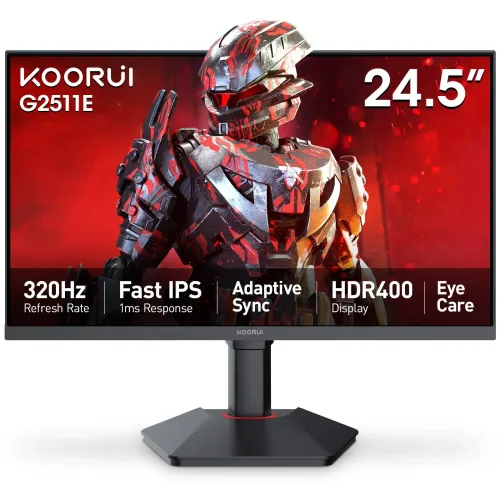
The KOORUI G2511E is a 24.5-inch flat Fast IPS Full HD monitor with a maximum 320Hz refresh rate, based on the KOORUI user manual. This product guide separates manufacturer manual details from Bangladesh seller observations and explains which system conditions matter for using the maximum refresh mode.
Model identity and target setup
The KOORUI G2511E is a flat 24.5-inch Fast IPS monitor with Full HD resolution and a maximum 320Hz refresh rate according to its user manual. The product page name identifies the model and main display characteristics so it is not confused with similarly named G-series models. Check the model printed on the rear label and seller invoice before purchase.
This monitor is aimed at setups that value very high refresh rates at 1920 × 1080. The panel will not create extra game frames; the computer and game must render them. For slower office systems, the fast refresh capability can remain unused, so compare the ergonomic stand, resolution and price against more suitable lower-refresh alternatives.
Display format and pixel density
The display is 24.5 inches diagonally, uses a 16:9 aspect ratio and has a native 1920 × 1080 pixel grid. Full HD is widely supported by games and applications and is less demanding to render than QHD. On this size, buyers who sit very close or work with detailed layouts may prefer the greater pixel density of a higher-resolution panel.
The screen is flat and uses Fast IPS technology. KOORUI lists 178°/178° viewing angles and 16.7 million colors. Viewing-angle figures describe the manufacturer specification and do not guarantee identical color or brightness at every angle. Ambient light, viewing distance, display settings and unit variation can affect perceived image.
Refresh rate, OD and frame delivery
The KOORUI manual specifies a maximum refresh rate of 320Hz. A higher refresh can show more updates per second when the graphics card and game produce matching frame rates. The number available in the operating system depends on the selected input, resolution, cable quality, graphics driver and hardware. If 320Hz is not selectable, test a direct DP connection, update the display driver and confirm the source output capability.
The manual states 1ms OD, meaning an overdrive response claim. OD response is not interchangeable with GtG or MPRT, and the reviewed source does not call it 1ms GtG. Overdrive settings can change motion behavior and may introduce overshoot; choose a mode based on the actual image rather than relying on the headline number.
High-refresh esports use can benefit from a fast system, but latency also depends on the computer, game engine, input devices and network. This product copy does not claim a measured input lag or guarantee competitive performance. A 320Hz display is only one part of an end-to-end setup.
Brightness, HDR and color
KOORUI’s manual lists 350 cd/m² for SDR and 400 cd/m² for HDR. It also labels the feature HDR400. This review reports the wording in the manual and does not independently verify VESA DisplayHDR certification, measured peak brightness, local dimming or HDR image quality. Buyers who require a certified HDR tier should check the certification registry and exact model revision.
The manual lists 95% DCI-P3 color gamut and 16.7 million colors. Some local retailer pages additionally list 99% sRGB and 72% NTSC; those figures are not all repeated in the manual section consulted here, so this page treats DCI-P3 as the manufacturer-documented gamut figure and leaves other coverage as seller-reported context.
A gamut percentage does not prove factory calibration or uniformity. For video, design or photo work, use color-managed software and calibrate the actual screen if accurate matching matters. HDR and wide-gamut modes may also change the way standard desktop content appears.
Connections and compatibility
The manual lists two HDMI 2.0 inputs and one DisplayPort 1.4 input. VGA, USB and Type-C are listed as none. This makes it possible to connect multiple video sources without assuming the monitor includes a USB dock or USB-C laptop charging. A source with only USB-C may need a compatible video adapter; verify its supported output mode.
A 1.5m DisplayPort cable is listed in the manual accessory list. Included items can differ by region, bundle or seller, so inspect the actual package description. For maximum refresh, use a cable and source that support the target mode, and avoid bandwidth-limiting adapters during initial setup.
One audio output is listed, while built-in speakers are marked none. Connect headphones or external speakers through the supported audio route. The monitor does not replace a separate sound system and no integrated microphone or webcam is listed.
Adaptive Sync and eye care
The manual lists Adaptive SYNC under VRR. Variable refresh can coordinate screen updates with a compatible graphics source to reduce tearing in supported ranges. Exact operation depends on the GPU, driver, input, firmware and game; the manual listing is not evidence of every vendor certification. Check the desired device pairing before relying on a specific FreeSync or G-Sync badge.
The manual marks Eye Care as yes. Local listings mention Flicker Free and Low Blue Light, but the specification page reviewed does not detail their exact implementation or operating modes. Treat these as display options rather than medical claims. Adjust brightness for the room and take breaks during extended screen use.
Custom shortcuts and 15 available menu languages are listed in the manual. The on-screen display can help users reach settings, though names and menu structure can change with firmware. Refer to the supplied manual for control locations and reset steps.
Ergonomics and mounting
The stand specification includes 110mm of height adjustment, rotation adjustment of ±90° and tilt of 5° forward / 20° backward. Horizontal adjustment is listed as non-adjustable. This gives more positioning options than a tilt-only stand, but it does not provide side-to-side swivel according to the manufacturer table.
The VESA pattern is 75 × 75 mm and the monitor includes a security slot. Confirm a mount supports 75 × 75 mm and the display weight; some arms include only 100 × 100 mm plates. Follow the manual on screw length because screws that are too long can damage internal components.
With the stand, KOORUI lists 560 × 494 × 262 mm; without it, 560 × 331 × 81 mm. The base dimensions are 265 × 234 mm. Measure the desk footprint and height clearance before installing the monitor, particularly when rotating the screen into portrait orientation.
Power, package and handling
The adapter input is 19V/2.58A. Maximum operating consumption is listed as no more than 49W and standby consumption no more than 0.5W. Use the supplied or an approved adapter with the correct rating; do not substitute a charger based only on connector fit. Keep the power cable away from sharp edges and moving stand joints.
The manual lists a 1.5m adapter cable, a 1.2m power cord, a 1.5m DP cable, column and base, user manual and installation manual. Package dimensions are 703 × 143 × 462 mm and package weight 6.01kg. Net weight is 4.10kg with stand and 2.90kg without stand. Verify the box contents and condition with the seller.
The stand base should be firmly attached and placed on a stable surface. When mounting on an arm, use the correct VESA hardware and supported screw length. Protect the screen during assembly and transport; consult the manual rather than lifting the monitor by the panel edge.
Practical use and limitations
For competitive games, the 320Hz maximum can be useful when the PC consistently renders high frame rates. Many games will run below this rate depending on graphics hardware and settings. The display resolution remains Full HD, so players may choose between visual quality and frame rate based on the title and system.
For everyday productivity, 24.5 inches and 1080p provide a familiar layout. The height-adjustable stand and rotation support can help tailor position. For multi-window work or fine-detail editing, compare the available workspace and pixel density against a QHD alternative before deciding.
For media, the manual’s HDR400 label and 95% DCI-P3 figure are useful comparison points, but actual HDR performance depends on content and display behavior. No built-in speakers are listed, so plan audio separately. This copy makes no firsthand image-quality or durability claim.
Bangladesh price, stock and warranty
At review time, Canvas IT showed ৳22,200 and In Stock. The Kothaekom Bangladesh price tracker showed recent in-stock retailer offers around ৳22,400. These figures are snapshots and can change after a promotion, stock update or seller edit. They are reference observations only, not a BiponiBD offer or guaranteed checkout price.
Some Bangladesh product listings describe three-year warranty. The manual reviewed here does not specify the local warranty provider or serial-number eligibility. Before buying, confirm who honors the warranty, the service location, invoice requirements, dead-pixel policy, included accessories and any exclusions. No BiponiBD warranty is implied by third-party seller pages.
Verify model G2511E, screen size, refresh rate, stock, final price and seller terms at checkout. Keep the invoice and serial number. For a damaged or pixel-defective unit, follow the selected seller’s documented return process and time limits.
Specification notes and source discipline
The KOORUI manual is the primary source for size, panel, resolution, 320Hz maximum, 1ms OD, input ports, power, dimensions, stand range, VESA and HDR400 label. Retailer pages contain some claims such as 1ms GtG, G-Sync, FreeSync, 99% sRGB and stand measurements. Claims not independently shown in the manual have not been upgraded into manufacturer-confirmed statements here.
HDR400 is reproduced as the manual’s product feature label; this review does not assert external certification. The 1ms figure is reproduced as OD. The product specifications retain clear measurement wording so a reader can distinguish a manufacturer entry from retailer shorthand.
No custom BiponiBD offer, warranty validation, barcode, GTIN, country of origin, package weight verification at receiving, visual gallery audit or hands-on performance test was available during this review. Those items remain open rather than being filled with guesses.
Key features
- 24.5-inch flat Fast IPS panel with Full HD 1920 × 1080 resolution and 16:9 aspect ratio.
- Maximum 320Hz refresh rate according to the KOORUI manual; source hardware and cable must support the chosen mode.
- 1ms OD response-time claim in the manufacturer manual; OD is overdrive response and should not be relabeled as GtG or MPRT.
- SDR brightness 350 cd/m² and HDR brightness 400 cd/m² are stated in the manual; HDR certification is not independently checked.
- Manual lists 95% DCI-P3 gamut and 16.7 million colors; color-critical work should use calibrated, measured results.
- Two HDMI 2.0 ports and one DisplayPort 1.4 input; no VGA, USB or USB-C input is listed.
- Adaptive SYNC/VRR and eye-care feature appear in the manufacturer manual.
- Stand supports 110mm height adjustment, ±90° rotation, and tilt from 5° forward to 20° backward.
- 75 × 75 mm VESA mounting and a security slot are listed.
- No built-in speakers; the manual lists one audio output.
- Adapter power input is 19V/2.58A; operating consumption is up to 49W and standby up to 0.5W.
- Manual identifies supplied adapter, power cord, DP cable, stand and documentation; verify box content with seller.
Pros
- A very high 320Hz maximum refresh rate for compatible systems that can deliver high frame rates.
- Fast IPS panel, 24.5-inch size and flat Full HD format suit compact competitive-gaming setups.
- The ergonomic stand includes height, tilt and rotation adjustment, with a 75 × 75 mm VESA option.
- Two HDMI 2.0 ports and one DP 1.4 input allow multiple video sources.
- KOORUI manual lists HDR400, Adaptive SYNC and 95% DCI-P3 as product capabilities.
Cons and trade-offs
- Full HD resolution on 24.5 inches provides less pixel detail than QHD; consider viewing distance and text sharpness needs.
- 320Hz is useful only when the source device, game, cable and selected display mode can supply the required signal and frame rate.
- No built-in speakers, USB hub, USB-C or VGA input is listed.
- 1ms is specified as OD in the manual; it is not an independently measured GtG response figure.
- Warranty terms and prices depend on the Bangladesh seller; none of the seller references proves a BiponiBD offer.
Specifications
- Brand: KOORUI
- Model: G2511E
- ScreenSize: 24.5 inches
- Panel: Fast IPS
- ScreenForm: Flat
- Resolution: Full HD 1920 × 1080
- AspectRatio: 16:9
- RefreshRate: 320Hz maximum
- ResponseTime: 1ms OD (overdrive; manufacturer manual)
- Brightness: 350 cd/m² SDR; 400 cd/m² HDR (manual)
- HDR: HDR400 stated in KOORUI manual; third-party certification not independently confirmed
- StaticContrastRatio: 1000:1
- DynamicContrastRatio: 20,000,000:1 (manual)
- ColorSupport: 16.7 million colors
- ColorGamut: 95% DCI-P3 (manual); retailer pages additionally state 99% sRGB and 72% NTSC
- ViewingAngle: 178° / 178°
- Inputs: 2 × HDMI 2.0; 1 × DisplayPort 1.4; no VGA
- AudioOutput: 1 × audio out; no built-in speakers
- USB: No USB input/hub
- AdaptiveSync: Adaptive SYNC / VRR (manual)
- EyeCare: Eye Care listed in manual; retailer pages mention flicker-free and low blue light
- VesaMount: 75 × 75 mm
- StandAdjustment: 110mm height; tilt forward 5° / backward 20°; rotation ±90°; no horizontal adjustment
- SecuritySlot: Yes
- PowerInput: 19V / 2.58A adapter
- PowerConsumption: ≤49W operating; ≤0.5W standby
- DimensionsWithStand: 560 × 494 × 262 mm
- DimensionsWithoutStand: 560 × 331 × 81 mm
- BaseDimensions: 265 × 234 mm
- PackagingDimensions: 703 × 143 × 462 mm
- NetWeightWithStand: 4.10 kg
- NetWeightWithoutStand: 2.90 kg
- PackagingWeight: 6.01 kg
- Accessories: Manual lists 1.5m adapter cable, 1.2m power cord, 1.5m DP cable, stand column/base, user manual and installation manual
Frequently asked questions
What resolution does the KOORUI G2511E use?
The manufacturer manual lists Full HD 1920 × 1080 at a 16:9 aspect ratio.
How large is the panel?
KOORUI lists a 24.5-inch flat Fast IPS panel.
Does it support a 320Hz refresh rate?
The manual lists 320Hz maximum. Your computer, graphics output, cable and settings must support the target resolution and refresh rate.
Is the response time 1ms GtG?
The KOORUI manual says 1ms OD (overdrive). It should not be restated as 1ms GtG or MPRT without a source that specifies that measurement.
What ports does it have?
The manual lists two HDMI 2.0 inputs, one DisplayPort 1.4 input and one audio output. It lists no VGA, USB or USB-C input.
Does it have built-in speakers?
No. The manual lists no built-in speakers, but includes an audio output.
What HDR brightness is specified?
The manual lists 350 cd/m² for SDR and 400 cd/m² for HDR, and labels the feature HDR400. This review does not independently confirm a certification.
What adjustments does its stand support?
KOORUI lists 110mm height adjustment, tilt from 5° forward to 20° backward and rotation of ±90°. Horizontal swivel is stated as non-adjustable.
Can I use a monitor arm?
Yes, the manual lists 75 × 75 mm VESA mounting. Confirm the arm supports this pattern and the monitor weight.
Does it support Adaptive-Sync?
The manual lists Adaptive SYNC/VRR. Confirm the required graphics-card compatibility and mode using the device and product documentation.
What comes in the box?
The manual lists an adapter, power cord, DP cable, stand column and base, user manual and installation manual. Confirm the actual seller package and cable condition.
What is the current Bangladesh price and warranty?
Canvas IT displayed ৳22,200 in stock, and the Kothaekom tracker showed current in-stock offers around ৳22,400 at review time. Seller stock, price and warranty can change; confirm directly. These observations are not a BiponiBD offer.
Source note: KOORUI G2511E user manual; Bangladesh retailer pages and price tracker used only for market observations. No hands-on test or verified BiponiBD offer is claimed.