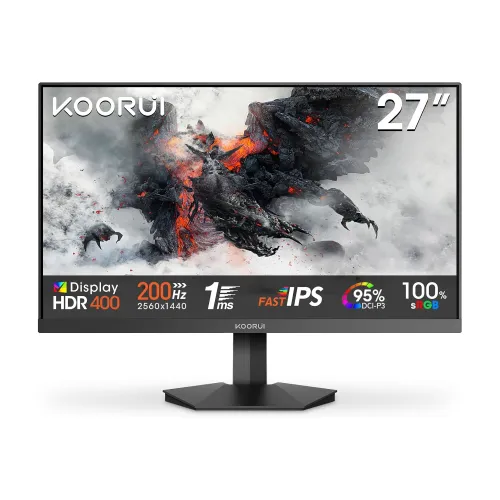
The KOORUI G2721P is a 27-inch QHD 2560 × 1440 Fast IPS monitor with up to 200Hz refresh, HDMI and DisplayPort connections, and 75 × 75mm VESA mounting. The manufacturer confirms these core specifications. Bangladesh sellers additionally advertise HDR400, Adaptive Sync, 1ms DIC response, 350 cd/m² brightness, 95% DCI-P3 and specific port versions; those details are identified below as retailer claims where the current manufacturer page does not confirm them.
Product overview
The KOORUI G2721P is a 27-inch Fast IPS gaming monitor with QHD 2560 × 1440 resolution and a manufacturer-rated maximum refresh rate of 200Hz. The combination targets players and desktop users who want more pixel detail than Full HD while retaining high-refresh motion. It is a flat 16:9 monitor in local seller listings. A high refresh ceiling is useful only when the computer, cable, chosen input and display settings all support the requested mode.
The current KOORUI product page confirms the size, panel type, resolution, maximum refresh and HDMI/DisplayPort connection types. It also cautions that maximum refresh depends on connection, cable, graphics hardware and settings. Retail pages add more detailed claims, including HDR400, 1ms DIC and Adaptive Sync. Since KOORUI does not currently publish those details on the page reviewed, keep them identified as retailer claims and confirm them for the exact regional SKU.
QHD resolution and 27-inch workspace
At 2560 × 1440, the G2721P has 3,686,400 pixels, providing 77.8% more pixels than a 1920 × 1080 Full HD screen. On a 27-inch 16:9 panel, that resolution can make fine text, game environments and multi-window layouts more detailed than Full HD, while generally requiring more graphics performance to render games at the same frame rate. The best scaling setting depends on eyesight, viewing distance and application.
QHD does not guarantee that every game will reach 200 frames per second. A graphics card must render each frame, and settings such as ray tracing can reduce frame rate. In productivity work, 2560 × 1440 adds workspace, but older applications may use small controls or imperfect scaling. Check your computer output and preferred scaling before replacing a 1080p monitor.
Fast IPS and motion
KOORUI identifies the panel as Fast IPS and specifies up to 200Hz. Higher refresh can make compatible motion appear smoother and reduce the time between refreshes compared with 60Hz or 144Hz, provided the source can deliver sufficiently frequent frames. It may help with fast camera movement and scrolling, but image response, input delay and motion clarity are separate measures.
A local Bangladesh listing advertises 1ms DIC response. The current manufacturer specification page does not provide a response-time measurement method, overdrive mode or independent test. Treat that figure as a retailer claim rather than a guarantee that every transition completes in one millisecond. Choose a supported overdrive setting based on visible ghosting or overshoot, and verify performance in the games and refresh modes you use.
Refresh-rate setup and compatibility
The 200Hz figure is a maximum specification, not an automatic operating mode. KOORUI states that refresh depends on connection, cable, graphics hardware and display settings. Connect the monitor to a capable output on the graphics card, use a suitable cable, select 2560 × 1440 in the operating system and then inspect advanced display settings for the available refresh rates. The monitor refresh rate and a game’s rendered frame rate are related but not the same.
The official page lists HDMI and DisplayPort but does not currently state their version or number. Local retailers list two HDMI 2.0 ports and one DisplayPort 1.4. Because high resolution at 200Hz is bandwidth-intensive, verify the specific port/cable mode and GPU output limits for the exact G2721P revision. If 200Hz is unavailable, update graphics drivers, check cable seating and review the monitor manual and graphics-card output specifications.
Color, brightness and contrast claims
Monarch IT lists 350 cd/m² brightness, a 1000:1 static contrast ratio, 95% DCI-P3 coverage, 16.7 million colors and 178° viewing angles. Those numbers may help compare products, but they are retailer-published details rather than current manufacturer specifications or an independent calibration report. Gamut coverage alone does not establish color accuracy, uniformity or factory calibration.
A wide-gamut display can make supported content look more vivid, but color-managed workflows may need an appropriate profile and calibration. Brightness should be adjusted for room lighting and comfort. The seller’s static contrast figure should not be confused with a dynamic contrast marketing value. For color-critical photo or print work, look for measured factory accuracy and calibration evidence instead of relying on gamut percentage alone.
HDR400 and Adaptive Sync
Bangladesh listings advertise HDR400 and Adaptive Sync. The current KOORUI page reviewed here confirms QHD, Fast IPS and 200Hz but does not publish HDR certification evidence, local dimming behavior, peak-brightness measurements or a supported variable-refresh range. For that reason, HDR400 and Adaptive Sync are recorded as seller-advertised features, not independently verified performance claims.
Before buying for HDR gaming, confirm the exact model revision, certification record and supported input mode with the seller or manufacturer. HDR label alone does not establish strong highlight brightness or deep blacks; panel contrast and local dimming also affect the experience. For variable refresh, check the GPU vendor’s compatibility list, the connection used and the monitor’s manual. Do not assume a particular FreeSync or G-Sync certification from the phrase Adaptive Sync.
Ports, sound and peripherals
KOORUI currently identifies HDMI and DisplayPort as the connection types. Local retailer specifications list two HDMI 2.0 ports, one DisplayPort 1.4 input and one audio-out. These local details give a useful connection expectation, but the manufacturer page does not publish a count or version, so the exact unit and included accessories should be checked before ordering. Neither USB-C charging nor a USB hub is established in the available specifications.
Monarch IT’s listing describes no built-in speakers. If sound is needed, plan to use headphones or external speakers; ask whether audio-out carries the selected HDMI/DisplayPort source on your exact model. Keep in mind that an adapter, dock, KVM or long cable can affect available resolution and refresh rate. For 200Hz QHD, connect directly to an appropriate graphics output when possible and confirm the active display mode.
Stand, desk placement and VESA
Monarch IT lists tilt from -5° to +20°. The current manufacturer page confirms 75 × 75mm VESA mounting. Height adjustment, swivel and pivot are not verified by the manufacturer page reviewed here. Tilt lets you angle the screen, while a VESA arm can offer additional positioning if the desk setup requires it.
Before mounting, compare the arm’s weight capacity with the monitor and stand/head weight information for the exact unit, check screw length and use the manual’s installation guidance. Route cables so they do not pull on the connectors. The local seller lists a stand weight of 4.1 ± 0.3kg and an external 19V adapter; those are seller figures, so use the carton label and manual for final setup.
Power, warranty and Bangladesh purchase checks
Monarch IT lists an external 19V adapter, 3.42A input and maximum consumption up to 65W. It also advertises a three-year warranty and a price of ৳26,800 with in-stock status on its product page at the time checked. These are seller observations and can change. They do not establish current BiponiBD price, availability or warranty coverage.
Before ordering, verify stock, delivery charges, model code G2721P, port versions, supplied adapter/cables and written warranty provider. Ask whether the warranty is manufacturer-backed or seller service, what serials qualify, which documents and packaging are required, and what exclusions apply. Save the invoice. No BiponiBD offer or live inventory is claimed in this description.
Buying decision and limitations
The G2721P may suit a buyer looking for a 27-inch QHD Fast IPS panel with a high maximum refresh rate and standard HDMI/DisplayPort connections. Its QHD resolution can add useful desktop detail, while a supported 200Hz mode can benefit motion-heavy games. VESA support is confirmed at 75 × 75mm. Those advantages should be weighed against graphics-card demands, unclear manufacturer detail for port versions and the limited confirmed stand adjustment.
This review is based on the current manufacturer product page and Bangladesh retailer listings, not a hands-on test. The official page confirms core panel, size, resolution, refresh ceiling, connections and VESA size. Details such as 350 cd/m², 95% DCI-P3, HDR400, Adaptive Sync, 1ms DIC, local price and warranty are retailer-reported. Check the precise revision and terms before purchase.
Key features
- 27-inch Fast IPS panel with QHD 2560 × 1440 resolution and a 16:9 format.
- Manufacturer specifies a maximum refresh rate of up to 200Hz; actual modes depend on the connection, cable, graphics hardware and display settings.
- KOORUI lists HDMI and DisplayPort connectivity. Local Bangladesh listings specify 2 × HDMI 2.0, 1 × DisplayPort 1.4 and audio-out; verify the exact regional unit.
- Manufacturer lists 75 × 75mm VESA mounting. Confirm arm weight rating and screw length before installation.
- Monarch IT lists 350 cd/m² brightness, 1000:1 static contrast and 95% DCI-P3; these seller-published figures are not a measured review.
- A local retailer advertises HDR400, Adaptive Sync and 1ms DIC response. Certification, supported modes and response measurement conditions are not established by the current manufacturer page.
- Tilt range is listed as -5° to +20° by local retailers; no height, swivel or pivot adjustment is verified.
- The monitor is listed without built-in speakers; an audio-out port is listed by a Bangladesh retailer.
- A local retailer lists an external 19V, 3.42A adapter and up to 65W consumption.
- A local Bangladesh seller advertises a three-year warranty; confirm the exact seller, serial eligibility and written claim terms before purchase.
Pros
- QHD resolution on a 27-inch screen provides more workspace detail than Full HD at the same size.
- Up to 200Hz can provide smoother motion when the computer can output a supported high-refresh mode.
- Fast IPS is specified by KOORUI, with broad 178° viewing angles reported by the local seller.
- Manufacturer confirms a 75 × 75mm VESA mount, enabling compatible monitor-arm installation.
- Retailer-listed HDMI, DisplayPort and audio-out provide common desktop and console connection options.
Cons and buying considerations
- The 200Hz maximum depends on the selected input, cable, GPU and display mode; compatibility is not guaranteed for every device or port.
- Manufacturer currently publishes only the connection types, not port counts/versions; the detailed HDMI/DP configuration is retailer-reported and should be checked against the unit.
- HDR400, Adaptive Sync and 1ms DIC are seller-advertised claims; the current manufacturer page does not provide certification or test-condition detail.
- The listed stand is tilt-only; height adjustment, swivel and pivot are not verified.
- Retailer pricing, availability and three-year warranty may vary and do not establish a live BiponiBD offer or local serial coverage.
Full specifications
- Brand: KOORUI
- Model: G2721P
- DisplaySize: 27 inches
- Panel: Fast IPS (manufacturer)
- Resolution: QHD 2560 × 1440
- AspectRatio: 16:9 (retailer listing)
- RefreshRate: Up to 200Hz (manufacturer)
- Brightness: 350 cd/m² (local retailer specification; confirm regional SKU)
- ContrastRatio: 1000:1 static (retailer listing)
- ColorGamut: 95% DCI-P3 (local retailer listing; manufacturer page currently does not publish gamut)
- ColorSupport: 16.7 million colors (retailer listing)
- ViewingAngle: 178° horizontal / 178° vertical (retailer listing)
- ResponseTime: 1ms DIC claimed by local retailer; manufacturer page does not currently publish response mode/test conditions
- HDR: HDR400 advertised in local retailer title/specification; certification/performance not independently verified
- AdaptiveSync: Adaptive Sync advertised by local retailer; confirm source/GPU compatibility
- Ports: 2 × HDMI 2.0, 1 × DisplayPort 1.4 and 1 × audio-out (local retailer listing; manufacturer currently lists HDMI and DisplayPort without count/version)
- VESA: 75 × 75 mm (manufacturer specification)
- Stand: Tilt -5° to +20° (local retailer listing)
- BuiltInSpeakers: No built-in speakers listed by retailer
- Power: External 19V adapter; retailer lists ≤65W and 3.42A input
- Warranty: Monarch IT advertises 3 years; this is not confirmation of BiponiBD or local serial coverage
- Weight: Stand weight 4.1±0.3kg (Monarch listing)
- Origin: Not confirmed
- SourceCheckedAt: 2026-11-08T20:03:21.127Z
- Sources: {"manufacturer":"https://koorui.com/products/koorui-g2721p-27-qhd-200hz-ips-gaming-monitor-hdr400-g2721p","skyland":"https://www.skyland.com.bd/koorui-g2721p-27-200hz-2k-qhd-1ms-fast-ips-gaming-monitor","monarch":"https://www.monarchit.com.bd/koorui-g2721p-27-qhd-200hz-ips-gaming-monitor"}
Frequently asked questions
What are the screen size and resolution?
KOORUI identifies the G2721P as a 27-inch Fast IPS display with QHD resolution of 2560 × 1440.
Does it support 200Hz?
KOORUI specifies up to 200Hz. The achievable refresh rate depends on the input, cable, graphics hardware, resolution and settings. Select a supported mode in the computer display settings and check the active signal.
Which ports does it have?
KOORUI currently lists HDMI and DisplayPort without publishing the number or version on its product page. Bangladesh retailers list 2 × HDMI 2.0, 1 × DisplayPort 1.4 and audio-out. Verify those details on the exact regional unit before purchase.
Is the response time 1ms?
A Bangladesh retailer advertises 1ms DIC. KOORUI’s current specification page does not publish response-time measurement conditions, so treat 1ms as a seller claim rather than an independently verified result.
Does this monitor support HDR400?
Local retail listings advertise HDR400, but the current KOORUI product page does not provide HDR certification details or measured HDR performance. Ask the seller to confirm the exact model and certification if HDR is a purchase requirement.
Does it support Adaptive Sync or FreeSync?
A local retailer advertises Adaptive Sync. The current manufacturer specification page reviewed here does not describe compatibility, so confirm support and the relevant input range with KOORUI and your GPU vendor.
Can I attach a monitor arm?
Yes. KOORUI lists 75 × 75mm VESA. Check that the arm supports the monitor’s weight, use the specified screw length and follow the manual.
Can the stand adjust height or rotate?
A Bangladesh retailer lists tilt from -5° to +20°. Height adjustment, swivel and pivot are not verified in the manufacturer page reviewed here. Use a compatible VESA arm if you need those movements.
Does it have built-in speakers?
The retailer listing says no built-in speakers and lists an audio-out port. Plan for headphones or external speakers, and verify the exact unit connections.
What brightness and color gamut are listed?
Monarch IT lists 350 cd/m² and 95% DCI-P3. These are retailer-published specifications; KOORUI’s currently available product specification page does not publish those figures.
What warranty is available in Bangladesh?
Monarch IT advertises a three-year warranty. That does not establish warranty coverage for every seller or a BiponiBD listing. Confirm the written terms, service center, invoice and serial eligibility with the seller.
What should I check before ordering?
Confirm the G2721P model, port count/version, included power adapter and cables, supported 200Hz mode, stand adjustment, warranty provider, stock and final checkout price. Keep the invoice and packaging for any claim.
Source note: KOORUI manufacturer page confirms the core panel, resolution, refresh, connection types and VESA size. Retailer-specific claims, price and warranty can vary. No hands-on test, BiponiBD offer or live inventory is claimed. Source pages checked 2026-11-08T20:03:21.127Z.