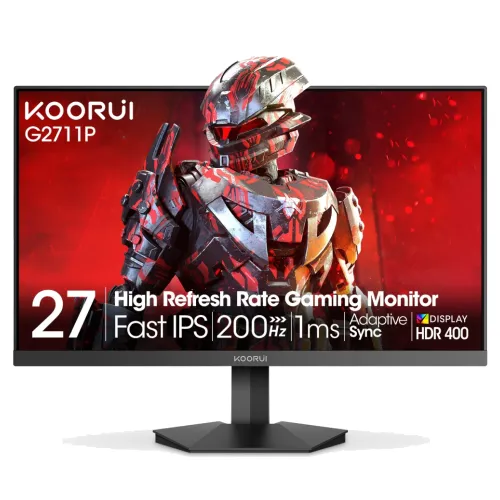
The KOORUI G2722P is a 27-inch QHD gaming monitor built around a Fast IPS panel and a maximum refresh rate of 200Hz. KOORUI advertises Adaptive Sync, HDR400 and a 1ms response specification; the manual adds input timing, adjustment ranges, power and mounting information. DisplayPort 1.4 is the route documented for 2560 × 1440 at 200Hz, while HDMI 2.0 is listed for QHD at 144Hz or Full HD at 200Hz. The panel has no listed built-in speakers. Review the exact connection and warranty details before buying.
QHD resolution and 27-inch workspace
The native resolution is 2560 × 1440 pixels in a 16:9 format across a 27-inch screen. Compared with a 27-inch Full HD display, QHD places more pixels into the same screen area, which can improve fine detail and create more desktop room for windows. Text size and application scaling remain user choices. QHD at 200Hz also asks more of a graphics card than Full HD at the same refresh rate, so match game settings to your PC’s performance instead of assuming every game will render 200 frames per second.
Fast IPS panel and viewing angle
KOORUI describes the panel as Fast IPS, and the product materials list 178-degree horizontal and vertical viewing angles. These are panel viewing-angle specifications; they do not promise that brightness and color remain perfectly uniform at every angle or across the whole panel. IPS is often selected for broad viewing angles and color presentation. The G2722P is a flat panel, not curved. Use a centered position for consistent viewing and adjust the stand to reduce glare and neck strain.
Refresh rate and input timing
The maximum refresh rate is listed as 200Hz. The G2722P user manual states DisplayPort 1.4 supports QHD at 200Hz. It lists HDMI 2.0 for QHD up to 144Hz or Full HD up to 200Hz. That means the 200Hz QHD mode should be planned around DisplayPort rather than assuming each input has the same limit. A compatible GPU, cable and operating-system setting are required. If the refresh option is missing, check input, cable, driver and monitor OSD settings.
Gaming frame rate and motion
A 200Hz screen refresh does not force a computer or console to render 200 frames each second. The game engine, GPU, CPU, resolution and quality settings determine frame rate. When the source renders fewer frames, the monitor can still display the output but will not receive a unique new frame on every refresh. Competitive games may benefit from high and consistent frame rates, while graphically demanding games may require lower detail settings. Evaluate the actual frame rate for your titles and graphics hardware.
Response time specification
KOORUI advertises a 1ms response time, but the reviewed manufacturer page does not define whether the figure is a gray-to-gray, overdrive or other measurement. A minimum response number does not describe every pixel transition, overshoot behavior or total input latency. Overdrive settings can change the balance between transition speed and artifacts. Compare the available OSD modes with your own games and content, and avoid interpreting a single best-case number as a guarantee of identical results in every mode.
Brightness, contrast and HDR
The manual and retailer specification list 350 cd/m² brightness, 1000:1 static contrast and a 20,000,000:1 dynamic contrast ratio. The static and dynamic values measure different things; dynamic contrast is not a normal fixed scene contrast ratio. KOORUI advertises HDR400, but the reviewed material does not include independent certification proof or a full peak-brightness table. Treat HDR400 as a manufacturer product claim and confirm certification and real HDR behavior if it is a purchase requirement.
Color gamut and color depth
KOORUI lists 95% DCI-P3 and 1.07 billion colors; the user manual describes 8-bit + FRC. A gamut percentage describes color coverage, not measured accuracy, factory calibration, panel uniformity or print matching. For general use, the standard color mode may be adequate. For design and photo work, use a colorimeter where accuracy matters, set the intended color space and review how applications manage wide-gamut content. Do not use the DCI-P3 coverage figure as a substitute for calibration evidence.
Adaptive Sync and compatible devices
The manufacturer advertises Adaptive Sync to reduce tearing when the graphics source and display operate within a supported variable-refresh range. The reviewed product page does not state the range or identify a specific FreeSync or G-Sync certification tier. Compatibility can depend on graphics card, driver, input and firmware. Confirm the exact source and port combination before relying on VRR, especially for consoles. Retailer claims about named compatibility standards should be treated as unverified unless supported by exact-model documentation.
HDMI, DisplayPort and audio output
The monitor has two HDMI 2.0 ports, one DisplayPort 1.4 and an audio output. The manual lists different maximum timings by port: QHD 200Hz through DisplayPort, QHD 144Hz through HDMI, or Full HD 200Hz through HDMI. Select the port based on source capabilities and desired resolution/refresh. The audio output can feed headphones or external speakers. The specification does not list USB data ports, a USB-C connection, a microphone input or an integrated speaker system.
Stand adjustment and mounting
The user manual lists a height adjustment range of up to 100mm, tilt of 5 degrees forward and 20 degrees backward, and ±90-degree rotation into portrait orientation. It describes horizontal adjustment as non-adjustable. The VESA mounting pattern is 75 × 75mm. Confirm the stand’s full movement and arm compatibility before purchase, because retailer tables may combine details from other models. If using a wall mount or arm, check the supported load, screws and cable clearance.
Dimensions, weight and desk fit
The manual gives approximate dimensions of 613 × 525 × 234mm with the stand and 613 × 362 × 83mm without the base. Net weight is listed as 5.16kg with stand and 3.75kg without. Measure the desk depth and leave room for the base, cables and height adjustment. A monitor arm can free desk space if its 75 × 75mm plate and load rating match. The shipping carton is larger and heavier than the monitor itself; verify delivery handling with the seller.
Power and included accessories
The manual lists a 19V / 3.42A external adapter, operating power up to 65W and standby consumption up to 0.5W. Listed box items include a 1.5m DisplayPort cable, adapter, power cable, stand and user manual. Retailer packages can vary by region, so inspect the supplied accessories and labels. Use the provided or correctly rated adapter, avoid straining the power connector and disconnect the monitor before cleaning or repositioning its cables.
Bangladesh price, stock and warranty
TechLand displayed ৳28,400 and out of stock during the research snapshot, with a three-year warranty listing. Other Bangladesh listings showed different prices and availability, and those pages can change. KOORUI’s product page describes one year of display coverage and three years for accessories, which differs from the local retailer statement. Ask the seller to identify the local warranty provider and confirm panel, adapter and accessory coverage, serial eligibility, dead-pixel rules, service location and claim documents in writing. No BiponiBD offer was verified.
Who may prefer this monitor
The G2722P may suit a user looking for a 27-inch QHD IPS screen, high refresh, Adaptive Sync, wide-gamut claims and an adjustable stand. It may be less suitable if you need QHD 200Hz over HDMI, USB-C docking, integrated speakers, a larger VESA pattern or independently proven HDR performance. Consider your graphics card, desk depth, color workflow and warranty service before choosing. The most useful setup is the one that matches your actual games and daily work, not only the maximum values printed in a product title.
Setup, care and model verification
Check the carton and rear label for G2722P before installing. Connect DisplayPort when targeting QHD at 200Hz, then enable the refresh rate in the operating system and confirm the source remains stable. Use the OSD to select Adaptive Sync or image modes that fit your content. Keep the invoice and warranty card. Clean the panel with a dry soft cloth while powered off; do not spray fluid directly onto it. Use KOORUI support documentation for the exact model if settings or accessories differ from the listing.
Key features
- 27-inch Fast IPS panel with 2560 × 1440 QHD resolution and a 16:9 layout.
- Maximum refresh rate of 200Hz; DP 1.4 timing table lists QHD 200Hz.
- HDMI 2.0 timing is listed up to QHD 144Hz or Full HD 200Hz in the user manual.
- KOORUI advertises 1ms response; the cited product page does not clarify the response-time measurement mode.
- 350 cd/m² SDR brightness, 1000:1 static contrast and 95% DCI-P3 listed in product documentation.
- HDR400 is advertised; check the exact certification and HDR peak-brightness evidence for the delivered unit.
- Adaptive Sync is advertised by KOORUI; supported VRR range and device behavior are not specified.
- Two HDMI 2.0 ports, one DisplayPort 1.4 and one audio output.
- Stand supports up to 100mm height adjustment, tilt and ±90° portrait rotation per manual.
- 75 × 75mm VESA mounting pattern.
- 1.07 billion color claim is associated with 8-bit + FRC in the manual.
- External 19V / 3.42A adapter, operating consumption up to 65W and standby up to 0.5W.
Pros
- QHD resolution offers more workspace and detail than Full HD at the same 27-inch size.
- A 200Hz maximum refresh rate can provide smooth motion when the source and game can deliver high frame rates.
- Fast IPS, 95% DCI-P3 and wide viewing angle specs support vivid general-purpose viewing.
- Manual lists height, tilt and portrait rotation adjustments, plus a standard VESA mounting pattern.
- DisplayPort and dual HDMI inputs support several source devices, with clearly stated input timing in the manual.
Cons and limitations
- A 200Hz QHD mode requires DisplayPort and compatible graphics output; HDMI is listed up to QHD 144Hz.
- HDR400 and 1ms are marketing/spec claims; certification and response measurement conditions need confirmation.
- There are no built-in speakers listed, only an audio output.
- VESA pattern is 75 × 75mm, so confirm arm compatibility and screw requirements.
- Global KOORUI and Bangladesh retailer warranty statements differ; written local coverage confirmation is important.
Frequently asked questions
What resolution and size does the G2722P have?
It is a 27-inch flat Fast IPS monitor with 2560 × 1440 QHD resolution and a 16:9 aspect ratio. KOORUI identifies the screen as 27 inches.
Can it run QHD at 200Hz?
The user manual lists DisplayPort 1.4 support for 2560 × 1440 at 200Hz. Use a compatible graphics output and DisplayPort cable, then select the supported refresh rate in the operating system.
What refresh rate works over HDMI?
The manual lists HDMI 2.0 up to 2560 × 1440 at 144Hz or 1920 × 1080 at 200Hz. Actual modes can depend on source device, cable, color settings and firmware.
What does the 1ms response claim mean?
KOORUI advertises a 1ms response time, but the product page does not clearly define the measurement mode. It should not be read as a guarantee of every pixel transition or total system input latency.
Is this an HDR400 monitor?
KOORUI advertises HDR400. The reviewed manufacturer page does not provide independent certification details or a complete HDR brightness table. Confirm the certification and exact unit behavior if HDR performance is a key requirement.
What color gamut and brightness are specified?
Product documentation lists 350 cd/m² SDR brightness and 95% DCI-P3. The manual lists 1.07 billion colors with 8-bit + FRC. These values do not independently establish calibration accuracy or uniformity.
Does it support FreeSync or G-Sync?
KOORUI advertises Adaptive Sync. The cited exact-model product page does not specify the VRR range or certify a specific FreeSync/G-Sync compatibility tier. Confirm the exact GPU, port and firmware combination.
What ports are available?
The G2722P lists two HDMI 2.0 inputs, one DisplayPort 1.4 input and an audio output. It does not list USB-C or built-in speakers.
Does it include built-in speakers?
No built-in speakers are listed in the reviewed specifications. The audio output can connect headphones or external speakers, subject to the source device audio route.
How adjustable is the stand?
The manual lists up to 100mm height adjustment, forward tilt 5°, backward tilt 20° and portrait rotation ±90°. It lists horizontal adjustment as non-adjustable.
Can I mount it on an arm?
The manual lists 75 × 75mm VESA mounting. Verify arm compatibility, weight rating, screws and clearance before installing.
What is the Bangladesh price and warranty?
TechLand showed ৳28,400 and out of stock with a 3-year warranty listing during research. KOORUI global listing says the display has 1-year coverage and accessories 3 years, so ask the Bangladesh seller to confirm exact panel and accessory coverage in writing.
Source note: KOORUI product information and user-manual specifications were reviewed 2026-11-08T21:57:59.702Z. Bangladesh price, stock and warranty statements are retailer observations and conflict with the global warranty statement; confirm local coverage directly. No independent hands-on test or BiponiBD offer is claimed.