Pros
- Connects compatible USB-A peripherals to supported USB-C host devices.
- OTG support can help phones and tablets access compatible accessories.
- Small adapter body is easy to carry.

All categories
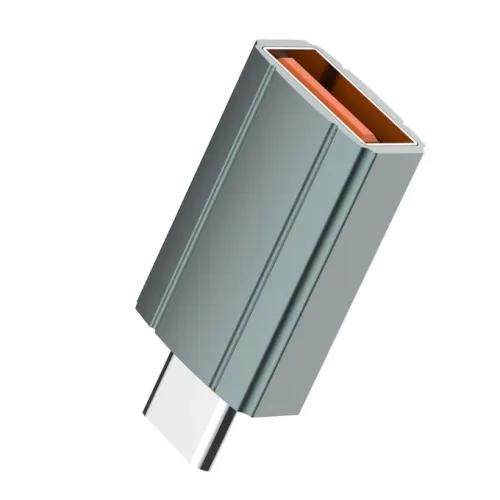 New condition
Computer Accessories
LDNIO · LC140 USB-C to USB-A OTG
LDNIO LC140 USB-C to USB-A OTG adapter for compatible peripherals. Verify host support, accessory power and seller warranty.
Approximate Market Price
BDT 250
Informational market estimate only; this is not a current Store offer.
Compare store prices
No live offers for this variant
BDT 250
Approximate Market Price
Informational market estimate only; this is not a current Store offer.
Loading history…
Product story
LDNIO LC140 is a compact USB-C-to-USB-A adapter with a USB-C connector for a compatible host and a USB-A port for an accessory. LDNIO Bangladesh’s product page and Star Tech describe it as an OTG converter for connecting USB-A peripherals such as storage, keyboards, mice and other accessories. The local LDNIO page lists 12 months’ warranty; warranty terms apply to that seller’s offer and should be confirmed on the invoice. This adapter is not a multiport hub or a charger.
The model is LC140. USB-C is the host-side connector and USB-A is the peripheral-side port. Insert the USB-C end into a compatible phone, tablet, notebook or other device, then connect one USB-A accessory. Some listing pages use broad “Type-C to USB” wording, so check the actual socket: this model has one USB-A output. It is not the reverse USB-A-to-USB-C adapter LC150 or an adapter with a Micro-USB port.
OTG allows a compatible USB-C phone or tablet to act as a host for a connected USB accessory. The LC140 does not create host capability on a device that lacks it; operating-system support and settings may also matter. Check the device manual for OTG/USB host support. If a storage device, audio interface or other accessory draws more power than the host can provide, use its recommended powered configuration rather than expecting the adapter to supply extra power.
The USB-A port can connect a compatible flash drive, keyboard, mouse, card reader, controller or other standard USB accessory. LDNIO and local retailers mention phone, tablet, notebook, HDD and peripheral use. Actual compatibility depends on the host software, accessory protocol, file system and power requirement. This single-port converter does not add HDMI, Ethernet, audio, display output or multiple USB ports. For several accessories, use a compatible powered hub.
LDNIO’s local and Egypt product pages and Star Tech identify USB 3.0 for the LC140. The reviewed pages do not publish a consistent numerical data rate for this particular unit. Actual throughput depends on host and accessory standards, device settings, storage speed and workload. USB 2.0 accessories can operate at their own lower mode. Do not interpret the “USB 3.0” label as a guaranteed file-copy speed or as proof that every connected USB-C port exposes SuperSpeed data.
Some retailer descriptions mention charging or fast transfer, but the reviewed LC140 pages do not establish a maximum current, voltage, USB Power Delivery pass-through rating or supported fast-charge protocol. Do not use it as a charger or assume it can charge a phone from a USB-A accessory port. Power comes from the host or a separately designed power arrangement, and compatible charging behavior depends on all connected devices. Use the device maker’s recommended charger for charging.
The LDNIO pages describe an aluminum alloy housing, grey finish and compact body; Star Tech lists aluminum alloy plus plastic and dimensions of 15 × 8 × 31.5 mm. These material and dimension details are retailer/manufacturer-published and may vary by listing. A rigid adapter with a connected flash drive can put leverage on a laptop or phone port, so avoid side pressure and remove it before placing the device in a bag.
Insert the USB-C connector fully without force, then attach the USB-A accessory. Unlock the host and grant file or accessory permissions if prompted. If nothing appears, verify OTG support, try a low-power accessory, check device settings and test the accessory on another host. If a drive is not readable, check its file system and power requirements. Disconnect storage safely before removal. Do not force a plug or continue using damaged connectors.
A USB flash drive or compatible external drive can be accessed when the host supports OTG, recognizes its file system and can provide adequate power. Some mobile operating systems cannot read certain file systems or encrypted drives without additional software. Larger HDDs may require an external power supply. The LC140 is only the connection adapter; storage, power supplies, file-management apps and backup software are separate.
The LDNIO Bangladesh product page states 12 months’ warranty. Star Tech’s displayed warranty field is not explicit in the reviewed content, and other seller policies may differ. Confirm warranty provider, duration, return eligibility and package quantity for the chosen seller. The reviewed offer describes one adapter; connected USB accessories are not included. Price and stock can change. BiponiBD’s current offer and fulfillment terms were not independently checked during this review.
The LC140 provides a small USB-C-to-USB-A connection and OTG support for compatible hosts, using a grey aluminum-alloy body. It can make familiar USB-A accessories available to some USB-C phones, tablets and laptops. Its limits are device-specific OTG support, accessory power requirements, unspecified exact data bandwidth and no verified charging pass-through. Check the intended host and peripheral before purchase, and confirm warranty terms with the selected merchant.
What is the model? LDNIO LC140. What ports does it have? USB-C host connector to one USB-A accessory port. Is it OTG? Listings describe OTG, but the host device must support USB host mode. Can I connect a flash drive? Yes when host, file system and power are compatible. Does it support USB 3.0? Retailers list USB 3.0; exact speed depends on the devices. Does it charge a phone? No charging pass-through rating is established by reviewed sources. What is the housing? Aluminum alloy is listed; Star Tech also notes plastic. What size? Star Tech lists 15 × 8 × 31.5 mm. What warranty? LDNIO Bangladesh lists 12 months for its offer; confirm your seller. Are accessories included? No, the reviewed page describes the adapter only.
Helpful answers
Product-specific answers maintained with the catalog information.
The model number listed by LDNIO and retailers is LC140.
It connects a USB-C host to one USB-A female peripheral port.
Retailers list OTG, but the connected USB-C host must support USB host mode.
Yes, when the host supports OTG and the drive file system and power are compatible.
Sources list USB 3.0, but do not establish a consistent numeric speed for this unit.
No verified charging pass-through or maximum current is specified in reviewed sources.
LDNIO lists aluminum alloy; Star Tech also mentions plastic in its material field.
Grey and 15 × 8 × 31.5 mm are listed by Star Tech.
LDNIO Bangladesh lists 12 months for its offer; confirm the selected seller terms.
No, product pages describe the adapter only; accessories are separate.
Customer community
Become a merchant
Join BiponiBD, publish accurate offers and start free.