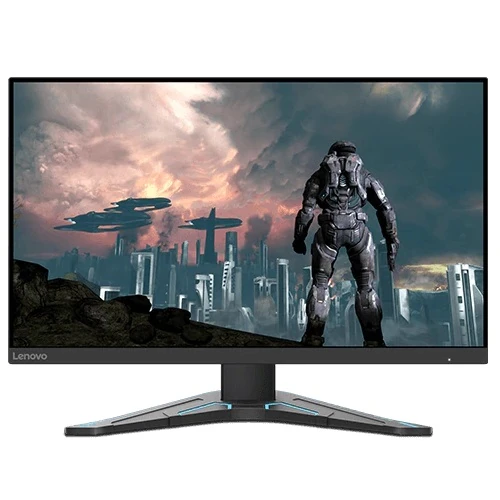
Lenovo G24-20 23.8-inch Full HD IPS gaming monitor
The Lenovo G24-20 is a 23.8-inch Full HD IPS gaming monitor with a 144Hz native refresh rate and an overclock option up to 165Hz. Lenovo PSREF documents its 1920 × 1080 panel, 350 cd/m² typical brightness, 99% sRGB gamut, AMD FreeSync Premium, two HDMI 2.0 inputs, DisplayPort and a height-adjustable stand. This product is catalogued at the native 144Hz rate; 165Hz requires a supported overclock configuration.
Bangladesh retailer pages identify the local part number as 66CFGAC1MY. Lenovo PSREF pages cover regional family configurations such as 66CFGAC1AR, and Lenovo notes that product configurations can vary. Check the complete machine type on the carton and product label, confirm the included cables and local warranty eligibility, and use the manual or model-specific PSREF page for that exact regional unit.
23.8-inch IPS Full HD display
The display measures 23.8 inches diagonally and uses a 3-side NearEdgeless IPS panel with WLED backlighting. Native resolution is 1920 × 1080 in a 16:9 format, with a 527.04 × 296.5mm active area, 0.2745mm pixel pitch and approximately 93 pixels per inch. An anti-glare surface helps reduce reflections in normal indoor conditions, although it cannot remove direct light from a window or lamp.
Lenovo specifies 178-degree horizontal and vertical viewing angles, 350 cd/m² typical brightness, 1000:1 typical static contrast and 99% sRGB coverage. The monitor displays 16.7 million colours with 8-bit colour depth. These figures describe the product specification; panel uniformity, calibration and the appearance of dark scenes can vary between units. The 23.8-inch Full HD size is common for gaming and everyday desktop work. Buyers who want more desktop space or finer text can compare a QHD monitor.
144Hz native refresh and 165Hz overclock
Lenovo lists 144Hz as the native refresh rate and permits an overclock to 165Hz on supported configurations. A higher refresh rate can make motion appear smoother when the computer renders enough frames and the complete connection chain supports the selected timing. It does not increase the graphics card’s frame rate by itself. The regional model, connection, graphics output, cable and monitor OSD settings all affect available modes.
Start with the included DisplayPort cable where possible, confirm that the monitor menu allows the overclock, then select the supported refresh rate in Windows or the graphics control panel. Verify the active signal rate after applying it. If the display blanks or behaves unexpectedly, revert to a supported lower mode. For consoles or other source devices, check their own maximum output; the monitor’s 165Hz overclock does not mean every connected device can use it.
Response-time modes and MPRT trade-off
Lenovo specifies 0.5ms MPRT and five selectable response settings: Level 1 at 1ms, Level 2 at 2ms, Level 3 at 3ms, Level 4 at 4ms and Off mode at 5ms. MPRT is a motion-picture response technique and is not the same thing as a guaranteed grey-to-grey transition under every pixel change. Motion clarity depends on the response setting, refresh rate, frame rate and the content displayed.
Lenovo explicitly notes that enabling MPRT disables AMD FreeSync and may cause negligible flicker. Users should decide whether blur reduction or variable refresh is more useful for a particular game and check the image for flicker, overshoot or dark/bright trails. A lower millisecond marketing number does not guarantee a better result for every scene or user.
AMD FreeSync Premium and eye-care features
The monitor supports AMD FreeSync Premium. Lenovo notes that AMD FreeSync technology works with AMD Radeon graphics cards. The GPU driver, active input, refresh mode and supported range affect operation. Variable refresh can help synchronize compatible output and reduce tearing or stutter, but it cannot prevent every frame pacing problem in a game or application.
Natural Low Blue Light and TÜV Rheinland Eye Comfort certification are listed by Lenovo. These functions can adjust the display characteristics, but they do not guarantee freedom from eye fatigue. Set brightness for the room, use comfortable text scaling and viewing distance, and take breaks during long sessions. Lenovo also lists HDR compliance; this is not a promise of the high peak brightness or local dimming found on dedicated HDR monitors.
Ports, audio and connectivity
Lenovo documents two HDMI 2.0 inputs, one DisplayPort 1.4 input and one 3.5mm audio line-out. This allows multiple video sources to remain connected, although you select one active input at a time. The product has no USB hub. It has no built-in speakers, camera or microphone. Audio can be sent over a compatible HDMI or DisplayPort connection and routed through the monitor’s line-out, or speakers and headphones can be connected directly to the computer.
Lenovo lists a DisplayPort cable and a power cable in the box for the cited configuration. Bangladesh retailer packages may differ by region or stock batch, so confirm included accessories before ordering. Use a suitable cable and graphics output for the refresh mode you plan to use. A port name alone does not guarantee the computer, adapter or cable supports every refresh/resolution combination.
Adjustable stand and mounting
The included stand tilts from -5° to +22° and raises the monitor by up to 130mm. Height adjustment helps position the screen relative to the user’s seated eye line. Lenovo lists a 100 × 100mm VESA mount, a Kensington lock slot and cable management support. Swivel and pivot adjustments are not specified for this model. Use a compatible stand or arm rated for the display’s weight and follow the exact installation instructions.
Approximate dimensions are 539.8 × 234.8 × 364.2mm at the lowest stand position and 539.8 × 234.8 × 494.2mm at the highest position, measured width × depth × height. The monitor head alone measures about 539.8 × 52.5 × 323.2mm. Lenovo reports approximately 3.3kg for the head, 5.3kg with stand and 7.3kg packaged. Dimensions and weights are approximate and may vary by configuration.
Power use and package contents
The monitor has an integrated power supply for AC 100–240V at 50–60Hz. Lenovo specifies 25W typical and 38W maximum consumption, below 0.5W in sleep, and below 0.3W in switch-off mode. Actual consumption depends on brightness, selected mode, refresh rate and usage. Do not substitute an adapter; this configuration uses an integrated supply and a mains power cable.
The cited PSREF configuration lists the monitor with stand, a 1.8m DisplayPort cable, a 1.8m power cable, quick setup guide and warranty booklet. The cable set and printed materials can differ across regional batches. Confirm the box contents with the local seller if a specific cable is required for your setup.
Who should consider the Lenovo G24-20?
The G24-20 may suit a gamer or home user looking for a 23.8-inch IPS Full HD monitor, a fast native refresh, an optional 165Hz overclock, FreeSync Premium and a stand with height adjustment. Two HDMI inputs and a DisplayPort input also help when switching between a PC and another device. For ordinary productivity, its familiar size and resolution are straightforward to support.
Consider a higher-resolution monitor if fine text and workspace density matter most, and compare newer gaming models if you need a refresh rate above 165Hz, USB connectivity, built-in speakers or a swivel/pivot stand. MPRT and FreeSync cannot be used together according to Lenovo, so select the motion mode that suits your actual games rather than assuming every feature is active simultaneously.
Bangladesh price and warranty
Retailer listings reviewed for this catalog pass showed asking prices around ৳19,800–৳24,999. Some Bangladesh sellers list stock and a three-year warranty. These are snapshots from individual retailers, not a BiponiBD offer, and the price and stock may change. Confirm the exact model code, final price, delivery charge, return policy and included accessories with the seller before ordering.
Lenovo PSREF specifies a three-year limited base warranty for the cited family configuration, but local service eligibility can depend on the regional part number, importer and serial number. Ask the seller who handles service in Bangladesh, which parts and labour are covered, whether the monitor serial qualifies and what dead-pixel policy applies. Keep the purchase invoice and warranty documents.
Frequently asked questions
Configuration note: Lenovo specifies 144Hz native with up to 165Hz overclock. MPRT disables FreeSync. Confirm the exact 66CFGAC1 regional variant, current stock and local serial warranty before purchase.