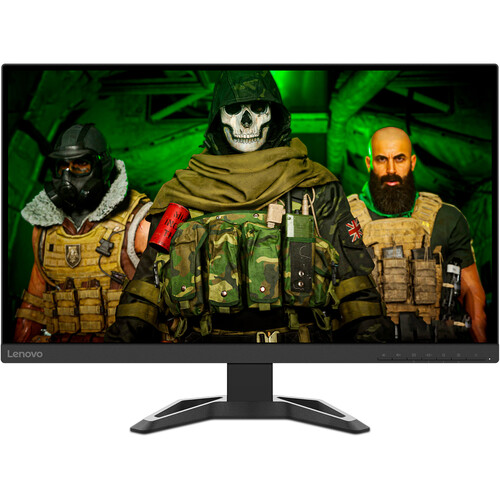
Exact model overview
The Lenovo G27q-30 is a 27-inch QHD gaming monitor with a VA panel, 2560 × 1440 resolution and 165Hz refresh rate. Lenovo PSREF lists 350 nits brightness, 3000:1 typical contrast, 99% sRGB coverage, 90% DCI-P3 coverage, HDR10 decoding, AMD FreeSync Premium and two integrated 3W speakers. It includes two HDMI 2.0 inputs, one DisplayPort 1.4 and an audio line-out. Its stand supports height adjustment and tilt; the monitor also provides 100 × 100mm VESA mounting. Do not confuse it with the Full HD G27-30 model.
27-inch QHD resolution
The flat 27-inch display has native 2560 × 1440 QHD resolution and a 16:9 aspect ratio. QHD offers more detail and workspace than Full HD at the same screen size, making it useful for games, documents and side-by-side applications. Pixel pitch is 0.233 × 0.233mm, with about 108.77 pixels per inch. Set the operating system to native resolution for sharp mapping and use scaling if text is too small. QHD rendering requires more graphics power than Full HD.
VA panel and contrast
Lenovo identifies a VA panel with a typical 3000:1 contrast ratio and 178° horizontal/vertical viewing angles. The contrast specification can help dark scenes appear deeper than on many IPS panels, though results depend on settings and room lighting. VA pixel transitions vary by color transition and overdrive mode. Center the screen for consistent viewing and check motion in the games you play. Panel type and contrast ratio do not guarantee unit-level uniformity or color calibration.
165Hz refresh rate
Lenovo lists 165Hz maximum refresh at 2560 × 1440. A higher refresh can make movement appear smoother when the computer supplies enough frames. Select native QHD resolution and choose 165Hz in system display settings. The source, cable and port must support the selected timing. If the maximum mode is unavailable, check the graphics output, DisplayPort/HDMI connection, driver and monitor settings. The display’s refresh ceiling does not make a game render at 165 frames per second.
Response time and MPRT
Lenovo lists 1ms MPRT and selectable overdrive levels from 4ms to 7ms. MPRT and gray-to-gray response values describe different behavior and are not input-lag measurements. The PSREF notes that enabling MPRT disables AMD FreeSync and may produce slight flicker. Choose between blur reduction and variable refresh based on the game and image stability you prefer. More aggressive overdrive can cause overshoot; compare actual motion and use the cleanest setting rather than relying only on the smallest number.
Adaptive sync and FreeSync Premium
Lenovo lists AMD FreeSync Premium technology. Compatible variable refresh can synchronize the monitor with changing frame output from supported AMD graphics hardware and help reduce tearing. It does not increase rendering performance. The G27q-30 PSREF notes that MPRT disables FreeSync, so these features should not be assumed to operate together. Enable the desired feature in the monitor and graphics settings and check the selected input and timing. If flicker occurs, use a stable refresh range or disable the conflicting motion mode.
Brightness, contrast and HDR10
Lenovo lists 350 cd/m² brightness, 3000:1 typical contrast and HDR10 decoding. HDR10 decoding allows the monitor to receive HDR content, but Lenovo does not list VESA DisplayHDR certification for this model. HDR input support is not a promise of local dimming or OLED-level blacks. Compare SDR and HDR using familiar content and adjust brightness for the room. The manufacturer’s 350-nit figure is not a guarantee that all picture modes sustain the same output.
Color gamut and color depth
Lenovo PSREF lists 99% sRGB and 90% DCI-P3 coverage, 16.7 million colors and 8-bit color using a 6-bit panel plus FRC. Coverage ratio differs from color-area ratio; the PSREF separately lists 123% sRGB color area. Do not mistake the area value for coverage or a calibration accuracy rating. For photo, video or design work, calibrate the individual screen and use color-managed applications. For games and media, choose a profile that keeps colors natural.
HDMI, DisplayPort and audio ports
The monitor provides two HDMI 2.0 inputs, one DisplayPort 1.4 input and one 3.5mm audio line-out. Lenovo lists QHD at 165Hz as the monitor’s maximum; exact source/cable limits should be checked when using a dock or adapter. Connect a PC directly to troubleshoot missing modes. The audio line-out can feed compatible headphones or speakers; it is not a microphone input. Lenovo lists no USB hub or USB-C video input for this model.
Integrated stereo speakers
Lenovo lists two integrated 3W speakers. They can provide convenient sound for gaming, video and calls without separate desk speakers, although a dedicated sound system may offer more bass and volume. HDMI audio can play through the display when it is selected as the computer’s output device. Check the operating system playback selection and monitor volume if sound is missing. The line-out can connect headphones or external speakers if preferred.
Stand height and tilt
Lenovo specifies a height-adjustable stand and tilt movement from approximately -5° to +22°, with lift up to 135mm on PSREF. Adjust the height to suit the seated eye line and tilt to reduce reflections. The catalog lists height adjustment and tilt, but no swivel or pivot movement is specified for this stand. Keep the base on a stable surface and leave slack in power and video cables as the display rises or tilts.
VESA mounting and cable routing
Lenovo lists a 100 × 100mm VESA mount, Kensington lock slot and no USB ports. If using an arm, verify the bracket’s load rating, screw length and instructions for the exact model. Secure the display while mounting and route cables so height/tilt movement does not pull on connectors. The Kensington slot accepts a compatible security cable but does not replace a stable stand or properly installed mount.
Dimensions, weight and desk fit
Lenovo PSREF lists dimensions of 614.1 × 529 × 239.2mm with the stand and a weight around 5.8kg for a specified model configuration. Dimensions without the stand and regional submodel figures can vary, so consult the exact delivered SKU before close-fit installation. Measure desk width, depth, monitor height and rear clearance. Leave room for the base, HDMI/DisplayPort connectors and cable bends. A 27-inch panel should be positioned at a comfortable viewing distance.
Power and consumption
Lenovo lists typical power consumption of 24W and maximum consumption of 65W, with an integrated power supply for the PSREF configuration. Power requirements can vary across region-specific models. Use the power cord supplied with the delivered monitor and a properly grounded outlet. Keep ventilation open, protect the display from liquids and disconnect power before moving or cleaning it. Do not infer power behavior from a different Lenovo monitor with a similar model name.
Eye comfort and display software
Lenovo lists Eyesafe Display, TÜV Rheinland Eye Comfort and hardware low-blue-light features. These display certifications and modes are intended to address aspects of viewing comfort but are not medical treatments. Comfort also depends on brightness, ambient lighting, text scaling, viewing distance and breaks. Lenovo Artery / Display Control Center can be used to configure supported profiles. Low-blue-light settings can shift image color; use a calibrated neutral profile when color accuracy matters.
Advantages and practical trade-offs
The G27q-30 combines 27-inch QHD, a VA panel, 165Hz refresh, 3000:1 typical contrast, FreeSync Premium, HDR10 decoding and stereo 3W speakers. Height adjustment and a VESA pattern support flexible desk setup. Trade-offs include the need for a capable PC to render QHD at high frame rates, MPRT/FreeSync mode conflict, and HDR10 without a listed VESA DisplayHDR tier. Verify regional model details and warranty before purchase.
Bangladesh warranty and seller terms
Lenovo PSREF describes product features but does not establish warranty coverage for a Bangladesh serial or current BiponiBD offer. The existing catalog says three years; confirm the actual serial coverage with the seller and Lenovo authorized service channel. Ask when coverage starts, which panel defects qualify, whether an invoice is required and where service is provided. Price, stock, delivery, return and payment terms can change; check the live listing at checkout and retain the invoice and packaging.
Setup and troubleshooting
Connect power and a compatible HDMI 2.0 or DisplayPort 1.4 cable, select 2560 × 1440 and choose a supported refresh up to 165Hz. If the high-refresh option is missing, check the cable, GPU output, driver, input and monitor settings. For tearing, enable FreeSync Premium where supported. The manual notes that MPRT disables FreeSync; choose one mode based on preference. For audio, select the display as playback device. Adjust overdrive if moving objects show trails or overshoot.
Who should consider this monitor
The Lenovo G27q-30 can suit a PC gamer who wants QHD detail, a VA panel with high typical contrast, 165Hz refresh and built-in stereo speakers. It also works for general productivity where a 27-inch QHD desktop is useful. Confirm that the graphics hardware can supply the desired frame rate, and decide whether variable refresh or MPRT blur reduction is more important because they conflict. Users seeking verified HDR certification, pivot/swivel stand movement or USB-C docking should compare other models.
Specification summary
Lenovo G27q-30: 27-inch VA, QHD 2560 × 1440, 16:9, 165Hz, 350 nits, 3000:1 typical contrast, 99% sRGB and 90% DCI-P3 coverage, 16.7M colors (8-bit 6+FRC), 1ms MPRT and adjustable 4–7ms overdrive. HDR10, AMD FreeSync Premium, HDMI 2.0 × 2, DP 1.4 × 1, audio out and 2 × 3W speakers. Stand: height adjustment up to 135mm and tilt. VESA 100 × 100mm. Confirm local serial warranty and current offer.