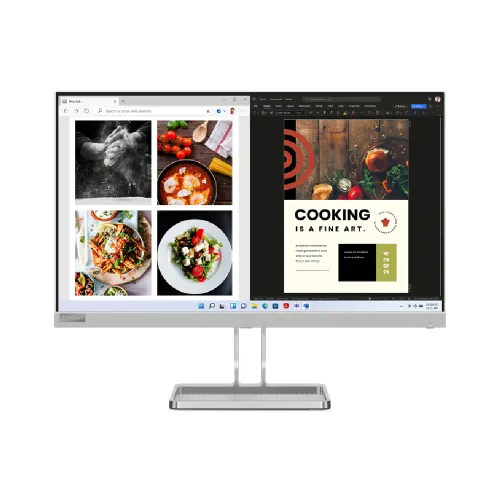
Lenovo L24i-40 23.8-inch Full HD 100Hz IPS Monitor
The Lenovo L24i-40 is a flat 23.8-inch Full HD IPS monitor for work, study and everyday entertainment. It combines a 1920 × 1080 resolution with a 100Hz maximum refresh rate over HDMI, integrated 2 × 3W speakers, AMD FreeSync and a near-edgeless three-side design. The screen has an anti-glare finish and a tilt stand, with a 100 × 100mm VESA mounting pattern for a compatible arm or wall mount. Its VGA input can connect older computers, but the 100Hz mode is HDMI-only.
This listing describes Lenovo L24i-40. Do not confuse it with later L24i models such as L24i-4A, which may use different contrast, refresh, colour and connectivity specifications. Lenovo notes that specifications and warranty can vary by regional configuration. The Bangladesh SKU is not shown in the provided catalog record, so confirm the exact model label, regional part number, warranty entitlement and box contents with the seller before ordering.
Screen size, resolution and panel
The display measures 23.8 inches diagonally, with an active image area of about 527.0 × 296.5mm. Its native resolution is 1920 × 1080 pixels in a 16:9 aspect ratio. Full HD is broadly compatible with desktop computers, laptops and common video sources. It offers a familiar workspace for documents, browser tabs and video while requiring less graphics performance than QHD or 4K. The trade-off is fewer pixels and less desktop space than higher-resolution monitors of a similar size.
Lenovo specifies an In-Plane Switching (IPS) panel with WLED backlighting, 178-degree horizontal and vertical viewing angles, 250 cd/m² brightness and 1300:1 typical contrast. The anti-glare surface helps manage ordinary reflections, but direct light can still be distracting. The display is flat; it is not a curved panel. Lenovo lists 16.7 million colours and 8-bit processing using 6-bit plus FRC. These are product specifications, not a guarantee of unit-to-unit colour uniformity or professional factory calibration.
Lenovo lists 99% sRGB coverage ratio and 110% sRGB colour area ratio. Coverage and colour area are different measurements: the area figure can exceed 100% without meaning that every sRGB colour is accurately reproduced. For colour-critical photography, print or grading work, check measured accuracy, calibration and uniformity for the exact regional unit rather than relying only on a gamut percentage. For general work, streaming and casual content creation, the panel's stated gamut and wide viewing angles are useful reference points.
100Hz refresh and response modes
The maximum refresh rate is 100Hz through the HDMI input. Lenovo's support specification lists the native mode as 1920 × 1080 at 100Hz over HDMI. The VGA input is analog and its supported vertical frequency is listed up to 76Hz; do not expect the HDMI-only 100Hz mode over VGA. Use the HDMI connection and a compatible graphics output/cable, then select 100Hz in the computer's display settings. The source device, operating system and cable all need to support the mode.
A 100Hz refresh can make cursor movement, scrolling and compatible games look smoother than a 60Hz display, but it does not create frames the computer has not rendered. The benefit depends on the graphics hardware, software, cable and content. Lenovo lists response-time modes of 4ms Extreme, 6ms Normal and 14ms Off. These figures describe different overdrive settings; the fastest mode can cause overshoot on some transitions. Choose the mode that looks best to you rather than assuming the lowest number always gives the clearest picture.
AMD FreeSync is listed as a supported sync technology. It can coordinate refresh with compatible AMD graphics output to reduce tearing within the supported operating range. Exact refresh range and behaviour depend on connection, graphics card, driver and settings. This listing does not claim NVIDIA G-SYNC certification. If variable refresh is essential, verify that your graphics device and selected HDMI connection support it with this exact display.
Comfort features and everyday viewing
Lenovo lists Natural Low Blue Light and Lenovo Artery / Lenovo Display Control Center software support. These options let users adjust the picture for different tasks. Low-blue-light modes may shift the image toward warmer colours, so disable or tune them for work that depends on colour judgement. Screen settings are not medical protection; comfortable brightness, room lighting, posture and breaks still matter during long sessions.
The three-side NearEdgeless design can make the visible borders less prominent in a two-monitor arrangement. A physical bezel remains, and the display is not truly borderless. The anti-glare finish reduces some reflections but cannot remove glare from a bright window or lamp aimed directly at the screen. Tilt the display and manage room lighting to improve visibility.
Ports, speakers and audio
The L24i-40 provides one HDMI 1.4 input, one VGA input and a 3.5mm audio output. HDMI supports Full HD at up to 100Hz; VGA supports Full HD with lower refresh capability, listed up to 76Hz in Lenovo support material. Connect headphones or external speakers to the audio output when you need private or higher-quality listening. No USB-C port, USB hub, DisplayPort or built-in microphone is listed for this model.
Two integrated 3W speakers provide basic audio for video, calls and alerts without separate desktop speakers. Their small enclosures are convenient for everyday sound but cannot reproduce the bass or output of larger speakers or headphones. The monitor's audio output can be used with compatible external audio equipment. Confirm audio routing from your computer when connecting over HDMI, because device settings may select another output.
Stand, mounting and desk placement
The included stand supports tilt from approximately -5° to +22°. Height adjustment, swivel and pivot are not listed. Use a riser or adjustable monitor arm if the display needs to sit higher or rotate vertically. Lenovo specifies a 100 × 100mm VESA mount; confirm the bracket's pattern, load rating, screw length and clearance before installation.
Lenovo support lists approximate dimensions of 539.4mm wide, 434mm high and 177.7mm deep with the stand. Weight is about 3.7kg including the stand, according to the catalog specifications. Allow room for the base and rear cables. The stand dimensions in one product page may vary by regional configuration; check the actual unit if desk space is tight.
Power and package contents
The monitor uses an integrated power supply and accepts 100–240V AC, 50–60Hz. Lenovo lists typical power consumption at 14.5W and maximum at 30W, with standby below 0.5W and off-mode below 0.3W. The listed package can include a power cable, HDMI cable, quick setup guide, screw and warranty booklet; included cables may vary by region and retailer. Confirm the contents of the Bangladesh box before purchase and retain the invoice and warranty booklet.
Bangladesh price and warranty
Bangladesh retailer listings observed during this review ranged from approximately ৳15,500 to ৳17,399 for the L24i-40. One retailer page reported in-stock availability and a three-year warranty, while another showed a different offer. Price and stock can change; these are external retailer observations, not BiponiBD offers. Contact the seller to confirm current stock, exact SKU, final price and whether the displayed offer applies to the unit being shipped.
Lenovo PSREF lists a three-year limited warranty for a specific model configuration, and Bangladesh sellers also advertise three years. Warranty entitlement depends on the regional machine type/serial number, local service terms and proof of purchase. Ask the seller to confirm in writing that the serial number is eligible for Lenovo-authorized Bangladesh service, and clarify dead-pixel coverage, service location and any exclusions. Do not assume that another regional SKU receives identical coverage.
Who should consider the Lenovo L24i-40?
Consider it if you want a 23.8-inch Full HD IPS screen with a 100Hz HDMI mode, integrated speakers and both HDMI and VGA connections. It can suit office documents, online learning, browsing and casual games. The near-edgeless appearance and VESA mounting can fit a multi-screen or arm-mounted desk, while the built-in speakers keep a simple setup compact.
Compare alternatives if you need a higher resolution, DisplayPort, USB-C docking, a height-adjustable stand, high-refresh gaming over VGA or verified colour calibration. If your only video connection is VGA, expect a lower refresh limit than 100Hz. If you need 100Hz, use HDMI and confirm support on the computer. The 23.8-inch FHD panel prioritizes broad compatibility and a compact workspace rather than maximum desktop resolution.
Key features
- 23.8-inch flat IPS display with Full HD 1920 × 1080
- 100Hz maximum refresh over HDMI only
- VGA input supports Full HD at lower refresh (up to 76Hz per Lenovo support)
- 250 cd/m² brightness and 1300:1 typical contrast
- 178° horizontal and vertical viewing angles
- 99% sRGB coverage ratio; 110% colour area ratio (Lenovo figures)
- 4ms Extreme / 6ms Normal / 14ms Off response modes
- AMD FreeSync and Natural Low Blue Light
- Two integrated 3W speakers and 3.5mm audio out
- NearEdgeless three-side design and anti-glare surface
- Tilt -5° to +22° and 100 × 100mm VESA mounting
- Integrated power supply; confirm regional SKU, warranty and box contents
Advantages
- 100Hz over HDMI can make compatible motion smoother than a 60Hz display.
- IPS panel offers wide viewing angles for everyday desk use.
- Built-in 2 × 3W speakers provide convenient basic audio.
- HDMI and VGA support a mix of newer and older computers.
- VESA mounting and a near-edgeless design suit flexible desk layouts.
Limitations to consider
- Full HD provides less workspace than QHD or 4K screens.
- 100Hz is supported over HDMI; VGA does not provide the 100Hz mode.
- The stand tilts only; height, swivel and pivot adjustment are not listed.
- No DisplayPort, USB-C, USB hub or microphone is listed.
- Built-in speakers are convenient but limited compared with dedicated audio.
- Warranty entitlement depends on the exact regional SKU and serial number.
Frequently asked questions
What are the display size and resolution?
The Lenovo L24i-40 has a 23.8-inch IPS screen with native 1920 × 1080 Full HD resolution and a 16:9 aspect ratio.
Does it support 100Hz?
Yes, through HDMI. Lenovo lists the native 1920 × 1080 mode at 100Hz over HDMI. VGA has a lower maximum vertical frequency and is not the 100Hz connection.
Does it have built-in speakers?
Yes. Lenovo lists two integrated 3W speakers. Use headphones or external speakers through the audio output if you need different sound quality.
What ports are included?
One HDMI 1.4, one VGA and one 3.5mm audio output are listed. No DisplayPort or USB-C is listed.
Does it support FreeSync?
Lenovo lists AMD FreeSync. The effective range and compatibility depend on the source, driver, HDMI connection and settings.
Can I mount it on an arm?
Yes. Lenovo lists 100 × 100mm VESA mounting. Check the arm rating, screws and installation clearance.
What warranty applies in Bangladesh?
Local retailer listings advertise three years, and Lenovo lists three years for a specific regional configuration. Confirm that the serial number is eligible for local service and ask about exclusions and dead-pixel terms.
What is the Bangladesh price?
Retail observations ranged around ৳15,500–৳17,399. Price and stock vary; these listings are not BiponiBD offers.
Before ordering: confirm the exact L24i-40 SKU, HDMI support for 100Hz, package contents, current stock and Lenovo Bangladesh warranty eligibility.