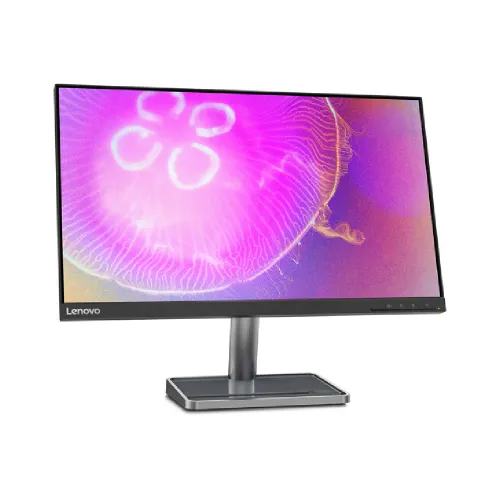
The Lenovo L24q-35 is a 23.8-inch QHD IPS monitor with a 2560 × 1440 native resolution, 99% sRGB gamut and a tilt stand. Lenovo’s Product Specifications Reference (PSREF) lists a 75Hz maximum refresh rate, 300 cd/m² typical brightness, integrated speakers and HDMI plus DisplayPort inputs. The product is a compact high-resolution work display with basic gaming features. The local catalog previously described it as 100Hz. Some seller pages repeat that number, but Lenovo PSREF identifies 75Hz. This page follows the manufacturer specification and records the discrepancy so buyers can ask the seller to demonstrate the supported mode. Do not purchase on an assumption of 100Hz unless Lenovo confirms it for the exact regional part number and the unit accepts that timing.
QHD resolution and 23.8-inch density
Native 2560 × 1440 resolution places 3.69 million pixels on a 23.8-inch diagonal screen, giving Lenovo’s stated 123dpi density and a 0.2058mm pixel pitch. Compared with Full HD at the same size, QHD offers more workspace for side-by-side documents, larger spreadsheets and detailed web pages. Set the computer to native resolution for clear text and graphics.
More pixels can require more GPU performance in 3D applications and games, especially at high image quality. Operating-system scaling can make small interface elements easier to read while preserving the added workspace. The best scaling depends on eyesight, software and viewing distance. If your main use is simple office work, match text size to comfort; if you edit high-resolution images, verify that the software and source files benefit from the extra pixels.
IPS picture, brightness and contrast
Lenovo lists a three-sided near-edgeless IPS panel with 178-degree horizontal and vertical viewing angles, 300 nits typical brightness and 1000:1 static contrast. The anti-glare surface helps reduce reflections from common room lighting. A dynamic contrast figure of 3,000,000:1 is also listed, but dynamic contrast is a changing processing metric and should not be compared as if it were the static panel contrast.
IPS viewing angles are useful when more than one person looks at the screen or when the user shifts position. They do not guarantee identical brightness and color from every angle. Set brightness to suit ambient light and avoid placing a bright window directly behind the viewer. In a dark room, a lower brightness can feel more comfortable. No independent measurement or panel uniformity test is claimed for the product listing.
Color gamut and color workflow
Lenovo specifies 99% sRGB and 16.7 million colors using 8-bit (6-bit + FRC) output. These figures describe the manufacturer’s stated color gamut and support, not a factory calibration certificate or a measured Delta E result. The display may suit everyday photo viewing, web design previews and office graphics, but color-critical output requires a controlled workflow.
For print or professional photo work, use a colorimeter if a measured profile is needed and check that applications are color managed. Do not assume 99% sRGB alone proves accurate white point, gamma, uniformity or calibration on the individual unit. If exact color matching is central to your work, consider a display with a published calibration report or a calibration process appropriate for your tools and target profile.
Refresh rate and the 75Hz / 100Hz discrepancy
Lenovo PSREF lists the L24q-35 at 75Hz. Some Bangladeshi retail pages say 75Hz in headings yet claim “100Hz for HDMI” in description text. That seller inconsistency does not override the manufacturer reference. For accurate product content, treat 75Hz as the supported maximum unless Lenovo confirms a different timing for the specific SKU.
Refresh rate is the number of display updates per second; it does not mean the computer renders that many frames. To configure the display, connect with a suitable HDMI 1.4 or DisplayPort 1.2 cable, choose 2560 × 1440 and inspect advanced display settings. If 75Hz is not available, check the GPU output, cable, driver, active input and color settings. Ask the seller for written support evidence before relying on a claimed 100Hz mode.
Response time, FreeSync and gaming
Lenovo lists 4ms in Extreme mode and 6ms in Normal mode. Pixel response and total input latency are different measurements. Extreme overdrive can change transition behavior; it does not prove every transition is 4ms or guarantee that visible ghosting is absent. Lenovo also lists AMD FreeSync and notes that this feature works with AMD Radeon series graphics cards.
The QHD resolution can look detailed in games, but frame rate depends on GPU capability and game settings. FreeSync behavior depends on compatible hardware, driver, connection and configuration; the product sheet does not state a variable-refresh range. This is a general professional monitor rather than a high-refresh esports screen. If you need 144Hz, 165Hz or higher, compare a gaming model with explicit refresh and sync specifications.
Ports, audio and compatibility
The rear connections listed by Lenovo are one HDMI 1.4, one DisplayPort 1.2 and one 3.5mm audio-out. The monitor has integrated speakers; Lenovo PSREF states 2 × 3W, while some local seller listings show 2 × 2W. Because of this conflict, this page preserves Lenovo’s official figure and advises buyers to confirm the regional unit if speaker output matters.
There is no USB-C, USB hub or VGA input listed. Use HDMI or DisplayPort for digital video, then select the correct source from the monitor controls. The 3.5mm output is available for external audio when the source signal carries audio. If a laptop lacks full-size video ports, verify any adapter’s QHD timing support. Do not assume a USB-C adapter will deliver native QHD without checking its output capabilities.
Stand, VESA and physical placement
The supplied stand is tilt-only, with Lenovo listing an adjustment range from -5° to +22°. The monitor also supports a 100mm VESA mount. The listed dimensions are 539.8 × 164.9 × 423.7mm with the stand at Lenovo’s stated position and 539.8 × 44.0 × 325.7mm for the display head. The monitor weighs about 3.9kg with stand.
The stand does not provide height, swivel or portrait rotation according to PSREF. If you need ergonomic adjustment beyond tilt, a compatible 100mm VESA arm can provide it. Check the mount’s weight capacity, screw type, cable slack and desk attachment before installation. Lenovo Tiny/Nano mounting requires separate optional kits. Leave enough space for the monitor’s stand footprint and keep cables from pulling when the screen angle changes.
Power, thermal and everyday use
Lenovo lists an internal power supply with AC 100–240V input at 47–63Hz, 22W typical consumption and 32W maximum. Sleep/off power is listed below 0.5W and switch-off below 0.3W. The monitor also has cable management and a Kensington security slot. A compatible lock is a separate accessory, and power use varies with display configuration and operating conditions.
Use the supplied power cord and a properly installed outlet. Keep vents clear and disconnect power safely before moving the monitor. Clean the screen with a soft microfiber cloth; avoid spraying liquids directly onto the panel. For daily text work, adjust brightness and scaling to your room and eyesight. These published wattage values are manufacturer figures, not an estimate of an individual household bill.
Eye comfort and display software
Lenovo lists Eyesafe certification, TÜV Rheinland Flicker Free, Eye Comfort and hardware Low Blue Light. It also supports Lenovo Artery, formerly known as Lenovo Display Control Center. Compatibility and available controls can vary across operating systems and software versions, so check Lenovo’s support resources for the exact device and operating system.
Comfort certifications and blue-light features do not replace breaks, suitable lighting or a comfortable viewing position. Use the tilt setting to reduce reflections and keep the monitor at a suitable distance. If you need a precise color workflow, confirm how eye-comfort modes affect the selected picture mode and calibration. Lenovo PSREF states that FreeSync requires an AMD Radeon series graphics card; software support should not be confused with graphics compatibility.
Bangladesh price, stock and warranty
TechLand showed a ৳26,000 discounted listing with Out of Stock status; Ryans showed stock unavailable and no current price. These seller pages may change and do not establish a live market-wide price. They also do not confirm a BiponiBD offer or stock. Verify final price, location-specific availability, delivery fees and the exact part number immediately before purchase.
Lenovo PSREF lists one-year and three-year courier/carry-in warranty options depending on configuration. Bangladeshi sellers advertise three years for some L24q-35 listings. The exact warranty depends on the imported configuration and serial. Ask the seller to confirm the authorized service provider, local serial eligibility, duration, invoice and box requirements, service location and dead-pixel claim conditions in writing.
Model identity and buyer checklist
This page is for Lenovo L24q-35, not L24q-30, L24q-40 or another Lenovo display. The PSREF identifies ports, panel, audio, refresh, stand, mount and accessory details for this model. A Bangladesh retailer lists part number 66D1GAC1MY; the product family can have regional configurations, so the carton label and serial warranty record should be checked before relying on a seller’s specification.
Before ordering, confirm the exact model and part code, native QHD output over your chosen input, 75Hz official refresh specification, speaker wattage if important, stand contents, VESA compatibility, warranty entitlement and live stock. Keep the box and invoice. If a store claims 100Hz, request manufacturer documentation for that precise SKU. Technical data here is sourced from Lenovo PSREF; local price, warranty and stock statements are seller observations, not independent testing.
Key features
- 23.8-inch IPS WLED panel with 2560 × 1440 QHD resolution, 16:9 aspect ratio and 123dpi pixel density.
- 75Hz maximum refresh rate according to Lenovo PSREF; source must support native QHD timing.
- 99% sRGB color gamut, 300 cd/m² typical brightness and 1000:1 static contrast.
- 178° horizontal and vertical viewing angles with anti-glare screen treatment.
- AMD FreeSync support; Lenovo specifies Radeon graphics compatibility for this feature.
- One HDMI 1.4, one DisplayPort 1.2 and one 3.5mm audio-out.
- Integrated stereo speakers; Lenovo PSREF lists 2 × 3W, while local listings conflict on wattage.
- Tilt adjustment from -5° to +22°; 100mm VESA support for compatible mounting.
- Eyesafe Certified, TÜV Flicker Free, Eye Comfort and hardware Low Blue Light certifications/features listed by Lenovo.
- Internal power supply, 22W typical / 32W maximum, plus integrated cable management and Kensington slot.
Frequently asked questions
What are the screen size and resolution?
Lenovo specifies a 23.8-inch IPS display with native 2560 × 1440 QHD resolution, 16:9 aspect ratio and 123dpi pixel density.
Is the Lenovo L24q-35 75Hz or 100Hz?
Lenovo PSREF lists 75Hz maximum. Some retailer text states 100Hz for HDMI, conflicting with Lenovo’s specification. Use 75Hz as the official manufacturer value and confirm the monitor’s accepted timing with the exact source and unit.
Which ports are available?
Lenovo lists one HDMI 1.4, one DisplayPort 1.2 and one 3.5mm audio-out, plus power and a Kensington security slot. It does not list USB-C, a USB hub or VGA.
Does it include built-in speakers?
Yes. Lenovo PSREF lists integrated speakers at 2 × 3W. Some Bangladesh seller text says 2 × 2W, so verify the exact regional product sheet or unit if speaker output is important.
Does it support AMD FreeSync?
Yes. Lenovo lists AMD FreeSync and notes that the feature works with AMD Radeon series graphics cards. Verify the source, connection and driver settings for variable-refresh behavior.
Is it suitable for gaming?
The QHD IPS panel, 75Hz maximum and FreeSync can support casual gaming. It is not a high-refresh esports display; frame rates depend on the computer and game, and the official refresh ceiling is 75Hz.
Can I use the stand in portrait or adjust screen height?
Lenovo PSREF describes a tilt stand from -5° to +22°. It does not list height adjustment, swivel or pivot. Use a compatible VESA arm if you need those movements.
What VESA mount does it support?
Lenovo lists support for a 100mm VESA mount. Check the arm’s load rating, screw requirements and clearance before installation. ThinkCentre Tiny/Nano mounting kits are optional and sold separately.
What is the color gamut and is it factory calibrated?
Lenovo specifies 99% sRGB, but this is not a factory calibration report and does not establish Delta E, uniformity or measured accuracy. Color-critical work may require a calibration workflow.
What is the price and current stock in Bangladesh?
TechLand showed ৳26,000 but Out of Stock when checked; Ryans listed stock unavailable with no current price. Listings can change and do not confirm a BiponiBD offer or current availability.
What warranty applies?
Lenovo PSREF lists 1-year and 3-year courier/carry-in service options depending on configuration. Bangladesh sellers commonly advertise three years. Confirm the exact serial, local service entitlement and claim terms in writing.
What is included in the box?
Lenovo PSREF lists the monitor with stand, a 1.8m power cable, a 1.5m HDMI cable and a quick setup guide. Local packages can differ, so confirm the actual box contents with the seller.
Source note: Lenovo PSREF and datasheet provide primary technical specifications. Bangladesh retailer pages are dated price, availability and warranty observations checked 2026-11-08T21:03:43.103Z; they conflict on refresh rate, speaker wattage and input details. They do not confirm a BiponiBD offer. No hands-on or measurement test is claimed.