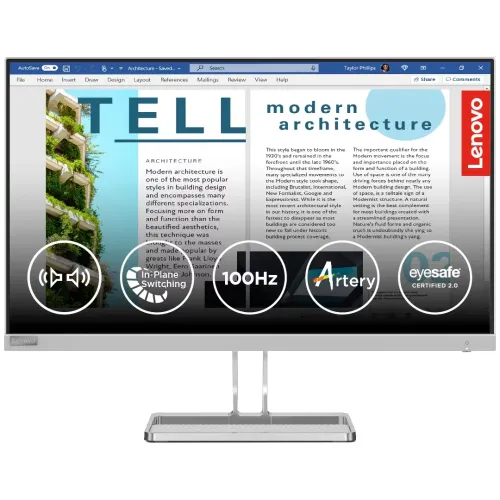
Lenovo L27i-40 27-inch Full HD IPS monitor
The Lenovo L27i-40 is a 27-inch Full HD IPS monitor with refresh rates up to 100Hz over HDMI. Lenovo lists 300 cd/m² brightness, 1300:1 typical contrast, 99% sRGB coverage, 4ms Extreme response, integrated stereo speakers rated 3W × 2 and a tilt stand. Connectivity includes two HDMI 1.4 ports, one VGA input and a 3.5mm audio output. The display supports 100 × 100mm VESA mounting, a Kensington security slot and Lenovo eye-comfort features. This description follows Lenovo's model-specific PSREF and datasheet; seller pages are used only for local availability and warranty observations.
27-inch IPS panel and Full HD resolution
The monitor uses a 27-inch WLED-backlit IPS panel with a native 1920 × 1080 resolution, 16:9 aspect ratio and 597.9 × 336.3mm active area. Lenovo lists 0.311mm pixel pitch, 82 dpi, 178-degree horizontal and vertical viewing angles and a three-sided NearEdgeless design. The anti-glare screen treatment helps reduce reflections under ordinary room lighting but cannot eliminate direct sunlight or every glare source.
Full HD on a 27-inch display creates a large physical work area but has fewer pixels per inch than QHD at the same size. Text and detailed images can look less crisp when viewed close up. Interface elements appear larger at standard scaling, which may suit users who prefer readable controls. If your daily work involves dense spreadsheets, detailed design or several windows at once, compare QHD monitors before choosing.
100Hz refresh: HDMI only
Lenovo specifies a 100Hz refresh rate over HDMI only. At 1920 × 1080, the HDMI 1.4 input can use 100Hz, while VGA supports Full HD at 60Hz. Connect through HDMI from a compatible computer or console, select 1920 × 1080 and choose 100Hz in the operating-system display settings. If 100Hz does not appear, check the selected input, graphics output, cable, driver and any dock or converter in the signal path.
A 100Hz screen can make pointer movement, scrolling and compatible games appear smoother than 60Hz when the system renders enough frames. It does not raise the graphics card's frame rate by itself. VGA can connect an older PC, but it is not the route to 100Hz at native resolution. Lenovo's official mode statement should take precedence over retailer listings that omit the input-specific limit.
Response modes and motion expectations
Lenovo lists 4ms Extreme, 6ms Normal and 14ms Off response modes. These options represent different overdrive settings and are not equivalent to a universal 1ms response claim. Pixel transitions vary and depend on mode, temperature and the specific grey-to-grey transition. A monitor's refresh rate, response behaviour, frame rate and input latency all contribute to perceived motion.
The L27i-40 is positioned as a general-use monitor with 100Hz support rather than a dedicated esports panel. Use a balanced setting that reduces blur without introducing distracting inverse ghosting. If fast competitive gaming is the main purpose, compare independent response and input-lag measurements for the exact model and consider a monitor designed for higher refresh rates.
Brightness, contrast and colour
Lenovo specifies 300 cd/m² brightness and 1300:1 typical contrast. The datasheet also lists 3,000,000:1 dynamic contrast; that value describes a different processing behaviour and should not be compared directly with static contrast. The brightness can suit ordinary office and home lighting, while strong glare or direct sunlight can still reduce visibility.
Colour gamut is listed as 99% sRGB coverage and 107% sRGB colour-area ratio. Those are distinct gamut measures. Lenovo lists 16.7 million colours and 8-bit depth using 6-bit plus FRC. Coverage values do not establish unit calibration accuracy, uniformity or panel consistency. For colour-critical work, request a calibration report or use suitable measurement equipment. For general office tasks, study and media, select the colour mode that looks comfortable and consistent.
Eye comfort and display software
Lenovo lists Natural Low Blue Light, TÜV Rheinland Eye Comfort, TÜV Low Blue Light hardware solution and Eyesafe 2.0 certifications. These features are intended to support comfortable viewing, but cannot guarantee that long sessions prevent eye fatigue. Adjust brightness for the room, use readable scaling, reduce reflections and take breaks during extended use.
Lenovo Artery, also called Lenovo Accessories and Display Manager, is listed as supported software for managing some display settings. Operating-system availability and functions can vary. Download the current release from Lenovo support for L27i-40. Display presets can alter colour and brightness, so review them if the same appearance needs to be maintained across tasks.
HDMI, VGA and audio connections
The official Lenovo PSREF lists two HDMI 1.4 inputs, one VGA input and one 3.5mm audio output. This corrects product records and retailer entries that list only one HDMI port or omit VGA. HDMI supports Full HD at 100Hz, while VGA supports 60Hz. No DisplayPort is listed. Two HDMI ports let users leave multiple digital devices connected and switch the active input from the monitor menu.
The monitor includes integrated stereo speakers rated at 3W each (2 × 3W). They are useful for system notifications, video calls and casual media without external speakers. For fuller sound or private listening, connect headphones or powered speakers to the 3.5mm audio output or directly to the source device. When using VGA, route sound separately because the analog VGA connection carries video only.
Tilt stand, VESA mounting and office setup
Lenovo specifies a tilt range from -5° to +22°. Height adjustment, swivel and pivot are not listed for this model. The 100 × 100mm VESA pattern allows mounting on a compatible arm or bracket. Check the arm weight rating, mounting screw size and clearance around cables before installation. A Kensington Security Slot supports a compatible lock in shared workplaces.
Lenovo lists dimensions of approximately 612.3 × 181.8 × 474.4mm with stand and 612.3 × 43.5 × 368mm for the monitor head. Weight is around 4.3kg with stand and 3.6kg without. Measure desk depth and cable access before setup. The Cloud Grey case and thin bezels can fit a professional workspace, while optional ThinkCentre Tiny or Nano mount hardware can attach compatible compact computers behind the display.
Power consumption and box contents
The monitor has an integrated power supply for 100–240V AC, 50–60Hz. Lenovo lists typical consumption of 19.5W, maximum 36W, 0.5W in sleep and below 0.3W in switch-off mode. Actual consumption depends on brightness and operation. Use the supplied power cord and follow the product rating label.
The Lenovo datasheet lists a monitor with stand, 1.8m HDMI cable, 1.8m power cable, one screw and quick setup guide in the box. Regional packaging may vary. Check the serial label, panel, stand, cable and invoice on delivery, and retain the warranty booklet. Do not discard the carton until you have confirmed the screen and accessories are in good condition.
AMD FreeSync compatibility
Lenovo lists AMD FreeSync and notes it can work only with AMD Radeon-series graphics cards. Variable refresh can coordinate compatible output with the display to reduce tearing when frame rates fluctuate within the supported conditions. Driver, GPU, HDMI input and settings all affect operation. This documentation does not establish NVIDIA G-SYNC certification, so do not assume support on every graphics card.
Enable the feature in the display and graphics settings and test with your actual system. If tearing or flicker occurs, check the input, driver and supported refresh mode. FreeSync does not increase frame rate; it coordinates display timing with compatible frames generated by the source.
Who should consider the Lenovo L27i-40?
The L27i-40 may suit office desks, study setups and general home use where a 27-inch IPS screen, built-in speakers and HDMI at 100Hz are useful. Dual HDMI ports can support a PC and another digital source, while VGA keeps compatibility with older computers. Eye-comfort certifications, VESA mounting and Tiny/Nano support can also fit managed workspaces.
Consider a QHD monitor if you need sharper text at 27 inches, a higher-refresh gaming model for competitive play, a height-adjustable stand for ergonomic positioning or a display with documented calibration for colour-critical work. Verify that your graphics system is AMD Radeon if FreeSync is a deciding feature.
Bangladesh price, stock and warranty
Retailer pages checked during this review did not provide a reliable live price for this exact model. TechLand showed the product out of stock, while Ryans did not publish a price. These pages are not a BiponiBD offer. Confirm current availability, the exact L27i-40 model, final price, delivery cost and return policy with the seller before ordering.
Some Bangladesh listings advertise a three-year warranty. Lenovo PSREF configurations can vary by region and product configuration, so verify the specific serial and authorised sales channel with Lenovo Bangladesh. Ask who handles service, whether the serial is eligible, the applicable dead-pixel and replacement terms, and retain the invoice and warranty documents.
Frequently asked questions
What is the display size and resolution?
Lenovo specifies a 27-inch IPS WLED panel with 1920 × 1080 Full HD resolution, 16:9 aspect ratio, 82 dpi and 0.311mm pixel pitch.
Does it support 100Hz through VGA?
No. Lenovo says 100Hz is supported only over HDMI. VGA supports 1920 × 1080 at up to 60Hz. Use a compatible HDMI source and cable for the 100Hz mode.
How many video ports does it have?
The Lenovo PSREF lists two HDMI 1.4 inputs and one VGA input, plus one 3.5mm audio-out. It does not list DisplayPort.
What are the response-time modes?
Lenovo specifies 4ms Extreme, 6ms Normal and 14ms Off modes. The official specification reviewed does not claim 1ms MPRT.
Does it include built-in speakers?
Yes. Lenovo lists integrated stereo speakers rated 3W × 2. The 3.5mm output can connect headphones or external speakers.
Does AMD FreeSync work with NVIDIA graphics?
Lenovo lists AMD FreeSync and notes it works only with AMD Radeon-series graphics. Do not assume NVIDIA certification or support from that statement.
What stand adjustments are available?
Lenovo lists a tilt range from -5° to +22°. Height adjustment, swivel and pivot are not listed. A 100 × 100mm VESA mount is supported.
What are the colour and contrast values?
Lenovo lists 99% sRGB coverage, 107% sRGB colour-area ratio, 1300:1 typical contrast and 3,000,000:1 dynamic contrast. Gamut coverage alone does not prove calibration accuracy.
What is included in the box?
The Lenovo datasheet lists the monitor with stand, 1.8m HDMI cable, 1.8m power cable, one screw and quick setup guide. Regional contents can vary.
What is the Bangladesh price and warranty?
The TechLand page reviewed showed the item out of stock and no valid current price; Ryans did not show a price. Some local sellers advertise three-year coverage, but exact serial eligibility and service terms require confirmation.
Key note: Lenovo lists two HDMI 1.4 ports plus VGA, 100Hz over HDMI only, 3W × 2 speakers, tilt-only stand, 1300:1 typical contrast and 99% sRGB coverage.