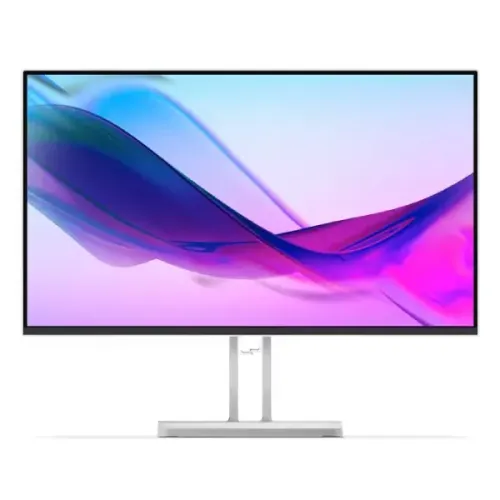
Lenovo L27i-4A 27-inch Full HD IPS monitor
The Lenovo L27i-4A is a 27-inch Full HD IPS monitor with refresh rates up to 100Hz over HDMI 1.4. Lenovo lists 300 cd/m² brightness, 1500:1 typical contrast, 99% sRGB coverage and four response modes: 1ms MPRT at 100Hz, 4ms Extreme, 6ms Normal and 14ms Off. Inputs include two HDMI 1.4 ports and VGA, with a 3.5mm audio output and stereo 3W × 2 speakers. The stand tilts, and the monitor supports 100 × 100mm VESA mounting. Lenovo's documentation also notes that enabling MPRT disables AMD FreeSync. This description follows Lenovo's official PSREF and datasheet.
27-inch IPS screen and Full HD resolution
The panel is a 27-inch IPS display with a 1920 × 1080 resolution and 16:9 aspect ratio. Lenovo lists a 597.9 × 336.3mm active area, 0.3114mm pixel pitch and 82 dpi. The flat WLED-backlit panel uses a four-sided ultra-thin bezel and anti-glare surface. This combination can work well for office documents, web browsing, video calls and general home use. A 27-inch display gives a physically large workspace, though Full HD pixels are less dense than QHD at the same size.
If you work with small text, dense spreadsheets, fine design detail or multiple windows, compare a 27-inch QHD monitor before choosing. The larger screen can make controls easy to see at standard scaling, but images and fine text may appear less sharp from close range. Lenovo's sRGB value describes gamut coverage; it does not guarantee that every unit is calibrated to a specific accuracy target.
100Hz refresh and input-specific limits
Lenovo specifies a 48–100Hz refresh range. The PSREF states that HDMI 1.4 supports 1920 × 1080 at 100Hz, while VGA supports 1920 × 1080 at 60Hz. To use 100Hz, connect the computer to HDMI, choose Full HD resolution and select 100Hz in the operating system or graphics settings. VGA remains useful for legacy equipment but is not the 100Hz path at native resolution.
If 100Hz does not appear, confirm the active input, graphics output, cable, driver, chosen resolution and any dock, KVM or converter. HDMI ports can remain connected to two sources, but only the selected source is displayed at a time. A higher refresh rate can make cursor motion, scrolling and supported games appear smoother when the computer supplies enough frames. It does not increase the computer's rendered frame rate.
Response modes and the MPRT/FreeSync trade-off
Lenovo lists 1ms MPRT at 100Hz, 4ms Extreme, 6ms Normal and 14ms Off. MPRT is a motion-picture response measure and differs from grey-to-grey pixel transition time. These modes do not mean that every pixel transition completes in the same time. Motion clarity also depends on frame rate, refresh rate, overdrive behaviour, content and display settings.
The Lenovo PSREF notes that enabling MPRT disables AMD FreeSync and may cause negligible flicker. That is a real mode trade-off: choose MPRT if its motion presentation suits your use, or choose FreeSync for variable-refresh behaviour with a compatible AMD graphics source. Both are not available simultaneously under the noted mode. Try the settings with your own content and use the mode that looks comfortable and stable.
Brightness, contrast and colour
Lenovo specifies 300 cd/m² brightness and a 1500:1 typical contrast ratio. It also lists a 3,000,000:1 dynamic contrast value; static typical and dynamic contrast figures describe different behaviours and should not be treated as equivalent measurements. Brightness of 300 nits can suit typical office lighting, although reflections and perceived visibility depend on room conditions and screen placement.
Colour specifications list 99% sRGB coverage under CIE 1931 and a 112% sRGB colour-area ratio. These refer to different ways of expressing gamut and should not be confused with one another. The display supports 16.7 million colours with 8-bit depth using a 6-bit plus FRC panel. Gamut figures do not establish factory calibration accuracy, grey uniformity or colour consistency across viewing angles. For colour-critical work, request calibration data or measure the unit with a colorimeter.
Two HDMI ports, VGA and audio connections
The official Lenovo PSREF lists two HDMI 1.4 inputs, one VGA input and one 3.5mm audio-out. This corrects retailer records that list only a single HDMI port and may omit or misstate other connections. One HDMI connection supports Full HD at 100Hz. Lenovo lists Full HD at 60Hz on VGA. The official specification does not include DisplayPort, so users who need DP should select another model or use a compatible output conversion only after checking timing and signal support.
HDMI can carry digital audio from the source to the monitor's speakers. If sound does not play, select the monitor as the computer's output device and check system and application volume. The 3.5mm output can connect headphones or powered external audio equipment. VGA carries analog video; route audio separately when using a VGA source.
Integrated stereo speakers
The monitor has stereo speakers rated at 3W each (2 × 3W). They are convenient for system sounds, casual video and basic calls without adding a separate speaker set. Small integrated drivers have limited bass and loudness compared with dedicated desktop speakers. For music, movies or a noisy room, use external speakers or headphones through the source or monitor audio output.
Stand, VESA, security and desk setup
Lenovo specifies a tilt range from -5° to +22°. The PSREF does not list height adjustment, swivel or pivot for the L27i-4A. The product's existing seller data had reported those adjustments, so they have been removed from the product content. A 100 × 100mm VESA mount allows installation on a compatible arm; check load capacity and screw specifications before mounting. The stand uses cable management and the back includes a Kensington Security Slot for a compatible lock.
Lenovo lists 611.5 × 181.5 × 474.6mm dimensions with stand and 611.5 × 41 × 355.6mm for the monitor head. Approximate weight is 3.88kg with stand and 2.91kg head only. Measure desk depth and ensure cables remain slack when adjusting tilt or mounting. The Cloud Grey finish can coordinate with light-coloured workspace equipment.
Eye comfort and Lenovo software
Lenovo lists Natural Low Blue Light, TÜV Rheinland Eye Comfort certification, TÜV Rheinland hardware Low Blue Light and Eyesafe 2.0. These certifications and modes can support comfortable viewing preferences but do not guarantee that long sessions prevent fatigue. Adjust brightness to match ambient light, use readable text scaling and take regular breaks.
Lenovo Artery, also named Lenovo Accessories and Display Manager, is listed for supported Windows 10 and 11, Mac OS and Windows on ARM systems, with functions varying by system. Check Lenovo's current support downloads for compatibility. Display modes can change colour appearance, so use a consistent preset for tasks where matching colour matters.
Power use and box contents
The monitor has an internal power supply rated for AC 100–240V at 50–60Hz. Lenovo lists 17.5W typical and 31.5W maximum power consumption, less than 0.5W in sleep/off mode and less than 0.3W in switch-off mode. Actual use changes with brightness and operating state.
The PSREF lists the monitor with stand, a 1.8m HDMI cable, a 1.8m power cable, one screw, quick setup guide and warranty booklet. Package contents can vary across regions. Inspect the panel, stand, cable, serial label and invoice at delivery. Keep the original documents for warranty service and ask the seller to confirm the box contents for the Bangladesh stock batch.
Who should consider the Lenovo L27i-4A?
This monitor may suit a home office, study desk or general-use workstation that needs a 27-inch IPS panel, HDMI at 100Hz, dual HDMI inputs and integrated speakers. Its low-blue-light features, VESA mounting and security slot can also fit shared work areas. It can support casual games and everyday media when the computer output matches the monitor's refresh mode.
Consider a QHD screen if sharper text is important at 27 inches, a more adjustable stand if you need height, swivel or pivot, or a gaming display with higher refresh and measured response if competitive play is central. Keep in mind that MPRT and FreeSync cannot operate together under Lenovo's listed mode note.
Bangladesh price and warranty checks
Current exact-model pricing was not captured reliably for this review, and seller availability can change. Ask for a live quote and confirm that the invoice identifies Lenovo L27i-4A. Check stock, delivery fee, return policy and whether the model comes with the included HDMI cable and power cord.
Lenovo PSREF lists warranty configurations of one-year or three-year courier/carry-in service depending on configuration. That does not prove which coverage applies to every Bangladesh serial. Ask the seller to verify the serial with Lenovo Bangladesh, state the service duration in writing and explain the claim process. Keep the dealer invoice, serial label and warranty booklet.
Frequently asked questions
What is the refresh rate and which input supports 100Hz?
Lenovo PSREF lists a 48–100Hz range. HDMI 1.4 supports 1920 × 1080 at 100Hz; VGA supports 1920 × 1080 at 60Hz. Connect by HDMI and select 100Hz in display settings.
How many video ports are included?
Lenovo specifies two HDMI 1.4 ports and one VGA input, plus a 3.5mm audio-out. It does not list DisplayPort.
What do the response-time modes mean?
Lenovo lists 1ms MPRT at 100Hz, 4ms Extreme, 6ms Normal and 14ms Off. MPRT is not the same as GtG. The 1ms MPRT mode disables AMD FreeSync and may cause slight flicker.
Does it support AMD FreeSync?
The PSREF configuration lists AMD FreeSync support. Note that Lenovo says enabling MPRT disables FreeSync. Choose one mode based on the motion behaviour you prefer.
Does it have built-in speakers?
Yes. Lenovo specifies stereo speakers rated 3W × 2 and a separate 3.5mm audio-out. Route HDMI audio from your computer, or connect an external audio device to the headphone output as needed.
How adjustable is the stand?
Lenovo lists tilt from -5° to +22°. The official PSREF does not list height adjustment, swivel or pivot for this model. It supports 100 × 100mm VESA mounting for a compatible arm.
What are its colour specifications?
Lenovo lists 99% sRGB coverage under CIE 1931, with 16.7 million colours and 8-bit (6-bit + FRC) depth. Gamut coverage alone does not prove calibration accuracy or uniformity.
What is the brightness and contrast?
Lenovo specifies 300 cd/m² brightness, 1500:1 typical contrast and 3,000,000:1 typical dynamic contrast. Typical static and dynamic figures describe different conditions.
What is included in the box?
The PSREF lists the monitor with stand, 1.8m HDMI cable, 1.8m power cable, one screw, quick setup guide and warranty booklet. Regional package contents can vary.
What is the warranty and current Bangladesh price?
Lenovo PSREF lists warranty configurations of one-year or three-year courier/carry-in service, depending on product configuration. Local serial eligibility, price and stock need seller confirmation; do not assume one warranty term for every unit.
Key note: Lenovo documents two HDMI 1.4 inputs plus VGA, no DisplayPort, 100Hz over HDMI, 60Hz over VGA and tilt-only stand. The 1ms MPRT mode disables FreeSync.