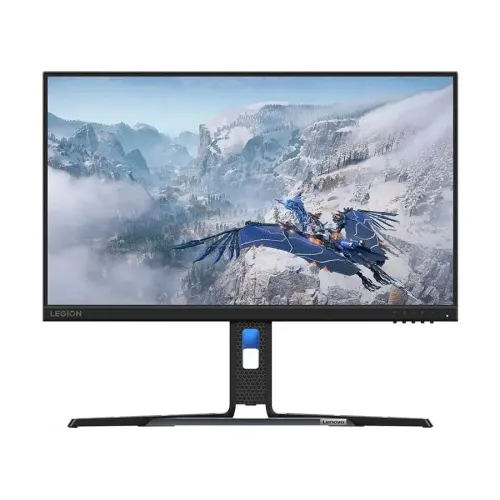
Lenovo Legion R24e 23.8-inch 180Hz Full HD IPS Gaming Monitor
The Lenovo Legion R24e is a 23.8-inch flat IPS monitor with 1920 × 1080 Full HD resolution and a maximum refresh rate of 180Hz. Lenovo’s Product Specifications Reference (PSREF) lists a 48Hz–180Hz refresh range, 300 cd/m² brightness, 1000:1 typical contrast and true 8-bit colour. Its stand offers tilt, swivel, pivot and height adjustment, making it more adjustable than a basic tilt-only monitor. The display is suited to PC gaming, study, office work and general entertainment when its Full HD resolution and size match your needs.
Lenovo publishes several regional machine-type/model (MTM) configurations under the Legion R24e family. The local catalog record does not include a verified full MTM for the individual unit, so confirm the carton label and serial before relying on region-specific warranty or package contents. Lenovo PSREF is used here for the product-family technical specifications; local price and stock notes come from Bangladesh retailer listings and can change.
23.8-inch Full HD IPS panel
The 16:9 panel has a 23.8-inch diagonal and a native resolution of 1920 × 1080 pixels. Full HD is widely supported by computers and consoles and can make it easier to reach high frame rates than a higher-resolution display. At this size it works well for gaming, browsing, video calls and standard documents. A QHD monitor supplies more pixels and desktop space, so users who prioritize detailed creative work or a larger workspace may prefer a higher resolution.
Lenovo identifies a three-side NearEdgeless IPS panel with WLED backlight and 178-degree horizontal and vertical viewing angles. Wide viewing angles can help maintain a usable picture when sitting off-centre, although real brightness and colour can vary across the panel and with viewing position. The anti-glare surface helps reduce reflections in typical indoor lighting but cannot remove glare from direct sunlight or a bright lamp.
180Hz refresh and response modes
Lenovo specifies a refresh range of 48Hz to 180Hz. A high refresh rate can make cursor movement and supported game motion look smoother when the computer supplies a sufficiently high frame rate. It does not make the computer render more frames by itself. Actual performance depends on the CPU, GPU, game, graphics settings, driver and connection. Use a compatible HDMI or DisplayPort output, then select the desired refresh rate in the operating system’s advanced display settings.
Lenovo lists 0.5ms MPRT along with response-time settings of 1ms, 2ms, 3ms and 4ms at different overdrive levels. MPRT and grey-to-grey response are different measurements; the 0.5ms headline should not be read as a universal 0.5ms GtG result for every pixel transition. Stronger overdrive can create visible overshoot or inverse ghosting. Compare the available settings with real games and motion, and choose the setting that produces the clearest image for your eyes.
Adaptive refresh and graphics compatibility
Lenovo lists AMD FreeSync. Its PSREF notes that FreeSync works with AMD Radeon series graphics cards. Compatibility and the available variable-refresh range depend on the graphics hardware, driver, connection and display settings. This product description does not claim NVIDIA G-SYNC certification or guarantee adaptive-refresh operation on every GPU. If variable refresh is important, check the graphics vendor’s current support information for the exact PC and test your chosen connection.
Brightness, contrast and colour
The published typical brightness is 300 cd/m² and typical static contrast is 1000:1. Lenovo also reports a typical dynamic contrast ratio; dynamic contrast is a different measure and should not be compared directly with the simultaneous static contrast. Position the screen away from direct sunlight for better perceived contrast and reduce brightness to suit the room. Individual panels can vary in uniformity and appearance.
Lenovo lists 99% sRGB colour coverage and a 120% sRGB colour-area ratio. Coverage means how much of the reference colour gamut the panel can reproduce; colour area can exceed 100% because it includes colours outside the reference. The two numbers are not contradictory, and neither proves professional calibration accuracy. The panel is listed as true 8-bit with 16.7 million colours. For photo, print or video work that depends on reliable colour, use calibration and a colour-managed workflow rather than relying on gamut figures alone.
Ports and audio
Lenovo PSREF lists one HDMI 2.1 TMDS input, one DisplayPort 1.4 using HBR2 and one 3.5mm audio line-out. Supported timing depends on the connected graphics device and cable. The monitor has no built-in speakers, camera or microphone listed. If you route audio over HDMI or DisplayPort, the 3.5mm output can be used with compatible headphones or speakers; the computer may need to select the monitor as its audio device. Alternatively, connect audio equipment directly to the PC.
Ergonomics and mounting
The included stand supports -5° to +22° tilt, 30° swivel to the left and right, -90° to +90° pivot and up to 135mm of height lift. This allows more positioning options for desk posture and portrait-oriented documents than a fixed stand. Lenovo also lists a 100 × 100mm VESA mounting pattern. Check your arm’s load capacity, screw length and clearance, and support the monitor carefully during installation. A Kensington security slot is included for compatible locking accessories.
Power, dimensions and box contents
The Legion R24e uses an integrated power supply and accepts AC 100–240V at 50–60Hz. Lenovo lists 16.6W typical and 24W maximum power consumption, with sleep/off below 0.5W and switch-off below 0.3W. The Raven Black monitor measures 540.4 × 258.6 × 388.0mm at its lowest stand position and 540.4 × 258.6 × 523.0mm at its highest. The display head alone is 540.4 × 51.7 × 325.3mm. Lenovo gives approximate weights of 4.8kg with the stand and 2.9kg for the head alone; package weight is approximately 7.0kg.
Lenovo’s reference package lists the monitor with stand, one 1.8m HDMI cable, one 1.8m power cable, a quick setup guide and warranty booklet. Box contents can vary by region and distributor, so confirm the included cable and documentation with the Bangladesh seller before purchase. Keep the packaging, invoice and serial label for support.
Software and supported systems
Lenovo lists Lenovo Artery, also called Lenovo Accessories and Display Manager, as supported software. The functions vary by operating system and configuration. Lenovo identifies Windows 10 and Windows 11 support for the reference configuration and notes support for Mac OS and Windows on Arm for the newer display-management application, with feature availability varying. The monitor does not include a smart operating system or touch input.
Who should consider the Legion R24e?
This monitor can suit PC players who want 180Hz motion, IPS viewing angles and an adjustable stand in a compact Full HD format. Its height lift, swivel and pivot are also useful for a flexible home or office desk. Check your graphics output can run 1920 × 1080 at the refresh rate you want. Consider a QHD display if fine detail and desktop space matter more than achieving high frame rates, and look elsewhere if integrated speakers or USB connectivity are essential.
Bangladesh price, stock and warranty
Bangladesh retailer listings observed for this review ranged roughly from ৳16,000 to ৳19,300, depending on seller, offer and stock. For example, Ultra Technology showed a discounted listing while Skyland listed a higher cash-discount price; Star Tech listed the product in its Lenovo monitor catalog. These are third-party snapshots, not a live BiponiBD offer, and may change by the time you order. Confirm current price, stock, delivery charge, return policy and exact model code directly with the seller.
Lenovo PSREF lists a three-year limited warranty for the reference configuration. Bangladesh service entitlement depends on the exact regional MTM and serial number. Ask the seller to identify the warranty provider and service location, and confirm the dead-pixel policy, proof-of-purchase requirement and whether the serial is eligible for Lenovo’s local support. Do not assume every imported unit has the same coverage.
Frequently asked questions
Configuration note: Lenovo technical figures describe the R24e product family. Regional MTM, warranty and box contents can differ. Verify the full machine-type/model code on the actual unit and invoice before buying.