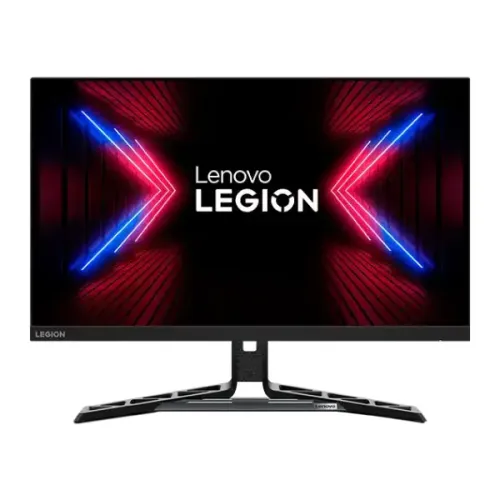
Model and verified overview
The Lenovo Legion R27q-30 is a flat 27-inch QHD gaming monitor built around an IPS panel. Lenovo PSREF specifies 2560 × 1440 resolution, 165Hz native refresh with an optional 180Hz overclock, 350 cd/m² typical and 400 cd/m² peak brightness, 1000:1 typical contrast, DisplayHDR 400, AMD FreeSync Premium and VESA Adaptive Sync. Connectivity includes two HDMI 2.1 TMDS inputs, DisplayPort 1.4 and a 3.5mm audio line-out. Two 3W speakers, an adjustable stand and 100 × 100mm VESA mounting are listed. Check regional SKU details before ordering.
27-inch QHD workspace
The 27-inch panel has 2560 × 1440 pixels in a 16:9 layout, with a listed pixel density of 109 dpi and pixel pitch of 0.233 × 0.233mm. This QHD resolution gives more desktop space and detail than Full HD at the same size, useful for game interfaces, documents and multiple windows. Set the computer to the panel’s native resolution for crisp text and edges; operating-system scaling can make small UI elements easier to read. Rendering demanding games at QHD and high frame rates needs a capable graphics card.
IPS panel and viewing angles
Lenovo identifies an In-Plane Switching panel with 178-degree horizontal and vertical viewing angles. IPS technology is useful when viewing from an angle or sharing the screen, while the published typical contrast is 1000:1. Contrast and black level depend on room lighting, panel settings and the individual unit. The PSREF lists a flat panel and anti-glare treatment. Position the monitor away from direct reflections and use a suitable brightness for the room. Specifications do not promise factory calibration or identical uniformity on every unit.
165Hz refresh and 180Hz overclock
The rated refresh rate is 165Hz, with an optional overclock mode up to 180Hz. Lenovo notes that 180Hz overclocking is based on laboratory testing and may cause display irregularities. The monitor and source must both be configured for the selected mode; frame rate still depends on the computer and game. If 180Hz causes artifacts, flicker or instability, return to 165Hz. HDMI 2.1 TMDS is listed to support QHD at 144Hz; use DisplayPort or confirm the exact source timing when targeting higher refresh.
Response time and motion modes
The manufacturer lists 0.5ms MPRT and selectable response levels from 4ms to 1ms. MPRT is a motion-blur reduction mode, not a measurement of input lag or a guarantee that every pixel transition completes in that time. Lenovo says MPRT disables AMD FreeSync and may introduce slight flicker. Higher overdrive settings can cause visible overshoot, so compare the available levels in real gameplay and select the cleanest image. Prefer adaptive sync when smooth variable frame pacing matters more than the MPRT mode.
FreeSync Premium and Adaptive Sync
Lenovo lists AMD FreeSync Premium and VESA Adaptive Sync. These technologies coordinate supported variable refresh behavior to reduce tearing when compatible graphics hardware changes its frame output. PSREF says AMD FreeSync works with AMD Radeon series graphics cards; verify current GPU and driver compatibility for the setup. FreeSync cannot raise the computer’s rendering performance. The monitor’s MPRT mode disables FreeSync, so the two should not be assumed to operate together. Enable the preferred mode in both the display and graphics settings, then test for stable operation.
DisplayHDR 400 and brightness
Lenovo specifies DisplayHDR 400 certification, 350 cd/m² typical brightness and a 400 cd/m² peak figure. HDR can provide compatible games and video with a wider brightness range, but the certificate does not imply OLED black levels or local dimming. HDR appearance depends on the content, operating system, game configuration and display settings. Try familiar SDR and HDR material and adjust brightness to the room. Peak and typical values describe test conditions and do not mean every preset continuously outputs the same brightness.
Color coverage and depth
The published color coverage is 99% sRGB and 90% DCI-P3; the separate sRGB color-area ratio is 125%. Coverage and area ratio are different measurements. Lenovo lists 1.07 billion colors with 10-bit processing using 8-bit plus FRC. This wide coverage supports vivid games and media, but it is not a guarantee of professional calibration accuracy. For color-critical work, calibrate the individual monitor and use color-managed software. Keep a neutral color profile when accurate sRGB output is required.
HDMI 2.1, DisplayPort and audio
The rear connections are two HDMI 2.1 TMDS ports, one DisplayPort 1.4 and one 3.5mm audio output. Lenovo specifically lists QHD at 144Hz over HDMI; supported modes can differ by port, graphics output, cable and device. Use a direct connection while diagnosing a missing refresh option. The audio jack is a line-out for headphones or powered speakers, not a microphone input. The specification does not list USB-C video, a USB hub or a docking function.
Integrated stereo sound
Two integrated 3W speakers are listed for basic game audio, video and system sounds without separate desktop speakers. A compact built-in speaker system may not match the bass, volume or imaging of a dedicated headset or speaker set. For HDMI or DisplayPort audio, select the monitor as the playback device in the operating system and check its volume. The 3.5mm line-out can connect compatible external audio equipment. No microphone input is specified.
Ergonomic LTPS stand
The included stand supports lift, tilt, pivot and swivel. Lenovo lists up to 135mm of height adjustment, -5 to +22 degrees of tilt, 30 degrees of swivel in either direction and -90 to +90 degrees of pivot. Adjust the panel for posture and portrait use, keeping cables loose enough to move with it. The base should sit on a level, stable desk. Stand motion range and fit can depend on the final regional package; check contents and assembly instructions when delivered.
VESA mounting and security
The monitor supports a 100 × 100mm VESA mount and includes a Kensington security slot. For a monitor arm, verify its load rating, compatible screw length and installation procedure. Support the screen while fitting the bracket and ensure the arm cannot collide with the desk or wall through its full movement range. Lenovo PSREF lists monitor weight with stand at approximately 5.8kg and head-only weight at 3.9kg; select mounting hardware with suitable capacity. A lock slot is for a compatible cable and does not secure the stand itself.
Dimensions and desk fit
With stand, Lenovo lists dimensions of 613.6 × 258.8 × 392.4mm at the lowest position and 613.6 × 258.8 × 527.4mm at the highest position. The panel head alone is 613.6 × 58.5 × 367.6mm. Approximate monitor weight is 5.8kg with stand. Measure desk depth and height, leave room for the stand base and cable bend, and consider the swivel and pivot clearance. Specifications can vary by configuration, so check the exact model label and supplied documentation for a close-fit installation.
Power and efficiency
The monitor has an internal power supply and supports AC 100–240V at 50–60Hz. Lenovo specifies 30W typical and 50W maximum consumption, below 0.5W in sleep/off mode, and below 0.3W in switch-off mode. Actual draw changes with brightness, refresh mode and content. Use the supplied power cable and a properly grounded outlet, keep ventilation clear and disconnect power before moving or cleaning. Do not use an incompatible adapter based on specifications for another Legion monitor.
Eye comfort and software
Lenovo lists Natural Low Blue Light, Eyesafe 2.0, TÜV Rheinland Eye Comfort and hardware Low Blue Light certification. These features and certifications describe display characteristics; they are not medical claims. Comfort also depends on room lighting, screen distance, text size and breaks. Lenovo Artery, also called Lenovo Accessories and Display Manager, supports Windows 10/11, macOS and Windows on Arm, with functions varying by system. Low-blue-light modes may affect image appearance; choose a neutral mode for color-sensitive tasks.
Gaming strengths and trade-offs
The R27q-30 combines QHD detail, IPS viewing angles, a fast 165Hz native refresh, optional 180Hz overclocking, DisplayHDR 400, FreeSync Premium, Adaptive Sync and an ergonomic stand. The 180Hz mode can cause irregularities; HDMI is specifically rated for QHD 144Hz, and MPRT disables FreeSync. A powerful PC is needed to render demanding QHD games at high frame rates. HDR quality depends on content and settings, while 1000:1 typical contrast is a conventional IPS-class figure rather than a guarantee of deep blacks.
Bangladesh warranty and seller terms
Lenovo’s PSREF lists a three-year limited base warranty for the product, but that does not confirm coverage for a particular imported or Bangladesh serial number. Ask the seller to verify serial-specific warranty, authorized service location, start date and eligible panel defects before purchase. The catalog currently states three years, which needs local confirmation. Price, stock, delivery, return and payment conditions can change; check the live offer at checkout and keep the invoice, box and serial information.
Setup and troubleshooting
Connect the supplied power cable and a compatible video cable, select 2560 × 1440 and configure a supported refresh rate. HDMI is listed for QHD at 144Hz; DisplayPort may be preferable for higher refresh configurations. If a mode is missing, check the GPU output, cable, driver, selected input and monitor settings. Try 165Hz if 180Hz overclocking looks unstable. If tearing occurs, enable supported FreeSync or Adaptive Sync; remember MPRT disables FreeSync. For audio, choose the display output in system sound settings.
Who should consider the R27q-30
This Legion monitor is a candidate for PC gamers who want a 27-inch QHD IPS display, high refresh, adaptive sync and an adjustable stand, or for mixed desktop use with a sharper-than-Full-HD workspace. Make sure the computer can drive the resolution and check which port supports the refresh target. Users who prioritize deep black levels, USB-C docking, a USB hub, or guaranteed 180Hz operation should compare alternatives. Confirm the country-specific package, serial warranty and live seller terms before ordering.
Specification summary
Lenovo Legion R27q-30: 27-inch flat IPS WLED, 2560 × 1440, 16:9, 165Hz native (180Hz overclock), 0.5ms MPRT and selectable 1–4ms response levels, 350-nit typical / 400-nit peak, 1000:1 contrast, 99% sRGB and 90% DCI-P3 coverage, 10-bit (8-bit + FRC), DisplayHDR 400. AMD FreeSync Premium and VESA Adaptive Sync. Ports: 2 × HDMI 2.1 TMDS, DP 1.4, 3.5mm audio-out. Speakers 2 × 3W; lift, tilt, swivel, pivot; VESA 100 × 100mm.