Pros
- QHD resolution and 200Hz maximum for capable gaming PCs.
- FreeSync Premium and VESA Adaptive Sync are listed.
- Fully adjustable stand provides height, tilt, swivel and pivot.
- 400-nit brightness, HDR10 and broad sRGB coverage are specified.

All categories
 New condition
Monitors
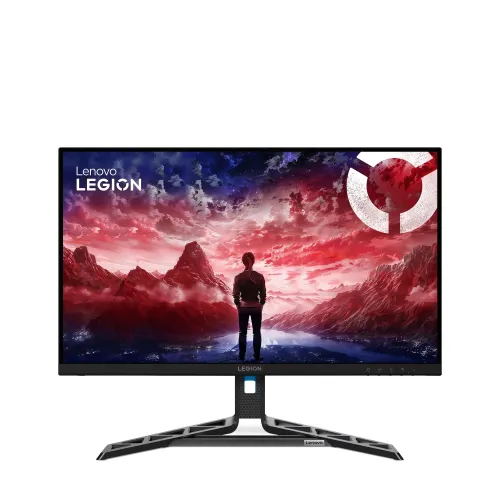
Lenovo · Legion R27qe Gen 2 27-inch QHD 200Hz
27-inch QHD IPS gaming monitor with 200Hz, FreeSync Premium, HDR10, DisplayPort 1.4 and adjustable stand.
Price unavailable
Price range updating
No verified price is available yet. Store offers will appear when merchants publish them.
Compare store prices
No live offers for this variant
Offers will appear when merchants publish them.
Loading history…
Product story
The Lenovo Legion R27qe Gen 2 is a 27-inch QHD IPS gaming monitor with 2560 × 1440 resolution and 200Hz maximum refresh. Lenovo PSREF specifies 400 cd/m² brightness, 1000:1 contrast, 99% sRGB coverage, 90% DCI-P3 (CIE 1976), 1.07 billion colors and 0.5ms MPRT. It supports AMD FreeSync Premium and VESA Adaptive Sync, HDR10, two HDMI 2.1 TMDS inputs and one DisplayPort 1.4 input. Its stand adjusts height, tilt, swivel and pivot. The exact PSREF notes HDMI supports QHD at up to 144Hz, so the full 200Hz target depends on the source and connection.
The display measures 27 inches diagonally and has native 2560 × 1440 QHD resolution in a 16:9 format. Lenovo lists a 596.7 × 335.7mm active area, 0.2331mm pixel pitch and 109dpi. QHD gives more workspace and detail than Full HD at the same screen size, but it also requires more GPU output capability, particularly when targeting high frame rates. Choose the native resolution for the clearest image. Adjust operating-system scaling to make text and controls comfortable at your normal desk distance.
Lenovo specifies an In-Plane Switching panel with a three-sided near-edgeless design, 178° horizontal and vertical viewing angles, anti-glare treatment and WLED backlight. Typical contrast is 1000:1 and brightness is 400 cd/m². These manufacturer specifications do not guarantee identical uniformity or calibration for every unit. Anti-glare treatment can reduce reflections but cannot remove direct sunlight or bright light sources. Position the screen to limit glare and adjust brightness for the room.
Lenovo lists a maximum refresh rate of 200Hz. Its PSREF specifically states that HDMI 2.1 TMDS supports 2560 × 1440 at up to 144Hz. The source and cable must support the desired timing; use DisplayPort 1.4 and verify the active signal in the computer’s display settings when targeting 200Hz. A label such as HDMI 2.1 does not guarantee that every monitor mode is available on every port. GPU, driver, cable, adapter and operating-system settings all affect achievable refresh.
The manufacturer lists 0.5ms MPRT and overdrive response levels of 4ms, 3ms, 2ms and 1ms, with 5ms when overdrive is off. MPRT and GtG overdrive are different measurements and should not be presented as equivalent guaranteed response times. Faster overdrive levels can introduce overshoot or inverse ghosting depending on frame rate and scene. Compare levels with actual moving content and use the setting that gives the clearest image. Motion clarity also depends on frame rate, refresh mode and graphics output.
Lenovo lists AMD FreeSync Premium and VESA Adaptive Sync. FreeSync can synchronize supported AMD graphics output with the monitor’s refresh behavior over a compatible range to reduce tearing and stutter. Actual operation depends on GPU, driver, selected port, frame rate and settings. Lenovo notes the FreeSync technology works with AMD Radeon series graphics cards. Do not assume the same feature path or certification behavior for every GPU. If variable refresh is unavailable, check the graphics driver, monitor menu, cable and active display mode.
The PSREF specifies HDR10 compliance and 400 cd/m² brightness. HDR content requires a compatible source, application, cable path and system setting. HDR10 compliance does not by itself establish a particular VESA DisplayHDR certification or local-dimming performance; those are not specified in the cited PSREF. Contrast is listed as 1000:1 typical. Compare SDR and HDR with your source content and use the mode that looks accurate. Do not infer peak HDR performance beyond the published brightness and format details.
Lenovo lists 99% sRGB coverage, 90% DCI-P3 coverage under CIE 1976, 128.48% sRGB color area ratio, and 1.07 billion supported colors with 10-bit (8-bit + FRC) color depth. Coverage and area ratio describe different measurements; they should not be condensed into one ambiguous percentage. Gamut coverage does not guarantee calibration or color accuracy. For photo, video or design work, use a calibrated profile and color-managed software. Confirm the intended color mode for applications that expect sRGB.
The rear connections are two HDMI 2.1 TMDS inputs and one DisplayPort 1.4 input. Lenovo specifies QHD at up to 144Hz over HDMI. The PSREF does not list USB ports, USB-C or an audio output, so this model should not be described as a USB hub, USB-C dock or speaker monitor. Use DisplayPort 1.4 for the higher refresh target, subject to source support. Check the rear-panel labels on the unit and choose the correct input in the on-screen menu. Plan separate speakers or headphones for audio.
The included stand supports height lift up to 135mm, tilt from -5° to +22°, swivel 30° left/right and pivot from -90° to +90°. Lenovo lists VESA mounting at 100mm. With the stand, dimensions are 613.1 × 258.8 × 383.2mm at the lowest position and 613.1 × 258.8 × 518.2mm at the highest. The monitor weighs about 5.9kg with stand and 4.0kg for the monitor head alone. Leave room for the base and cables, and make sure the monitor arm matches the VESA pattern and load rating.
A QHD 200Hz mode can suit a PC with a graphics card and output that can drive the desired timing. Demanding games may not render 200 frames per second at QHD, and the display cannot increase the computer’s frame rate. Check each game’s settings, GPU capability, cable and selected connection. Lenovo’s specified HDMI mode tops out at QHD 144Hz; DisplayPort 1.4 is the intended option to explore for 200Hz. Consoles may support fewer combinations than a gaming PC. Verify the output mode before purchase if a specific console is central to the setup.
Lenovo lists a TÜV Rheinland Eye Comfort 3-star certification and Lenovo Artery, also known as Lenovo Accessories and Display Manager. Lenovo states Artery supports Windows 10/11, Mac OS and Windows on Arm, with functions varying across systems. The certification is a manufacturer-listed feature, not a guarantee that prolonged screen time causes no discomfort. Use suitable room lighting, comfortable brightness, readable scaling and regular breaks. Download software from Lenovo’s official support source for the exact model.
The monitor has an internal power supply and supports AC 90–264V at 50–60Hz. Lenovo lists 22W typical and 65W maximum, below 0.5W in sleep/off and below 0.3W in switch-off mode. Standard box contents include the monitor with stand, one 1.8m DisplayPort cable, one 1.8m power cable, quick setup guide and warranty booklet. Regional package contents can vary; verify the sealed box before ordering. Keep cables clear of the stand while adjusting height, swivel or pivot.
Lenovo PSREF lists a three-year limited warranty for the model. This product-level specification does not confirm local service eligibility for a particular serial or BiponiBD transaction. Ask the seller for the authorized service provider, serial-registration steps, dead-pixel coverage, replacement/repair terms, warranty start date and invoice requirements in writing. No live BiponiBD stock or offer was independently verified during this review. Confirm current price, delivery charge and return policy before payment.
This model combines QHD resolution, a 200Hz maximum refresh, IPS viewing angles, 400-nit brightness, FreeSync Premium, HDR10, and an adjustable stand. It may suit competitive PC gaming when the graphics system and DisplayPort connection can use the intended mode. Trade-offs include HDMI’s published QHD 144Hz limit, the absence of listed USB hub/USB-C/audio ports, and the GPU workload of QHD at high frame rates. HDR10 compliance should not be confused with a VESA DisplayHDR tier. Match the exact input capability to your computer.
Confirm the exact product label says Legion R27qe Gen 2 and not first-generation R27qe. Connect DisplayPort 1.4 if targeting QHD 200Hz; Lenovo lists HDMI at QHD up to 144Hz. Select 2560 × 1440 and the supported refresh in the operating system, then confirm the active signal. Enable FreeSync/Adaptive Sync only with a compatible GPU and driver. Check that the box includes the DisplayPort and power cables. Ask the seller to document local warranty, serial eligibility and return terms. Adjust stand height, tilt, swivel and pivot after cable slack is arranged.
Lenovo Legion R27qe Gen 2 is a 27-inch QHD 2560 × 1440 IPS gaming monitor with 200Hz maximum refresh, 0.5ms MPRT, 400 cd/m² brightness, 1000:1 contrast, 99% sRGB, 90% DCI-P3, 1.07 billion colors, HDR10, AMD FreeSync Premium and VESA Adaptive Sync. It has two HDMI 2.1 TMDS ports and one DisplayPort 1.4; Lenovo specifies HDMI up to QHD 144Hz. Its stand supports 135mm lift, tilt, swivel and pivot with 100mm VESA mounting. Confirm local serial warranty and BiponiBD offer before ordering.
Helpful answers
Product-specific answers maintained with the catalog information.
QHD 2560 × 1440 with up to 200Hz; Lenovo notes HDMI supports QHD up to 144Hz.
Two HDMI 2.1 TMDS inputs and one DisplayPort 1.4.
0.5ms MPRT, with separate overdrive levels of 4, 3, 2 and 1ms and 5ms overdrive-off.
Lenovo lists AMD FreeSync Premium and VESA Adaptive Sync; compatibility depends on the GPU and settings.
The Lenovo PSREF lists HDR10 compliance. This does not establish a VESA DisplayHDR certification.
Lenovo specifies HDMI up to 2560 × 1440 at 144Hz. Check DisplayPort and source capability for the 200Hz target.
Yes: up to 135mm lift, tilt -5° to +22°, swivel 30° left/right and pivot ±90°.
Lenovo’s PSREF lists neither USB ports nor audio output for this model.
Lenovo lists a three-year limited warranty; ask the seller to confirm local serial eligibility and service terms.
Customer community
Become a merchant
Join BiponiBD, publish accurate offers and start free.