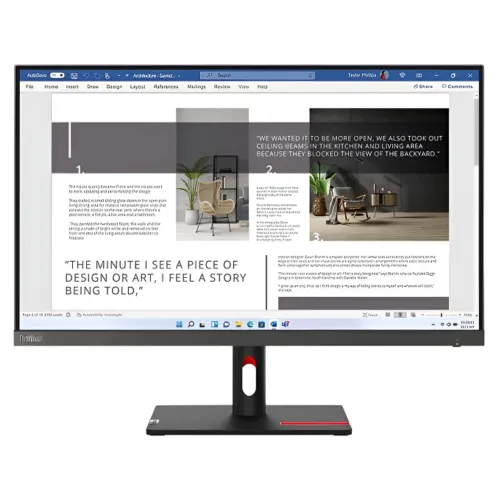
The Lenovo ThinkVision S27i-30 is a 27-inch Full HD IPS business monitor with 100Hz refresh, 99% sRGB, 300 cd/m² typical brightness, dual HDMI 1.4, VGA and audio-out. Lenovo lists 4ms Extreme / 6ms Normal response, tilt-only adjustment and 100 × 100mm VESA mounting. The official datasheet does not list USB ports, built-in speakers, height adjustment or HDR. Read the full specifications and buying notes below.
For everyday office productivity
The Lenovo ThinkVision S27i-30 is a 27-inch 16:9 IPS monitor with 1920 × 1080 Full HD resolution. Its 3-side NearEdgeless design reduces the visible bezel on three edges, which can make adjacent displays look more continuous when placed side by side. The 597.9 × 336.3 mm active area and 0.311 mm pixel pitch are specified by Lenovo.
At 27 inches, Full HD provides a large, readable workspace but less pixel density than QHD. Small text and fine design details may appear less sharp to viewers sitting close. Consider your viewing distance, eyesight and the detail level of documents or creative work. Operating-system scaling can enlarge text, but cannot increase the number of physical pixels.
100Hz refresh and the HDMI note
Lenovo specifies a 100Hz refresh rate and explicitly notes that HDMI 1.4 supports 1920 × 1080 at 100Hz. A higher refresh can make supported scrolling, cursor motion and video transitions look smoother than at 60Hz. Whether you see the maximum depends on the computer, selected display mode, graphics output and cable.
Connect the monitor directly where possible, then choose 100Hz in your operating system and confirm the active mode. Two HDMI 1.4 inputs let you attach multiple digital sources; VGA supports a legacy analog source. Lenovo does not list DisplayPort on this model. A dock or adapter can limit refresh rate or image stability.
IPS image and color
The panel is IPS with WLED backlight, 178-degree horizontal/vertical viewing angles and 99% sRGB coverage. Lenovo lists 300 cd/m² typical brightness and 1300:1 typical contrast. These values describe the specified model, not a calibration report for a particular retail unit. The anti-glare surface helps reduce reflections, but direct sunlight and bright lamps can still affect visibility.
The monitor supports 16.7 million colors with 8-bit color depth described as 6-bit plus FRC. sRGB coverage is useful for web and office content but does not guarantee factory color accuracy, uniformity or low delta error. For photo or print work, use calibrated hardware and a color-managed workflow. Set brightness for your workspace rather than assuming maximum output is best.
Response modes and motion
Lenovo lists 4ms in Extreme mode and 6ms in Normal mode. These modes reflect different response settings and should not be treated as equivalent to an independent motion test or input-lag measurement. Extreme overdrive can sometimes create visible overshoot; a slower mode can look cleaner depending on content and individual unit.
This monitor is designed for business and general use rather than competitive gaming. Its 100Hz refresh can make desktop motion smoother, but the 4ms/6ms response modes and Full HD resolution are not gaming performance guarantees. If gaming is important, compare a monitor with independent response testing and features suited to the games you play.
Connectivity and audio
Lenovo’s datasheet lists two HDMI 1.4 inputs, one VGA input and one audio-out port. The two HDMI sockets allow more than one digital device to remain connected. The VGA input provides compatibility with older computers, but it uses analog video and may not produce the same clarity as a digital connection.
No DisplayPort, USB port or USB hub is listed for this model. Lenovo’s overview lists an audio-out port, but no built-in speakers. Plan external speakers or a headset if you need audio. Confirm the video output on a laptop or desktop before purchase; some compact computers rely on USB-C adapters that may limit available modes.
Tilt stand and VESA mounting
The included stand offers tilt from -5° forward to +22° backward. It does not provide height adjustment, swivel or pivot according to Lenovo’s datasheet. Position the base on a stable desk and align the screen so you can view it without sustained neck movement. If a height-adjustable setup is important, account for a monitor arm or riser.
The monitor supports a 100 × 100 mm VESA mount and includes cable management. Lenovo also lists a Kensington lock slot. Check arm weight limits, screw length and clearance before installation. The VESA mount can add positioning flexibility, but use hardware appropriate for the display and follow Lenovo’s mounting instructions.
Natural Low Blue Light and certifications
Lenovo lists Natural Low Blue Light, anti-glare, Eyesafe Display 2.0, TÜV Rheinland Eye Comfort and Hardware Low Blue Light for the model. The datasheet also lists ENERGY STAR, EPEAT Gold, TCO 9.0 and TCO Edge 2.0. These credentials and features can help buyers compare workplace requirements, although certification registration and availability can vary across markets.
Low-blue-light and eye-comfort features are not medical treatments and cannot guarantee that fatigue will not happen. Adjust text size and brightness, balance room lighting, avoid reflections and take breaks during extended use. For a business fleet, verify the exact regional model and certification status when procurement policy requires a specific certification or registration.
Power, dimensions and package contents
Lenovo specifies internal power, 100–240V AC at 50–60Hz, typical/max consumption of 19.5W/36W, sleep/off below 0.5W and switch-off below 0.3W. ENERGY STAR power-on consumption is listed as 15.7W. With stand, dimensions are 612.3 × 475 × 184.9 mm; the display head is 612.3 × 368 × 43.5 mm.
Net weight is 4.5 kg with stand and 3.6 kg for the monitor head; packed weight is 6.9 kg. Lenovo lists the monitor with stand, a 1.8m power cable, a 1.8m HDMI cable and a quick setup guide. Regional packages can vary, so confirm cables and documentation in the box. Keep power and signal cables routed without tension.
HDR, USB and other buying expectations
Lenovo’s datasheet does not list HDR support, integrated speakers, a USB hub or height adjustment. Some third-party product pages contain conflicting details or copy information from other monitors. For this product, the manufacturer datasheet and PSREF are the primary references. Do not infer a feature from a nearby ThinkVision model or from a marketplace title alone.
The S27i-30 is an SDR Full HD office display with tilt-only stand, two HDMI inputs, VGA and audio-out. If you require HDR, USB-C docking, a speaker system, adjustable height or pivot, compare a different model before ordering. Its strengths are a 100Hz IPS screen, near-edgeless appearance, low-blue-light features and business-focused certifications.
Bangladesh price and warranty
Ryans showed the product Out of Stock with no listed price; Micro BD listed ৳23,800 but also Out of Stock when checked. These retailer observations can change and do not establish a current BiponiBD offer or inventory. Confirm the exact ThinkVision S27i-30 product code, final checkout price, delivery charges and stock status with the seller.
Ryans advertises three years and says the box is mandatory for warranty claims. Confirm Lenovo Bangladesh warranty coverage, service provider, serial eligibility, invoice requirements, dead-pixel policy and exclusions in writing. Warranty terms can depend on region and sales channel; do not assume another market’s limited warranty applies to a local unit.
Before ordering
Check that your computer supports Full HD at 100Hz over HDMI 1.4, and use the supplied HDMI cable or a suitable replacement. Decide whether Full HD at 27 inches is sharp enough for your work, since QHD displays provide more detail. Confirm that tilt-only adjustment is sufficient or plan a VESA arm if you need height, swivel or pivot movement.
Inspect the model code on the carton and rear label, confirm the local warranty terms, and check the included 1.8m power and HDMI cables. Lenovo notes that regional specifications can vary. No hands-on calibration or performance test is claimed here, and retailer stock/price snapshots are not a BiponiBD offer.
Key features
- 27-inch Full HD 1920 × 1080, 3-side NearEdgeless IPS panel with WLED backlight.
- 100Hz refresh; Lenovo confirms HDMI 1.4 supports Full HD at 100Hz.
- 300 cd/m² typical brightness, 1300:1 typical contrast and 99% sRGB coverage.
- 4ms response in Extreme mode and 6ms in Normal mode, as listed by Lenovo.
- Two HDMI 1.4 inputs, one VGA input and one audio-out port.
- Tilt adjustment from -5° forward to +22° backward; VESA 100 × 100mm mounting.
- Natural Low Blue Light and anti-glare surface; Lenovo lists Eyesafe 2.0 and TÜV eye-comfort certifications.
- 100Hz makes supported scrolling and motion smoother than 60Hz, while remaining a standard Full HD business display.
- Internal power supply with 19.5W typical and 36W maximum consumption.
- ENERGY STAR, EPEAT Gold and TCO-related certifications are listed for the model.
- No USB hub, built-in speaker, height adjustment, swivel or pivot is listed in Lenovo’s datasheet.
- Packed accessories listed: monitor stand, 1.8m HDMI cable, 1.8m power cable and quick setup guide.
Pros
- 100Hz refresh and 99% sRGB are useful for a general office display with smooth scrolling and broad everyday color coverage.
- IPS viewing angles, anti-glare finish and Natural Low Blue Light suit shared workspaces.
- Dual HDMI plus VGA make it easy to connect two digital sources and one legacy device.
- The monitor is VESA mountable and has cable management and a Kensington lock slot.
- Lenovo lists EPEAT Gold, ENERGY STAR and Eyesafe/TÜV-related certifications for applicable configurations.
Cons and buying considerations
- 27-inch Full HD has lower pixel density than QHD for small text, high-detail design and dense multiwindow work.
- The stand only tilts; there is no height adjustment, swivel or pivot in the official specification.
- No USB hub, built-in speakers, DisplayPort or HDR support is listed.
- Response is 4ms in Extreme mode or 6ms Normal mode, so it is not a high-speed gaming display.
- Local price, stock and three-year warranty depend on retailer and exact serial; BiponiBD offer is unverified.
Full specifications
- Brand: Lenovo
- Model: ThinkVision S27i-30
- DisplaySize: 27 inches
- Panel: 3-side NearEdgeless IPS; WLED backlight
- Resolution: 1920 × 1080 (Full HD)
- AspectRatio: 16:9
- PixelPitch: 0.311 × 0.311 mm
- PixelDensity: 82 PPI
- ActiveArea: 597.9 × 336.3 mm
- ScreenDimensions: 606.9 × 349.2 mm
- ViewingAngles: 178° horizontal / 178° vertical (CR 10:1)
- RefreshRate: 100Hz; HDMI 1.4 supports 1920 × 1080 at 100Hz
- ResponseTime: 4ms Extreme mode; 6ms Normal mode
- Brightness: 300 cd/m² typical
- Contrast: 1300:1 typical; dynamic contrast 3M:1 typical
- ColorGamut: 99% sRGB
- ColorSupport: 16.7 million colors; 8-bit (6-bit + FRC)
- Surface: Anti-glare
- HDR: Not listed as supported in Lenovo datasheet
- VideoPorts: 2 × HDMI 1.4; 1 × VGA
- Audio: 1 × audio-out; no built-in speakers or audio input listed
- USB: No USB ports or hub listed in the Lenovo model datasheet
- Stand: Tilt -5° front / +22° back; no height/swivel/pivot adjustment listed
- VESA: 100 × 100 mm
- Security: Kensington lock slot 2.5 × 6 mm; cable management
- Power: Internal supply, 100–240V AC 50–60Hz; typical/max 19.5W/36W; sleep/off <0.5W; switch-off <0.3W
- Dimensions: With stand 612.3 × 475 × 184.9 mm; head only 612.3 × 368 × 43.5 mm (W×H×D)
- Weight: 4.5 kg with stand; 3.6 kg monitor head; 6.9 kg packed
- InBox: Monitor with stand, 1.8m power cable, 1.8m HDMI cable, quick setup guide
- Certifications: ENERGY STAR, TCO 9.0, TCO Edge 2.0, EPEAT Gold, Eyesafe 2.0, TÜV Rheinland Eye Comfort and Hardware Low Blue Light listed
- LocalPriceObservation: Ryans showed Out of Stock with price unavailable; Micro BD listed ৳23,800 and Out of Stock; seller snapshots only
- LocalWarrantyObservation: Ryans advertises 3 years and requires box for claim; verify local Lenovo distributor, serial eligibility and written terms
Frequently asked questions
What are the size and resolution?
Lenovo specifies a 27-inch 16:9 IPS monitor with Full HD 1920 × 1080 resolution.
Does ThinkVision S27i-30 support 100Hz?
Yes. Lenovo lists 100Hz and specifically notes HDMI 1.4 supports 1920 × 1080 at 100Hz. The source device and cable must also support the mode.
What is the panel response time?
Lenovo lists 4ms in Extreme mode and 6ms in Normal mode. These are mode-specific response figures, not input-lag measurements.
Which ports are included?
The Lenovo datasheet lists two HDMI 1.4 ports, one VGA port and one audio-out port. It does not list DisplayPort or USB.
Does it have USB ports or a hub?
No USB ports or hub are listed in Lenovo’s model datasheet. Do not confuse it with ThinkVision models that include a USB hub.
Does it have speakers?
Lenovo lists one audio-out port but no built-in speakers. Use external speakers or headphones.
Can I adjust the height or rotate the monitor?
The Lenovo datasheet lists tilt from -5° to +22° only. It does not list height, swivel or pivot adjustment. A VESA arm can provide additional positioning.
Can it be VESA mounted?
Yes. Lenovo lists a 100 × 100mm VESA mount capability. Confirm arm capacity and screw requirements before installation.
Does it support HDR?
HDR is not listed as supported in the Lenovo datasheet. Treat it as an SDR monitor.
What eye-care features does it have?
Lenovo lists Natural Low Blue Light, anti-glare, Eyesafe Display 2.0 and TÜV Rheinland Eye Comfort/Hardware Low Blue Light certifications for the model. Certification availability may vary by region.
What is the price and warranty in Bangladesh?
Ryans showed Out of Stock with no price; Micro BD listed ৳23,800 and Out of Stock during review. Ryans advertises three years and requires the box for claims. Verify current seller terms and serial eligibility.
What comes in the box?
Lenovo lists the monitor with stand, a 1.8m power cable, a 1.8m HDMI cable and a quick setup guide. Regional packaging may vary.
Source note: Lenovo’s manufacturer datasheet and PSREF provide the technical specifications. Bangladesh seller prices, stock and warranty are retailer observations and may change. Verify exact local SKU, service terms and box contents. No BiponiBD offer, hands-on test or inventory guarantee is claimed.