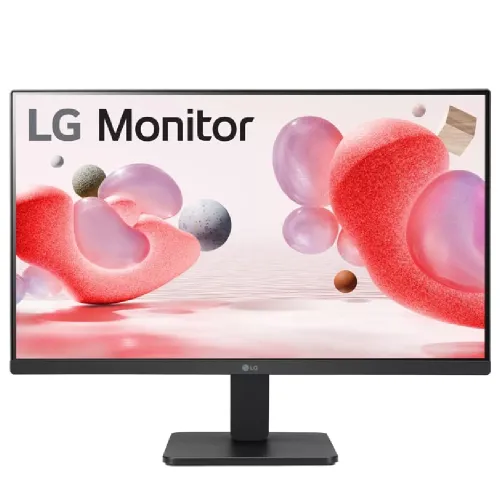
LG 24MR400-B 23.8-inch Full HD 100Hz IPS Monitor
The LG 24MR400-B is a flat 23.8-inch Full HD IPS monitor for office work, study, browsing, streaming and everyday gaming. It combines 1920 × 1080 resolution with a 100Hz refresh rate and AMD FreeSync. The display has a three-side virtually borderless design, anti-glare surface, Reader Mode and Flicker Safe. HDMI and D-Sub/VGA inputs support current and older computers, and a headphone output provides a way to connect private or external audio.
This page describes the exact 24MR400-B model. LG's similarly named MR series monitors can differ in refresh rate, screen size and connectivity. Do not confuse this model with 24MS500-B or 27MR400-B. Confirm the product label and regional suffix before purchase. LG notes that specifications and appearance may vary by market, and the Bangladesh warranty must be checked against the serial number and purchase documents.
Picture, resolution and colour
The screen is marketed as a 24-inch class display; LG lists an approximately 23.8-inch viewable IPS panel. It uses 1920 × 1080 native pixels in a 16:9 aspect ratio. Full HD is compatible with a broad range of computers and keeps the graphics workload lower than QHD or 4K. The trade-off is less fine detail and desktop space than higher-resolution monitors at the same size, particularly when several dense windows need to remain visible.
LG's product specification lists IPS technology, 250 cd/m² typical brightness (220 cd/m² minimum), a 1300:1 typical contrast ratio (1000:1 minimum), and 178-degree horizontal and vertical viewing angles. The anti-glare treatment can reduce reflections from ordinary indoor light but does not eliminate glare from a bright window or lamp. The display is flat, not curved. These measurements are published specifications and do not promise identical brightness or uniformity for every unit.
LG lists a typical sRGB gamut of 99% under CIE1931 in regional specifications. Gamut coverage is not the same as calibration, colour accuracy or uniformity. The reviewed product record does not include a factory calibration report. For photo editing, print preparation or grading, check independent measurement results and a calibration workflow for the exact regional unit rather than relying only on a gamut percentage.
100Hz refresh and response time
The 24MR400-B supports a maximum 100Hz refresh rate. LG's regional specification lists up to 100Hz through HDMI; VGA supports a lower refresh mode. Use HDMI for the 100Hz setting and confirm that the computer's graphics output, cable, operating system and chosen resolution support it. The refresh rate is selected in the computer's display settings. If the display is connected through an adapter or dock, its video bandwidth may limit the available mode.
A 100Hz refresh can make pointer movement, scrolling and supported games appear smoother than 60Hz. The monitor does not create additional frames: the graphics card and software have to render them. Your actual experience depends on the source frame rate, connection, refresh setting and content. A game running at 60 frames per second will not become a 100-FPS game simply because it is connected to a 100Hz display.
LG specifies 5ms grey-to-grey response time using the Faster setting. This is a pixel-transition measurement for that mode, not a promise that all motion will be blur-free. Overdrive settings can affect both response and overshoot. Use the mode that looks clear without distracting inverse trails. This monitor is suitable for casual and general gaming, while dedicated competitive displays may offer higher refresh rates and more motion controls.
AMD FreeSync and gaming features
AMD FreeSync is listed for the 24MR400-B. It can synchronize display refresh with compatible graphics hardware to reduce tearing within the supported range. Compatibility depends on the GPU, driver, HDMI connection and monitor settings. LG's Dynamic Action Sync is an on-screen gaming feature intended to reduce display processing delay; it is not the same as NVIDIA G-SYNC certification. This product description does not claim G-SYNC certification.
Black Stabilizer adjusts dark-scene visibility, and a Crosshair option may be available in the on-screen controls. Reader Mode changes picture settings for reading, and Flicker Safe is designed to reduce visible flicker. These functions provide display controls, not medical protection or a substitute for comfortable lighting and breaks. Picture presets can change brightness and colour balance; review the image before using them for colour-sensitive tasks.
Ports, audio and device setup
The model has one HDMI input, one D-Sub (VGA) input and one headphone-out connection according to the regional product specifications. It does not list DisplayPort, USB-C, a USB hub or integrated speakers. The 3.5mm output is for headphones or compatible external audio, not an integrated speaker system. No built-in microphone is listed; use a separate headset or the computer's microphone input for calls.
HDMI can carry digital video and audio from compatible sources. VGA is an analog video input and has a lower maximum refresh rate. If your laptop provides only USB-C or DisplayPort, an adapter may be required; check that it supports Full HD at the chosen refresh rate and can route audio if needed. Confirm the active audio device in the computer's sound settings when using the headphone output.
Stand, VESA mounting and desk fit
The included stand supports tilt adjustment, listed around -5° to +20° in regional product details. Height adjustment, swivel and pivot are not listed. If you need a specific eye-level position, use a riser or a compatible monitor arm. Bangladesh listings report a 100 × 100mm VESA pattern; confirm the mount, screws and weight rating with the manual before installation.
LG's regional specifications list dimensions of approximately 541 × 414 × 201mm with the stand and around 541 × 320 × 39mm without it; regional variants and retailer rounding can differ. Weight with the stand is listed around 2.9kg, also subject to regional configuration. Leave desk space for the base and rear cables. Measure your setup if the monitor will fit into a shelf, monitor bay or narrow desk area.
Power and box contents
The monitor uses an external power adapter and accepts 100–240V AC at 50/60Hz in the regional specification. Use the adapter supplied with the exact unit. Do not substitute a power supply based only on connector shape; voltage, polarity and current rating need to match. Package contents can vary by market. Confirm whether an HDMI cable, power cord, adapter, stand screws and setup guide are included with the Bangladesh unit.
Bangladesh price and warranty
Bangladesh retailer observations for the 24MR400-B ranged from approximately ৳17,600 to ৳19,200. One listing showed in-stock status, while other retailer pages showed out of stock. Price and availability change; these are external retailer observations, not BiponiBD offers. Contact the seller to confirm the current price, stock, delivery, model suffix and return terms before ordering.
Several Bangladesh sellers advertise a three-year warranty, while LG's U.S. support page lists one year for that U.S. market. Warranty coverage is regional and cannot be inferred from another country's support page. Ask the local seller to confirm the warranty provider, serial eligibility for LG Bangladesh service, service location, dead-pixel policy and documents required. Keep the invoice, serial details and warranty booklet, and obtain the applicable terms for your exact unit in writing.
Who should consider the LG 24MR400-B?
Consider it if you want a straightforward 23.8-inch Full HD IPS monitor with 100Hz over HDMI, FreeSync, Reader Mode, Flicker Safe and a headphone output. It can fit a home office or study desk and handle general entertainment and casual games. The VGA connection can help with older equipment, while the HDMI input supports the higher refresh mode on a compatible device.
Compare alternatives if you need QHD resolution, a height-adjustable stand, DisplayPort, USB-C docking, integrated speakers, a USB hub or a refresh rate above 100Hz. If you use VGA, expect a lower refresh limit than HDMI. If the local warranty is important, confirm serial-number eligibility and dead-pixel coverage before comparing prices.
Key features
- 23.8-inch viewable IPS Full HD display, 1920 × 1080
- 100Hz maximum refresh rate over HDMI
- AMD FreeSync support
- 5ms GtG response time using the Faster setting
- 250 cd/m² typical brightness and 1300:1 typical contrast
- 178° horizontal and vertical viewing angles
- Typical sRGB 99% (CIE1931; regional spec)
- HDMI, D-Sub/VGA and headphone out
- Three-side virtually borderless design and anti-glare finish
- Reader Mode, Flicker Safe, Black Stabilizer and Dynamic Action Sync
- Tilt stand and seller-reported 100 × 100mm VESA pattern
- No built-in speakers or microphone; confirm local warranty and bundle
Advantages
- 100Hz can make supported desktop motion smoother than a 60Hz monitor.
- IPS panel offers wide viewing angles for shared viewing and desk use.
- FreeSync and LG gaming controls add useful options for compatible systems.
- HDMI and VGA support newer and older computers.
- Reader Mode, Flicker Safe and the anti-glare finish suit everyday work settings.
Limitations to consider
- Full HD gives less workspace and detail than QHD at a similar size.
- 100Hz is available over HDMI; VGA is limited to lower refresh modes.
- The stand tilts but does not list height, swivel or pivot adjustment.
- No built-in speakers, DisplayPort, USB-C or USB hub are listed.
- 5ms response is slower than dedicated esports monitors.
- Bangladesh warranty coverage depends on seller and serial eligibility.
Frequently asked questions
What are the screen size and resolution?
LG markets it as a 24-inch monitor with a 23.8-inch viewable IPS display and 1920 × 1080 Full HD resolution.
Does it support 100Hz?
Yes, LG lists up to 100Hz over HDMI. VGA has a lower refresh limit; use HDMI and a compatible source for 100Hz.
Does it have built-in speakers?
No built-in speakers or microphone are listed. A headphone output is available for compatible external audio.
Does it support FreeSync?
Yes, AMD FreeSync is listed. The operating range depends on the GPU, driver, connection and settings.
Which ports are included?
One HDMI, one D-Sub/VGA and one headphone-out are listed. DisplayPort and USB-C are not listed.
Can I mount it on an arm?
Bangladesh retailer specifications report 100 × 100mm VESA mounting. Confirm the pattern, screws and arm load rating for the exact unit.
What warranty applies in Bangladesh?
Local sellers advertise three years, but confirm the provider and serial eligibility with LG Bangladesh for your exact unit.
What is the current Bangladesh price?
Retailer observations were about ৳17,600–৳19,200, with differing stock status. These are not BiponiBD offers.
Before ordering: verify the 24MR400-B model, use HDMI for 100Hz, confirm included cables, local serial coverage and current stock.