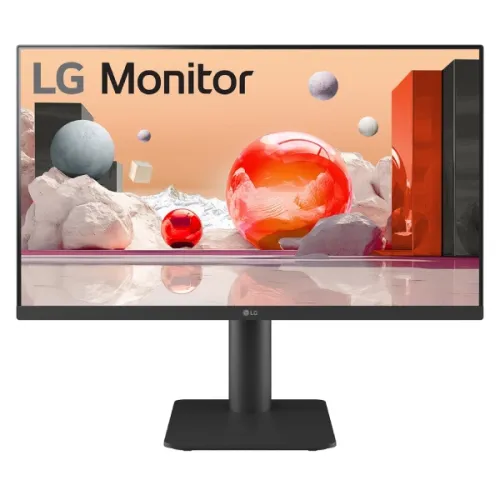
LG 25MS500-B 24.5-inch Full HD IPS monitor
The LG 25MS500-B is a 24.5-inch Full HD IPS monitor with a 100Hz maximum refresh rate, dual HDMI inputs and a 3-pole headphone output. LG specifies 1920 × 1080 resolution, 250 cd/m² typical brightness, 1000:1 typical contrast, NTSC 72% (CIE1931) colour coverage and 5ms GtG response at Faster mode. The monitor supports tilt adjustment and a 75 × 75mm VESA mount. LG’s official product specifications list a headphone output but do not list built-in speakers.
This page covers the exact LG 25MS500-B model. Some retailer descriptions overstate the stand’s adjustment or mention built-in sound, so this product content follows LG’s manufacturer specification. The Bangladesh support page points customers to the warranty policy included with the unit; retailer price, stock and service claims may vary. Confirm the exact product and local terms before ordering.
24.5-inch IPS Full HD picture
The 25MS500-B uses an IPS panel with a 24.5-inch diagonal size (62.23cm), 1920 × 1080 native resolution and a 16:9 aspect ratio. The flat panel and 3-side virtually borderless design suit a compact desktop or a two-screen arrangement. Full HD is compatible with a wide range of computers and is suitable for documents, web browsing, study, meetings, video and general entertainment.
LG lists typical brightness at 250 cd/m², typical contrast at 1000:1 and 178-degree viewing angles in every direction. The manufacturer specifies NTSC 72% under CIE1931. Gamut coverage describes colour range; it does not prove factory calibration, uniformity or colour accuracy for professional work. If you create colour-sensitive content, calibrate the screen and verify results rather than relying on a coverage number alone.
100Hz refresh and 5ms GtG
The maximum refresh rate is 100Hz. LG specifies 5ms GtG at the Faster response setting. A compatible computer and connection can use the higher refresh to make scrolling, pointer movement and supported games appear smoother than 60Hz. The monitor cannot increase the frame rate rendered by the computer. The source, cable, active HDMI port, resolution and display settings all affect the available signal mode.
After connecting a source, open the operating system’s advanced display settings and select 1920 × 1080 at the highest supported refresh rate. If 100Hz is missing, check the graphics output, cable capability and driver, then inspect the monitor’s on-screen settings. For fast competitive games, compare this 100Hz monitor with models that offer higher refresh rates and independently tested motion handling.
The 5ms GtG figure applies to a specified response mode and does not guarantee that every pixel transition is blur-free. Motion clarity also depends on the frame rate, refresh rate, image transition and response setting. Try the available display modes with real content and select the one that looks best for your use.
LG display and gaming modes
LG lists Reader Mode, Auto Input Switch, Black Stabilizer, Color Weakness, Crosshair, Dynamic Action Sync, Flicker Safe, Smart Energy Saving and Super Resolution+. These features support different tasks: Reader Mode adjusts the display for reading, Black Stabilizer changes dark-scene visibility and Crosshair adds an on-screen aiming aid. Their value depends on the application and personal preference; they do not replace source-device features or guarantee a particular gaming result.
LG also lists OnScreen Control (LG Screen Manager) software. Availability and supported functions can depend on the computer operating system and software version. Download software only from LG’s official support page for the matching model and region. For visual comfort, set brightness to the room, take regular breaks and use a comfortable viewing distance.
Dual HDMI and headphone output
The monitor has two HDMI inputs, which can keep two compatible sources connected, such as a desktop and a laptop or console. Switch the active source using the monitor controls. LG also lists a 3-pole headphone output for sound. The output carries audio only and is not a microphone input.
LG does not list VGA, DisplayPort or USB connectivity for this model. It also does not list integrated speakers. Use headphones or connect external speakers to the monitor’s headphone output or directly to the computer. Do not assume that audio will play from the display simply because HDMI carries an audio signal; a monitor needs speakers or an audio output for sound.
Tilt stand, VESA mounting and placement
The supplied stand tilts from -5° to +15°. LG does not list height adjustment, swivel or pivot for the 25MS500-B, despite some retailer copy that may suggest additional stand movement. A desk riser can raise the screen if the fixed stand height does not suit your workspace. Confirm the exact unit and included stand before purchase.
LG lists a 75 × 75mm VESA mounting pattern. When selecting a monitor arm, verify the arm’s supported weight, screw length and clearance for the monitor’s ports. Follow the LG installation instructions and support the monitor during attachment. Approximate dimensions are 557.5 × 421.2 × 189.9mm with stand and 557.5 × 328.3 × 58.8mm without stand, measured width × height × depth. Weight is about 2.6kg with the stand and 2.3kg without.
Power and package details
The monitor uses an external adapter with 19V, 0.84A DC output and accepts 100–240V AC at 50/60Hz. Power consumption varies with settings and operating conditions. Use the adapter supplied for the exact monitor rather than selecting a replacement only by connector shape. Local seller pages report sleep consumption below 0.5W and DC-off below 0.3W; confirm exact values in the regional manual.
Package accessories can differ by country and distributor. Bangladesh retailer listings mention an adapter, power cord, stand and HDMI cable, but the box contents should be verified before purchase. Retain the carton, invoice, serial number and any warranty documents because a seller may require them for a claim.
Who should consider the LG 25MS500-B?
This model may suit someone looking for a 24.5-inch Full HD IPS monitor with 100Hz refresh, two HDMI inputs, VESA mounting and a headphone output. Its feature modes can support office tasks, reading and casual gaming. Dual HDMI is useful if you switch between two video sources, and the nearly borderless design can work well beside another screen.
Consider a different monitor if you need a built-in speaker, USB hub, VGA or DisplayPort, height-adjustable stand, pivot, or a refresh rate above 100Hz. The 25MS500-B stand only tilts. For competitive gaming, compare higher-refresh models; for colour-critical editing, confirm measured calibration and gamut results for the exact unit.
Bangladesh price, stock and warranty
Bangladesh retailer pages checked during this review showed prices around ৳19,000–৳22,500. One seller marked the model out of stock while other listings showed availability, so current stock is inconsistent. These are third-party market observations and not a BiponiBD offer. Confirm the price, delivery charge, return policy, exact model code and stock before paying.
Some Bangladesh sellers advertise a three-year warranty. LG Bangladesh’s support page directs users to the detailed warranty policy included with the product, and service requires the serial number and proof of purchase. Ask who provides the local warranty, confirm that the serial is eligible, clarify the dead-pixel policy and keep the original box if required for claims.
Frequently asked questions
Specification note: LG lists two HDMI inputs, headphone-out, a 75 × 75mm mount and tilt adjustment only. Built-in speakers and height adjustment are not specified. Confirm seller warranty and stock for the exact 25MS500-B unit.