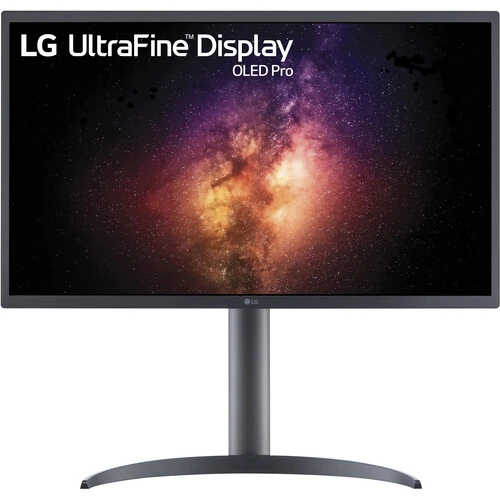
LG UltraFine OLED Pro 27EP950-B overview
The LG UltraFine OLED Pro 27EP950-B is a 27-inch class professional monitor with a 26.9-inch RGB OLED panel and 3840 × 2160 UHD resolution. LG lists 99% DCI-P3 and Adobe RGB color gamut, 10-bit color, hardware calibration, HDMI 2.0, two DisplayPort 1.4 inputs and USB-C with 90W Power Delivery. Its adjustable stand supports height, tilt and pivot. LG marks the US business product discontinued, so this update does not establish current availability or local service eligibility.
Exact model and screen measurement
The precise model code is 27EP950-B. LG markets it as a 27-inch UltraFine OLED Pro monitor; regional LG product pages list a 26.9-inch panel measurement, while some US business copy describes a 26.5-inch class viewing size. This listing uses LG’s 26.9-inch spec value and identifies it as a 27-inch class model. Confirm the suffix on the unit label, carton and invoice. The existing slug, Active state, variant and SKU remain unchanged.
RGB OLED panel and 4K UHD resolution
The display uses an RGB OLED panel with self-lit pixels and a native 3840 × 2160 resolution in a 16:9 format. Each pixel can illuminate independently, supporting detailed 4K imagery and OLED contrast. At a normal desk distance, operating-system scaling may improve text size. The panel’s anti-glare treatment can reduce some reflections but cannot remove all glare. Ambient light, screen brightness and calibration settings influence how the picture appears.
Color gamut for professional workflows
LG lists 99% DCI-P3 and 99% Adobe RGB coverage, plus hardware calibration. The monitor includes color-space options such as Native, P3-D65, BT.709, BT.2020, Adobe RGB and PQ modes. Gamut coverage describes the range of reproducible colors and does not guarantee that a particular unit is calibrated identically after transport or use. For grading, print or design work, use an appropriate measuring device, supported calibration software and a color-managed workflow.
10-bit color and viewing angles
LG specifies 10-bit color with 1.07 billion colors and 178° horizontal and vertical viewing angles. The panel can support smooth tonal transitions when the application, source and signal are configured for compatible color depth. A wide viewing angle is useful when checking material from different positions, although light and reflections can still change perceived appearance. Confirm the chosen GPU output, operating-system color settings and professional software pipeline before relying on a specific mode.
Brightness and OLED contrast
LG’s business specification lists peak luminance of 540 nits at 50% average picture level, 400 nits at 75% and 250 nits at 100%. The same page lists a 1M:1 contrast ratio and self-lit pixel dimming. Brightness therefore depends on how much of the screen is bright at one time. HDR and dark-scene appearance also depend on source mastering, settings, room lighting and the monitor’s chosen color mode. Avoid comparing a small-window peak with full-screen output.
HDR support and signal formats
The 27EP950-B is listed with VESA DisplayHDR 400 True Black and HDR10 features on LG regional product pages; the US business specifications expose professional PQ clip-point and EOTF controls. Available modes can vary by input, firmware, source and region. Check the exact unit’s menu and user guide for HDR options. A display’s HDR label alone does not ensure that every video application or computer is sending a correctly configured HDR signal.
60Hz operation and response rating
LG lists 48, 50 and 60Hz refresh options and a response time below 1ms GtG. This monitor is designed for professional 4K image work rather than high-refresh competitive gaming. A sub-1ms panel response rating is not total system input lag. The source, cable and selected mode determine the actual refresh and response behavior. If smooth high-frame-rate gaming is a priority, note that 60Hz is the published maximum for this model.
HDMI, DisplayPort and HDCP
The monitor includes one HDMI input identified as HDMI 2.0 with HDCP 2.2, plus two DisplayPort 1.4 inputs. LG lists 3840 × 2160 UHD operation up to 60Hz. Use a suitable cable and verify that the source supports the target resolution, refresh, HDR and color-depth combination. The HDMI and DisplayPort paths may offer different available color formats or mode options; consult the manual and input signal menu when configuring a workstation.
USB-C video and 90W Power Delivery
USB-C supports DisplayPort 1.4 video and up to 90W Power Delivery. A compatible laptop can send video and receive power over a single full-featured Type-C cable. LG also lists a USB Type-B upstream connection and three USB 3.0 Type-A downstream ports for peripherals. Charging depends on laptop demand and cable capability, and a charge-only cable cannot carry display video. Confirm that the laptop’s USB-C port supports DisplayPort Alt Mode.
Hardware calibration and color controls
Hardware calibration allows supported software and a compatible measurement device to write calibration results into the monitor’s internal color processing. LG lists adjustable red, green and blue gain, custom color temperature and color-space settings. Hardware calibration is not the same as merely selecting a preset. Confirm software compatibility and required calibration equipment before purchase, then save the desired profile and use color-managed applications for accurate display.
Stand adjustment, pivot and VESA mounting
The supplied stand supports height adjustment, tilt and portrait pivot; LG’s regional specifications list up to 110mm height and 90° pivot. The standard VESA mounting pattern is 100 × 100mm. The display can be used in portrait orientation when the application and desk setup support it. Before using an arm, check its load rating and mounting screw fit. Allow enough clearance for rotation, cables and the stand base, and secure the display before pivoting.
Dimensions, weight and power
LG lists approximate dimensions of 624.3 × 587.3 × 239.3mm with the stand raised, 624.3 × 477.3 × 239.3mm with it lowered, and 624.3 × 372.8 × 35.3mm without the stand. Weight is approximately 4.8kg with stand and 3.1kg without. Typical power is 60W, maximum 200W, standby below 0.5W and off mode below 0.3W. Confirm electrical rating and package size for the supplied region.
Included accessories and product availability
LG lists HDMI, DisplayPort, USB-A-to-B, USB-C and power cables among the box contents, but regional bundles can vary. The LG US business page marks 27EP950-B discontinued. This product record’s Active status is preserved, but stock, new-unit availability and current price were not confirmed. Ask the seller to confirm whether the offer is new, the exact 27EP950-B model, included cables and the serial’s authorized service route before purchase.
Warranty and service checks
The official product pages reviewed do not establish warranty coverage for a specific Bangladesh unit. Coverage may vary by seller, import route, region and serial number. Request written warranty duration, service provider, panel defect criteria, return window and invoice details before purchase. Keep the serial label and proof of purchase. Do not infer local service eligibility from a global product specification or from the product page’s historical availability.
Frequently asked questions
What is the resolution? 3840 × 2160 UHD. What panel technology? RGB OLED. What size? 27-inch class; LG regional specs list approximately 26.9 inches. What refresh rate? Up to 60Hz. Which color gamuts? LG lists 99% DCI-P3 and Adobe RGB. Does USB-C charge a laptop? Yes, up to 90W with compatible equipment. How many DisplayPorts? Two DP 1.4 inputs. Is it discontinued? LG US business marks it discontinued. What Bangladesh warranty applies? Confirm with the seller for the supplied serial.