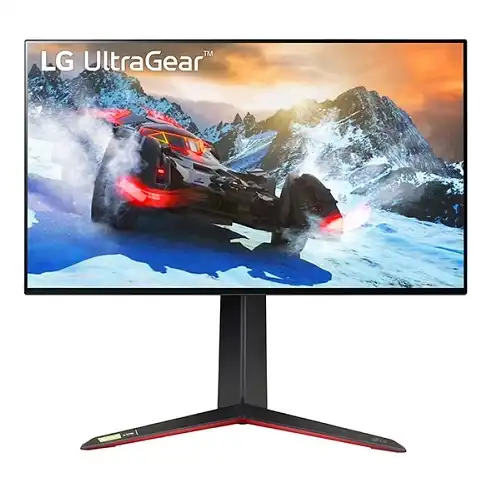
LG UltraGear 27GP95R-B overview
The LG UltraGear 27GP95R-B is a 27-inch 4K UHD Nano IPS gaming monitor with a 144Hz refresh rate and a DisplayPort overclock mode up to 160Hz. It combines a 1ms GtG response setting, DCI-P3 98% color gamut, VESA DisplayHDR 600, NVIDIA G-SYNC Compatible support and AMD FreeSync Premium Pro. Two HDMI 2.1 inputs, DisplayPort 1.4 with DSC, a USB hub and a fully adjustable stand make it suited to PC and console gaming. The highest timings require compatible source hardware and correct settings. Actual mode availability depends on regional specification, GPU, DSC support, cable, firmware and selected OSD settings; confirm the exact Bangladesh unit and warranty before purchase.
Exact model and overclocked refresh distinctions
The model is 27GP95R-B. Keep the “R” suffix intact when checking firmware, regional manuals and warranty. Similar names such as 27GP950-B, 27GP95U and 27GR93U are related but not guaranteed identical in regional feature or bundle. LG’s specification identifies 144Hz as the normal maximum and 160Hz as an overclock option. The 160Hz mode is not the same as a standard guaranteed timing on every input: LG says 4K 160Hz requires DSC-capable graphics and that DSC is supported through DisplayPort 1.4. Actual mode availability depends on regional specification, GPU, DSC support, cable, firmware and selected OSD settings; confirm the exact Bangladesh unit and warranty before purchase.
27-inch 4K UHD Nano IPS screen
The 27-inch Nano IPS panel has native 3840 × 2160 UHD resolution and a 16:9 aspect ratio. LG lists a 0.1554mm pixel pitch, 178-degree viewing angles, anti-glare surface and approximately 10.7 billion display colors. 4K at 27 inches gives fine detail for games and text, though interface scaling may be needed for comfortable reading. A powerful GPU is helpful at native 4K, especially when high frame rates and demanding graphics settings are desired. Actual mode availability depends on regional specification, GPU, DSC support, cable, firmware and selected OSD settings; confirm the exact Bangladesh unit and warranty before purchase.
Pixel density, viewing angle and coating
Nano IPS is LG’s panel branding for this model. Typical brightness is 400 cd/m², with peak brightness specified around 600 cd/m² for HDR in LG’s US/press materials; the Japan specification lists a 750 cd/m² peak figure, a regional source discrepancy that should not be collapsed into a single guaranteed value. Native contrast is 1000:1. Viewing experience varies with picture mode, HDR content, room light and local dimming behavior. Confirm regional rating and unit documentation if peak brightness is purchase-critical. Actual mode availability depends on regional specification, GPU, DSC support, cable, firmware and selected OSD settings; confirm the exact Bangladesh unit and warranty before purchase.
144Hz native and 160Hz overclock timing
LG lists 144Hz maximum refresh on the ordinary mode and up to 160Hz when overclocked. The Japan product page shows 48–144Hz over HDMI and 48–144Hz with 48–160Hz overclock through DisplayPort. To reach the overclock timing, enable the option in the OSD and use a compatible graphics card and cable. Overclock availability may depend on firmware and configuration. If 160Hz is unstable or unavailable, use 144Hz, which remains the manufacturer’s standard maximum mode. Actual mode availability depends on regional specification, GPU, DSC support, cable, firmware and selected OSD settings; confirm the exact Bangladesh unit and warranty before purchase.
Display Stream Compression and GPU requirements
LG states that 4K at 160Hz requires a graphics card supporting Display Stream Compression (DSC), and the US page specifies DSC support only on DisplayPort 1.4. DSC compresses the signal to support high resolution and refresh over the available link. Check GPU, driver and cable capability before purchase. At 4K 144Hz, signal bit depth and chroma settings also affect bandwidth. When a display mode is missing, test a supported timing and verified cable before attributing the issue to a monitor fault. Actual mode availability depends on regional specification, GPU, DSC support, cable, firmware and selected OSD settings; confirm the exact Bangladesh unit and warranty before purchase.
HDMI 2.1, DisplayPort and USB hub
The monitor provides two HDMI 2.1 inputs, one DisplayPort 1.4 input, USB upstream and two USB downstream ports, plus a headphone jack. HDMI 2.1 supports compatible gaming devices and consoles; DisplayPort is the route LG specifies for DSC-assisted 4K 160Hz. The USB upstream cable is required for the monitor hub to connect peripherals to a computer. No USB-C video input or laptop charging is listed. Verify cable certification and source settings for the desired resolution and refresh. Actual mode availability depends on regional specification, GPU, DSC support, cable, firmware and selected OSD settings; confirm the exact Bangladesh unit and warranty before purchase.
G-SYNC Compatible and FreeSync Premium Pro
LG lists NVIDIA G-SYNC Compatible support and AMD FreeSync Premium Pro. These adaptive-sync technologies can align display refresh with compatible GPU frame output to reduce tearing and stutter. Support depends on the source, driver, input and frame rate; it does not create additional GPU performance. Enable the monitor’s relevant setting and graphics control panel options. For console play, verify the specific console’s VRR support, game mode and supported output resolution. Actual mode availability depends on regional specification, GPU, DSC support, cable, firmware and selected OSD settings; confirm the exact Bangladesh unit and warranty before purchase.
VESA DisplayHDR 600 and local dimming
VESA DisplayHDR 600 certification and HDR10 support are listed, with local dimming features in the product materials. HDR performance depends on source, game, picture preset, local dimming and ambient light. The monitor’s 1000:1 native contrast remains distinct from OLED contrast. Enable HDR in the operating system and supported title, then calibrate brightness and tone mapping. Do not assume all games or video apps use HDR correctly; compare SDR and HDR output using content you actually watch. Actual mode availability depends on regional specification, GPU, DSC support, cable, firmware and selected OSD settings; confirm the exact Bangladesh unit and warranty before purchase.
DCI-P3 color, brightness and calibration
LG lists DCI-P3 98% color coverage and typical 400 cd/m² brightness. The display can show a wide range of saturated game and video colors, but the percentage is a model specification, not proof of a specific unit’s color accuracy. Use an sRGB mode for standard web content where needed and color-managed applications for creative work. A gaming monitor’s HDR and vivid modes may alter color. For professional color proofing, measure the panel and use a workflow-specific reference display. Actual mode availability depends on regional specification, GPU, DSC support, cable, firmware and selected OSD settings; confirm the exact Bangladesh unit and warranty before purchase.
Gaming response modes and motion tuning
The 1ms GtG response figure applies when the Faster response-time mode is selected, per LG’s note. Overdrive can improve transitions but may create visible overshoot depending on refresh rate and content. Choose the fastest setting that looks clean rather than assuming the maximum value is always best. Motion blur also depends on frame rate, game engine, pixel transitions and eye tracking. Check game mode, response time, adaptive sync and black stabilizer options one at a time. Actual mode availability depends on regional specification, GPU, DSC support, cable, firmware and selected OSD settings; confirm the exact Bangladesh unit and warranty before purchase.
Ergonomic stand and VESA mount
The stand supports tilt, height adjustment, swivel and bi-directional pivot; LG Japan lists 110mm height range, -5 to +15 degrees tilt, right 90-degree pivot, 100 × 100mm VESA mount, and 7.4kg weight with stand. Regional listing says full adjustment. Make enough room for the base, screen rotation and rear connectors. Use a VESA arm rated for the monitor’s weight and follow mounting instructions. Pivot is useful for documents, but not all games or apps rotate automatically. Actual mode availability depends on regional specification, GPU, DSC support, cable, firmware and selected OSD settings; confirm the exact Bangladesh unit and warranty before purchase.
PC setup for 4K high refresh
For PC use, connect DisplayPort 1.4, choose 3840 × 2160 and set 144Hz in the graphics driver. If using the overclock mode, enable it in the monitor OSD and select up to 160Hz only when the GPU supports DSC. Verify color depth, HDR and adaptive-sync settings after changing refresh. If the image blanks or timing is unstable, return to 144Hz and validate the cable and driver. Demanding games may need reduced settings or upscaling to maintain high frame rates at 4K. Actual mode availability depends on regional specification, GPU, DSC support, cable, firmware and selected OSD settings; confirm the exact Bangladesh unit and warranty before purchase.
Console use through HDMI 2.1
The two HDMI 2.1 ports can connect current consoles and support high-resolution gaming modes, subject to the console’s own output modes. LG promotes HDMI 2.1 and 4K/120Hz console support in related product materials. Configure the console’s resolution, refresh, HDR and VRR settings, then verify with a compatible title. Console operation does not use the 160Hz DisplayPort overclock feature. Confirm the HDMI cable is suitable for the target bandwidth and the monitor is on the correct input. Actual mode availability depends on regional specification, GPU, DSC support, cable, firmware and selected OSD settings; confirm the exact Bangladesh unit and warranty before purchase.
Audio, speakers and desk connectivity
No built-in speaker is listed for this model. A headphone output is available, and connected HDMI/DisplayPort sources can carry audio for headphones or external speakers. Plan a separate sound system for desk or room use. The monitor’s USB hub can connect accessories after the upstream USB cable is attached, but it does not function as a USB-C dock. Check source audio settings and the selected device if sound is not heard. Actual mode availability depends on regional specification, GPU, DSC support, cable, firmware and selected OSD settings; confirm the exact Bangladesh unit and warranty before purchase.
Creative work and everyday use
The 4K resolution and wide color gamut can support high-detail game content, photo review and video editing. The adjustable stand and USB hub make it practical for a desktop, and multiple inputs support a PC plus console. For long-form text work, use scaling and suitable brightness. The monitor is tuned for gaming features; creators who require consistent measured color should calibrate it and consider a display with workflow-specific uniformity and color certification. Actual mode availability depends on regional specification, GPU, DSC support, cable, firmware and selected OSD settings; confirm the exact Bangladesh unit and warranty before purchase.
Limitations and trade-offs
This monitor is not OLED, does not include built-in speakers and has no USB-C one-cable laptop connection. Its standard refresh is 144Hz; 160Hz is an optional DisplayPort overclock. High-refresh 4K demands a capable GPU and DSC support for the overclock mode. LG regional materials vary on peak brightness, so 600/750-nit figures should be checked against the exact unit and region. HDR certification does not mean every game will look the same or that local dimming eliminates all halo effects. Actual mode availability depends on regional specification, GPU, DSC support, cable, firmware and selected OSD settings; confirm the exact Bangladesh unit and warranty before purchase.
Bangladesh stock and warranty checks
Before ordering in Bangladesh, confirm exact model 27GP95R-B, condition, current seller offer, panel return policy and included stand/cables. Ask LG’s local service channel about warranty period and serial eligibility in writing. Confirm the GPU’s DisplayPort DSC support if 4K 160Hz is essential, and verify whether the unit’s regional documentation specifies 600 or 750-nit peak brightness. Global LG pages do not prove local inventory, price or warranty. Actual mode availability depends on regional specification, GPU, DSC support, cable, firmware and selected OSD settings; confirm the exact Bangladesh unit and warranty before purchase.
Setup and troubleshooting guide
Assemble the stand on a stable surface and connect the GPU through DisplayPort for 4K 144Hz or the supported 160Hz overclock. Enable overclock and DSC-compatible output only after checking the source. Install current GPU drivers and configure adaptive sync, HDR and color depth separately. If the display is limited to 60Hz, check the cable, input, GPU output mode and operating-system refresh selection. If 160Hz flickers, return to 144Hz and recheck the source and cable. Actual mode availability depends on regional specification, GPU, DSC support, cable, firmware and selected OSD settings; confirm the exact Bangladesh unit and warranty before purchase.
Frequently asked questions
What is the native resolution? 3840 × 2160 UHD 4K. What is the standard maximum refresh rate? 144Hz. Can it reach 160Hz? LG lists a DisplayPort overclock option up to 160Hz with DSC-capable graphics. What panel is used? Nano IPS. Does it support HDMI 2.1? Yes, two HDMI 2.1 ports are listed. Which VRR is available? G-SYNC Compatible and FreeSync Premium Pro. What HDR certification is listed? VESA DisplayHDR 600. Does it have speakers? No built-in speakers are listed. Is USB-C available? No USB-C video or charging port is listed. What warranty applies in Bangladesh? Confirm local LG service and serial terms with the seller. Actual mode availability depends on regional specification, GPU, DSC support, cable, firmware and selected OSD settings; confirm the exact Bangladesh unit and warranty before purchase.