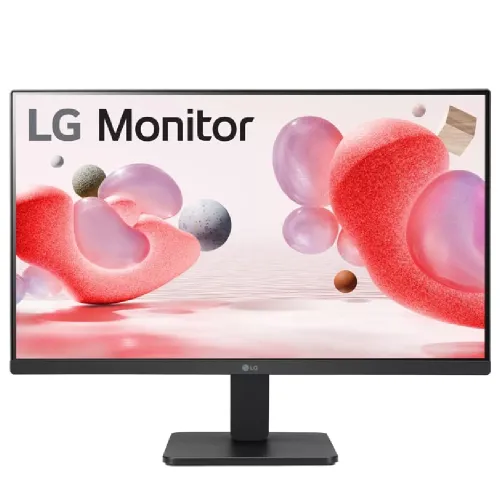
LG 27MR400-B is a 27-inch Full HD IPS monitor with 100Hz refresh, AMD FreeSync, Reader Mode and Flicker Safe features. Its native 1920 × 1080 resolution and 16:9 panel suit office, study, media and casual gaming. This model has HDMI, DisplayPort and headphone out in local listings; it does not include built-in speakers.
27-inch IPS Full HD panel
LG 27MR400-B uses a 27-inch IPS panel with 1920 × 1080 Full HD resolution and a 16:9 aspect ratio. This native mode works with common computers, office apps, video players and games. The official LG page describes a three-side virtually borderless design, while LG’s regional specifications list 178-degree horizontal and vertical viewing angles. Screen appearance still varies with position, room light and picture settings.
At 27 inches, Full HD provides larger interface elements but fewer pixels per inch than a QHD screen of the same size. This can suit users who prefer readable controls or whose computer is optimized for Full HD. If you need finer text, more desktop workspace or detailed image editing, compare 2560 × 1440 QHD before choosing.
100Hz refresh for supported sources
LG lists a 100Hz maximum refresh rate. When a compatible computer sends the monitor a 100Hz signal, scrolling, pointer movement and supported games can appear smoother than at 60Hz. The refresh rate is not the same as a guaranteed game frame rate; the source hardware, software and frame pacing determine how many distinct frames are delivered.
After connecting the computer, select 1920 × 1080 and check the advanced display settings for 100Hz. If the option is not available, review the cable, adapter or dock, selected port, graphics driver and operating-system settings. A console may offer lower refresh modes than a PC; check its supported output timings.
AMD FreeSync and compatible gaming
AMD FreeSync support is listed by LG. With compatible graphics hardware and a supported connection, variable refresh can coordinate display updates with source frame delivery to reduce tearing in supported conditions. The result depends on the GPU, driver, connection and usable refresh range. FreeSync does not raise the monitor’s refresh ceiling or guarantee a particular frame rate.
Enable the feature in the monitor menu if required and in the graphics driver. Use a compatible direct connection, then test with a supported game. If the feature is unavailable, check driver version, cable and port. Competitive players who prioritize maximum motion clarity may prefer a higher-refresh monitor after comparing actual response behavior.
5ms GTG and real motion performance
LG specifies 5ms GTG at the Faster response setting. Grey-to-grey response measures a pixel transition under a defined test; it does not promise that all transitions complete in exactly five milliseconds. Perceived motion depends on refresh rate, frame rate, overdrive, scene contrast and the content being displayed.
Try response-time settings with the games and videos you use. More aggressive overdrive can create bright inverse trails, so the strongest setting is not always best. A stable frame rate and a supported 100Hz source can matter as much as the headline response figure. For highly competitive gaming, seek independent measurements across multiple transitions.
Brightness, contrast and sRGB colour
LG’s regional specification lists 250 cd/m² typical brightness, 220 cd/m² minimum, 1300:1 typical contrast and sRGB 99% typical coverage. These specifications suit a normal indoor workspace. They do not establish HDR support, factory calibration, uniformity or the measured accuracy of a specific retail unit. Bright windows and direct lights may still cause reflections or wash out the image.
Set brightness for the room and avoid judging colour in a strongly tinted comfort mode. For photo, print or design work, consider calibration and compare the monitor’s measured accuracy with the project’s needs. sRGB coverage describes a colour space range, not a promise that every unit is calibrated to a particular Delta E.
HDMI, DisplayPort and audio out
Local specifications list one HDMI input, one DisplayPort input and a headphone output. HDMI can connect common PCs or media devices, while DisplayPort is useful for many desktop graphics cards. Supported resolution and refresh depend on the computer, cable, selected input and driver. The model is not listed here with a USB hub or USB-C docking capability.
Connect directly while checking signal modes. If the source only has USB-C, choose an adapter that supports Full HD at 100Hz. Check whether sound is routed over HDMI or through the computer’s separate audio device. The headphone output is not a built-in speaker system; external speakers need their own power.
Reader Mode and Flicker Safe
LG lists Reader Mode and Flicker Safe. Reader Mode changes the picture for reading, and Flicker Safe is a display feature documented by LG. These options can be adjusted to personal preference, but they do not guarantee that eye fatigue will not occur. Text size, brightness, viewing distance, glare and regular breaks also affect comfort.
Use a warmer reading mode for text if it is comfortable, and switch back to a neutral picture when colour judgement matters. Set the monitor at a comfortable height and reduce reflections. Follow LG’s user instructions for picture modes and do not interpret comfort features as medical claims.
Black Stabilizer and Dynamic Action Sync
LG lists Dynamic Action Sync and Black Stabilizer among the model’s gaming features. They provide optional picture or response adjustments intended for games. The result depends on the source and selected settings. They cannot improve a low-quality source or change the monitor’s physical resolution and refresh limits.
Try one feature at a time and compare visibility and latency in the games you actually play. Brightening dark areas can change the appearance of a scene, so return to default settings for work or media if the image no longer looks natural. A monitor setting is a user preference, not a substitute for game-specific configuration.
Three-side borderless design and desk setup
LG describes the screen as three-side virtually borderless. Narrower edges can make a single display look cleaner and may reduce visual gaps in a multi-monitor arrangement. They do not eliminate the panel border entirely. When matching displays, compare physical height, bezel appearance, colour mode and viewing angle as well as screen size.
The 27-inch diagonal needs sufficient desk depth and eye distance. Keep the base on a flat surface and leave clearance for power and video cables. Retailer dimension tables may describe package, display or assembled dimensions differently; use the manual or measure the exact unit if fit is tight.
Stand adjustment and VESA mounting
The LG regional specification lists tilt as the available stand adjustment. Height adjustment, swivel and pivot are not listed for the supplied base. Local listings identify a 100 × 100mm VESA pattern. Verify the pattern, screws and allowable mount load using the current manual before attaching an arm or wall bracket.
A VESA mount can add positioning flexibility, but the bracket must suit the wall or desk and the fasteners must not protrude too far into the monitor. Support the screen during installation and keep cables clear of moving joints. Do not infer stand adjustment from a similar LG model with a different suffix.
Power, adapter and daily use
LG product support provides regional documentation for the 27MR400-B. Bangladesh listings describe an external adapter and 100–240V, 50/60Hz input. Check the label on the local unit and the adapter supplied in its box before use, particularly for imported stock. Use the supplied or approved power equipment and keep connectors secured.
For a home office or study desk, adjust brightness and text scale to the room and user. The monitor’s 100Hz mode can benefit supported desktop motion, while ordinary video remains limited by its encoded frame rate. The display does not include a USB-C power connection or laptop charger in the listed configuration.
Choosing this model for work and play
The 27MR400-B is a general-purpose Full HD monitor for office tasks, study, web use, media and casual games. Its IPS panel, 100Hz refresh, FreeSync and Reader Mode cover a useful range of everyday situations. The stand keeps desk placement straightforward, and common video inputs support desktop connections.
Choose QHD for a sharper image at 27 inches, a more adjustable stand for ergonomics, integrated speakers for simple audio or USB-C if you need single-cable laptop docking. For competitive gaming, compare higher-refresh models. Match the product to the equipment you already use and verify cable support for the desired refresh.
Bangladesh price, stock and warranty
The seller pages checked showed ৳21,700 at Tech Link, ৳21,799 at Creatus and ৳23,000 at Nexus, each reporting stock at the time their pages were checked. Prices and availability can change quickly. This market range is a comparison snapshot, not a BiponiBD sale offer or a guarantee that the listed sellers still have the product.
Warranty terms are region- and distributor-specific. LG’s US support page lists US coverage, which does not establish a Bangladesh serial’s eligibility. Local sellers may advertise three years, but confirm the service provider, written duration, exclusions, serial coverage and claim steps before paying. Keep the original invoice and serial number.
Care, setup and delivery inspection
Use a soft microfiber cloth and avoid spraying liquid directly onto the panel. Place the screen away from strong glare, keep vents clear and support the frame when moving it. Connect power and video cables without straining the ports. If the image looks incorrect, select native 1920 × 1080, check the input source and verify the computer’s refresh setting.
Inspect the panel, ports, tilt hinge, power adapter and supplied accessories after delivery. Test the HDMI and DisplayPort connections you plan to use, check audio through headphones and confirm the expected 100Hz mode. Record the serial and retain the invoice and packaging through the seller’s inspection period. Follow LG and seller instructions for returns or warranty claims.
Source and price notes
LG official regional product pages identify the 27-inch Full HD IPS panel, 100Hz, FreeSync, Reader Mode, Flicker Safe and 5ms GTG at Faster. Local retailer listings checked 2026-11-08 showed prices between ৳21,700 and ৳23,000. Stock, warranty and delivery are seller-specific and should be confirmed before ordering. The price range is not a BiponiBD offer.