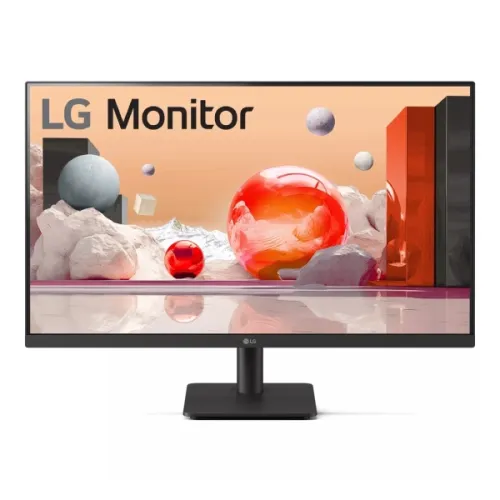
LG 27MS500-B is a 27-inch Full HD IPS monitor with a 100Hz refresh rate, two HDMI inputs and LG Reader Mode / Flicker Safe display features. It suits office work, study, video and casual gaming when Full HD resolution and a 27-inch viewing area match the desk setup. The stand tilts; height adjustment, swivel and pivot are not listed.
27-inch Full HD IPS display
The LG 27MS500-B uses a 27-inch IPS panel with 1920 × 1080 Full HD resolution and a 16:9 layout. This common format works with office applications, web pages, streaming video and many games without special scaling requirements. The panel provides 178-degree horizontal and vertical viewing angles in LG’s specification, which can help when more than one person is looking at the screen. Viewing-angle figures do not mean that colour and contrast remain perfectly unchanged from every position.
At 27 inches, Full HD creates a larger image than a 24-inch Full HD panel but provides lower pixel density. Text, icons and images may look less fine than they do on a 27-inch QHD display. This can be useful if larger on-screen elements are preferred, while users who want denser detail or more spreadsheet workspace should compare a QHD alternative.
100Hz refresh for everyday motion
LG lists a 100Hz refresh rate. When the connected computer sends a supported 100Hz signal, the monitor can refresh more often than a 60Hz display. Scrolling, pointer movement and compatible games can feel smoother. The refresh rate does not create additional rendered frames; the processor, graphics hardware, software, settings and source content control the actual frame rate.
Connect a computer directly, select 1920 × 1080, then choose 100Hz in the operating system’s advanced display settings. If the option is missing, check the cable, dock, adapter, selected input and graphics driver. Some laptops or consoles expose different modes depending on the port. Verify the source device’s output limits before expecting 100Hz at a specific resolution.
5ms GTG response and gaming expectations
LG lists a 5ms grey-to-grey response time using the Faster response-time setting. GTG describes a pixel transition between grey levels under a specified test condition. It is different from MPRT and does not mean every transition completes in 5ms. Perceived motion depends on refresh rate, rendered frame rate, frame pacing, response tuning and content.
For casual games, the 100Hz ceiling and 5ms GTG claim may be adequate. If you notice trailing, compare response-time options in the games you play and watch for overshoot artefacts. Competitive players should compare independently tested motion performance and consider displays at 144Hz or above. Avoid assuming a headline response figure alone predicts real-world clarity.
Brightness, contrast and room lighting
The listed brightness is 250 cd/m² typical and 200 cd/m² minimum, with a typical 1000:1 contrast ratio. These are mainstream SDR specifications for a home or office environment. Reflections, direct sunlight and strong overhead lighting can still affect visibility. LG’s product listing describes the monitor as a Full HD IPS display rather than a high-brightness HDR product.
Set brightness to match the room instead of leaving it at maximum. Position the screen to avoid windows reflecting into the panel, and adjust text scaling if reading comfort is a concern. Typical contrast and brightness are specification values, not guaranteed measurements for every unit. Do not infer HDR capability from a retailer keyword unless LG identifies it for this exact model.
Dual HDMI connection options
Two HDMI inputs let a user leave more than one source attached, such as a desktop and a laptop or a media player. Select the active source using the monitor controls. The source, HDMI output, cable and display timing all determine which resolution and refresh-rate combinations are available. Regional package contents may vary, so check with the seller whether an HDMI cable is included.
The product is not listed here with DisplayPort, USB-C, an integrated USB hub or laptop charging. If your computer only has USB-C, you may need a compatible video adapter or dock. Check that the adapter supports Full HD at 100Hz and that it does not add a limitation. Keep the input cable firmly seated and use a direct connection while diagnosing a missing signal.
Audio output and speakers
Regional product specifications describe a 3-pole audio output, while LG’s page highlights the monitor’s visual features. No built-in speakers are listed for the 27MS500-B. A 3.5mm output can pass audio from a compatible HDMI source to headphones or powered speakers, but the audio path and available controls depend on the source and model region.
If no sound is heard, check the computer’s selected output device, volume, HDMI audio support and cable. Try headphones or speakers known to work with another source. For a desktop PC, connecting audio directly to the computer may be simpler. Confirm the exact rear-panel connectors and manual for the local variant before buying audio accessories.
Reader Mode and Flicker Safe
LG lists Reader Mode and Flicker Safe. Reader Mode can adjust the display appearance for reading, and Flicker Safe is a display feature identified by LG. These are user-selectable comfort tools, not medical treatment and not a promise that extended screen use will never cause fatigue. The best settings depend on room brightness, content, viewing distance and personal preference.
A well-positioned screen, comfortable text size, reduced glare and regular breaks remain useful habits. If Reader Mode changes colour appearance, switch back to a neutral picture setting for tasks where colour judgement matters. Avoid placing a bright display in a dark room at an uncomfortable level. Consult the manual for the available picture modes and on-screen controls.
LG picture and gaming tools
LG product information lists Dynamic Action Sync, Black Stabilizer, Crosshair, Super Resolution+ and OnScreen Control among the model’s features. Their availability and behavior can depend on the monitor menu, supported software and computer operating system. They provide optional adjustments; they do not increase the physical resolution, refresh ceiling or graphics performance of the connected device.
Use the on-screen menu to explore picture settings and install OnScreen Control only from LG’s official software/support resources for the relevant computer. For games, compare optional settings against the default image and disable any that make colours or shadows harder to judge. Software versions and supported operating systems may change over time; check the current LG support page.
Stand, tilt and VESA mounting
The supplied stand is listed with tilt adjustment. Height, swivel and pivot movement are not specified for this model, so plan for a fixed desk height unless using a compatible VESA mount. Local specification sources report 75 × 75mm mounting compatibility. Verify the pattern, screw depth and support requirement on the exact monitor before choosing a bracket or arm.
Use a stable desk and support the panel when connecting cables or changing tilt. Do not force the hinge beyond its range. If wall-mounting, use hardware suited to the wall and check the bracket’s capacity. A mount can add movement that the bundled stand does not provide, but it does not change the monitor’s resolution or refresh capability.
Dimensions, power and setup
LG’s support resources and local sellers document regional information for the 27MS500-B. Retailer listings specify a 100–240V, 50/60Hz input and external power adapter. Check the label on the monitor and the supplied adapter before use, particularly if buying a region-imported unit. Use the supplied or LG-approved power equipment and route the cable so it cannot be pulled when adjusting the monitor.
Some local listings give the screen width with the stand as about 539.9mm and list weight around 2.6kg with stand; package size and shipping weight are different. Treat exact dimensions and weight as variant-sensitive until confirmed against the label or manual. Measure the desk, mounting clearance and cable path before arranging a compact workspace.
Who this monitor suits
The 27MS500-B can suit a home office, study desk or general-purpose computer setup where a 27-inch image, IPS viewing angles, dual HDMI and 100Hz are useful. It can also handle casual gaming and video playback at its native resolution. Reader Mode and the optional software controls provide additional ways to adjust the display for different tasks.
Choose a different monitor if you need QHD or 4K detail at 27 inches, a height-adjustable stand, USB-C docking, built-in speakers, DisplayPort or a refresh rate above 100Hz. Check the actual model suffix, local warranty and return policy. The screen does not make a low-resolution source sharper, and gaming performance still depends on the computer and game.
Bangladesh price, stock and warranty checks
Local seller pages showed different price and availability snapshots during this review. CanvasIT listed ৳17,500 and in stock; Creatus listed ৳20,990 and in stock; Tech Land showed ৳20,300 but out of stock. Nexus listed a different price snapshot. These seller pages may change at any time; the range is for comparison and is not a BiponiBD selling price.
Warranty claims also vary by seller and region. Some Bangladesh retailers advertise three years, while LG support pages show different warranty terms for US and India regional suffixes. Those regional terms do not prove coverage for a Bangladesh serial number. Ask which authorized service channel applies, request written warranty details and confirm delivery stock before paying.
Care and delivery inspection
Place the monitor on a stable surface, keep ventilation openings unobstructed and use a soft microfiber cloth for dust. Follow LG’s cleaning instructions and avoid spraying liquid directly onto the screen. Hold the frame when moving the display, avoid pressure on the LCD surface and disconnect power before rearranging cables. Keep the stand and fasteners installed as described in the guide.
Inspect the panel, HDMI ports, stand, adapter and supplied accessories promptly after delivery. Record the serial number and retain the invoice and packaging until initial checks are complete. If the display does not show the expected resolution or refresh rate, check input selection, cable, computer output and driver settings before assuming the panel is faulty. Follow the seller’s written return and warranty steps.
Specification and source notes
LG’s regional product page and official support pages identify the 27MS500-B as a 27-inch IPS Full HD monitor with 100Hz, 5ms GTG, Reader Mode, Flicker Safe and three-side virtually borderless design. Local retailer pages specify two HDMI inputs, an audio output, 250 cd/m² typical brightness, 1000:1 contrast, tilt and 75 × 75mm VESA mounting. Local listings do not agree on price, stock or warranty; confirm the exact Bangladesh serial coverage with the seller.
Price observations checked 2026-11-08: CanvasIT ৳17,500 in stock; Creatus ৳20,990 in stock; Tech Land ৳20,300 out of stock. These are third-party snapshots, not a BiponiBD offer or guaranteed current availability.