Exact model overview
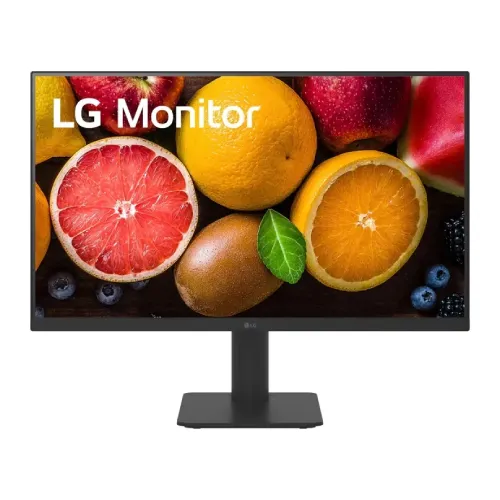
The LG 27MS570B-B is a 27-inch Full HD IPS monitor with a 1920 × 1080 resolution and 100Hz maximum refresh rate. LG’s product page identifies USB-C with up to 65W Power Delivery, built-in speakers and a stand with height and tilt adjustment. It also includes Reader Mode, Flicker Safe, Black Stabilizer, Crosshair and Dynamic Action Sync features. Regional versions can differ in accessories, warranty and some details, so confirm the delivered suffix and local specification. This model is 27MS570B-B; do not confuse it with the similarly named 27MS500-B or QHD MP275 products.
27-inch Full HD workspace
The screen measures 27 inches diagonally and uses 16:9 Full HD resolution of 1920 × 1080. This format works well for common office applications, web browsing, video and general home use. At 27 inches, Full HD has lower pixel density than QHD at the same size; text and fine details may appear less sharp from close range. Set native resolution for direct pixel mapping, then choose comfortable operating-system scaling and viewing distance. This resolution is also less demanding to render than QHD for casual gaming.
IPS panel and viewing angles
LG specifies an IPS panel with 178-degree horizontal and vertical viewing angles. IPS can help preserve color appearance across a wider seating area, although viewing angle does not guarantee unit-level uniformity or calibration. The regional product specification lists a 1300:1 typical contrast ratio and 72% NTSC typical color gamut, while the US page emphasizes 250 nits typical brightness. Choose a position with controlled reflections and calibrate the display for color-sensitive work. The screen is flat; no curved-panel specification is listed.
100Hz refresh and motion
LG lists a maximum refresh rate of 100Hz. Compared with common 60Hz screens, this can make scrolling and supported motion appear smoother when the computer delivers the relevant frames. It does not increase the frame rate rendered by a game or application. Connect using a supported input, choose 1920 × 1080 and select an available refresh rate in the operating system. Refresh availability can depend on the source, cable, port and graphics driver. Check the regional manual if a mode is missing.
Response time and gaming tools
LG’s regional specifications list 5ms GtG at the Faster setting. This is distinct from refresh rate and input latency, and pixel transitions can vary by setting. The monitor also lists Black Stabilizer, Crosshair and Dynamic Action Sync for supported gaming use. These tools adjust visibility or display processing but do not improve the computer’s rendering speed. Try settings with familiar content and return to a neutral image if dark areas become washed out or overlays are unwanted.
USB-C connection and 65W power delivery
LG highlights a USB-C connection with up to 65W Power Delivery. With a compatible laptop and cable, one USB-C connection can carry display signal and provide charging, reducing cable clutter. The exact data and charging behavior depends on the connected computer, cable and selected region. Confirm that the laptop supports video over USB-C and can accept the available charging power. High-performance laptops may still require their own adapter. Do not assume every USB-C port on another computer supports display output.
USB hub and peripheral connection
LG’s Singapore specification lists USB-C data transmission, a USB upstream connection through USB-C and two USB downstream 2.0 ports. This can allow compatible peripherals to connect through the monitor while the host laptop uses a USB-C upstream link. Downstream ports do not necessarily charge high-power devices. The local regional configuration should be checked because port availability can vary. Use a data-capable USB-C cable and consult the manual if a keyboard, mouse or storage device is not recognized.
HDMI and audio connections
The product page lists two HDMI inputs and one headphone output. HDMI supports video and audio from compatible sources; check the device output mode and monitor manual when connecting a console or media player. The headphone jack is an audio output, not a microphone input. USB-C provides an additional display route for compatible laptops. If a source is not detected, select the correct input and verify the cable and source settings. Disconnect unnecessary adapters while troubleshooting.
Built-in speakers
The 27MS570B-B has two integrated 2W speakers. They provide convenient sound for video calls, alerts and everyday media without requiring separate desktop speakers. Small monitor speakers have limited bass and maximum volume compared with dedicated audio equipment. Select the LG monitor as the output device when using HDMI or USB-C audio, check system volume and mute settings, and use headphones or external speakers when more substantial sound is needed.
Height-adjustable and tilt stand
LG lists a stand with height and tilt adjustment. These adjustments help align the screen with the user’s seated position and desk. Raise the display so the viewing area is comfortable and tilt it to reduce reflections. The published page summary does not list swivel or pivot movement, so do not assume the panel rotates to portrait or swivels sideways. Leave cable slack when adjusting height and ensure the base is stable before moving the monitor.
VESA mounting
The LG regional page lists a 75 × 75mm wall-mount pattern. A third-party listing also reports 75 × 75, but always verify the rear mounting pattern, screw depth and load rating against the exact manual and delivered regional unit before purchasing a bracket. Use a compatible arm and install it with the correct hardware. The supplied stand may be preferable when the mounting pattern or local accessory configuration has not been confirmed.
Brightness and eye-care modes
LG regional specifications list 250 nits typical brightness, Reader Mode and Flicker Safe. Reader Mode can change the color balance for text viewing, while Flicker Safe is an image-comfort feature. These functions are not medical treatments, and perceived comfort depends on lighting, brightness, font size, distance and breaks. Set brightness for the room and use a neutral mode when color accuracy matters. The stated brightness is typical, not a guarantee for every picture mode or unit.
Color and resolution limits
LG lists 16.7 million colors and NTSC gamut figures on regional product pages. Those values describe display capability and do not guarantee professional color accuracy or calibration. Full HD at 27 inches gives a larger workspace image but less fine detail than QHD at the same size. For office documents and video, this may be acceptable and can ease graphics workload. For detailed design, photo editing or dense multitasking, compare pixel density and gamut needs before choosing.
Dimensions, weight and workspace
LG India lists dimensions without stand of 612 × 362.5 × 56.2mm and with stand of 612 × 492.1 × 219.4mm at the raised position; weight without stand is 3.2kg and with stand 4.0kg. Regional measurements may vary. Measure desk width, depth, height and rear clearance before purchase, especially if placing the display below a shelf or using an arm. Leave room for USB-C, HDMI and power cables and for the stand’s height movement.
Power use and laptop charging
USB-C Power Delivery is rated up to 65W on LG’s product page, while USB-C charging compatibility depends on the host laptop and cable. A laptop that requires more power may charge slowly or continue using its own adapter. Use a suitable certified cable and check the computer’s charging requirements. Monitor power consumption and adapter details can vary by region; use the power accessory supplied with the exact product and follow the manual. Avoid assuming the 65W output is available from every input or operating condition.
Productivity, study and home use
The combination of 27-inch Full HD, IPS viewing angles, 100Hz refresh, USB-C laptop connectivity, a USB hub, speakers and height adjustment can support a home or office desk. A single USB-C cable may simplify a compatible laptop setup, while two HDMI inputs can serve additional sources. Consider whether Full HD pixel density is suitable at 27 inches and whether a 65W charge rate is enough for the laptop. The monitor is not a USB-C dock replacement for every workstation, because host support and peripheral needs differ.
Advantages and practical trade-offs
The 27MS570B-B offers IPS, Full HD, 100Hz refresh, USB-C with up to 65W Power Delivery, built-in 2W × 2 speakers and an adjustable stand. Reader Mode, Flicker Safe and LG Switch add convenience for supported workflows. Trade-offs include Full HD pixel density at 27 inches, modest built-in speaker output and the need for USB-C video/charging compatibility from the laptop. Confirm regional USB hub configuration, VESA pattern, local warranty and included cables before ordering.
Bangladesh warranty and purchase terms
LG’s US support page describes a one-year warranty for US-purchased units only; that does not establish coverage for a Bangladesh serial. The catalog warranty should be verified with the seller and authorized local service channel. Ask who handles service, when coverage starts, which panel defects qualify and whether an invoice or serial is required. Price, stock, delivery, payment, return and included accessory details can vary by seller and region. Check the live BiponiBD listing at checkout and retain the invoice and packaging.
Setup and troubleshooting
For USB-C setup, confirm that the laptop port supports video and Power Delivery, then use a cable rated for display and charging. Otherwise, connect video over HDMI and use the required laptop power adapter. Select 1920 × 1080 and a supported refresh up to 100Hz. If the screen is blank, check the input selector, cable and host output mode. If USB peripherals fail, confirm USB-C upstream connection and data support. For sound, choose the display as the playback device and check volume or headphone routing.
Specification summary
LG 27MS570B-B: 27-inch flat IPS, 1920 × 1080 FHD, 16:9, 100Hz, 5ms GtG at Faster, 250 nits typical, 1300:1 typical contrast and 72% NTSC (regional figures). It offers USB-C with up to 65W PD, USB downstream ports in listed regional configuration, HDMI × 2, headphone out and 2W × 2 speakers. Stand: height and tilt adjustment; VESA 75 × 75mm on LG regional page. Verify the exact regional SKU, local warranty and current seller offer.