Pros
- Adjustable Ergo arm helps recover desk space.
- USB-C video and 60W PD can simplify compatible laptop setups.
- QHD IPS screen with sRGB 99% typical.
- Integrated speakers and FreeSync listed.

All categories
 New condition
Monitors
LG · 27QN880-B Ergo
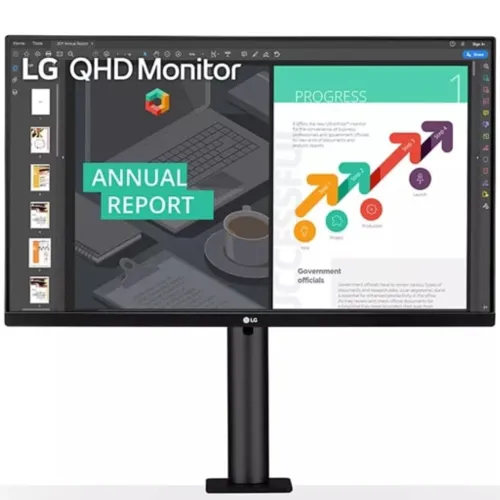
27-inch QHD IPS Ergo monitor with C-clamp arm, USB-C 60W PD, HDR10 and 99% sRGB.
Price unavailable
Price range updating
No verified price is available yet. Store offers will appear when merchants publish them.
Compare store prices
No live offers for this variant
Offers will appear when merchants publish them.
Loading history…
Product story
The LG 27QN880-B is a 27-inch QHD (2560 × 1440) IPS monitor with an Ergo C-clamp arm stand and USB Type-C. LG lists sRGB 99% typical, HDR10, AMD FreeSync and USB-C Power Delivery up to 60W. Its flexible arm offers extend/retract, swivel, pivot, height and tilt adjustments to free desk space. Use LG's 27QN880-B manual and regional product sheet for exact port, refresh and installation details. Performance depends on host device, cable, settings and content. Bangladesh price, stock, warranty and return conditions are seller-specific and should be confirmed before purchase.
Confirm the exact model 27QN880-B on the label; similar LG Ergo monitors such as 27UN880 and later QN models have different resolution or connections. LG's US support page marks 27QN880-B discontinued in that market. This does not by itself prove Bangladesh stock status, so verify the actual unit, source region and local service before purchase. Use LG's 27QN880-B manual and regional product sheet for exact port, refresh and installation details. Performance depends on host device, cable, settings and content. Bangladesh price, stock, warranty and return conditions are seller-specific and should be confirmed before purchase.
The screen has a 27-inch 16:9 format and native 2560 × 1440 QHD resolution. QHD provides more workspace and detail than Full HD while remaining less demanding than 4K. Use native resolution for clear text and select scaling based on viewing distance and application size. The wide canvas suits document work and multiple windows. Use LG's 27QN880-B manual and regional product sheet for exact port, refresh and installation details. Performance depends on host device, cable, settings and content. Bangladesh price, stock, warranty and return conditions are seller-specific and should be confirmed before purchase.
LG specifies an IPS panel with 99% typical sRGB coverage. This is a useful gamut reference for general work and web content, but not a unit-specific calibration certificate. For color-sensitive publishing, measure the display and use a color-managed workflow. Perceived uniformity and contrast depend on the unit, room light and viewing angle. Use LG's 27QN880-B manual and regional product sheet for exact port, refresh and installation details. Performance depends on host device, cable, settings and content. Bangladesh price, stock, warranty and return conditions are seller-specific and should be confirmed before purchase.
The monitor is a standard office display rather than a high-refresh gaming model; product-family specifications list up to 75Hz and 5ms response on some regional data sheets. Confirm the exact local sheet because LG regional pages can vary. Select a supported refresh in the operating system and avoid assuming 144Hz or other gaming rates. Use LG's 27QN880-B manual and regional product sheet for exact port, refresh and installation details. Performance depends on host device, cable, settings and content. Bangladesh price, stock, warranty and return conditions are seller-specific and should be confirmed before purchase.
LG lists HDR10 support. HDR picture quality depends on content, source and settings; this model is not advertised as a high-end HDR display with local dimming. Use compatible HDR content and compare the result with SDR. Do not infer a peak-brightness certification from HDR10 compatibility alone. Use LG's 27QN880-B manual and regional product sheet for exact port, refresh and installation details. Performance depends on host device, cable, settings and content. Bangladesh price, stock, warranty and return conditions are seller-specific and should be confirmed before purchase.
The Ergo stand uses a C-clamp to attach to a suitable desk edge and raises the screen on an articulated arm. LG lists extend/retract, swivel, pivot, height and tilt positioning. This can bring the screen closer and open space beneath it. Check the desk thickness, edge shape, clearance and arm load requirements before installation. Use LG's 27QN880-B manual and regional product sheet for exact port, refresh and installation details. Performance depends on host device, cable, settings and content. Bangladesh price, stock, warranty and return conditions are seller-specific and should be confirmed before purchase.
The arm adjusts the display in multiple directions to suit seated work and collaboration. Set the screen at a comfortable viewing height and distance, then tighten the clamp as instructed. Ensure there is enough space behind the desk for the arm's movement and no collision with a wall, shelving or cables while extending or rotating the panel. Use LG's 27QN880-B manual and regional product sheet for exact port, refresh and installation details. Performance depends on host device, cable, settings and content. Bangladesh price, stock, warranty and return conditions are seller-specific and should be confirmed before purchase.
USB Type-C supports DisplayPort video and up to 60W Power Delivery according to LG. A compatible laptop can send video and receive power through one cable, reducing desk clutter. Verify the laptop's USB-C port supports DisplayPort Alt Mode and that 60W meets its charging needs; high-performance computers may still need their own adapter. Use LG's 27QN880-B manual and regional product sheet for exact port, refresh and installation details. Performance depends on host device, cable, settings and content. Bangladesh price, stock, warranty and return conditions are seller-specific and should be confirmed before purchase.
The product family includes two HDMI inputs, one DisplayPort input, USB-C and USB downstream connectivity. Some regional data sheets list a USB upstream and two downstream USB ports. Confirm the exact port versions and layout on the supplied unit. A USB hub typically needs its upstream link to the computer to pass data. Use LG's 27QN880-B manual and regional product sheet for exact port, refresh and installation details. Performance depends on host device, cable, settings and content. Bangladesh price, stock, warranty and return conditions are seller-specific and should be confirmed before purchase.
LG lists stereo speakers with 5W output and MaxxAudio on product information for the model family. Audio quality is suitable for basic desktop listening and calls but depends on room and source. Use headphones or external speakers for stronger sound. Confirm the local SKU's exact audio and port behavior from its manual. Use LG's 27QN880-B manual and regional product sheet for exact port, refresh and installation details. Performance depends on host device, cable, settings and content. Bangladesh price, stock, warranty and return conditions are seller-specific and should be confirmed before purchase.
LG lists AMD FreeSync, Reader Mode, Flicker Safe and low-blue-light options on regional product pages. FreeSync requires a compatible graphics source and enabled settings. Comfort also depends on brightness, lighting and breaks; these features do not guarantee prevention of eye fatigue. Some image modes may change color appearance. Use LG's 27QN880-B manual and regional product sheet for exact port, refresh and installation details. Performance depends on host device, cable, settings and content. Bangladesh price, stock, warranty and return conditions are seller-specific and should be confirmed before purchase.
Connect a laptop with USB-C for video and charging if the host supports DisplayPort Alt Mode. Alternatively, use HDMI or DisplayPort for video and USB upstream for the built-in hub. Choose 2560 × 1440 and a supported refresh in the operating system. Confirm signal input selection and cable before mounting the display permanently. Use LG's 27QN880-B manual and regional product sheet for exact port, refresh and installation details. Performance depends on host device, cable, settings and content. Bangladesh price, stock, warranty and return conditions are seller-specific and should be confirmed before purchase.
Console compatibility depends on the console's output resolution and supported refresh. This QHD productivity monitor is not a 120Hz or 144Hz gaming display unless the exact regional specification states otherwise. Check how the console handles 2560 × 1440 and HDR over the chosen HDMI input before purchase. Gaming refresh rates vary by title and console. Use LG's 27QN880-B manual and regional product sheet for exact port, refresh and installation details. Performance depends on host device, cable, settings and content. Bangladesh price, stock, warranty and return conditions are seller-specific and should be confirmed before purchase.
The C-clamp attaches directly to the desk and is not the same as a standard VESA arm installation. LG product materials describe an ergonomic arm rather than a conventional base. Confirm desk thickness/load compatibility, mounting space and whether an alternate VESA pattern is supported on your exact unit. Install with the display supported to avoid tipping or damage. Use LG's 27QN880-B manual and regional product sheet for exact port, refresh and installation details. Performance depends on host device, cable, settings and content. Bangladesh price, stock, warranty and return conditions are seller-specific and should be confirmed before purchase.
Strengths include QHD IPS resolution, 99% typical sRGB, USB-C 60W, integrated audio and a space-saving arm with broad adjustment. Trade-offs include a moderate refresh rate, desk-clamp installation requirements, no high-end HDR claim and possible regional/model availability limits. Consider the setup design and laptop connectivity rather than treating it as a high-refresh gaming monitor. Use LG's 27QN880-B manual and regional product sheet for exact port, refresh and installation details. Performance depends on host device, cable, settings and content. Bangladesh price, stock, warranty and return conditions are seller-specific and should be confirmed before purchase.
LG's US page marks 27QN880-B discontinued there. Product pages and inventory differ by market, and older products can remain listed by regional sellers. Verify that the Bangladesh offer is for a new, correctly identified unit with valid serial support. Do not assume an international product page confirms current local stock or service. Use LG's 27QN880-B manual and regional product sheet for exact port, refresh and installation details. Performance depends on host device, cable, settings and content. Bangladesh price, stock, warranty and return conditions are seller-specific and should be confirmed before purchase.
Inspect the panel, arm, clamp, adjustment joints, USB-C, adapter/power cable and included cables on delivery. Keep the invoice, serial label and packaging through the return period. Move the arm slowly and check that the clamp remains firm. Clean the screen with a soft microfiber cloth and avoid spraying liquid on the panel. Use LG's 27QN880-B manual and regional product sheet for exact port, refresh and installation details. Performance depends on host device, cable, settings and content. Bangladesh price, stock, warranty and return conditions are seller-specific and should be confirmed before purchase.
Before purchase in Bangladesh, confirm current stock and price, exact model/suffix, new or used condition, C-clamp bundle, USB-C cable and power accessories, return/dead-pixel terms, delivery and serial-specific LG warranty provider and term. The US page's discontinued status is market-specific. Have the seller confirm local availability and service on the invoice. Use LG's 27QN880-B manual and regional product sheet for exact port, refresh and installation details. Performance depends on host device, cable, settings and content. Bangladesh price, stock, warranty and return conditions are seller-specific and should be confirmed before purchase.
LG 27QN880-B is a 27-inch QHD IPS Ergo monitor with 99% sRGB, HDR10, AMD FreeSync, USB-C up to 60W PD and an adjustable C-clamp arm. LG marks it discontinued in the US. Confirm regional ports, refresh, clamp fit, included accessories and Bangladesh serial warranty before purchase. Use LG's 27QN880-B manual and regional product sheet for exact port, refresh and installation details. Performance depends on host device, cable, settings and content. Bangladesh price, stock, warranty and return conditions are seller-specific and should be confirmed before purchase.
Helpful answers
Product-specific answers maintained with the catalog information.
The 27-inch IPS panel uses 2560 × 1440 QHD resolution.
Yes. LG describes a C-clamp arm with several position adjustments.
USB-C supports up to 60W Power Delivery if the laptop supports USB-C video.
LG lists sRGB 99% typical for the 27QN880-B.
It is a productivity monitor; confirm the regional refresh specification before buying.
HDR10 support is listed; that does not imply local dimming or premium HDR performance.
LG marks it discontinued on the US product page; status may differ by market.
Check desk thickness, edge shape, load capacity and arm clearance before installation.
Confirm serial-specific local LG provider, term and service with the seller.
Customer community
Become a merchant
Join BiponiBD, publish accurate offers and start free.