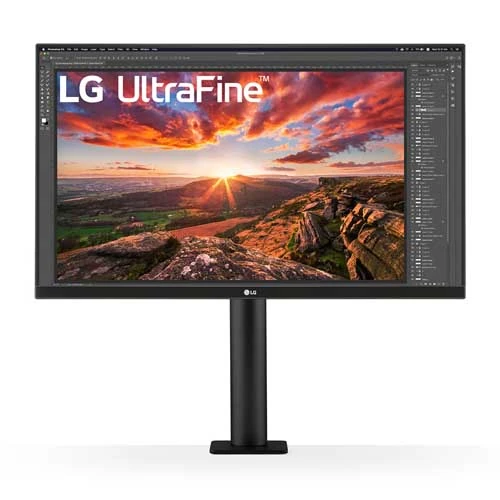
LG UltraFine Ergo 27UN880-B overview
The LG UltraFine Ergo 27UN880-B is a 27-inch 4K UHD IPS monitor with an articulated desk arm and C-clamp mounting system. LG lists 3840 × 2160 resolution, 60Hz refresh, sRGB 99% typical coverage and VESA DisplayHDR 400. USB-C carries video and data and provides up to 60W power delivery. The integrated arm supports many desk positions while keeping the monitor base off the desktop. Actual behavior depends on source support, cable, room, desk construction and settings. Bangladesh price, availability, package, desk fit and serial-specific warranty must be confirmed with the seller.
Confirm exact model and ergonomic mount
Verify the complete 27UN880-B model and regional suffix. Related LG UltraFine and Ergo products can differ in panel, USB-C power and stand. This model’s distinctive C-clamp mount attaches to a compatible desk edge or grommet; it is not the same as a conventional wide-foot monitor stand. Check desk thickness, edge shape, cable clearance and included mounting components before purchase. Actual behavior depends on source support, cable, room, desk construction and settings. Bangladesh price, availability, package, desk fit and serial-specific warranty must be confirmed with the seller.
27-inch 4K IPS image detail
The 27-inch IPS panel provides 3840 × 2160 pixels in a 16:9 format at up to 60Hz. At 4K, small text and detailed images can appear crisp; many users will want operating-system scaling for comfortable reading. IPS viewing angles support consistent color from different seating positions. Select native resolution and confirm the source can output 4K at 60Hz. Actual behavior depends on source support, cable, room, desk construction and settings. Bangladesh price, availability, package, desk fit and serial-specific warranty must be confirmed with the seller.
Color gamut and calibration notes
LG specifies sRGB 99% typical and factory color calibration. This supports common SDR photo, web and office workflows, but does not guarantee reference accuracy for every unit or every color space. The monitor is also described as hardware-calibration ready. Use supported calibration equipment and software if professional color matching is required, and verify the delivered unit’s calibration materials. Actual behavior depends on source support, cable, room, desk construction and settings. Bangladesh price, availability, package, desk fit and serial-specific warranty must be confirmed with the seller.
Refresh rate and response
The maximum refresh rate is 60Hz and response time is listed as 5ms GTG at the Faster setting. This is a productivity and creative-work display rather than a high-refresh gaming monitor. Fast moving objects may not look as clear as on a 120Hz or faster screen. Choose a response-time setting that avoids visible overshoot and configure 3840 × 2160 at 60Hz. Actual behavior depends on source support, cable, room, desk construction and settings. Bangladesh price, availability, package, desk fit and serial-specific warranty must be confirmed with the seller.
HDR400 and brightness expectations
VESA DisplayHDR 400 is listed, with HDR10 signal support. These indicate HDR compatibility and certification level, not local dimming or premium HDR contrast. LG lists typical brightness at 350 cd/m². HDR output varies by application, source and operating-system configuration; compare SDR and HDR modes in the content you use rather than assuming all HDR will look better. Actual behavior depends on source support, cable, room, desk construction and settings. Bangladesh price, availability, package, desk fit and serial-specific warranty must be confirmed with the seller.
USB-C video, data and 60W power
USB-C supports DisplayPort Alt Mode, data transmission and up to 60W power delivery, including 3840 × 2160 at 60Hz. A compatible laptop can use one cable for video, USB communication and charging. The computer’s USB-C port must support display output, and some higher-power laptops may still require their own charger under load. Actual behavior depends on source support, cable, room, desk construction and settings. Bangladesh price, availability, package, desk fit and serial-specific warranty must be confirmed with the seller.
HDMI, DisplayPort and USB hub
LG lists two HDMI inputs, one DisplayPort 1.4, one USB-C and two USB 3.0 downstream ports, plus a headphone output. USB devices use the downstream ports when the upstream path is connected. Check regional input labels and use a suitable HDMI, DP or USB-C cable for 4K at 60Hz. A dock may impose bandwidth limits. Actual behavior depends on source support, cable, room, desk construction and settings. Bangladesh price, availability, package, desk fit and serial-specific warranty must be confirmed with the seller.
The Ergo arm and C-clamp desk fit
The included Ergo arm uses a C-clamp and grommet mounting option to attach to a compatible desk. Its design can free surface area otherwise occupied by a large monitor base. Before clamping, confirm desk thickness and construction, avoid fragile or hollow edges, and use the installation instructions. Secure the clamp fully before adjusting the arm. Actual behavior depends on source support, cable, room, desk construction and settings. Bangladesh price, availability, package, desk fit and serial-specific warranty must be confirmed with the seller.
Reach, height, pivot, swivel and tilt
The stand supports 0–130mm height adjustment, 180mm extension and retraction, ±280-degree swivel, 90-degree pivot and ±25-degree tilt. This range helps position the screen for sitting, standing or portrait work. Keep cables loose enough for full movement and ensure the panel cannot hit a wall or shelf while the arm swings. Actual behavior depends on source support, cable, room, desk construction and settings. Bangladesh price, availability, package, desk fit and serial-specific warranty must be confirmed with the seller.
Built-in sound and audio routing
LG lists built-in stereo speakers and a headphone output. Speakers are useful for basic alerts and calls, though external audio may provide fuller sound. Select the monitor as the audio device in the operating system when sound comes through HDMI, DisplayPort or USB-C. Verify volume and output routing after connecting a new laptop or dock. Actual behavior depends on source support, cable, room, desk construction and settings. Bangladesh price, availability, package, desk fit and serial-specific warranty must be confirmed with the seller.
FreeSync and everyday gaming
AMD FreeSync is listed, but the panel refresh is 60Hz. This can synchronize compatible lower-frame-rate gaming within supported ranges, though it does not provide the motion smoothness of high-refresh gaming displays. The 4K resolution also places a significant load on graphics hardware. Consider this monitor for casual play rather than competitive high-frame-rate use. Actual behavior depends on source support, cable, room, desk construction and settings. Bangladesh price, availability, package, desk fit and serial-specific warranty must be confirmed with the seller.
Creative and office workflows
The 4K IPS image and ergonomic arm can support photo work, design, coding, spreadsheets and long office sessions. The arm’s articulation makes screen sharing or repositioning easier, and USB-C can reduce cable clutter on a compatible laptop. For color-critical workflows, calibrate the panel. For multiple full-size windows, use appropriate scaling and desktop layout tools. Actual behavior depends on source support, cable, room, desk construction and settings. Bangladesh price, availability, package, desk fit and serial-specific warranty must be confirmed with the seller.
OSD, eye comfort and software
LG lists Reader Mode, Flicker Safe, Black Stabilizer, Color Weakness mode, Super Resolution+, Dynamic Action Sync and Smart Energy Saving. These alter viewing or processing behavior; choose modes for the task and recheck color output after switching. The monitor’s controls and operating-system color management should be configured consistently for editing work. Actual behavior depends on source support, cable, room, desk construction and settings. Bangladesh price, availability, package, desk fit and serial-specific warranty must be confirmed with the seller.
Desk setup and cable routing
Mount the C-clamp at a suitable desk edge, connect power and video, and route all cables through the arm without restricting movement. Set 3840 × 2160 at 60Hz, then adjust scaling, brightness and color mode. If using USB-C docking, connect a cable rated for display and data and confirm the laptop can deliver video over that port. Actual behavior depends on source support, cable, room, desk construction and settings. Bangladesh price, availability, package, desk fit and serial-specific warranty must be confirmed with the seller.
Strengths and practical limits
Advantages include 4K IPS detail, 99% sRGB typical coverage, factory calibration, 60W USB-C, HDR400, built-in speakers and a highly adjustable C-clamp arm. Trade-offs include 60Hz refresh, limited HDR capability, arm compatibility with the desk, and 60W power that may not satisfy every laptop. It is a workstation-first model rather than a high-refresh gaming screen. Actual behavior depends on source support, cable, room, desk construction and settings. Bangladesh price, availability, package, desk fit and serial-specific warranty must be confirmed with the seller.
Care, mounting and installation
Inspect the desk mount, clamp hardware, arm joints, cables, display panel and serial label. Keep the panel supported while attaching it and follow the manual’s setup steps to prevent sudden arm movement. Clean the screen with a soft microfiber cloth. Do not use the monitor arm to carry or lift the desk, and keep children from pulling on exposed cables. Actual behavior depends on source support, cable, room, desk construction and settings. Bangladesh price, availability, package, desk fit and serial-specific warranty must be confirmed with the seller.
Bangladesh buying checklist
Before ordering in Bangladesh, confirm price and stock, exact 27UN880-B model and new condition, C-clamp and grommet parts, USB-C/HDMI/DP cables, power adapter, return and pixel terms, desk-mount requirements and the seller’s written serial-specific LG warranty provider and duration. Ask whether the delivered regional package includes all arm components and a local power cord. Actual behavior depends on source support, cable, room, desk construction and settings. Bangladesh price, availability, package, desk fit and serial-specific warranty must be confirmed with the seller.
Frequently asked questions
The 27UN880-B is a 27-inch 4K IPS monitor with 60Hz refresh, 99% sRGB typical, DisplayHDR 400 and USB-C video/data with 60W power. Its C-clamp Ergo arm supports height, reach, swivel, pivot and tilt adjustment. Check laptop charging requirements, desk fit, package contents and Bangladesh warranty before purchase. Actual behavior depends on source support, cable, room, desk construction and settings. Bangladesh price, availability, package, desk fit and serial-specific warranty must be confirmed with the seller.
Product summary and use fit
Choose the 27UN880-B when 4K detail, USB-C laptop connectivity and a flexible arm mount are more important than high refresh gaming. It works well for a desk that can accept a C-clamp or grommet mount. Consider a conventional stand if your desk edge is incompatible, a higher-power USB-C display for demanding laptops, or a faster panel for competitive gaming. Actual behavior depends on source support, cable, room, desk construction and settings. Bangladesh price, availability, package, desk fit and serial-specific warranty must be confirmed with the seller.