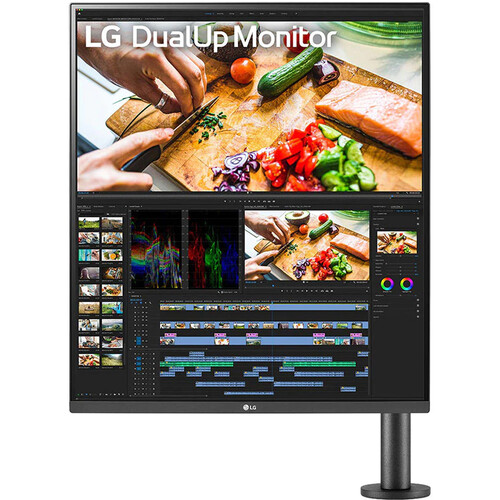
LG DualUp 28MQ780-B overview
The LG DualUp 28MQ780-B is a 27.6-inch Nano IPS monitor with an unusual 16:18 aspect ratio and 2560 × 2880 SDQHD resolution. Its tall screen provides the vertical pixel count of two stacked QHD work areas in one panel, while the Ergo C-clamp arm lets the user position and pivot the display. USB-C supports video, data and up to 90W power delivery; built-in KVM, Picture-by-Picture, two HDMI inputs and a DisplayPort add multi-device flexibility. LG’s US listing currently marks the model discontinued, so confirm the exact local unit and warranty before purchase. Actual compatibility depends on the desk, host USB-C capabilities, cables, operating system and regional accessories. Review LG instructions and the delivered model documentation before installation.
Identify the 28MQ780-B DualUp model
The exact model is 28MQ780-B. It is distinct from conventional 16:9 4K monitors and from later DualUp products. LG markets the panel as 28-inch class, while detailed specifications state a 27.6-inch screen. The native format is 16:18, and the Ergo arm with C-clamp is part of the model package. Confirm that the clamp hardware, cable covers and power adapter are included, especially for open-box or second-hand stock. The listing should not be confused with the 28MQ750-C or a 32-inch Ergo monitor. Actual compatibility depends on the desk, host USB-C capabilities, cables, operating system and regional accessories. Review LG instructions and the delivered model documentation before installation.
27.6-inch 16:18 SDQHD Nano IPS panel
The Nano IPS panel has a 2560 × 2880 SDQHD resolution, approximately 0.18195mm pixel pitch, 1000:1 typical contrast and 178-degree viewing angles. Its 16:18 panel is almost square and much taller than a standard landscape display. The 300 cd/m² typical brightness and anti-glare treatment suit many indoor desks. Rather than stretching ordinary video to fill the display, the monitor can show extra vertical content in documents, coding, messaging, web pages and timelines, while conventional video can use unused space or an alternate layout. Actual compatibility depends on the desk, host USB-C capabilities, cables, operating system and regional accessories. Review LG instructions and the delivered model documentation before installation.
Vertical workspace and screen layout
The 16:18 geometry is the main workflow difference. At 2560 × 2880, the panel provides a large continuous vertical canvas that can reduce scrolling in long documents and keep multiple tools visible. LG describes the area as comparable to two stacked 21.5-inch screens. This is a layout comparison rather than a promise that every application will automatically divide into two windows. Use operating-system window snapping or LG OnScreen Control to arrange applications, and test the layout against the actual software and workflow. Actual compatibility depends on the desk, host USB-C capabilities, cables, operating system and regional accessories. Review LG instructions and the delivered model documentation before installation.
Color, brightness and HDR10
LG specifies typical DCI-P3 coverage of 98% and 1.07 billion colors, with factory calibration listed. Typical brightness is 300 cd/m², minimum brightness 240 cd/m² and typical contrast 1000:1. HDR10 and HDR Effect are supported; these do not equal a VESA DisplayHDR certification. A wide gamut can show vivid supported media, but content-management settings determine whether colors look accurate. For design work, use a calibrated profile and avoid using Reader Mode or HDR Effect while judging final color. Actual compatibility depends on the desk, host USB-C capabilities, cables, operating system and regional accessories. Review LG instructions and the delivered model documentation before installation.
USB-C video, data and 90W charging
USB-C supports DisplayPort Alt Mode video, USB data and up to 90W Power Delivery according to LG. A compatible laptop can connect with one USB-C cable for image, peripherals and substantial charging. Confirm DP Alt Mode and the laptop’s charging requirements; some high-performance notebooks may need their own adapter under heavy workloads. The monitor’s USB upstream connection allows its integrated hub and KVM workflow to connect to a computer. A USB-C connector that lacks video Alt Mode will not send a display signal. Actual compatibility depends on the desk, host USB-C capabilities, cables, operating system and regional accessories. Review LG instructions and the delivered model documentation before installation.
HDMI, DisplayPort and USB hub
The monitor lists two HDMI 2.0 inputs, one DisplayPort 1.4, one USB-C input, one USB upstream connection and two USB 3.0 downstream ports. A headphone output is available. The ports allow a desktop, laptop or other video source to remain connected, while USB routing can be used with the KVM function. Use a suitable cable for the resolution and 60Hz timing. The display does not offer a high-refresh gaming mode; its maximum refresh rate is 60Hz. Actual compatibility depends on the desk, host USB-C capabilities, cables, operating system and regional accessories. Review LG instructions and the delivered model documentation before installation.
KVM and Picture-by-Picture workflow
Built-in KVM can switch the connected USB peripherals between compatible video sources, helping one keyboard and mouse serve two computers. Picture-by-Picture can show two sources side by side, and LG lists PIP support as well. Exact KVM behavior depends on connecting the USB upstream path and associating inputs in the menu. This monitor is not a Thunderbolt dock, and the functions do not guarantee seamless switching for every device or operating system. Check which source is active before troubleshooting a keyboard or mouse that appears disconnected. Actual compatibility depends on the desk, host USB-C capabilities, cables, operating system and regional accessories. Review LG instructions and the delivered model documentation before installation.
Ergo stand and C-clamp installation
The Ergo stand attaches to a desk using a C-clamp and supports extension, retraction, swivel, pivot, height adjustment and tilt. LG lists 130mm of height travel, ±25 degrees of tilt, up to ±335 degrees of swivel and portrait pivot. The clamp can free desk surface beneath the monitor, but requires a stable, compatible desk edge and adequate space behind it. Inspect the desk thickness, edge shape, grommet availability and cable access. Do not assume a conventional VESA wall mount is supported unless the regional manual explicitly confirms it. Actual compatibility depends on the desk, host USB-C capabilities, cables, operating system and regional accessories. Review LG instructions and the delivered model documentation before installation.
Pivot, height and screen positioning
Pivot allows the tall panel to rotate between portrait and landscape positions, while the arm can extend or retract to set viewing distance. Adjust height and tilt so the screen does not force uncomfortable neck movement. The 16:18 layout can be physically tall relative to the user, so place the display far enough back and center the most-used content. When rotating the panel, check that cables have enough slack and that nearby shelves or lamps do not obstruct the arm. Tighten the clamp according to LG instructions before moving the display. Actual compatibility depends on the desk, host USB-C capabilities, cables, operating system and regional accessories. Review LG instructions and the delivered model documentation before installation.
Speakers, ambient light and comfort
LG lists built-in stereo speakers rated at 7W per channel with MaxxAudio on product information, plus an ambient light sensor and automatic brightness. Regional catalog pages can show slightly different audio or power details, so verify the exact market specification. The speakers are convenient for calls and general video, though external speakers or headphones may be preferable for detailed listening. The headphone jack provides another option. Ambient-light and Reader Mode functions affect the picture and should be disabled when consistent color output is needed. Actual compatibility depends on the desk, host USB-C capabilities, cables, operating system and regional accessories. Review LG instructions and the delivered model documentation before installation.
Office and creative use cases
The vertical canvas suits coding with long source files, documents, spreadsheets, chat alongside a primary app, portrait photo review and editing timelines. USB-C charging and KVM can simplify a laptop-plus-desktop setup, while PBP can show two computers at once. Factory calibration and wide gamut are helpful starting points for creative tasks but do not replace verification for color-critical production. The unusual aspect ratio may require application window rearrangement and can leave blank space around video or older software not designed for tall displays. Actual compatibility depends on the desk, host USB-C capabilities, cables, operating system and regional accessories. Review LG instructions and the delivered model documentation before installation.
Gaming capability and refresh limits
The native refresh rate is 60Hz and response time is specified as 5ms GTG on the Faster setting. Casual gaming is possible, but the display is not designed for high-frame-rate competitive play. HDMI 2.0 and DisplayPort 1.4 support the native SDQHD mode at 60Hz, subject to host and cable compatibility. The extra vertical space can benefit some strategy or simulation interfaces, but many games target standard aspect ratios and may use letterboxing or a centered view. Choose this product primarily for productivity rather than refresh rate. Actual compatibility depends on the desk, host USB-C capabilities, cables, operating system and regional accessories. Review LG instructions and the delivered model documentation before installation.
Desk compatibility and cable routing
LG lists a detachable C-clamp Ergo arm, an adapter, USB-C and HDMI cables, a USB A-to-B cable, body cable/top covers and a wrench among the package accessories. Exact regional contents may differ. Route cables through the arm without pinching them and leave enough length for full extension and pivot. The monitor can be mounted to the desktop edge using the supplied clamp or a compatible desk grommet arrangement. Ensure the desk can bear the display and arm load, and protect surfaces as recommended by the installation guide. Actual compatibility depends on the desk, host USB-C capabilities, cables, operating system and regional accessories. Review LG instructions and the delivered model documentation before installation.
Advantages of the DualUp format
Strengths include a distinctive vertical SDQHD canvas, broad stand movement, 90W USB-C charging, integrated USB hub, KVM, PBP, built-in speakers and factory color calibration. It can reduce the need to stack two separate screens and keeps a laptop-oriented workspace relatively tidy. The C-clamp mount leaves the desk area underneath open. These benefits matter most when the user has long vertical content and regularly switches between two computers. Actual compatibility depends on the desk, host USB-C capabilities, cables, operating system and regional accessories. Review LG instructions and the delivered model documentation before installation.
Limitations and compatibility checks
The 16:18 format is unusual and some websites, videos and games will not fill the panel. Refresh rate is limited to 60Hz, HDR is HDR10 rather than a listed VESA DisplayHDR class, and USB-C 90W may not fully power every workstation during demanding use. The large arm requires a compatible desk and can be difficult to reposition after installation. Some workflows still benefit more from two conventional monitors. Check application compatibility, audio expectations and mount completeness before purchasing. Actual compatibility depends on the desk, host USB-C capabilities, cables, operating system and regional accessories. Review LG instructions and the delivered model documentation before installation.
Discontinued status and Bangladesh buying advice
LG’s US product page currently labels 28MQ780-B discontinued. That status does not prove that all regional inventory is unavailable, but it makes current production and future service parts uncertain. Before ordering in Bangladesh, ask whether the exact unit is new, refurbished or old stock, confirm serial number and authorized service eligibility, final delivered price, included clamp and cables, dead-pixel policy and return period. Obtain warranty duration and claim procedures in writing. LG’s US warranty line cannot be assumed to apply in Bangladesh. Actual compatibility depends on the desk, host USB-C capabilities, cables, operating system and regional accessories. Review LG instructions and the delivered model documentation before installation.
Frequently asked questions
What is the native resolution? 2560 × 2880 SDQHD. What is its aspect ratio? 16:18. What does DualUp mean? It provides a tall, nearly square workspace similar to two stacked displays. How much USB-C power is available? Up to 90W with compatible hosts. Does it have KVM? Yes, LG lists KVM support. Can it show two computers at once? PBP and PIP are listed. What refresh rate? 60Hz. Is it discontinued? LG USA marks it discontinued; check regional availability. Does the stand pivot? Yes, it supports pivot and a broad range of adjustments. Actual compatibility depends on the desk, host USB-C capabilities, cables, operating system and regional accessories. Review LG instructions and the delivered model documentation before installation.
Set up a laptop and desktop
For a laptop and desktop setup, connect the desktop using DisplayPort or HDMI and the laptop using USB-C with DP Alt Mode. Connect the USB upstream path for the desktop if required by the intended KVM routing, then assign inputs and USB switching in the OSD. For PBP, select two video sources and arrange application windows on both computers. If charging is insufficient, connect the laptop’s own power adapter. If peripherals do not follow the active source, verify USB upstream connections, KVM assignment and input selection. Actual compatibility depends on the desk, host USB-C capabilities, cables, operating system and regional accessories. Review LG instructions and the delivered model documentation before installation.
Who should choose the DualUp monitor
Choose the LG 28MQ780-B if a continuous tall 16:18 canvas, ergonomic C-clamp arm and laptop-focused connectivity solve a real desk workflow. It suits coding, document work and multitasking better than high-refresh gaming. Compare conventional 4K monitors if video, full-screen compatibility or standard mounting matters more; compare newer products if local warranty and serviceability are priorities. Because LG USA marks it discontinued, confirm the exact unit, hardware bundle, region and local support before ordering. Actual compatibility depends on the desk, host USB-C capabilities, cables, operating system and regional accessories. Review LG instructions and the delivered model documentation before installation.