Pros
- Large QHD Nano IPS panel with wide color gamut.
- 165Hz native refresh and optional 180Hz overclock.
- Adaptive sync support for compatible AMD and NVIDIA graphics.
- Adjustable stand supports portrait pivot.

All categories
 New condition
Monitors
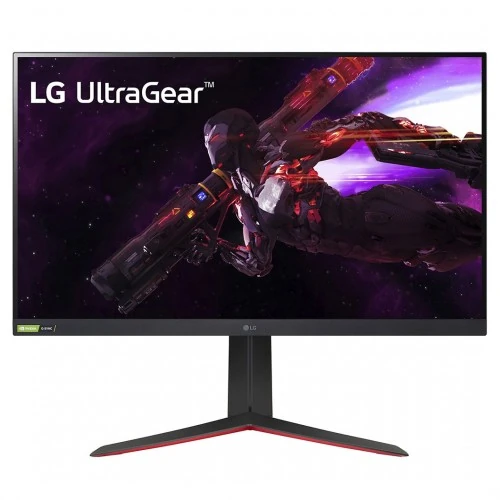
LG · UltraGear 32GP850-B
31.5-inch QHD Nano IPS gaming monitor with 165Hz refresh, 180Hz overclock, adaptive sync and adjustable stand.
Price unavailable
Price range updating
No verified price is available yet. Store offers will appear when merchants publish them.
Compare store prices
No live offers for this variant
Offers will appear when merchants publish them.
Loading history…
Product story
The LG UltraGear 32GP850-B is a 31.5-inch QHD Nano IPS gaming monitor with a 2560 × 1440 resolution. LG specifies a native 165Hz refresh rate and an overclocked mode up to 180Hz, 1ms gray-to-gray response time, HDR10, NVIDIA G-SYNC compatibility and AMD FreeSync Premium. Its large screen and fast refresh target PC gaming, while QHD keeps more detail than Full HD. Exact refresh and feature availability depend on regional model, input, graphics source, cable and selected settings. Bangladesh price, stock, package contents and serial-specific warranty must be confirmed by the seller.
Check the exact 32GP850-B model code, including the screen size family, on the label. The product is a 31.5-inch QHD monitor; models such as 27GP850-B, 32GP750-B and 32GN-series differ in size or features. Confirm regional suffix and bundled accessories with the seller. The 180Hz figure is an overclocked mode; 165Hz is the standard specified refresh. Exact refresh and feature availability depend on regional model, input, graphics source, cable and selected settings. Bangladesh price, stock, package contents and serial-specific warranty must be confirmed by the seller.
The 16:9 Nano IPS panel displays 2560 × 1440 pixels on a 31.5-inch screen. QHD offers more desktop detail than Full HD without the graphics load of 4K. Pixel density is lower than a 27-inch QHD screen, so users sitting close may notice individual pixels more readily. Set the display to its native resolution for the clearest text and interface. Exact refresh and feature availability depend on regional model, input, graphics source, cable and selected settings. Bangladesh price, stock, package contents and serial-specific warranty must be confirmed by the seller.
LG lists 98% DCI-P3 color gamut and Nano IPS technology. This wide gamut supports vivid game visuals and broad color reproduction, although it does not by itself guarantee professional calibration. For color-critical creation, confirm the selected picture mode, use application color management and calibrate the unit. Wide-gamut content may look oversaturated in applications that do not manage color. Exact refresh and feature availability depend on regional model, input, graphics source, cable and selected settings. Bangladesh price, stock, package contents and serial-specific warranty must be confirmed by the seller.
The standard maximum refresh is 165Hz, with overclocking available up to 180Hz according to LG. To use the overclocked mode, enable the relevant monitor setting and select a supported refresh in the PC graphics control panel. Stability depends on the source, cable and selected mode. If flicker or artifacts occur, return to the stable 165Hz mode. Exact refresh and feature availability depend on regional model, input, graphics source, cable and selected settings. Bangladesh price, stock, package contents and serial-specific warranty must be confirmed by the seller.
LG specifies 1ms GTG response time using its fastest response setting. A quoted response time is a test-condition figure, not a guarantee that every transition is invisible. Very aggressive overdrive can cause inverse ghosting. Compare response settings using actual games and use the fastest mode that avoids distracting artifacts. Exact refresh and feature availability depend on regional model, input, graphics source, cable and selected settings. Bangladesh price, stock, package contents and serial-specific warranty must be confirmed by the seller.
The monitor supports NVIDIA G-SYNC compatibility and AMD FreeSync Premium. Adaptive synchronization can align display refresh with compatible graphics output to reduce tearing and stutter within supported operating ranges. Enable it in the monitor menu and GPU driver, then check the game frame rate. Behavior can differ by GPU, connection, driver and variable-refresh range. Exact refresh and feature availability depend on regional model, input, graphics source, cable and selected settings. Bangladesh price, stock, package contents and serial-specific warranty must be confirmed by the seller.
LG lists HDR10 support and typical brightness around 350 cd/m², with a typical contrast ratio of 1000:1. HDR10 signal support does not imply high-end local dimming or sustained very high HDR brightness. Treat HDR as basic compatible HDR playback and compare it with SDR in your games. Room lighting and selected brightness affect perceived highlight detail. Exact refresh and feature availability depend on regional model, input, graphics source, cable and selected settings. Bangladesh price, stock, package contents and serial-specific warranty must be confirmed by the seller.
The monitor includes two HDMI inputs and one DisplayPort input; regional specifications list DisplayPort 1.4 and HDMI 2.0. It also includes USB 3.0 downstream ports and a USB upstream connection, plus a headphone output. Connect the USB upstream cable to use the hub. Check LG’s regional manual for exact port revisions and supported refresh by connection. Exact refresh and feature availability depend on regional model, input, graphics source, cable and selected settings. Bangladesh price, stock, package contents and serial-specific warranty must be confirmed by the seller.
The stand supports height adjustment, tilt and pivot for portrait orientation. It also supports a 100 × 100mm VESA mount. Adjust the screen so the top edge sits near eye level and the panel is centered in front of the user. Check desk depth and arm load capacity before replacing the supplied stand. Exact refresh and feature availability depend on regional model, input, graphics source, cable and selected settings. Bangladesh price, stock, package contents and serial-specific warranty must be confirmed by the seller.
LG OnScreen Control provides desktop layout and monitor controls on supported PCs. The monitor menu offers gaming settings, crosshair, black stabilizer and picture modes. These tools can improve convenience or visibility but alter the intended image. Avoid using competitive overlays in contexts where they are prohibited, and disable them for normal desktop or color work. Exact refresh and feature availability depend on regional model, input, graphics source, cable and selected settings. Bangladesh price, stock, package contents and serial-specific warranty must be confirmed by the seller.
For QHD high-refresh play, connect a capable graphics card directly to DisplayPort, set 2560 × 1440 and choose 165Hz in system settings. Enable G-SYNC compatible or FreeSync as appropriate. To test 180Hz, enable monitor overclocking first. Use a certified cable and avoid adapters that limit bandwidth; check GPU output and active signal if refresh options are missing. Exact refresh and feature availability depend on regional model, input, graphics source, cable and selected settings. Bangladesh price, stock, package contents and serial-specific warranty must be confirmed by the seller.
Console devices can use supported QHD or lower-resolution modes over HDMI, but refresh ceilings depend on the console, game and HDMI signal support. The 165Hz and overclocked 180Hz modes are principally PC display capabilities; consoles commonly use up to 120Hz in compatible games. Confirm the console’s output information instead of assuming it can reach the monitor’s maximum refresh. Exact refresh and feature availability depend on regional model, input, graphics source, cable and selected settings. Bangladesh price, stock, package contents and serial-specific warranty must be confirmed by the seller.
A 31.5-inch screen is immersive for gaming and convenient for split windows, but needs more desk distance than a smaller display. QHD balances detail and frame rate for many mid-to-high performance PCs. Competitive players who sit close and prioritize pixel density may prefer 27-inch QHD, while users who want sharper large-format text may compare 4K options. Exact refresh and feature availability depend on regional model, input, graphics source, cable and selected settings. Bangladesh price, stock, package contents and serial-specific warranty must be confirmed by the seller.
Strengths include a large Nano IPS QHD panel, 165Hz native refresh, optional 180Hz overclock, 1ms GTG claim, broad DCI-P3 coverage, adaptive sync and an adjustable stand. Trade-offs include QHD rather than 4K at 31.5 inches, modest HDR brightness, overclock stability depending on setup and the need to use a USB upstream cable for hub functions. Exact refresh and feature availability depend on regional model, input, graphics source, cable and selected settings. Bangladesh price, stock, package contents and serial-specific warranty must be confirmed by the seller.
Use the height and tilt adjustments to reduce neck and shoulder strain, and pivot only when portrait orientation is useful. Flicker-safe and low-blue-light functions can support comfortable viewing, though image color changes when these modes are enabled. Set brightness for room conditions, avoid glare and take breaks during long play or work sessions. Exact refresh and feature availability depend on regional model, input, graphics source, cable and selected settings. Bangladesh price, stock, package contents and serial-specific warranty must be confirmed by the seller.
Place the display on a stable surface, use the supplied power equipment and route cables with enough slack for stand adjustment. Clean the screen gently with a soft microfiber cloth; do not press on the LCD or apply cleaner directly to it. Inspect the panel, stand, cables and serial label at delivery, and retain packaging during the seller’s return period. Exact refresh and feature availability depend on regional model, input, graphics source, cable and selected settings. Bangladesh price, stock, package contents and serial-specific warranty must be confirmed by the seller.
Before ordering in Bangladesh, confirm price and stock, exact LG 32GP850-B model and condition, package cables and stand, dead-pixel and return policy, local delivery, and the seller’s written serial-specific LG warranty provider and term. Verify the unit’s standard 165Hz mode and confirm whether overclocked 180Hz is supported by the regional model and intended input. Exact refresh and feature availability depend on regional model, input, graphics source, cable and selected settings. Bangladesh price, stock, package contents and serial-specific warranty must be confirmed by the seller.
The LG 32GP850-B is a 31.5-inch QHD Nano IPS gaming monitor with 165Hz standard refresh, optional 180Hz overclock, 1ms GTG, HDR10, G-SYNC compatibility and FreeSync Premium. It offers an adjustable stand and gaming controls. Confirm the exact regional version, connection limits and Bangladesh warranty with the seller before purchase. Exact refresh and feature availability depend on regional model, input, graphics source, cable and selected settings. Bangladesh price, stock, package contents and serial-specific warranty must be confirmed by the seller.
Choose the 32GP850-B if you want a large QHD screen with fast PC refresh and adaptive sync. It works best with a graphics system that can sustain high QHD frame rates. If you value 4K detail, console-native 120Hz modes, stronger HDR or a smaller pixel-dense screen, compare those needs against this model before deciding. Exact refresh and feature availability depend on regional model, input, graphics source, cable and selected settings. Bangladesh price, stock, package contents and serial-specific warranty must be confirmed by the seller.
Helpful answers
Product-specific answers maintained with the catalog information.
The 32GP850-B uses 2560 × 1440 QHD resolution.
LG specifies 165Hz standard and up to 180Hz overclocked.
Yes, LG identifies a Nano IPS panel.
LG lists NVIDIA G-SYNC compatibility and AMD FreeSync Premium.
It accepts HDR10; brightness and contrast are typical monitor-class specifications.
LG specifies 1ms GTG under its fastest response setting.
Yes, the stand supports pivot along with height and tilt adjustment.
It has a USB hub; connect its upstream cable to the PC to use downstream ports.
Confirm the local provider, service coverage, duration and serial-specific terms with the seller.
Customer community
Become a merchant
Join BiponiBD, publish accurate offers and start free.