Pros
- Large curved 31.5-inch-class screen with 100Hz and FreeSync.
- VA panel has a manufacturer-listed 3000:1 typical contrast ratio.
- Two HDMI ports plus VGA support several source types.
- Reader Mode and Flicker Safe add practical daily-use options.

All categories
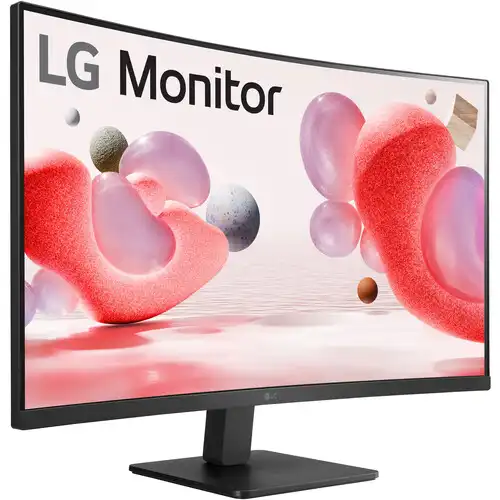 New condition
Monitors
LG · 32MR50C-B 31.5-inch FHD Curved
31.5-inch FHD curved VA monitor with 100Hz refresh, AMD FreeSync, dual HDMI and Reader Mode.
Price unavailable
Price range updating
No verified price is available yet. Store offers will appear when merchants publish them.
Compare store prices
No live offers for this variant
Offers will appear when merchants publish them.
Loading history…
Product story
The LG 32MR50C-B is a large curved desktop monitor with Full HD resolution, a VA panel and a maximum refresh rate of 100Hz. LG identifies the screen as 31.5 inches in its India specification page and markets the same model as a 32-inch FHD curved 100Hz monitor in the United States. It combines 1920 × 1080 resolution, 1500R curvature, AMD FreeSync and picture tools such as Reader Mode, Flicker Safe, Black Stabilizer and Dynamic Action Sync. Its documented connections include two HDMI inputs, one D-Sub/VGA input and a headphone output. Regional port details and warranty may vary, so check the exact box label and local seller terms.
The LG India specification lists a 31.5-inch diagonal, equivalent to the 32-inch class naming used on LG’s US page. Native resolution is 1920 × 1080 pixels with a 16:9 aspect ratio. A large Full HD screen makes interface elements physically larger, which some users prefer for viewing from farther away, but the pixel density is lower than on a smaller Full HD panel or a 32-inch QHD monitor. For sharpest output, set the computer to native 1920 × 1080 resolution. Consider your normal desk distance and text-size preference before choosing a large FHD display for detailed editing or dense spreadsheets.
The panel is VA type and uses a 1500R curve, according to LG’s regional specification. A curved screen brings the edges toward the viewer and can make a wide panel feel more consistent from a centered position. It does not change the resolution or create extra desktop pixels. VA panels commonly offer stronger native contrast than IPS, and LG lists a 3000:1 typical contrast ratio for this model in the India specification. The effect on perceived depth depends on room lighting, seating distance and personal preference. A curved panel is not ideal for every workflow; users doing perspective-sensitive drawing or layout should assess their own use case.
LG lists a maximum 100Hz refresh rate for the 32MR50C-B. A 100Hz mode can present motion more frequently than a 60Hz display when the computer supplies corresponding frames. Actual refresh availability depends on the chosen input, cable, graphics output and driver. Select 1920 × 1080 at 100Hz in the operating system after connecting the monitor. If 100Hz is missing, confirm that the source output and cable support it, check the graphics control panel and avoid limiting adapters during diagnosis. The monitor refreshes the picture; it does not render frames on behalf of a game or application.
LG lists AMD FreeSync for this model. Variable refresh can synchronize the display with a compatible graphics card over a supported frame-rate range and help reduce tearing or stutter. The feature needs compatible source hardware, driver settings and a supported connection. Turn it on in the monitor or graphics settings where available, then verify the selected mode and behavior in a compatible game. FreeSync does not increase graphics performance or guarantee a particular frame rate. If the feature is missing, update the driver, check the active input and consult the exact regional manual for supported modes.
The product includes Dynamic Action Sync and Black Stabilizer, which LG presents as gaming functions. Dynamic Action Sync is intended to reduce perceived display processing delay, while Black Stabilizer adjusts dark-scene visibility. The monitor also supports FreeSync and up to 100Hz refresh. These features may help casual gaming and make dark scenes easier to inspect, but they do not replace high-end gaming specifications such as a much higher refresh ceiling or a low-latency measurement. The product documentation lists a 5ms GtG response at the Faster setting. Choose the mode that looks best in actual gameplay and avoid interpreting a named feature as a guarantee of competitive advantage.
LG’s regional technical specifications list 5ms GtG at the Faster response-time setting. Gray-to-gray response time describes pixel transitions and is not equivalent to input latency, refresh rate or total motion clarity. The selected response mode affects transitions and may create overshoot if too aggressive. A 100Hz refresh can improve motion compared with 60Hz when the source delivers frames, while actual sharpness depends on content and pixel behavior. LG does not specify a 1ms mode in the reviewed exact-model data. If trails or inverse ghosting appear, adjust response-time settings and compare a lower level.
LG lists 250 cd/m² typical brightness, 3000:1 typical contrast and 16.7 million colors. Color gamut is listed as NTSC 72% typical and 68% minimum in the LG India product specification. The large VA panel’s contrast specification can help dark scenes look deeper in a dim room, but actual black level depends on brightness and viewing environment. The product is not represented here as a factory-calibrated professional display. Use a neutral picture preset for general work and verify a calibrated profile when color-critical output matters. Adjust brightness to avoid eye strain and reflections in the room.
LG lists two HDMI inputs, one D-Sub/VGA input and a three-pole headphone output. The 32MR50C-B regional pages differ in how connector revisions are described, so verify the current regional manual and the exact shipped unit if a specific HDMI standard is essential. HDMI is suitable for modern computers, consoles and media players that support 1920 × 1080 at the intended refresh. VGA can connect legacy equipment, though analog image quality depends on source and cable. The headphone output is for audio pass-through, not an input for a microphone. Adapters and docks can limit available refresh modes; connect directly while troubleshooting.
LG’s product specifications reviewed do not list built-in speakers. The monitor does provide a headphone output for compatible headphones or powered external speakers when audio is routed through the active video connection. Select the LG display as the computer’s audio device if HDMI audio is used, then check both operating-system and monitor volume settings. A VGA connection carries video but not digital audio, so use a separate audio cable or source connection in that setup. Do not assume speakers or an audio cable are included unless the local package list confirms them.
The standard stand supports tilt adjustment; LG lists a -5 to +20 degree range. Height adjustment, swivel and pivot are not listed for the included stand. A 100 × 100mm VESA pattern supports compatible optional mounts. If using an arm, check its weight capacity and ensure the monitor’s curvature and large width do not collide with the desk or wall during adjustment. Use the correct screw size and follow LG’s installation instructions. Adjust tilt to reduce reflections and maintain a comfortable view. Keep the monitor stable on a firm desk, especially when using its full-width base.
LG lists Reader Mode and Flicker Safe for the 32MR50C-B. Reader Mode changes the display’s color presentation for reading, and Flicker Safe is LG’s monitor feature for reducing visible flicker behavior. These functions can help some users, but comfort also depends on brightness, text size, room lighting, viewing distance and breaks. Reader Mode may alter colors, so disable it when evaluating images or matching color. The curved panel should be viewed from a comfortable centered position when possible. Product comfort features are not medical treatment and will not eliminate all eyestrain in every setup.
LG lists OnScreen Control software and Auto Input Switch. OnScreen Control offers supported software-based monitor adjustments; LG notes that a software installation is required. Auto Input Switch can help the monitor move to an active source, depending on connection and configuration. These tools complement the physical on-screen controls. Software features depend on host operating-system compatibility and may change with updates. If the utility does not detect the monitor, check the cable type, direct connection and supported software version. The user can also choose inputs and picture modes through the monitor’s own menu.
LG India lists dimensions of approximately 708.2 × 512.4 × 233.4mm with stand and 708.2 × 421.4 × 92.2mm without the stand. Weight is listed at about 6.2kg with stand and 5.14kg without. Shipping weight and carton size are larger. Because the 31.5-inch screen is wide and curved, measure desk depth and width and leave room for the stand base and cables. The monitor’s center should align with the user’s primary seat. If mounting it, use the 100 × 100mm VESA pattern and a support rated for the monitor. Check the physical manual for the exact unit and regional packaging.
The model uses an external power adapter and accepts AC 100–240V, 50/60Hz input. LG lists approximately 31W typical consumption, below 0.3W when DC is off and below 0.5W in sleep mode. Actual power use changes with screen brightness and operating state. Use the supplied adapter or a manufacturer-approved replacement with the correct electrical rating and polarity. Keep the adapter ventilated and avoid using damaged cables. Disconnect power safely before cleaning or moving the display. Where possible, use the operating system’s sleep behavior or turn the monitor off when it will not be used for an extended period.
The 31.5-inch curved screen offers a large viewing area for everyday desktop use, video and casual games. Its 100Hz refresh, AMD FreeSync, Dynamic Action Sync and Black Stabilizer add gaming-oriented features beyond a basic 60Hz office display. The VA panel’s listed 3000:1 contrast and 1500R curvature may suit users who prefer a more immersive large screen. Two HDMI inputs and a VGA connection support multiple modern and legacy sources, while Reader Mode and Flicker Safe support general reading sessions. The best fit depends on viewing distance and whether Full HD sharpness is enough at this large screen size.
At 31.5 inches, 1920 × 1080 offers a lower pixel density than QHD or 4K options at a similar diagonal. The stand is tilt-only according to LG’s published mechanical specification; buyers needing height or swivel adjustment should plan for a VESA arm. Built-in speakers are not listed. Regional product specifications can vary, including connection details and warranty. Confirm the exact 32MR50C-B suffix, refresh rate available through the planned input, package contents and local service coverage. Also check the desk size and preferred viewing distance, since a large curved panel is not as compact as a typical 24- or 27-inch display.
LG regional warranty terms differ, and the reviewed US page does not establish coverage for a Bangladesh purchase. The existing catalog warranty field should be confirmed with the seller using the serial number and invoice. Ask whether service is handled by LG’s authorized Bangladesh channel or by the seller, the coverage duration, start date, panel policy and exclusions. Price, inventory, delivery and return terms should be checked on the current BiponiBD offer because they are separate from LG’s global product specifications. Keep the receipt and product label for after-sales service.
Install the stand on a stable surface, connect the supplied adapter and attach the source through HDMI or VGA. Select 1920 × 1080 and, where the source supports it, 100Hz in the display settings. Enable FreeSync in compatible driver settings if desired. If the screen shows no image, verify the selected input and cable, then test a direct source connection. If 100Hz does not appear, confirm the computer’s output and cable capability and update the graphics driver. For audio, choose the appropriate digital output when using HDMI or route sound separately for VGA. Adjust tilt and brightness for the room.
The LG 32MR50C-B is for a buyer who wants a large curved 16:9 display with Full HD resolution, 100Hz refresh and FreeSync for home, media and casual gaming. It can work well when the user prefers larger on-screen elements and has enough desk space. Buyers who read fine text at close range, work with detailed images, or need more desktop vertical room may prefer a 27-inch QHD or 32-inch 4K model. Buyers who need an ergonomic stand should account for its tilt-only movement or add a compatible VESA arm. Check application compatibility, connection type and local warranty before deciding.
LG 32MR50C-B is a 31.5-inch-class, 1500R curved FHD VA monitor with 1920 × 1080 resolution, 100Hz maximum refresh, AMD FreeSync, 5ms GtG at Faster setting, 250-nit typical brightness and 3000:1 typical contrast. LG lists two HDMI inputs, VGA, headphone out, Reader Mode, Flicker Safe, Dynamic Action Sync and Black Stabilizer. The supplied stand is tilt-adjustable and the display supports 100 × 100mm VESA mounting. Confirm exact regional specifications, local warranty and current BiponiBD price and availability before purchase.
Helpful answers
Product-specific answers maintained with the catalog information.
It is a Full HD monitor with 1920 × 1080 resolution and a 16:9 aspect ratio.
LG lists up to 100Hz. The source and connection must support the selected mode.
Yes. LG lists a 1500R curved VA panel.
Yes. AMD FreeSync is listed by LG for this model.
The reviewed LG regional specifications do not list integrated speakers. A headphone output is provided.
LG lists two HDMI inputs, one D-Sub/VGA and a headphone output; check the exact regional unit.
Yes. LG lists 100 × 100mm VESA mounting. Confirm the arm rating and mounting instructions.
LG lists tilt adjustment from -5° to +20°. Height adjustment and swivel are not listed for the supplied stand.
Warranty varies by market. Confirm the exact serial-specific Bangladesh coverage and service provider with the seller.
Customer community
Become a merchant
Join BiponiBD, publish accurate offers and start free.