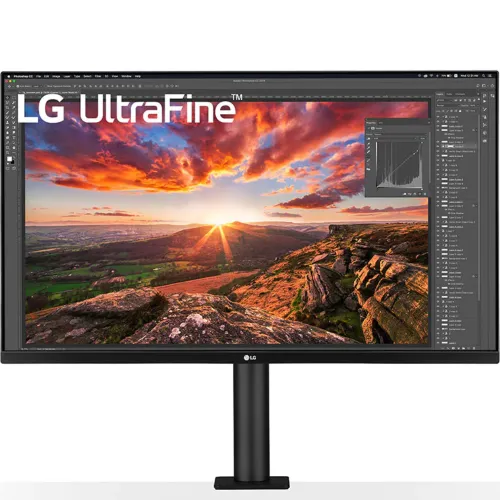
LG 32UN880-B UltraFine Ergo overview
The LG 32UN880-B UltraFine Ergo is a 31.5-inch 4K UHD IPS monitor built for desktop work, creative tasks and flexible laptop setups. Its 3840 × 2160 panel supports HDR10 and typical 95% DCI-P3 color gamut, while the distinctive Ergo arm uses a C-clamp to attach to a desk and positions the screen through height, extension, retraction, swivel, pivot and tilt adjustments. USB-C provides DisplayPort video, data and up to 60W power delivery. LG’s US product page currently labels the model discontinued, so a Bangladesh listing should be treated as existing or imported stock only after availability is confirmed. Actual results depend on host graphics, cable, selected input, color profile, desk dimensions and regional hardware bundle. Check LG support information and the delivered unit documentation before installation.
Exact model and product status
The complete model code is 32UN880-B. It is not the similar 27UN880-B, nor a newer 32UN880P-B or UltraGear gaming monitor. LG lists a 31.5-inch IPS panel, 60Hz maximum refresh and USB-C power delivery up to 60W. The “32-inch” retail description rounds the actual 31.5-inch panel. The Ergo arm is a central part of this model’s identity; check that the C-clamp, grommet plate and required stand parts are included because second-hand or open-box units may not contain the complete mounting kit. Actual results depend on host graphics, cable, selected input, color profile, desk dimensions and regional hardware bundle. Check LG support information and the delivered unit documentation before installation.
31.5-inch 4K UHD IPS display
The display uses a 16:9 IPS panel with native UHD 3840 × 2160 resolution and 0.18159mm pixel pitch. LG lists 178-degree viewing angles, 1000:1 typical contrast, 350 cd/m² typical brightness and 5ms GTG response using the Faster setting. The 4K resolution provides a detailed workspace for spreadsheets, design applications, document layouts and high-resolution video. Operating-system scaling can make interface text easier to read at a comfortable distance. IPS viewing angles help when the screen is shared, while dark-scene black levels remain typical of an LCD panel. Actual results depend on host graphics, cable, selected input, color profile, desk dimensions and regional hardware bundle. Check LG support information and the delivered unit documentation before installation.
Color, brightness and factory calibration
LG specifies typical 95% DCI-P3 coverage, 1.07 billion colors and factory color calibration on regional product specifications. The exact measured performance of an individual monitor can still vary, so color-critical work should use a color-managed application and calibration when accuracy is important. DCI-P3 coverage is not a promise that every application or file is displayed in the intended color space automatically. The 350-nit typical brightness is suited to many indoor work environments, but direct sunlight and strong reflections can reduce perceived contrast. Actual results depend on host graphics, cable, selected input, color profile, desk dimensions and regional hardware bundle. Check LG support information and the delivered unit documentation before installation.
HDR10 and contrast expectations
The monitor supports HDR10 and LG HDR Effect. HDR10 compatibility means it can accept HDR content; it does not establish VESA DisplayHDR certification or advanced local dimming. LG lists a typical 1000:1 contrast ratio and does not specify a local-dimming zone system for this model. Consequently, HDR highlights and dark scenes will not have the same dynamic range as a high-end Mini LED or OLED display. Compare SDR and HDR picture settings for the actual content and room, and avoid assuming HDR alone guarantees a dramatic brightness improvement. Actual results depend on host graphics, cable, selected input, color profile, desk dimensions and regional hardware bundle. Check LG support information and the delivered unit documentation before installation.
USB-C single-cable connection and 60W charging
The USB-C port supports DisplayPort Alt Mode, data transmission and up to 60W Power Delivery. A compatible laptop can use one USB-C cable for the monitor signal, USB data and limited charging, reducing desk cable clutter. Confirm that the host USB-C port supports video output; a Type-C connector by itself is not enough. Sixty watts may charge many thin-and-light laptops during typical work, but power-hungry workstations can require their own adapter or may charge slowly under heavy load. The display is not Thunderbolt and does not promise high-wattage dock charging. Actual results depend on host graphics, cable, selected input, color profile, desk dimensions and regional hardware bundle. Check LG support information and the delivered unit documentation before installation.
HDMI, DisplayPort and USB hub
Video inputs include two HDMI ports, one DisplayPort 1.4 and one USB-C DisplayPort Alt Mode connection. The monitor also has two USB 3.0 downstream ports and a headphone output. The downstream USB ports support peripherals when the appropriate upstream connection is established, and the USB-C connection can carry data from a compatible host. There is no built-in KVM switch specified. Plan which laptop or desktop uses each cable and confirm that the selected input and USB routing match the peripherals you want available. Actual results depend on host graphics, cable, selected input, color profile, desk dimensions and regional hardware bundle. Check LG support information and the delivered unit documentation before installation.
Ergo stand, clamp and full adjustment range
LG’s Ergo arm supports extension and retraction, height adjustment, swivel, pivot and tilt. The C-clamp attaches to the desktop edge, while a grommet-mount option may use a desk opening where supported by the included hardware. This frees more of the desk surface than a broad monitor base and allows the screen to move toward or away from the user. Inspect desk thickness, edge shape, reinforcement, cable clearance and clamp compatibility before installation. Do not mount it to a fragile glass desk unless the desk and mount manufacturers explicitly permit that configuration. Actual results depend on host graphics, cable, selected input, color profile, desk dimensions and regional hardware bundle. Check LG support information and the delivered unit documentation before installation.
Desk fit, cable routing and installation
The arm’s reach and movement make it possible to position the panel for sitting, standing, collaboration or portrait-oriented documents. Adjust height so the display’s upper edge and viewing angle suit the user, then set tilt and distance to reduce neck and eye strain. Keep cables long enough to accommodate full arm travel without pulling connectors. The arm and screen have substantial combined weight; install with a second person if needed, and tighten the clamp securely according to the manual. Check stability before moving the screen through its full range. Actual results depend on host graphics, cable, selected input, color profile, desk dimensions and regional hardware bundle. Check LG support information and the delivered unit documentation before installation.
Mac, Windows and laptop compatibility
On Windows and Mac, a compatible USB-C connection can provide 4K video and USB data while delivering up to 60W. A desktop computer can instead use HDMI or DisplayPort for video and an appropriate USB upstream connection for the monitor’s USB ports. Confirm the laptop graphics capability for 4K at 60Hz and select the correct scaling mode. If no image appears over USB-C, test whether the computer supports DP Alt Mode, use a capable cable and verify the selected input. Some computers require their own charging adapter even while connected. Actual results depend on host graphics, cable, selected input, color profile, desk dimensions and regional hardware bundle. Check LG support information and the delivered unit documentation before installation.
Refresh rate and response behavior
The maximum refresh rate is 60Hz, with 5ms GTG response time listed at Faster. This is a productivity and general-use monitor rather than a high-refresh esports display. Documents, browsing, video playback and creative applications are appropriate use cases, while fast competitive gaming may feel less fluid than on 120Hz or higher displays. AMD FreeSync is listed on LG regional specifications, but its useful range and behavior depend on the source, driver, connection and mode. Do not infer that 4K60 equals a gaming monitor’s high-refresh capability. Actual results depend on host graphics, cable, selected input, color profile, desk dimensions and regional hardware bundle. Check LG support information and the delivered unit documentation before installation.
Built-in audio and headphone output
LG lists two-channel audio with 5W output per channel on the product portal specification. A headphone output is also present. Actual speaker sound is convenient for calls and casual video, but a compact integrated monitor speaker is not a replacement for dedicated desktop speakers or headphones when clear dialogue, bass or gaming positional cues matter. Check the regional specification because audio configuration may vary by market. If using HDMI or DisplayPort, select the monitor as the audio device in system settings. Actual results depend on host graphics, cable, selected input, color profile, desk dimensions and regional hardware bundle. Check LG support information and the delivered unit documentation before installation.
Picture controls and productivity features
Productivity options include Reader Mode, Black Stabilizer, Dynamic Action Sync, Super Resolution+, HDR Effect, Picture-in-Picture, color-weakness support, flicker-safe operation and Smart Energy Saving, as listed by LG regional materials. Hardware calibration is described as ready and color calibration at factory is listed; compatible calibration software and a measurement device may be needed for a full hardware-calibration workflow. Features should be enabled only when they serve the task. Reader mode can alter color appearance and is not appropriate for judging color-critical images. Actual results depend on host graphics, cable, selected input, color profile, desk dimensions and regional hardware bundle. Check LG support information and the delivered unit documentation before installation.
Photo, video and office-work suitability
The 4K IPS image and 95% DCI-P3 coverage can support photo editing, video review and design work when paired with suitable color management. Factory calibration is a useful starting point, but it does not guarantee a specific unit’s accuracy years later or after a different operating mode. The flexible arm can help switch between focused work and collaboration. The panel’s 60Hz ceiling, HDR10 implementation and 1000:1 contrast make it better suited to productivity and general media than competitive gaming or high-end HDR mastering. Actual results depend on host graphics, cable, selected input, color profile, desk dimensions and regional hardware bundle. Check LG support information and the delivered unit documentation before installation.
Power, dimensions and mounting
LG regional specifications list dimensions around 713.7 × 640.1 × 406.4mm with stand, approximately 10.3kg with the arm, and 6.5kg without stand. Power consumption is listed around 55W typical and up to 160W maximum in some regional product material; exact figures can vary by region and operating mode. Use the correct power cable and allow ventilation. Before placing the clamp, check the desk edge and space behind it, as the arm occupies room behind the panel even though it reduces the footprint beneath the screen. Actual results depend on host graphics, cable, selected input, color profile, desk dimensions and regional hardware bundle. Check LG support information and the delivered unit documentation before installation.
Advantages for a flexible desk
The main strengths are the sharp 4K IPS image, wide color coverage, USB-C video with 60W delivery, integrated USB ports and highly adjustable C-clamp arm. A laptop user can create a clean desk arrangement and position the screen precisely. Factory color calibration, 60Hz operation and 31.5-inch size suit office and creative workflows. The arm can also be useful for moving the panel between tasks without lifting or dragging the monitor base across the desk. Actual results depend on host graphics, cable, selected input, color profile, desk dimensions and regional hardware bundle. Check LG support information and the delivered unit documentation before installation.
Limitations and model age
The model is limited to 60Hz, has typical LCD contrast, and does not list a modern local-dimming HDR system. USB-C charging is limited to 60W, which may not meet the needs of some powerful laptops. The C-clamp requires a compatible sturdy desk and its components must be present. LG’s US product page labels 32UN880-B discontinued; service parts, stock and warranty may depend on the market. Buyers prioritizing fast gaming, newer connectivity, a conventional stand or a current official warranty should compare newer alternatives. Actual results depend on host graphics, cable, selected input, color profile, desk dimensions and regional hardware bundle. Check LG support information and the delivered unit documentation before installation.
Bangladesh availability and warranty checklist
Before purchase in Bangladesh, confirm whether the unit is new, used, refurbished or open-box; verify stock, delivered price, serial number, included clamp/grommet hardware, power adapter, USB-C cable, dead-pixel policy and return window. Ask the seller to confirm whether LG Bangladesh or an authorized service point will provide warranty support for that serial. The US “discontinued” notice does not establish availability or warranty in Bangladesh. Obtain local warranty duration and claim terms in writing, and inspect the arm and clamp for wear if buying used. Actual results depend on host graphics, cable, selected input, color profile, desk dimensions and regional hardware bundle. Check LG support information and the delivered unit documentation before installation.
Frequently asked questions
What is the panel resolution? 3840 × 2160 UHD 4K. What is the actual panel size? 31.5 inches. Does USB-C charge a laptop? It supports up to 60W Power Delivery, which may be insufficient for some laptops. What stand adjustments are available? Height, extension, retraction, swivel, pivot and tilt. Is it a gaming monitor? It is a 60Hz productivity monitor. How many video inputs? Two HDMI, one DisplayPort and one USB-C DP Alt Mode. Does it have speakers? Regional LG specs list two 5W speakers. Is it still sold new? LG USA marks the model discontinued; check current local stock and warranty. Actual results depend on host graphics, cable, selected input, color profile, desk dimensions and regional hardware bundle. Check LG support information and the delivered unit documentation before installation.
Who should choose this monitor
Choose the LG 32UN880-B when you need a large 4K IPS workspace, a flexible ergonomic arm and USB-C display plus data connectivity for a laptop. It is most attractive for office, design and general media work when the desk supports the clamp. Compare other models if you need high refresh, advanced HDR, Thunderbolt, high-wattage charging or assured current production. Because the source product is discontinued in the US, verify the precise unit condition, regional bundle and local service before ordering. Actual results depend on host graphics, cable, selected input, color profile, desk dimensions and regional hardware bundle. Check LG support information and the delivered unit documentation before installation.