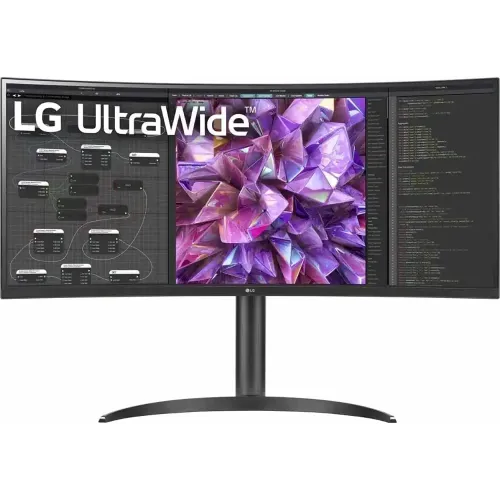
LG 34WQ75C-B overview
The LG 34WQ75C-B is a 34.14-inch curved UltraWide IPS monitor with a native 3440 × 1440 resolution and 21:9 aspect ratio. It is built around productivity and laptop docking: USB-C offers DisplayPort video, data and up to 90W Power Delivery, while the monitor also includes a wired LAN port, integrated KVM, Picture-by-Picture, four USB downstream ports and two 7W speakers. The official specification sheet lists a 60Hz maximum refresh and 5ms GTG response. It should not be marketed as a 100Hz monitor. Host compatibility, regional bundle and exact capabilities depend on the supplied model code and connection. Consult LG’s product sheet and the delivered unit documentation for final confirmation.
Exact model and 34WQ75C variant
Confirm the exact model suffix 34WQ75C-B. LG also sells monitors with similar 34-inch curved names and different VA/IPS panels, power delivery and refresh rates. The “B” version described here is curved IPS with 3440 × 1440 resolution, USB-C 90W, built-in KVM and RJ-45 LAN. LG’s US support sheet identifies a 34.14-inch display area, while the product name rounds it to 34 inches. Check the regional part number and the stand, cables and included accessories on the delivered unit. Host compatibility, regional bundle and exact capabilities depend on the supplied model code and connection. Consult LG’s product sheet and the delivered unit documentation for final confirmation.
34.14-inch 21:9 curved IPS screen
The display is a 21:9 IPS panel with a 3800R curve and native 3440 × 1440 UWQHD resolution. LG lists 178-degree horizontal and vertical viewing angles, a 1000:1 typical contrast ratio and 0.2325mm pixel pitch. The wide format places two application windows side by side or shows long video timelines without a second display. IPS viewing angles help when sharing the screen. The gentle 3800R curve is less pronounced than tighter gaming curves, though some users prefer a flat screen for precise straight-line design work. Host compatibility, regional bundle and exact capabilities depend on the supplied model code and connection. Consult LG’s product sheet and the delivered unit documentation for final confirmation.
UWQHD resolution, workspace and pixel density
The 3440 × 1440 resolution gives more horizontal workspace than standard QHD, with a 21:9 canvas for documents beside a video call, a timeline beside tool panels, or multiple browser windows. At 34 inches, operating-system scaling and viewing distance influence comfort. LG lists a 34.14-inch active display, while 34-inch is the rounded commercial class. Ultrawide video and software support vary; standard 16:9 content may show side bars, and screen-sharing tools may crop or letterbox the desktop. Host compatibility, regional bundle and exact capabilities depend on the supplied model code and connection. Consult LG’s product sheet and the delivered unit documentation for final confirmation.
Refresh rate and response-time expectations
LG’s official spec sheet lists a 60Hz refresh rate and 5ms GTG response at Faster. Some retail descriptions of this monitor can mistakenly conflate it with 100Hz curved UltraWide models; the 34WQ75C-B specification sheet and product page do not establish a 100Hz mode. It is designed for work and general media rather than competitive gaming. Standard desktop motion is supported, but players wanting 120Hz or higher should choose a different monitor family. Host compatibility, regional bundle and exact capabilities depend on the supplied model code and connection. Consult LG’s product sheet and the delivered unit documentation for final confirmation.
HDR10, brightness and color coverage
The monitor supports HDR10 and LG HDR Effect; no VESA DisplayHDR certification is listed in the product sheet. LG specifies 300 cd/m² typical and 240 cd/m² minimum brightness, 99% sRGB coverage and 1.07 billion colors. HDR10 compatibility means the display can accept HDR content, not that it provides local dimming or high peak brightness. Use HDR for compatible media if desired, but compare the image with SDR, especially in bright rooms and color-sensitive work. Host compatibility, regional bundle and exact capabilities depend on the supplied model code and connection. Consult LG’s product sheet and the delivered unit documentation for final confirmation.
USB-C 90W laptop connection
The USB-C input supports DisplayPort Alt Mode, data and up to 90W Power Delivery. A compatible laptop can send video and data while receiving power through one cable. The host port must support DP Alt Mode; the Type-C connector alone does not guarantee monitor output. Ninety watts can power many business laptops, while some performance notebooks may still need their own charger during heavy workloads. Confirm the laptop’s power draw and cable capability before removing its adapter from the desk. Host compatibility, regional bundle and exact capabilities depend on the supplied model code and connection. Consult LG’s product sheet and the delivered unit documentation for final confirmation.
LAN, USB hub and video inputs
The monitor includes two HDMI inputs, one DisplayPort input, one USB-C input, one USB upstream connection, four USB downstream ports (two USB 2.0 and two USB 3.0 according to LG’s US sheet), a 3.5mm audio output and RJ-45 LAN. The wired network path can be useful in a laptop docking setup. Connect the USB upstream route and Ethernet to the intended host, then check operating-system network and peripheral settings. Port versions and bundle details can vary by regional part number. Host compatibility, regional bundle and exact capabilities depend on the supplied model code and connection. Consult LG’s product sheet and the delivered unit documentation for final confirmation.
Built-in KVM and Picture-by-Picture
Built-in KVM can route one keyboard and mouse between two connected computers when video and USB upstream paths are assigned correctly. Picture-by-Picture can display two sources at once; LG lists 2PBP. This can help compare documents or keep a second computer visible. KVM behavior depends on OSD assignment, cable connections and active input. It is not necessary to use USB-C for every source, but the appropriate upstream connection must reach each host if peripherals are expected to follow the selected computer. Host compatibility, regional bundle and exact capabilities depend on the supplied model code and connection. Consult LG’s product sheet and the delivered unit documentation for final confirmation.
Ergonomic stand and VESA mounting
The stand supports tilt and height adjustment, with LG describing a one-click setup. Product materials list a 100 × 100mm VESA pattern. The product sheet identifies tilt/height adjustment but does not specify swivel or pivot, so do not claim those adjustments without confirmation for the exact stand. A height-adjustable stand helps position the panel at eye level, while the wide screen requires adequate desk width and depth. Use the correct VESA hardware if attaching a compatible arm. Host compatibility, regional bundle and exact capabilities depend on the supplied model code and connection. Consult LG’s product sheet and the delivered unit documentation for final confirmation.
Speakers, audio and meeting use
Two built-in speakers rated at 7W each with MaxxAudio are listed, along with a headphone output. They can simplify calls and casual viewing, while an external headset may provide clearer voice pickup and better isolation in a busy room. LG lists KVM, Dual Controller, OnScreen Control and a key for user-assigned functions. Select the monitor as the audio output in the host operating system, and check that volume and mute are not controlled separately by the computer and monitor. Host compatibility, regional bundle and exact capabilities depend on the supplied model code and connection. Consult LG’s product sheet and the delivered unit documentation for final confirmation.
Productivity and multitasking workflow
For a laptop-plus-desktop setup, connect the laptop through USB-C for video, data, LAN and up to 90W charging, then connect the desktop using DisplayPort or HDMI and its USB upstream path for the KVM. Use PBP when both sources should remain visible. LG OnScreen Control can support screen layouts on compatible Windows or Mac systems. These functions reduce the need for separate adapters, but the monitor does not guarantee that every dock, host or operating-system version exposes all features identically. Host compatibility, regional bundle and exact capabilities depend on the supplied model code and connection. Consult LG’s product sheet and the delivered unit documentation for final confirmation.
Mac and Windows compatibility
A Windows or Mac laptop can drive 3440 × 1440 over DisplayPort Alt Mode if its graphics hardware and port support the mode. USB-C also provides power and data when compatible. A desktop may connect by HDMI or DisplayPort and use USB upstream separately for hub/KVM. If the correct resolution is missing, verify the selected input, host GPU support, cable, driver and OS display settings. If the computer does not support video over Type-C, use HDMI or DisplayPort for picture and retain the laptop’s own power supply. Host compatibility, regional bundle and exact capabilities depend on the supplied model code and connection. Consult LG’s product sheet and the delivered unit documentation for final confirmation.
Gaming performance and limitations
Casual games and video playback work at the monitor’s supported timings, but 60Hz is below high-refresh gaming displays. The 21:9 ratio can provide a wider field of view in games that support it, yet older or competitive titles may use 16:9 output with side bars. The IPS panel and HDR10 support do not make it a high-speed gaming monitor. For gaming-first use, compare 100Hz/144Hz models and confirm the exact refresh in manufacturer documentation rather than relying on a generic store title. Host compatibility, regional bundle and exact capabilities depend on the supplied model code and connection. Consult LG’s product sheet and the delivered unit documentation for final confirmation.
Stand, cable routing and desk setup
The monitor and stand need a broad setup area. Route USB-C, LAN and video cables so they do not pull when adjusting height. Keep the screen centered to avoid excessive neck rotation across the wide panel. Verify the included power adapter and USB cable, especially for imported stock. If using VESA mounting, confirm the arm supports the panel’s weight and dimensions. The product’s 3800R curve is gentle, but available desk depth still matters for comfortable viewing across the full width. Host compatibility, regional bundle and exact capabilities depend on the supplied model code and connection. Consult LG’s product sheet and the delivered unit documentation for final confirmation.
Advantages for laptop-centric work
Strengths include a wide IPS workspace, 90W USB-C charging, Ethernet, KVM, PBP and integrated 7W speakers. One monitor can serve a laptop dock, desktop and peripheral switch, reducing desk clutter. The wide QHD resolution supports multiple applications, and the height-adjustable stand helps with posture. It is useful for office productivity and video meetings when a 60Hz refresh rate is acceptable. Host compatibility, regional bundle and exact capabilities depend on the supplied model code and connection. Consult LG’s product sheet and the delivered unit documentation for final confirmation.
Limitations and version-specific checks
The model’s 60Hz maximum refresh does not match the 100Hz claims that appear on some unrelated or misidentified listings. HDR10 is not a VESA HDR certification, and typical brightness is 300 nits. The wide panel needs desk room, and USB-C video requires host DP Alt Mode. Stand adjustment details are regional and the official US sheet lists tilt and height; swivel and pivot are not established. Buyers focused on high-refresh gaming, deep HDR or color-critical wide-gamut work should compare alternatives. Host compatibility, regional bundle and exact capabilities depend on the supplied model code and connection. Consult LG’s product sheet and the delivered unit documentation for final confirmation.
Bangladesh purchase, stock and warranty
Before ordering in Bangladesh, verify the exact 34WQ75C-B regional SKU, current stock, delivered price, new/sealed condition, included USB-C and display cables, stand, dead-pixel policy and return window. Ask the seller to confirm local LG service coverage and serial eligibility in writing; a US one-year parts-and-labor listing does not establish Bangladesh warranty terms. Confirm the maximum refresh as 60Hz against the official sheet and ensure the laptop supports video Alt Mode and the required 90W charging. Host compatibility, regional bundle and exact capabilities depend on the supplied model code and connection. Consult LG’s product sheet and the delivered unit documentation for final confirmation.
Frequently asked questions
What is the native resolution? 3440 × 1440 UWQHD. What refresh rate does LG list? 60Hz. Is it IPS or VA? LG lists an IPS panel for 34WQ75C-B. How much USB-C power is available? Up to 90W. Does it include KVM? Yes, built-in KVM and 2PBP are listed. Does it have wired Ethernet? Yes, RJ-45 LAN is included. How many speakers? Two 7W speakers are listed. Why do some stores say 100Hz? That figure appears to be a catalog mismatch; LG’s US spec sheet says 60Hz. Host compatibility, regional bundle and exact capabilities depend on the supplied model code and connection. Consult LG’s product sheet and the delivered unit documentation for final confirmation.
Who should choose this monitor
Choose the LG 34WQ75C-B if you want a curved ultrawide office display with IPS viewing angles, a 90W USB-C dock, wired LAN, KVM, PBP and integrated speakers. It suits laptop-centered productivity better than high-frame-rate gaming. The official refresh specification is 60Hz, so compare other models if 100Hz or higher is essential. Verify regional ports, stand, bundle and warranty before purchase. Host compatibility, regional bundle and exact capabilities depend on the supplied model code and connection. Consult LG’s product sheet and the delivered unit documentation for final confirmation.