Pros
- 21:9 workspace can keep multiple applications side by side.
- 3440 × 1440 provides a wide QHD-class desktop canvas.
- 100Hz offers smoother motion than standard 60Hz.
- Curved VA presentation suits immersive viewing for compatible games and media.

All categories
 New condition
Monitors
LG · 34WR55QK-B 34-inch UltraWide
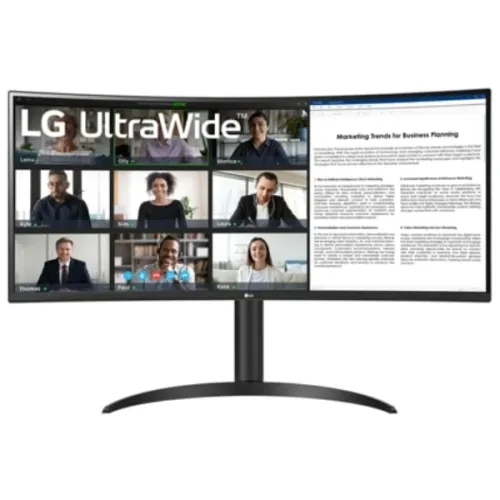
34-inch curved 21:9 UltraWide WQHD monitor with 100Hz, HDR10 and USB-C 65W power delivery.
Price unavailable
Price range updating
No verified price is available yet. Store offers will appear when merchants publish them.
Compare store prices
No live offers for this variant
Offers will appear when merchants publish them.
Loading history…
Product story
The LG 34WR55QK-B is a 34-inch UltraWide monitor with 21:9 aspect ratio, 3440 × 1440 WQHD resolution and a curved VA panel. LG specifies a 100Hz refresh rate, HDR10 signal support and USB Type-C connectivity. Its wide canvas suits side-by-side applications, broad video timelines and immersive games, while the VA panel and curve create a different viewing character from flat IPS displays. The actual experience depends on region, connected computer, application support, cable and settings. Price, stock, package contents, exact USB-C power and local warranty must be confirmed by the Bangladesh seller.
Check the full 34WR55QK-B model suffix and regional product label. Similar LG 34-inch UltraWide models vary in refresh rate, port selection, curve and USB-C power. LG regional product pages identify this model as 100Hz, but package contents, power lead and warranty terms vary. Ask the seller to confirm the exact unit rather than relying on a generic UltraWide listing. The actual experience depends on region, connected computer, application support, cable and settings. Price, stock, package contents, exact USB-C power and local warranty must be confirmed by the Bangladesh seller.
A 21:9 screen provides substantially more horizontal workspace than a conventional 16:9 monitor. The 3440 × 1440 canvas can keep two windows visible without a central bezel and gives video editors more timeline width. Some videos and games do not support 21:9 and may show side bars or crop the image. Check application support for your workflow. The actual experience depends on region, connected computer, application support, cable and settings. Price, stock, package contents, exact USB-C power and local warranty must be confirmed by the Bangladesh seller.
The 34-inch curved VA screen uses 3440 × 1440 pixels. VA technology typically provides stronger native contrast than common IPS panels, while viewing angle and dark transition behavior differ by model and settings. The curve helps bring the wide panel edges into view from a centered seat. Sit at an appropriate distance and assess whether the curve suits flat-line design work. The actual experience depends on region, connected computer, application support, cable and settings. Price, stock, package contents, exact USB-C power and local warranty must be confirmed by the Bangladesh seller.
LG lists a 100Hz refresh rate. This is smoother than standard 60Hz for scrolling and supported games, but it is below high-refresh competitive gaming screens. Response-time figures vary by regional listing and picture setting; do not infer ultra-fast motion performance from refresh rate alone. Choose a compatible video output and select 100Hz in the computer display settings. The actual experience depends on region, connected computer, application support, cable and settings. Price, stock, package contents, exact USB-C power and local warranty must be confirmed by the Bangladesh seller.
The model supports HDR10 input, but HDR signal acceptance does not itself indicate high-end HDR brightness or local dimming. SDR color and brightness depend on the active preset, source and room lighting. Check the regional specification for gamut and brightness before treating it as a color-reference display. For color-critical output, use a calibrated workflow and verify each unit. The actual experience depends on region, connected computer, application support, cable and settings. Price, stock, package contents, exact USB-C power and local warranty must be confirmed by the Bangladesh seller.
LG specifies USB Type-C with DisplayPort Alt Mode and 65W power delivery. The port also supports data and can carry the monitor signal at 3440 × 1440 and 100Hz. This can simplify a compatible laptop desk with video, USB hub access and charging over one cable. The host USB-C port must support video output; laptops requiring more than 65W may still need their own adapter. The actual experience depends on region, connected computer, application support, cable and settings. Price, stock, package contents, exact USB-C power and local warranty must be confirmed by the Bangladesh seller.
The 65W USB-C power delivery can charge many compatible laptops while carrying video, though high-performance notebooks may need their own charger under load. LG lists two USB downstream ports and a USB-C data connection; connect the upstream USB-C cable to use the hub. Check the laptop port supports DisplayPort video output before relying on a single-cable setup. The actual experience depends on region, connected computer, application support, cable and settings. Price, stock, package contents, exact USB-C power and local warranty must be confirmed by the Bangladesh seller.
Select the native 3440 × 1440 resolution and 100Hz refresh when supported. Use operating-system scaling if text size needs adjustment. Check the selected picture mode, aspect ratio and HDR state when the image appears stretched, dim or oversaturated. If a connected source cannot provide the full mode, test a direct cable and inspect the graphics output limits. The actual experience depends on region, connected computer, application support, cable and settings. Price, stock, package contents, exact USB-C power and local warranty must be confirmed by the Bangladesh seller.
The wide screen can show a browser, document and reference window together, or provide extra room for spreadsheets and editing tools. Window management software can divide the display into predictable regions. A single UltraWide avoids the center bezel of two monitors, but it does not replace separate physical displays when independent positioning, portrait orientation or hardware separation is needed. The actual experience depends on region, connected computer, application support, cable and settings. Price, stock, package contents, exact USB-C power and local warranty must be confirmed by the Bangladesh seller.
100Hz supports casual gaming and smoother desktop motion. Games that support 21:9 can fill the display, while others may use 16:9 with black side bars. Competitive players who prioritize very high refresh or low response times should compare gaming-focused models. Confirm adaptive-sync support in the regional spec before relying on variable refresh; do not assume a feature absent from the page. The actual experience depends on region, connected computer, application support, cable and settings. Price, stock, package contents, exact USB-C power and local warranty must be confirmed by the Bangladesh seller.
Measure desk width and depth before buying. The 34-inch panel is wider than standard 27-inch displays and needs room for its stand and cable bend. Center the monitor, set a comfortable height and maintain a viewing distance that allows the full screen to be seen without repeated head turning. Check VESA compatibility and arm load before planning a mount. The actual experience depends on region, connected computer, application support, cable and settings. Price, stock, package contents, exact USB-C power and local warranty must be confirmed by the Bangladesh seller.
LG lists a headphone output; built-in speakers are not listed in the official specification. For meetings or media playback, plan on headphones or external speakers. Select the correct audio output on the source computer and check whether audio travels over the chosen HDMI, DisplayPort or USB-C connection. The actual experience depends on region, connected computer, application support, cable and settings. Price, stock, package contents, exact USB-C power and local warranty must be confirmed by the Bangladesh seller.
Advantages include a broad 21:9 canvas, QHD-class vertical resolution, 100Hz refresh, curved VA presentation and USB-C connectivity. Trade-offs include application compatibility with the ultrawide ratio, lower refresh than esports monitors, HDR10 without a guarantee of advanced HDR, and USB-C power limits that require regional confirmation. The actual experience depends on region, connected computer, application support, cable and settings. Price, stock, package contents, exact USB-C power and local warranty must be confirmed by the Bangladesh seller.
Connect a compatible source, choose the correct input and set 3440 × 1440 at 100Hz where supported. Use a high-quality cable and connect USB-C directly when the host supports video output. For docks, check that their bandwidth supports the target resolution and refresh. Configure HDR only when both the source and content support it and the resulting image looks correct. The actual experience depends on region, connected computer, application support, cable and settings. Price, stock, package contents, exact USB-C power and local warranty must be confirmed by the Bangladesh seller.
At delivery, inspect the panel for shipping damage, verify the model and serial label, and check the stand, power equipment and cables against the regional package list. Test native resolution, refresh and each input during the return period. Clean with a soft microfiber cloth and avoid pressure on the curved panel. Keep the invoice and packaging until inspection is complete. The actual experience depends on region, connected computer, application support, cable and settings. Price, stock, package contents, exact USB-C power and local warranty must be confirmed by the Bangladesh seller.
Before ordering in Bangladesh, confirm current price and stock, exact 34WR55QK-B regional version, new condition, included stand/cables and power cord, return and dead-pixel terms, delivery, USB-C power capability and the seller’s written serial-specific LG warranty provider and duration. Ask the seller to state the warranty terms on the invoice rather than relying on a generic “official warranty” label. The actual experience depends on region, connected computer, application support, cable and settings. Price, stock, package contents, exact USB-C power and local warranty must be confirmed by the Bangladesh seller.
The LG 34WR55QK-B provides a 34-inch 21:9 curved UltraWide display with 3440 × 1440 resolution and 100Hz refresh. LG regional pages list HDR10 and USB-C connectivity. Confirm the exact port set, USB-C power capability, package, adaptive-sync support and Bangladesh warranty for the specific regional unit before purchase. The actual experience depends on region, connected computer, application support, cable and settings. Price, stock, package contents, exact USB-C power and local warranty must be confirmed by the Bangladesh seller.
Choose the 34WR55QK-B if you want a wide canvas for multitasking and applications that support 21:9, with a moderate 100Hz refresh. Compare a flat 16:9 display for geometry-critical work, a faster gaming panel for esports, or a model with explicitly verified higher USB-C power delivery if laptop charging is central to your setup. The actual experience depends on region, connected computer, application support, cable and settings. Price, stock, package contents, exact USB-C power and local warranty must be confirmed by the Bangladesh seller.
Before selecting it, match the display to the computer outputs, software and viewing distance. The wide 3440 × 1440 resolution can replace some two-screen setups, but it cannot make unsupported games render ultrawide or guarantee one-cable charging. Verify regional model details and local service conditions with the Bangladesh seller. The actual experience depends on region, connected computer, application support, cable and settings. Price, stock, package contents, exact USB-C power and local warranty must be confirmed by the Bangladesh seller.
Helpful answers
Product-specific answers maintained with the catalog information.
The monitor supports 3440 × 1440 WQHD in a 21:9 aspect ratio.
LG regional product information specifies a 100Hz refresh rate.
Yes, LG specifies an 1800R curved UltraWide panel.
LG lists USB Type-C; confirm video and power-delivery details for the regional unit.
No, 21:9 support varies by game; some titles use side bars or cropping.
HDR10 input support alone does not establish high peak brightness or local dimming.
USB-C delivers up to 65W; high-performance laptops may still need their own adapter.
It is smoother than 60Hz, but many competitive monitors offer higher refresh.
Confirm the local LG provider, coverage, duration and serial-specific terms with the seller.
Customer community
Become a merchant
Join BiponiBD, publish accurate offers and start free.